
Rhagymadrodd
This manual provides detailed instructions for the setup, operation, and maintenance of your LIGE EF19-A Smartwatch. This device features a 1.85-inch HD display, Bluetooth calling capabilities, extensive health monitoring, and over 100 sports modes. It is designed for durability with IP68 waterproofing and a robust build. Please read this manual thoroughly to ensure proper use and to maximize the functionality of your smartwatch.
1. Gosod
1.1 Cynnwys Pecyn
- 1 x LIGE EF19-A Smartwatch
- 2 x Watch Straps (1 steel, 1 silicone)
- 1 x Cebl Codi Tâl USB
- 1 x Cebl Codi Tâl Math-C
- 1 x Strap Adjuster (Regulator)
- 1 x Llawlyfr Defnyddiwr
1.2 Gwefru'r Oriawr Clyfar
Before initial use, fully charge your smartwatch.
- Connect the magnetic charging cable to the charging contacts on the back of the smartwatch.
- Connect the other end of the charging cable (USB or Type-C) to a compatible power source (e.g., USB wall adapter, computer USB port, power bank, car charger).
- The watch display will indicate charging status. A full charge typically takes approximately 2 hours.

Image: The smartwatch connected to a charging cable, illustrating its 1000 mAh battery capacity and charging process.
A fully charged battery provides up to 7-15 days of normal use and up to 50 days in standby mode.
1.3 Gosod a Pharu Apiau
To access all features, download the companion app on your smartphone. The smartwatch is compatible with Android 5.1 and higher, and iOS 9.0 and higher.
- Scan the QR code provided in the manual or on the watch packaging, or search for the app name (usually specified in the quick start guide) in your phone's app store (Google Play Store for Android, Apple App Store for iOS).
- Install the app and create an account if prompted.
- Sicrhewch fod Bluetooth wedi'i alluogi ar eich ffôn clyfar.
- Open the app and follow the on-screen instructions to add your device. The app will search for your smartwatch.
- Select your smartwatch (e.g., "EF19-A" or similar Bluetooth name) from the list of available devices to pair.
- Confirm the pairing request on both your smartphone and smartwatch if a prompt appears.
1.4 Strap Installation/Adjustment
The smartwatch comes with two interchangeable straps: a steel strap and a silicone strap.
- I atodi strap: Align the spring bar with the lug holes on the watch body and slide the pin into place.
- I gael gwared ar strap: Locate the small lever on the spring bar, pull it inwards, and gently detach the strap from the watch body.
- For the steel strap: Use the provided strap adjuster (regulator) to remove or add links for a comfortable fit. Refer to the specific instructions for the strap adjuster if needed.
2. Cyfarwyddiadau Gweithredu
2.1 Mordwyo Sylfaenol
- Sgrin gyffwrdd: Sweipiwch i'r chwith/dde, i fyny/i lawr i lywio drwy'r ddewislenni a'r nodweddion. Tapiwch i ddewis.
- Side Button(s): Typically, one button serves as a power on/off, back, or home button. Long press for power options, short press to return to the watch face or previous screen.
2.2 Galwadau a Hysbysiadau Bluetooth
Once paired with your smartphone, the smartwatch allows you to manage calls and receive notifications.
- Gwneud/Derbyn Galwadau: When a call comes in, the watch will display the caller ID. You can answer or reject calls directly from the watch. You can also dial numbers or select contacts from the watch interface.
- Hysbysiadau Neges: Receive notifications for SMS, Facebook, WhatsApp, Twitter, TikTok, and other apps directly on your watch. Swipe down from the watch face to view hysbysiadau diweddar.

Image: The smartwatch showing an incoming call, message notifications, and the voice assistant interface.
2.3 Monitro Iechyd
The smartwatch continuously monitors various health metrics.
- Cyfradd y galon: Access the heart rate monitoring function to view your current heart rate and historical data.
- Ocsigen yn y Gwaed (SpO2): Mesurwch lefelau ocsigen eich gwaed.
- Ansawdd cwsg: The watch automatically tracks your sleep patterns, including deep sleep, light sleep, and wake times. View detailed sleep reports in the companion app.
- Stress Level: Monitro eich lefelau straen drwy gydol y dydd.
- Hyfforddiant Anadlu: Engage in guided breathing exercises to help manage stress.

Image: A user wearing the smartwatch, with the display showing real-time heart rate, blood oxygen saturation, and breathing exercise prompts.
Nodyn: This device is not a medical device. Health monitoring data is for reference only and should not be used for medical diagnosis or treatment.
2.4 o Ddulliau Chwaraeon
The smartwatch supports over 100 sports modes for tracking your physical activity.
- Navigate to the "Workout" or "Sports" menu on your watch.
- Select your desired activity (e.g., running, cycling, swimming, hiking, yoga, badminton, basketball, golf).
- The watch will begin tracking metrics such as steps, distance, calories burned, and heart rate.
- End the workout by following the on-screen prompts. Detailed summaries are available on the watch and in the companion app.

Image: A person cycling while wearing the smartwatch, with the display showing steps, distance, calories, and heart rate for different sports activities.
2.5 Torch Function
The smartwatch includes a built-in torch function for instant illumination.
- Access the torch function from the quick settings menu or app list.
- It offers different modes such as constant light, warning mode, and SOS mode.
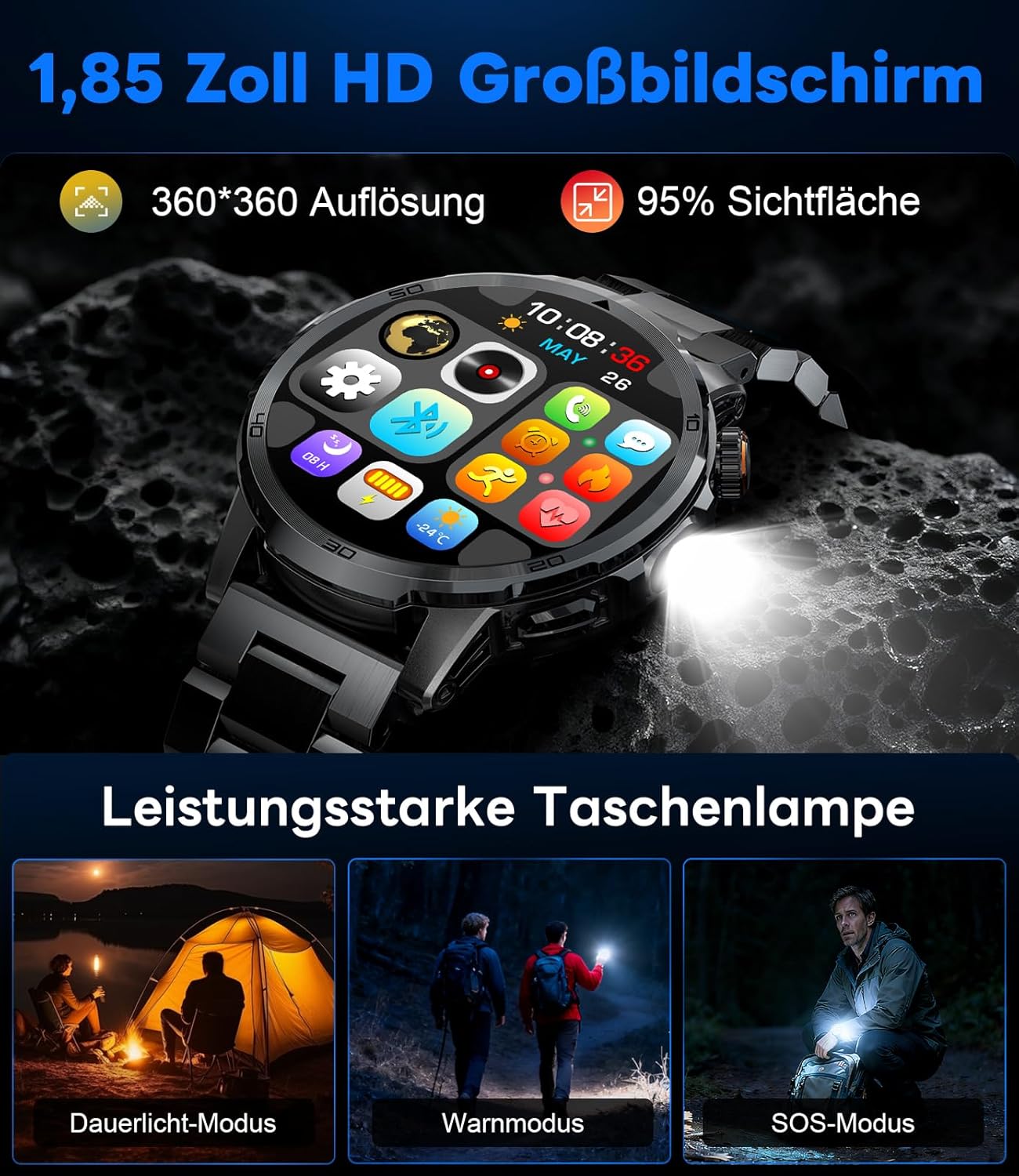
Image: The smartwatch displaying its 1.85-inch HD screen and demonstrating its powerful flashlight feature with different modes.
2.6 Swyddogaethau Eraill
- Cynorthwyydd Llais: Activate the voice assistant to control your phone or get information (e.g., "What's the weather?").
- Rheoli Cerddoriaeth: Control music playback on your smartphone (play, pause, skip tracks, adjust volume) directly from your watch.
- Rheoli Camera: Defnyddiwch eich oriawr fel caead o bell ar gyfer camera eich ffôn clyfar.
- Rhagolwg y Tywydd: View amodau a rhagolygon y tywydd cyfredol.
- Larymau ac Amseryddion: Set alarms and use stopwatch/timer functions.
- Nodyn Atgoffa Diod: Set reminders to drink water.
- Wynebau Gwylio: Customize your watch face from over 100 options or upload your own photos via the app.

Image: The smartwatch interface displaying icons for music control, flashlight, camera control, weather, alarm, and drink reminders.

Image: A selection of diverse watch faces available for customization on the LIGE EF19-A Smartwatch.
3. cynnal
3.1 Glanhau
- Regularly clean your smartwatch and straps with a soft, dry, lint-free cloth.
- Os oes angen, defnyddiwch ychydig o damp lliain gyda sebon ysgafn, yna sychwch yn sych.
- Osgowch ddefnyddio cemegau llym, glanhawyr sgraffiniol, neu doddyddion, gan y gall y rhain niweidio gorffeniad a seliau'r oriawr.
- Gwnewch yn siŵr bod y cysylltiadau gwefru yn lân ac yn sych cyn gwefru.
3.2 Gwrthiant Dŵr (IP68)
The LIGE EF19-A Smartwatch is IP68 waterproof, meaning it is resistant to dust and can withstand immersion in water up to 1.5 meters for up to 30 minutes.
- It is suitable for daily use, such as hand washing, rain, and shallow water swimming.
- Avoid using the watch in hot water, saunas, or steam rooms, as steam can penetrate the seals and cause damage.
- Peidiwch â phwyso botymau o dan y dŵr.
- After exposure to water, wipe the watch dry before charging or using.

Image: The smartwatch highlighting its robust military-grade design, including resistance to temperature extremes, shock, dust, and IP68 water resistance.
4. Datrys Problemau
4.1 Oriawr Ddim yn Troi Ymlaen
- Gwnewch yn siŵr bod yr oriawr wedi'i gwefru'n llawn. Cysylltwch hi â'r gwefrydd am o leiaf 30 munud.
- Try long-pressing the side button for 10-15 seconds to force a restart.
4.2 Methu Paru â Ffôn Clyfar
- Sicrhewch fod Bluetooth wedi'i alluogi ar eich ffôn clyfar.
- Ensure the smartwatch is within Bluetooth range (typically 10 meters).
- Ailgychwynwch eich ffôn clyfar a'ch oriawr smart.
- Check if the app has the necessary permissions (location, Bluetooth, etc.).
- If previously paired, try "forgetting" the device in your phone's Bluetooth settings and re-pairing through the app.
4.3 Data Iechyd Anghywir
- Gwnewch yn siŵr bod yr oriawr yn cael ei gwisgo'n glyd ar eich arddwrn, tua lled un bys uwchben asgwrn yr arddwrn.
- Osgowch symud gormodol yn ystod mesuriadau.
- Glanhewch y synhwyrydd ar gefn yr oriawr.
- Gall ffactorau amgylcheddol a ffisioleg unigol effeithio ar ddarlleniadau.
4.4 Hysbysiadau Ddim yn Ymddangos
- Verify that the watch is successfully paired with your smartphone.
- Check notification settings within the companion app to ensure desired apps are enabled for notifications.
- Gwnewch yn siŵr bod gosodiadau hysbysu eich ffôn yn caniatáu i'r ap cydymaith arddangos hysbysiadau.
- Make sure your phone is not in "Do Not Disturb" mode.
5. manylebau
| Nodwedd | Manyleb |
|---|---|
| Rhif Model | EF19-A |
| Arddangos | 1.85-inch IPS HD Touch Screen, 360x360 pixels |
| Gallu Batri | Polymer Lithiwm 1000 mAh |
| Bywyd Batri (Defnydd Arferol) | 7-15 diwrnod |
| Bywyd batri (wrth gefn) | Hyd at 50 diwrnod |
| Amser Codi Tâl | Tua. 2 awr |
| Cysylltedd | Bluetooth 5.2 |
| Gwrthiant Dŵr | IP68 (Dŵr) |
| Cynhwysedd Storio Cof | 128 MB |
| Dyfeisiau Cydnaws | Android 5.1+ / iOS 9.0+ Smartphones |
| Monitro Iechyd | Heart Rate, Blood Oxygen, Sleep Quality, Stress Level |
| Moddau Chwaraeon | 100+ (e.g., Running, Cycling, Swimming, Hiking, Yoga) |
| Nodweddion Ychwanegol | Bluetooth Calls, Message Notifications, Torch, Voice Assistant, Music Control, Camera Control, Weather, Alarms, Timers, Drink Reminder, Customizable Watch Faces |
| GPS | Trwy ffôn clyfar |
| Cynulleidfa Darged | Dynion |
6. Gwybodaeth Gwarant
The LIGE EF19-A Smartwatch comes with a Gwarant 2 mlynedd o ddyddiad y pryniant. Mae'r warant hon yn cwmpasu diffygion gweithgynhyrchu a chamweithrediadau o dan ddefnydd arferol.
Nid yw'r warant yn cwmpasu:
- Damage caused by improper use, accident, abuse, neglect, or unauthorized modification.
- Normal wear and tear, including scratches, dents, or cosmetic damage.
- Damage caused by exposure to extreme temperatures, liquids (beyond IP68 rating), or corrosive environments.
- Damage to accessories (straps, charging cables) unless defective upon receipt.
To claim warranty service, please retain your proof of purchase and contact customer support.
7. Cefnogaeth i Gwsmeriaid
If you encounter any issues or have questions regarding your LIGE EF19-A Smartwatch that are not covered in this manual, please contact our customer support team.
- Refer to the contact information provided on the product packaging or the official LIGE websafle.
- When contacting support, please provide your product model number (EF19-A) and a detailed description of the issue.