
Rhagymadrodd
Diolch am brynuasing the AFEXOA DY29Z Night Light Bluetooth Speaker Alarm Clock. This versatile device combines a Bluetooth speaker, night light, alarm clock, sound machine, and MP3 player into one compact unit. This manual provides detailed instructions for setup, operation, and maintenance to ensure optimal performance and user satisfaction.

Figure 1: AFEXOA DY29Z device highlighting its 5-in-1 functionality.
Gwybodaeth Diogelwch
- Peidiwch ag amlygu'r ddyfais i ddŵr na lleithder gormodol.
- Osgoi tymereddau eithafol a golau haul uniongyrchol.
- Peidiwch â dadosod na cheisio atgyweirio'r ddyfais eich hun. Cysylltwch â chymorth cwsmeriaid am gymorth.
- Cadwch allan o gyrraedd plant ac anifeiliaid anwes.
- Defnyddiwch y cebl gwefru a ddarperir neu gebl Math-C ardystiedig yn unig ar gyfer gwefru.
Cynnwys Pecyn
Gwiriwch y pecyn am yr eitemau canlynol:
- AFEXOA DY29Z Night Light Bluetooth Speaker Alarm Clock
- Cebl Codi Tâl USB Math-C
- Llawlyfr Defnyddiwr
Cynnyrch Drosview
Rheolaethau Panel Blaen
The front panel features an LED display for time and status, along with several control buttons:
- Botwm Amserydd: Short press to pause, long press for standby (turns off sound and light).
- Bluetooth On/Off Button: Activates or deactivates Bluetooth mode.
- Botwm Trac Blaenorol / Gostwng y Sain: Pwyswch yn fyr am y trac blaenorol, pwyswch yn hir i ostwng y gyfrol.
- Botwm Trac Nesaf / Cyfaint i Fyny: Pwyswch yn fyr am y trac nesaf, pwyswch yn hir i gynyddu'r gyfrol.
- Natural Sound & Lullaby Button: Cycles through built-in soothing sounds.
Rear Ports and Switches
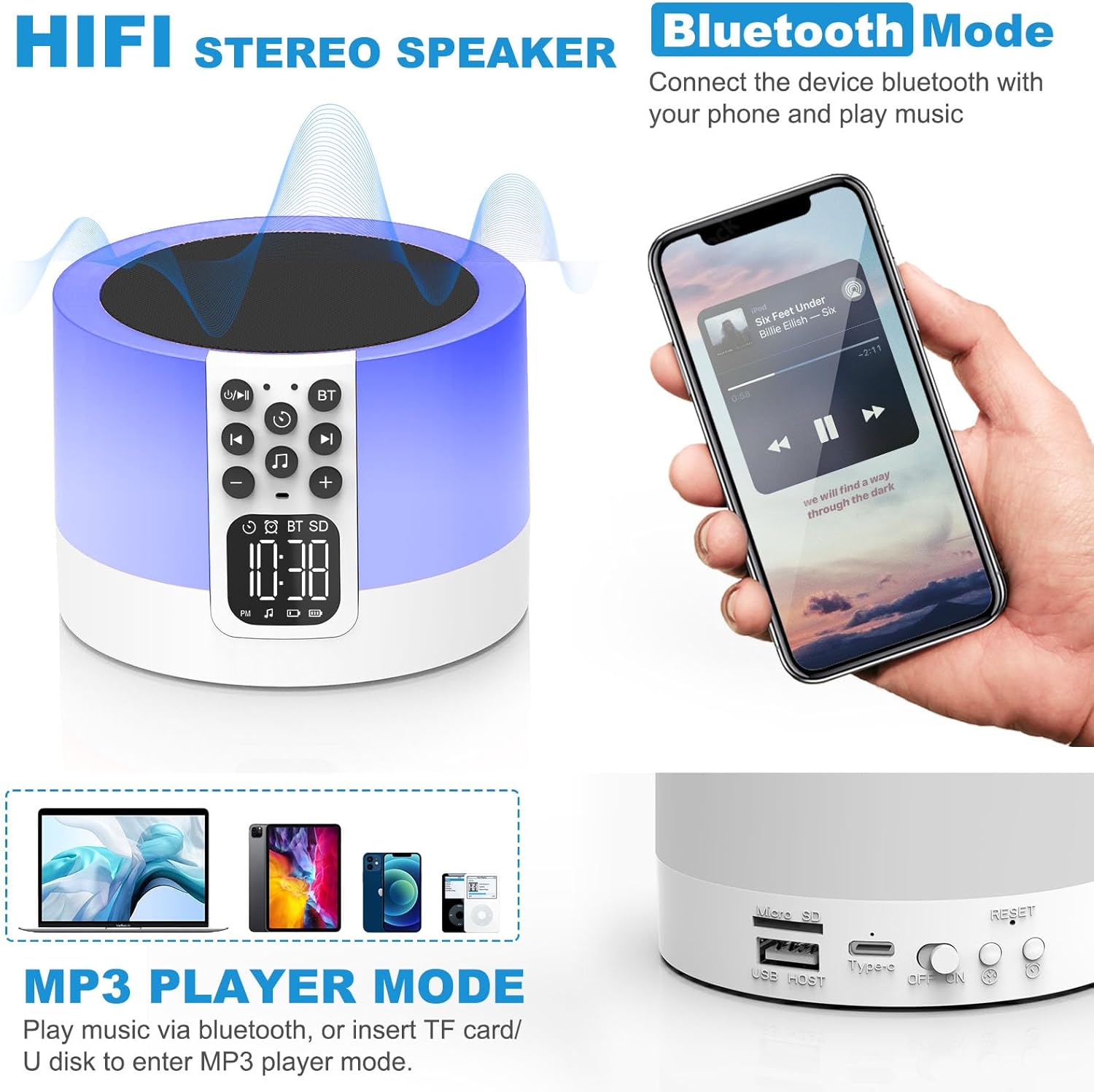
Figure 2: AFEXOA DY29Z showing Bluetooth connectivity and rear ports.
- Micro SD/TF Card Slot: Ar gyfer chwarae MP3 files o gerdyn cof.
- USB HOST Port: Ar gyfer chwarae MP3 files o yriant fflach USB.
- Type-C Power Port: Ar gyfer gwefru'r ddyfais.
- Switsh ymlaen/i ffwrdd: Prif switsh pŵer ar gyfer y ddyfais.
- Botwm Ailosod: Small button to reset the device (requires a pin).
- Time Setup Button: Short press for 12h/24h mode, long press for time setup.
- Alarm Setup Button: For setting the alarm.
Gosod
1. Codi Tâl y Dyfais
Before first use, fully charge the device. Connect the provided Type-C USB cable to the Type-C power port on the back of the device and plug the other end into a USB power adapter (not included), computer, or power bank.

Figure 3: Charging the device via USB.
2. Gosod yr Amser
- Turn on the device using the On/Off switch on the back.
- Long press the 'Time Setup' button on the back until the hour digits flash.
- Use the 'Previous Track / Volume Down' and 'Next Track / Volume Up' buttons on the front to adjust the hour.
- Press the 'Time Setup' button again to switch to minute adjustment. Adjust minutes using the volume buttons.
- Press the 'Time Setup' button a third time to confirm and exit time setting.
- Short press the 'Time Setup' button to toggle between 12-hour and 24-hour display formats.
Cyfarwyddiadau Gweithredu
1. Pŵer Ymlaen / I ffwrdd
Slide the 'On/Off' switch on the back of the device to turn it on or off.
2. Modd Siaradwr Bluetooth
- Trowch y ddyfais ymlaen.
- Press the 'Bluetooth On/Off' button on the front panel. The device will enter pairing mode, indicated by a flashing Bluetooth icon on the display.
- On your smartphone or other Bluetooth-enabled device, search for 'DY29Z' in the Bluetooth settings and select it to pair.
- Once paired, you can play audio from your device through the speaker.
- Use the 'Previous Track / Volume Down' and 'Next Track / Volume Up' buttons to control playback and volume.
3. Swyddogaeth Golau Nos
The device features a sensitive touch top mesh for light control.

Figure 4: Adjusting warm white light brightness via touch control.
- Golau Gwyn Cynnes: Tap the top mesh to cycle through 3 levels of warm white brightness (low, medium, high). Tap again to turn off.
- Multicolor Light: Long press the top mesh and then release to activate the ambient light mode, which cycles through various colors.
- Fixed Color Light: While in multicolor cycling mode, long press the top mesh again and release to fix the current color. Repeat to cycle through other fixed colors.

Figure 5: Various multicolor night light options.
4. Alarm Clock Function
Set and manage alarms with customizable tones.

Figure 6: Digital alarm clock with wake-up light.
- Gosod y Larwm: Long press the 'Alarm Setup' button on the back until the alarm hour digits flash. Adjust the hour using the volume buttons. Press 'Alarm Setup' again to set minutes, then press again to confirm.
- Custom Alarm Tone: Insert a USB Flash Drive or Micro SD Card with your favorite MP3 music. The device will automatically use this as the alarm tone.
- Swyddogaeth Snooze: When the alarm sounds, tap the top mesh to activate snooze. The alarm will sound again after 9 minutes. This can be repeated indefinitely.
- Atal y Larwm: Press any button (except the top mesh for snooze) to stop the alarm for the day.
5. Sound Machine Function
The device offers 30 built-in soothing sounds to aid sleep and relaxation.
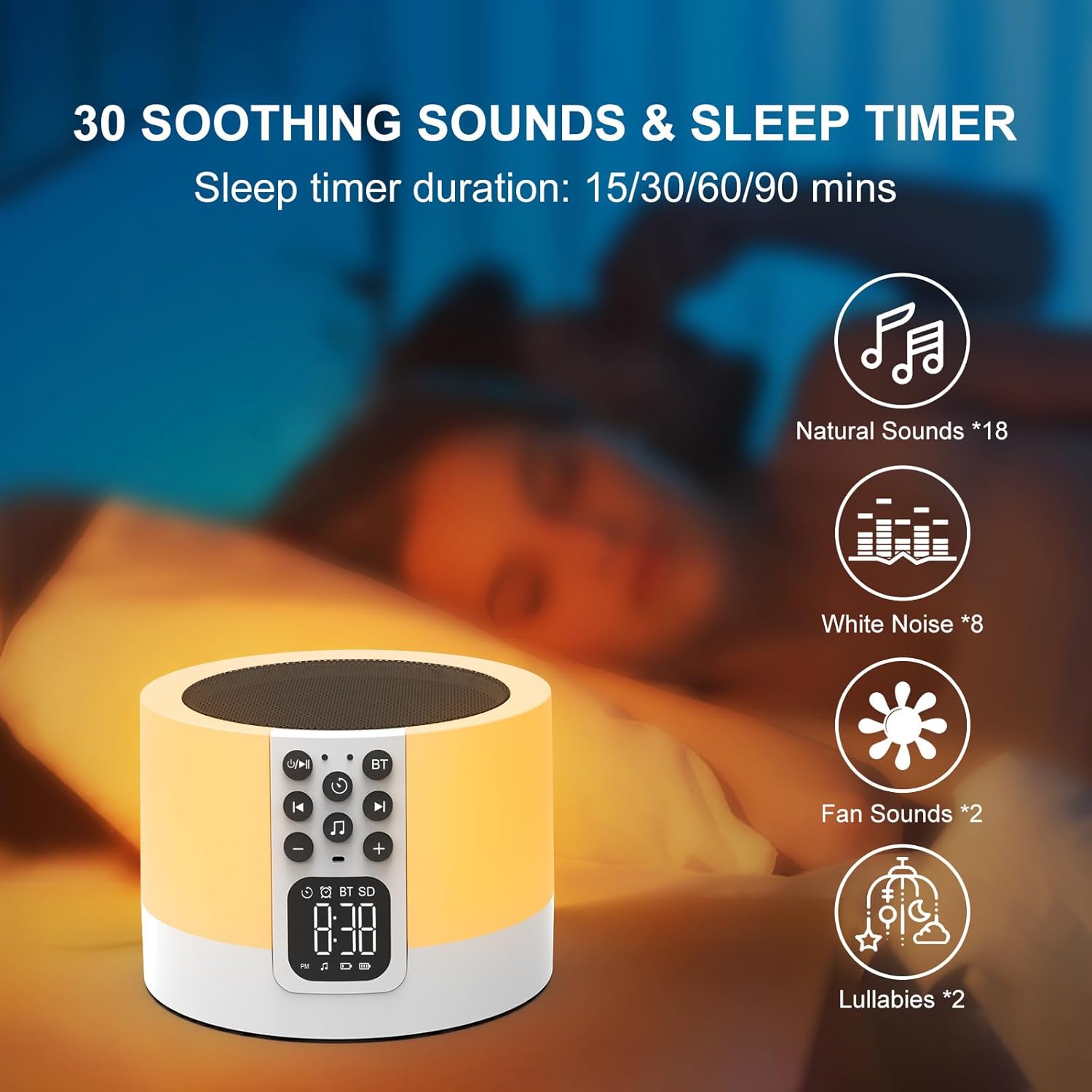
Figure 7: Soothing sounds and sleep timer options.
- Press the 'Natural Sound & Lullaby' button on the front panel to cycle through the 30 available sounds (including white noise, fan noise, pink noise, nature sounds, and lullabies).
- Amserydd Cwsg: To set a sleep timer, short press the 'Timer' button repeatedly to select 15, 30, 60, or 90 minutes. The device will automatically turn off after the selected duration.
6. MP3 Player Mode
Play your own music directly from a USB flash drive or Micro SD card.

Figure 8: Using USB flash drives and Micro SD cards for MP3 playback.
- Insert a USB flash drive into the USB HOST port or a Micro SD card into the Micro SD/TF card slot on the back of the device.
- The device will automatically detect the storage and begin playing MP3 files.
- Use the 'Previous Track / Volume Down' and 'Next Track / Volume Up' buttons to navigate tracks and adjust volume.
7. Galwad Di-Ddwylo
When connected via Bluetooth to a smartphone, the device can be used for hands-free calls.
- When a call comes in, the device will ring.
- Press the 'Timer' button (which also functions as Play/Pause) to answer an incoming call.
- Press the 'Timer' button again to end the call.
Cynnal a chadw
- Glanhewch y ddyfais gyda lliain meddal, sych. Peidiwch â defnyddio glanhawyr sgraffiniol na thoddyddion.
- Sicrhewch fod pob porthladd yn rhydd o lwch a malurion.
- Storiwch y ddyfais mewn lle oer, sych pan nad yw'n cael ei defnyddio am gyfnodau hir.
Datrys problemau
| Problem | Achos Posibl | Ateb |
|---|---|---|
| Nid yw'r ddyfais yn pweru ymlaen. | Mae'r batri wedi gwanhau. Mae'r switsh pŵer i ffwrdd. | Charge the device fully. Ensure the On/Off switch is in the 'On' position. |
| Methu cysylltu drwy Bluetooth. | Bluetooth not enabled on device or phone. Device is already paired with another unit. | Ensure Bluetooth is active on both devices. Disconnect from other devices. Restart pairing process. |
| Dim sain o'r siaradwr. | Volume is too low. Device is paused. Incorrect mode selected. | Increase volume. Press the 'Timer' button to unpause. Ensure correct mode (Bluetooth, MP3, Sound Machine) is active. |
| Golau nos ddim yn gweithio. | Device is off or in standby. | Ensure the device is powered on. Tap the top mesh to activate the light. |
| Nid yw'r larwm yn canu. | Alarm not set correctly. Volume too low. | Verify alarm time and activation. Increase device volume. |
Manylebau
| Nodwedd | Manylyn |
|---|---|
| Brand | AFEXOA |
| Rhif Model | DY29Z |
| Technoleg Cysylltedd | Bluetooth, USB |
| Modd Allbwn Sain | Stereo |
| Deunydd | Styren Biwtadïen Acrylonitrile (ABS) |
| Math o Siaradwr | Siaradwr Bluetooth cludadwy |
| Nodweddion Ychwanegol | Alarm, Illuminated, Mood Light, Noise Machine, Timer |
| Dull Rheoli | Cyffwrdd |
| Ffynhonnell Pwer | Wedi'i Bweru â Batri |
| Nifer y Batris | 1 Ion Lithiwm (wedi'i gynnwys) |
| Dyfeisiau Cydnaws | Gliniadur, Chwaraewr MP3, Ffôn Clyfar, Tabled |
Gwarant a Chefnogaeth
This product comes with a limited warranty. For detailed warranty information or technical support, please refer to the product packaging or contact AFEXOA customer service. Keep your purchase receipt for warranty claims.