
1. Rhagymadrodd
This manual provides essential information for the setup, operation, and maintenance of your NIMO 15.6-inch laptop, model N15A. Please read this guide thoroughly to ensure optimal performance and longevity of your device.
1.1 Cynnyrch drosoddview
The NIMO 15.6-inch laptop is designed for productivity and light gaming, featuring an AMD Ryzen 7 Pro 6850U processor, 16GB LPDDR5 RAM, and a 1TB PCIe 4.0 SSD. It includes a 15.6" FHD IPS anti-glare display, a backlit keyboard, and an integrated fingerprint sensor for secure login.

Image 1.1: NIMO 15.6-inch Laptop N15A. This image displays the laptop with its screen showing a dynamic graphic, highlighting key features like the 15.6" FHD IPS display, AMD Ryzen 7 Pro 6850U processor, 16GB RAM, 1TB SSD, fingerprint sensor, Type-C PD charger, and backlit keyboard.
1.2 Beth sydd yn y Bocs
- 1 x NIMO N15A Laptop
- 1 x Type-C 100W PD Fast Charger
- 1 x Llawlyfr Defnyddiwr (y ddogfen hon)
- Windows 11 Home (wedi'i osod ymlaen llaw)
2. Gosod
2.1 Codi Tâl Cychwynnol
Before first use, it is recommended to fully charge your NIMO laptop. Connect the included 100W PD fast charger to the Type-C charging port on the laptop and to a power outlet. The charging indicator light will illuminate. A 15-minute charge can provide up to 2 hours of usage, and a full charge typically takes approximately 1 hour for 5 hours of usage, with up to 12 hours of standby time.
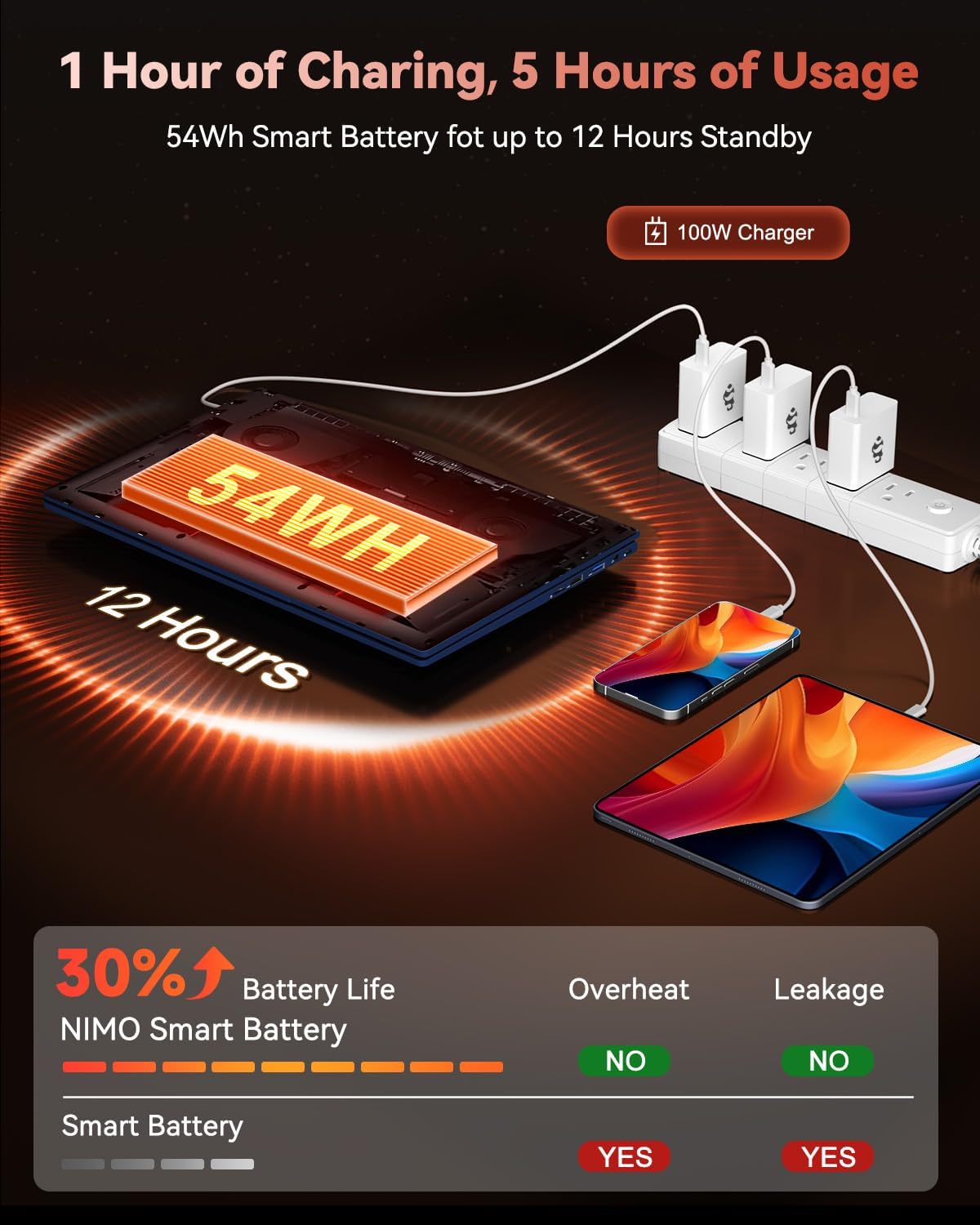
Image 2.1: NIMO Laptop Charging. This image illustrates the laptop being charged with the 100W Type-C PD fast charger, highlighting the 54Wh smart battery and charging efficiency.
2.2 Pweru Ymlaen
Press the power button located on the keyboard to turn on the laptop. The system will boot into Windows 11 Home. Follow the on-screen instructions for initial Windows setup, including language selection, network connection, and user account creation.
3. Gweithrediad
3.1 Arddangos
Your NIMO laptop features a 15.6-inch Full HD (1920x1080 pixels) IPS anti-glare display. This display offers clear, vibrant visuals with an 85% screen-to-body ratio and eye protection features. Adjust brightness using the function keys (Fn + Fx keys, refer to keyboard layout for specific keys).

Image 3.1: NIMO Laptop Display. This image emphasizes the 15.6-inch Full HD IPS display with its 1920x1080 resolution, bright view, and eye protection features.
3.2 Bysellfwrdd a Phad Cyffwrdd
The laptop is equipped with a backlit keyboard for comfortable typing in various lighting conditions. The precision gesture touchpad allows for effortless navigation. An integrated fingerprint sensor is located on the touchpad for secure and instant login.

Image 3.2: NIMO Laptop Backlit Keyboard and Fingerprint Sensor. This image shows a user interacting with the laptop, highlighting the backlit keyboard and the fingerprint sensor on the touchpad.
3.3 Webcam Privacy
The laptop includes a built-in 2.0 MP webcam with a privacy camera switch. This allows you to physically disable the webcam when not in use, enhancing your privacy.
4. Perfformiad
4.1 Prosesydd a Graffeg
The NIMO N15A is powered by an AMD Ryzen 7 Pro 6850U processor, featuring 8 cores and 16 threads with turbo speeds up to 4.7GHz. This processor is designed for efficient handling of demanding tasks, professional workloads, and content creation. Integrated graphics are provided by the AMD Radeon 680M GPU, one of the most capable integrated GPUs available, offering balanced performance for productivity and gaming.

Image 4.1: AMD Ryzen 7 Pro 6850U Processor. This image visually represents the AMD Ryzen 7 Pro 6850U processor, highlighting its 8 cores, 16 threads, 680M GPU Radeon, and 4.7GHz turbo boost.

Image 4.2: AMD Radeon 680M Graphics. This image showcases the laptop's capability with AMD Radeon 680M graphics, displaying various applications and games.
4.2 Cof a Storio
The laptop comes equipped with 16GB of LPDDR5 RAM, operating at 6400 MHz, providing a 50% speed increase compared to DDR4. For storage, it includes a 1TB PCIe 4.0 SSD, offering rapid multitasking and data access with speeds up to 6000 MB/s. This configuration ensures seamless multitasking and ample storio ar gyfer eich files a chymwysiadau.

Image 4.3: NIMO Laptop Memory and Storage. This image illustrates the 1TB PCIe 4.0 SSD and 16GB LPDDR5 RAM, demonstrating the laptop's multitasking capabilities with multiple applications open.
5. Cysylltedd
The NIMO N15A laptop offers a range of high-speed interfaces for connecting peripherals and external devices:
- Porthladdoedd USB 3.0: 4 borthladd ar gyfer trosglwyddo data cyflym.
- Porth USB 2.0: 1 port for general peripheral connections.
- Porthladdoedd Math-C: Multiple Type-C ports, including one for 100W PD charging and others with multifunction capabilities.
- Porthladd HDMI: Ar gyfer cysylltu ag arddangosfeydd neu daflunyddion allanol.
- Jack Clustffon: Ar gyfer allbwn sain.
- Micro SD Reader: For expanding storage or transferring data from memory cards.
- Slot Clo Kensington: Ar gyfer diogelwch corfforol.
- Cysylltedd Di-wifr: Supports 802.11a/b/g/n/ac for Wi-Fi.

Image 5.1: NIMO Laptop Connectivity Ports. This image provides a detailed diagram of the laptop's various ports, including Micro SD, USB 2.0, USB 3.2, Headphone Jack, Kensington Lock, Type-C (multifunction), HDMI, and Charger LED.
6. cynnal
6.1 Gofal Cyffredinol
- Keep the laptop clean by regularly wiping surfaces with a soft, dry cloth.
- Osgowch amlygu'r gliniadur i dymheredd eithafol, golau haul uniongyrchol, neu leithder uchel.
- Peidiwch â gosod gwrthrychau trwm ar y gliniadur.
- Sicrhewch awyru priodol trwy beidio â rhwystro'r fentiau aer.
6.2 Uwchraddio Cydrannau
The NIMO N15A laptop is designed with user-friendly upgrade options. You can easily upgrade components such as the SSD to meet evolving needs. Refer to the official NIMO support resources or a qualified technician for detailed upgrade instructions to avoid voiding your warranty.
7. Datrys Problemau
This section addresses common issues you might encounter with your NIMO laptop. For more complex problems, please contact NIMO customer support.
7.1 Problemau Pŵer
- Nid yw'r gliniadur yn troi ymlaen: Ensure the charger is properly connected and the battery has sufficient charge. Try holding the power button for 10-15 seconds to perform a hard reset.
- Batri ddim yn codi tâl: Verify the charger is functioning correctly and connected to a working power outlet. Check the Type-C cable for damage.
7.2 Problemau Arddangos
- Mae'r sgrin yn wag: Ensure the laptop is powered on. Try adjusting the display brightness using function keys. Connect to an external monitor to check if the issue is with the laptop's internal display.
7.3 Problemau Cysylltedd
- Wi-Fi ddim yn cysylltu: Check if Wi-Fi is enabled in Windows settings. Restart your router and the laptop. Ensure correct Wi-Fi password is entered.
- Dyfeisiau USB heb eu hadnabod: Try connecting the device to a different USB port. Ensure device drivers are up to date.
8. manylebau
| Nodwedd | Manylyn |
|---|---|
| Brand | NIMO |
| Enw Model | NIMO N15AB (N15A) |
| Maint Sgrin | 15.6 modfedd |
| Cydraniad Sgrin | 1920 x 1080 Pixels (Full HD IPS) |
| Prosesydd | AMD Ryzen 7 Pro 6850U (8 Cores, up to 4.7 GHz) |
| HWRDD | 16 GB LPDDR5 (6400 MHz) |
| Gyriant Caled | SSD 1024 GB (PCIe 4.0) |
| Cydbrosesydd graffeg | AMD Radeon 680M (Integrated) |
| System Weithredu | Windows 11 Cartref |
| Math Di-wifr | 802.11a/b/g/n/ac |
| Porthladdoedd USB | 1 x USB 2.0, 4 x USB 3.0, Multiple Type-C (Multifunction) |
| Porthladdoedd Eraill | HDMI, Headphone Jack, Micro SD Reader, Kensington Lock |
| Bywyd Batri (Cyfartaledd) | 9 Awr |
| Pwysau Eitem | 3.8 pwys |
| Dimensiynau Cynnyrch | 14.07 x 8.98 x 0.76 modfedd |
| Nodweddion Arbennig | Backlit Keyboard, Fingerprint Reader, HD Audio, Numeric Keypad |
| Cefn Webcam Datrys | 2 AS |
9. Gwarant a Chefnogaeth
NIMO stands by the quality of its products. Your NIMO laptop comes with the following:
- Gwarant Gwneuthurwr 2 Flynedd: Yn cwmpasu diffygion mewn deunyddiau a chrefftwaith o dan ddefnydd arferol.
- 90-Day Hassle-Free Return Policy: Allows for returns within 90 days of purchase.
For technical assistance, warranty claims, or product-related inquiries, please contact NIMO customer support. Our dedicated support team is available to provide prompt and effective assistance.
Contact information may be found on the official NIMO website or through the product page where you made your purchase.