
Rhagymadrodd
This manual provides essential information for the setup, operation, maintenance, and troubleshooting of your AWOW Mini PC, Model BA7. Please read these instructions carefully before using the device.

Delwedd: Drosoddview of the AWOW BA7 Mini PC, highlighting its compact design and key features.
Cynnwys Pecyn
Gwiriwch fod yr holl eitemau yn bresennol yn y pecyn:
- AWOW BA7 Mini PC
- Addasydd Pŵer
- Sgriwiau Mowntio
- Braced Mynydd VESA
- Cebl HDMI
- Llawlyfr Defnyddiwr (y ddogfen hon)

Image: Illustration of the AWOW BA7 Mini PC and its included accessories: power adapter, screws, VESA mount, HDMI cable, and user manual.
Cyfarwyddiadau Gosod
- Cysylltu Perifferolion: Cysylltwch eich bysellfwrdd, llygoden, a monitor(au) â'r porthladdoedd priodol ar y Mini PC.
Delwedd: Blaen view of the Mini PC showing the Power Button, Type-C port, USB 3.2 ports, and 3.5mm Audio Jack.

Delwedd: Cefn view of the Mini PC showing the DC IN, DP1.2, HDMI2.0, USB 2.0 ports, and RJ45 LAN port.
- Cysylltiad Pwer: Connect the power adapter to the DC IN port on the Mini PC, then plug the adapter into a power outlet.
- Pŵer Ymlaen: Pwyswch y botwm pŵer sydd wedi'i leoli ar flaen y Mini PC. Bydd y system yn cychwyn.
- Gosodiad Cychwynnol: Dilynwch y cyfarwyddiadau ar y sgrin i gwblhau'r gosodiad cychwynnol o Windows 11 Pro, gan gynnwys iaith, rhanbarth, cysylltiad rhwydwaith, a chreu cyfrif defnyddiwr.
- Cysylltiad Rhwydwaith:
- Gwifrog: Connect an Ethernet cable to the RJ45 LAN port for a stable wired connection.
- Di-wifr: During Windows setup or via Windows settings, connect to your Wi-Fi network using the built-in WiFi 6.
Cyfarwyddiadau Gweithredu
Gweithrediad Sylfaenol
- Pŵer ymlaen / i ffwrdd: Press the power button to turn on the PC. To shut down, use the Windows Start menu options (Shut down, Restart, Sleep). A short press on the power button can put the PC to sleep. A long press (approx. 5 seconds) will force a shutdown.
- Allbwn Arddangos: The Mini PC supports up to three 4K displays simultaneously via DP, HDMI, and USB-C. Connect your monitors and configure display settings in Windows.

Image: A user working with a triple monitor setup, demonstrating the Mini PC's multi-display capability.
- Cysylltedd USB: Utilize the USB 2.0 and USB 3.0 ports for connecting external devices such as external hard drives, USB flash drives, printers, and other peripherals. The Type-C port also supports data transfer and display output.
- Sain: Cysylltwch glustffonau neu siaradwyr â'r jac sain 3.5mm.
Defnydd Uwch
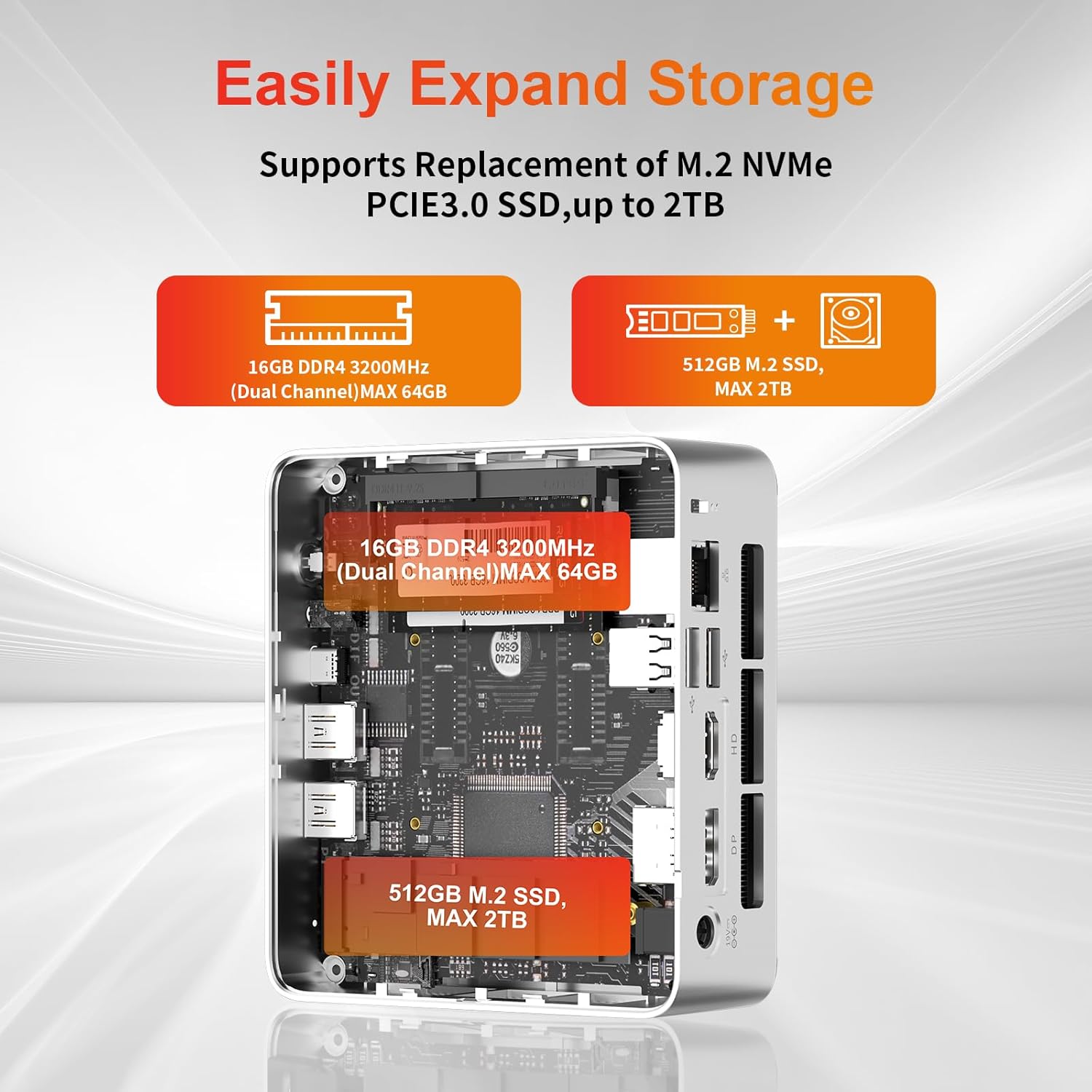
- Ehangu Storio: The Mini PC supports replacement of the M.2 NVMe PCIe 3.0 SSD up to 2TB. It also supports memory expansion up to 64GB DDR4.

Image: Diagram illustrating the internal components and options for expanding storage (M.2 SSD up to 2TB) and RAM (DDR4 up to 64GB).
- Mowntio VESA: Use the included VESA mount bracket to attach the Mini PC to the back of a compatible monitor or to a wall mount, saving desk space.
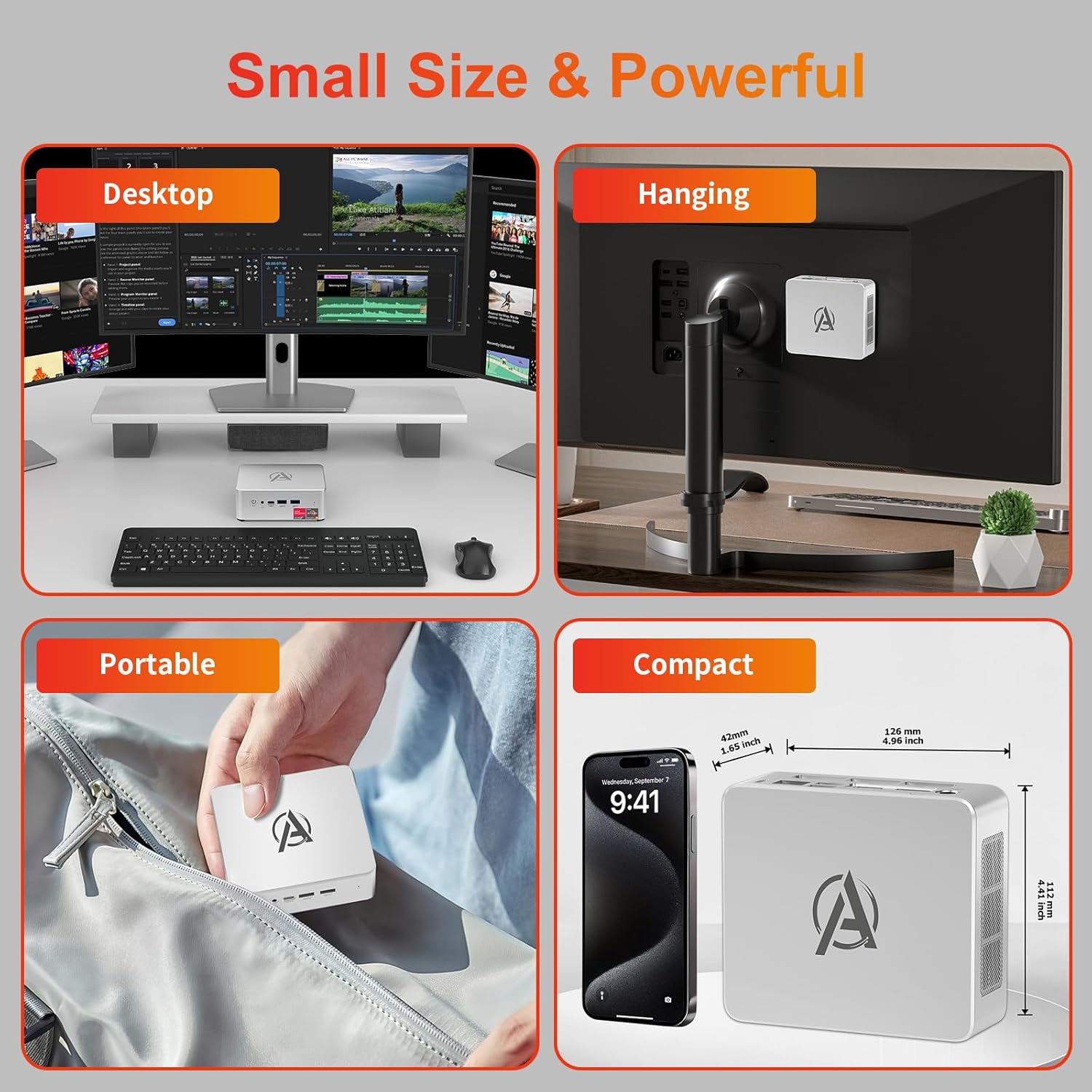
Image: Various usage scenarios for the Mini PC, including desktop, VESA-mounted behind a monitor, portable, and compact size comparison.
Cynnal a chadw
- Glanhau: Use a soft, dry cloth to clean the exterior of the Mini PC. Do not use liquid cleaners or aerosols. Ensure ventilation openings are free from dust.
- Diweddariadau Meddalwedd: Regularly check for and install Windows updates and driver updates to ensure optimal performance and security.
- Rheoli Gwres: Ensure the Mini PC is placed in a well-ventilated area. Avoid blocking the air vents. The intelligent cooling system is designed for low noise and efficient heat dissipation.

Image: Diagram illustrating the internal cooling fan and heat sink, showing airflow for efficient heat dissipation.
- Rheoli Storio: Glanhau unrhyw bethau diangen o bryd i'w gilydd files and applications to maintain system performance.
Datrys problemau
- Dim pŵer:
- Gwiriwch a yw'r addasydd pŵer wedi'i gysylltu'n ddiogel â'r Mini PC a'r allfa bŵer.
- Sicrhewch fod yr allfa bŵer yn weithredol.
- Rhowch gynnig ar allfa bŵer wahanol.
- Dim Arddangosfa:
- Verify that the HDMI/DP/USB-C cable is securely connected to both the Mini PC and the monitor.
- Gwnewch yn siŵr bod y monitor wedi'i droi ymlaen ac wedi'i osod i'r ffynhonnell fewnbwn gywir.
- Rhowch gynnig ar gebl arddangos neu fonitor gwahanol os yw ar gael.
- Perfformiad Araf:
- Cau cymwysiadau diangen sy'n rhedeg yn y cefndir.
- Chwiliwch am unrhyw ddiweddariadau Windows neu ddiweddariadau gyrwyr sydd ar ddod a'u gosod.
- Gwnewch yn siŵr bod digon o le gwag ar yr SSD.
- Monitor CPU and RAM usage in Task Manager to identify resource-intensive processes.
- Problemau Cysylltedd Rhwydwaith:
- For wired connections, ensure the Ethernet cable is properly connected and the router is working.
- For Wi-Fi, check if the Wi-Fi adapter is enabled and connected to the correct network. Restart your router/modem.
- System yn Rhewi/Damwain:
- Restart the Mini PC.
- Ensure the system is not overheating (check ventilation).
- Run a system diagnostic or check Windows Event Viewer for error messages.
Manylebau
| Model | AWOW BA7 Mini PC |
| Prosesydd | AMD Ryzen 5 7430U (6 Cores, 12 Threads, up to 4.3 GHz) |
| Graffeg | Graffeg AMD Radeon Integredig |
| HWRDD | 16GB DDR4 (Ehangadwy hyd at 64GB) |
| Storio | 512GB PCIe 3.0 M.2 SSD (Expandable up to 2TB) |
| System Weithredu | Windows 11 Pro |
| Allbwn Fideo | DP1.2 (4K@60Hz), HDMI2.0 (4K@60Hz), USB-C (4K@60Hz) - Supports Triple Display |
| Cysylltedd | WiFi 6, Bluetooth 5.2, 1000Mbps RJ45 LAN |
| Porthladdoedd | 2x USB 3.2, 2x USB 2.0, 1x Type-C (Full Function), 1x DP1.2, 1x HDMI2.0, 1x RJ45 LAN, 1x 3.5mm Audio Jack, 1x DC IN |
| Dimensiynau | 126mm x 112mm x 42mm (tua 4.96 x 4.41 x 1.65 modfedd) |
| Pwysau | 398g (dyfais yn unig) Image: The Mini PC with its dimensions (126mm x 112mm x 42mm) and weight (398g) labeled. |
Gwarant a Chefnogaeth
AWOW provides comprehensive support for its products.
- Gwarant: This product includes a 12-month service period from the date of purchase, covering manufacturing defects.
- Cymorth Technegol: Lifetime technical support is available for all AWOW products.
- Cyswllt: For technical assistance, warranty claims, or any product-related inquiries, please visit the official AWOW websafle neu cysylltwch â'u gwasanaeth cwsmeriaid.

Image: AWOW brand message emphasizing fulfillment, lifetime technical support, and 12-month service.