
1. Rhagymadrodd
Thank you for choosing the Azeyou 8.7-inch Android Tablet F68. This manual provides essential information for setting up, operating, and maintaining your device. Please read it carefully to ensure optimal performance and longevity of your tablet.
2. Gwybodaeth Diogelwch
- Peidiwch ag amlygu'r dabled i dymheredd eithafol, golau haul uniongyrchol, na lleithder uchel.
- Osgowch ollwng y dabled neu roi’r dabled dan effeithiau cryf.
- Use only the provided charger and accessories to prevent damage and ensure safety.
- Cadwch y dabled i ffwrdd o ddŵr a hylifau eraill.
- Do not attempt to disassemble or repair the tablet yourself. Contact customer support for assistance.
3. Cynnwys Pecyn
Gwiriwch fod yr holl eitemau yn bresennol yn eich pecyn:
- Azeyou 8.7-inch Android Tablet F68
- Cebl Codi Tâl USB Math-C
- Addasydd Pŵer
- Llawlyfr Defnyddiwr (y ddogfen hon)

Image: Tablet and included accessories.
4. Cynnyrch Drosview
The Azeyou F68 tablet features a sleek, all-metal design, making it both durable and portable. It is equipped with essential ports and components for a comprehensive user experience.
Cydrannau Ffisegol
- Arddangosfa IPS 8.7 modfedd: High-resolution screen (1340x800) for vivid visuals.
- Camera blaen: 5MP for video calls and selfies.
- Camera Cefn: 13MP for capturing photos and videos.
- Botwm Pŵer: Located on the side for turning the device on/off and screen lock.
- Botymau Cyfrol: Addaswch lefelau sain.
- Porth USB Math-C: Ar gyfer codi tâl a throsglwyddo data.
- Jack clustffon 3.5mm: Ar gyfer cysylltu clustffonau â gwifrau.
- Siaradwyr Deuol: Enhanced audio output.
- Slot Cerdyn MicroSD: For storage expansion up to 1TB.
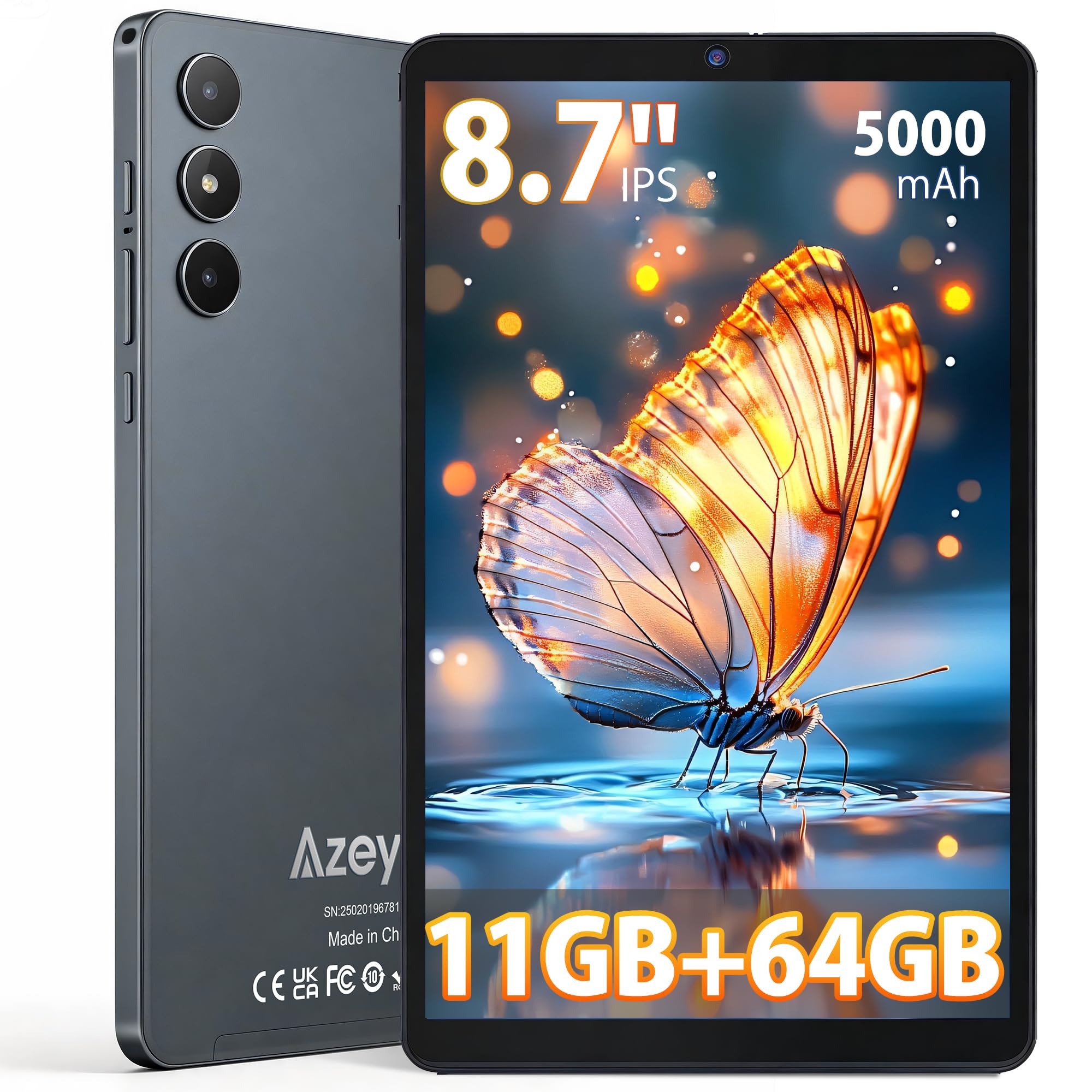
Delwedd: Blaen view of the Azeyou F68 tablet.

Image: Tablet held in hand, demonstrating portability.

Image: Tablet side profile, highlighting thinness and weight.
5. Gosod
5.1 Tâl Cychwynnol
Before first use, fully charge your tablet. Connect the USB Type-C cable to the tablet's charging port and the power adapter to a wall outlet. The battery indicator will show charging status.
5.2 Pŵer Ymlaen/Diffodd
- I Bweru Ymlaen: Press and hold the Power button until the Azeyou logo appears on the screen.
- I Bweru i ffwrdd: Pwyswch a daliwch y botwm Pŵer, yna dewiswch 'Diffoddwch' o'r opsiynau.
- I ailgychwyn: Pwyswch a daliwch y botwm Pŵer, yna dewiswch 'Ailgychwyn' o'r opsiynau.
5.3 Dewin Gosod Cychwynnol
Ar ôl ei droi ymlaen am y tro cyntaf, bydd y dabled yn eich tywys trwy broses sefydlu gychwynnol. Mae hyn yn cynnwys:
- Yn dewis eich iaith.
- Cysylltu â rhwydwaith Wi-Fi.
- Setting up your Google account (required for GMS services like Google Play Store).
- Setting up screen lock (PIN, pattern, or password).
5.4 Mewnosod Cerdyn MicroSD
To expand storage, insert a microSD card (up to 1TB) into the designated slot. Ensure the tablet is powered off before inserting or removing the card.
6. Cyfarwyddiadau Gweithredu
6.1 Mordwyo
The tablet runs on Android 15, offering an intuitive touch interface. Use gestures like tapping, swiping, pinching, and spreading to navigate.
6.2 Cysylltedd Wi-Fi a Bluetooth
Access Wi-Fi settings from the Quick Settings panel (swipe down from the top of the screen) or through the Settings app. The tablet supports dual-band Wi-Fi (2.4G+5G) and Bluetooth 5.0 for stable connections.

Image: High-speed and stable connectivity features.
6.3 Defnydd o'r Cyfryngau
The 8.7-inch IPS display with 1340x800 resolution and T-Colour image technology provides a vibrant viewing experience. With Widevine L1 support, you can stream high-definition content from platforms like Netflix, YouTube, and Prime Video.

Image: Tablet display quality for video viewing.

Image: Widevine L1 support for high-definition streaming.
6.4 Defnyddio'r Camera
The tablet features a 13MP rear camera and a 5MP front camera. Open the Camera app to capture photos and videos. The AI camera features enhance image quality.

Image: Camera features and examples.
6.5 OTG Functionality
The tablet supports USB On-The-Go (OTG), allowing you to connect external devices such as USB drives, keyboards, or mice using an OTG adapter (sold separately).
6.6 Kids Protection Mode
Utilize the built-in parental control features to manage screen time and content access for children. This helps maintain a balance between learning and entertainment.
6.7 Multitasking and Wireless Projection
The Android 15 operating system supports multitasking, allowing you to run multiple applications simultaneously. The tablet also supports wireless projection for displaying content on compatible screens.

Image: Wireless projection and split-screen multitasking.
7. cynnal
7.1 Glanhau'r Tabled
Defnyddiwch frethyn meddal, di-flwff i lanhau'r sgrin a chorff y dabled. Osgowch ddefnyddio cemegau llym neu ddeunyddiau sgraffiniol a allai niweidio'r wyneb.
7.2 Gofal Batri
To prolong battery life, avoid fully discharging the tablet frequently. Charge the tablet regularly, and if storing for an extended period, ensure it has at least a 50% charge.
7.3 Diweddariadau Meddalwedd
Chwiliwch am ddiweddariadau system a'u gosod yn rheolaidd i sicrhau bod gan eich tabled y nodweddion, y clytiau diogelwch a'r gwelliannau perfformiad diweddaraf. Ewch i Gosodiadau > System > Diweddariad system.
8. Datrys Problemau
- Tabled ddim yn troi ymlaen: Gwnewch yn siŵr bod y dabled wedi'i wefru. Cysylltwch hi â'r gwefrydd ac aros ychydig funudau cyn ceisio ei throi ymlaen eto.
- Mae'r sgrin yn anymatebol: Ceisiwch ailgychwyn y dabled trwy ddal y botwm Pŵer am tua 10-15 eiliad nes iddo ailgychwyn.
- Mae apiau'n chwalu neu'n rhewi: Close background apps. Clear the cache of the problematic app (Settings > Apps > [App Name] > Storage > Clear cache). If the issue persists, uninstall and reinstall the app.
- Problemau cysylltiad Wi-Fi: Restart your Wi-Fi router and the tablet. Forget the network on your tablet and reconnect.
- Perfformiad araf: Close unnecessary background apps. Clear cached data. Consider uninstalling unused apps.
- Batri yn draenio'n gyflym: Reduce screen brightness. Turn off Wi-Fi, Bluetooth, and GPS when not in use. Limit background app activity.
9. manylebau
| Nodwedd | Disgrifiad |
|---|---|
| Model | F68 |
| Arddangos | 8.7-inch IPS LCD, 1340x800 pixels, 60Hz refresh rate, 300 nits brightness, 16:9 aspect ratio |
| Prosesydd | Unisoc T310 (1.8 GHz CPU speed, 2 GHz max CPU speed), 12nm process |
| HWRDD | 11GB (3GB base + 8GB expansion) |
| Storio Mewnol | 64GB |
| Storfa Ehangadwy | MicroSD card up to 1TB |
| System Weithredu | Android 15 (Ardystio GMS) |
| Batri | 5000mAh, up to 6.5 hours continuous use |
| Porthladd Codi Tâl | USB Math-C |
| Camerâu | Rear: 13MP, Front: 5MP |
| Cysylltedd | Wi-Fi (802.11a/b/g/n/ac, Dual-Band 2.4G+5G), Bluetooth 5.0 |
| Sain | 3.5mm Headphone Jack, Dual Speakers |
| Dimensiynau | 24.3 cm (L) x 16.2 cm (W) x 0.9 cm (T) |
| Pwysau | Tua. 360g |
| Ardystiadau | PSE, CE, FCC, TELEC, GMS |
| Nodweddion Arbennig | Widevine L1, OTG Support, Wireless Projection, Screen Split, Kids Protection Mode |

Delwedd: Drosoddview of tablet features.

Image: Storage and RAM details.

Image: Battery and connectivity ports.
10. Gwarant a Chefnogaeth
Your Azeyou F68 tablet comes with a Gwarant 12 mis from the date of purchase. Additionally, a 30-day refund period is offered for eligible returns.
Cwmpas Gwarant
This warranty covers manufacturing defects and malfunctions under normal use. It does not cover damage caused by misuse, accidents, unauthorized repairs, or normal wear and tear.
How to Obtain Support
If you encounter any issues or have questions about your product, please contact Azeyou customer support. You can reach us via email (English and Japanese support available). To facilitate the process, please provide your Amazon order number.
You can typically find contact information by navigating to your Amazon purchase history, clicking on the product, and then selecting the seller's name to find the 'Ask a question' option.