
1. Rhagymadrodd
This manual provides essential information for the safe and efficient operation of your iSinbox AC311 Projector. Please read it thoroughly before using the device and keep it for future reference.
2. Gwybodaeth Diogelwch
Dilynwch ragofalon diogelwch sylfaenol bob amser wrth ddefnyddio'r cynnyrch hwn i leihau'r risg o dân, sioc drydanol ac anaf i bobl.
- Peidiwch â rhwystro agoriadau awyru.
- Peidiwch ag amlygu'r taflunydd i law na lleithder.
- Osgoi edrych yn uniongyrchol i mewn i'r lens taflunydd pan fydd y lamp yn ymlaen.
- Defnyddiwch atodiadau/ategolion a nodir gan y gwneuthurwr yn unig.
- Datgysylltwch y llinyn pŵer yn ystod stormydd mellt a phan na chaiff ei ddefnyddio am gyfnodau hir.
3. Cynnwys Pecyn
Gwiriwch fod yr holl eitemau yn bresennol yn y pecyn:
- iSinbox AC311 Projector
- Rheolaeth Anghysbell
- Cebl HDMI
- Cable AV
- Cebl Pŵer
- Llawlyfr Defnyddiwr (y ddogfen hon)
4. Cynnyrch Drosview
Familiarize yourself with the projector's components and interfaces.

Delwedd: Blaen view of the iSinbox AC311 Projector, showcasing ei ddyluniad a'i lens cryno.
Rhyngwynebau:
- Porthladd HDMI: Connect to HDMI-enabled devices like laptops, game consoles, or streaming sticks.
- Porth USB: Cysylltwch ddyfeisiau storio USB ar gyfer chwarae cyfryngau.
- Jac Sain 3.5mm: Cysylltwch siaradwyr neu glustffonau allanol.
- Mewnbwn pŵer: Cysylltwch y cebl pŵer.
5. Gosod
- Lleoliad: Place the projector on a stable, flat surface or mount it according to your preference (floor, ceiling, tripod, wall). Ensure adequate ventilation around the device. The projector supports short-throw projection, allowing a 100-inch screen from approximately 2.4 meters away.

Image: Diagram illustrating optimal projection distances for various screen sizes with the iSinbox AC311 Projector.
- Cysylltiad Pwer: Connect the power cable to the projector's power input and then to an electrical outlet.
- Pŵer Cychwynnol Ar: Pwyswch y botwm pŵer ar y taflunydd neu'r teclyn rheoli o bell i droi'r ddyfais ymlaen.
- Cywiriad Ffocws a Charreg Allwedd: The iSinbox AC311 features automatic focus and 6D keystone correction. The projector will automatically adjust the image for clarity and correct distortion. Manual adjustments can also be made if needed.

Image: Visual representation of the automatic focus and 6D keystone correction capabilities of the iSinbox AC311 Projector.
- Cysylltiad Rhwydwaith: Connect the projector to your Wi-Fi network using the settings menu. The projector supports ultra-fast WiFi 6 for stable streaming.
6. Cyfarwyddiadau Gweithredu
6.1 Rheoli o Bell
The included remote control allows you to navigate the projector's interface and control playback.

Image: The iSinbox AC311 Projector remote control, showing dedicated buttons for popular streaming services like Netflix and YouTube.
6.2 Dethol Ffynonellau
Use the remote control to select your desired input source (HDMI, USB, or built-in streaming apps).
6.3 Cymwysiadau Ffrydio
The iSinbox AC311 Projector comes with a Movin Smart operating system and is compatible with popular streaming services such as Netflix, Prime Video, YouTube, Disney, and Apple TV. Access these directly from the home screen.
6.4 Ansawdd Delwedd
The projector supports 4K resolution with HDR10+ and features AI Image Enhance technology, delivering vibrant and detailed visuals. It boasts 1200 ANSI lumens for bright images.
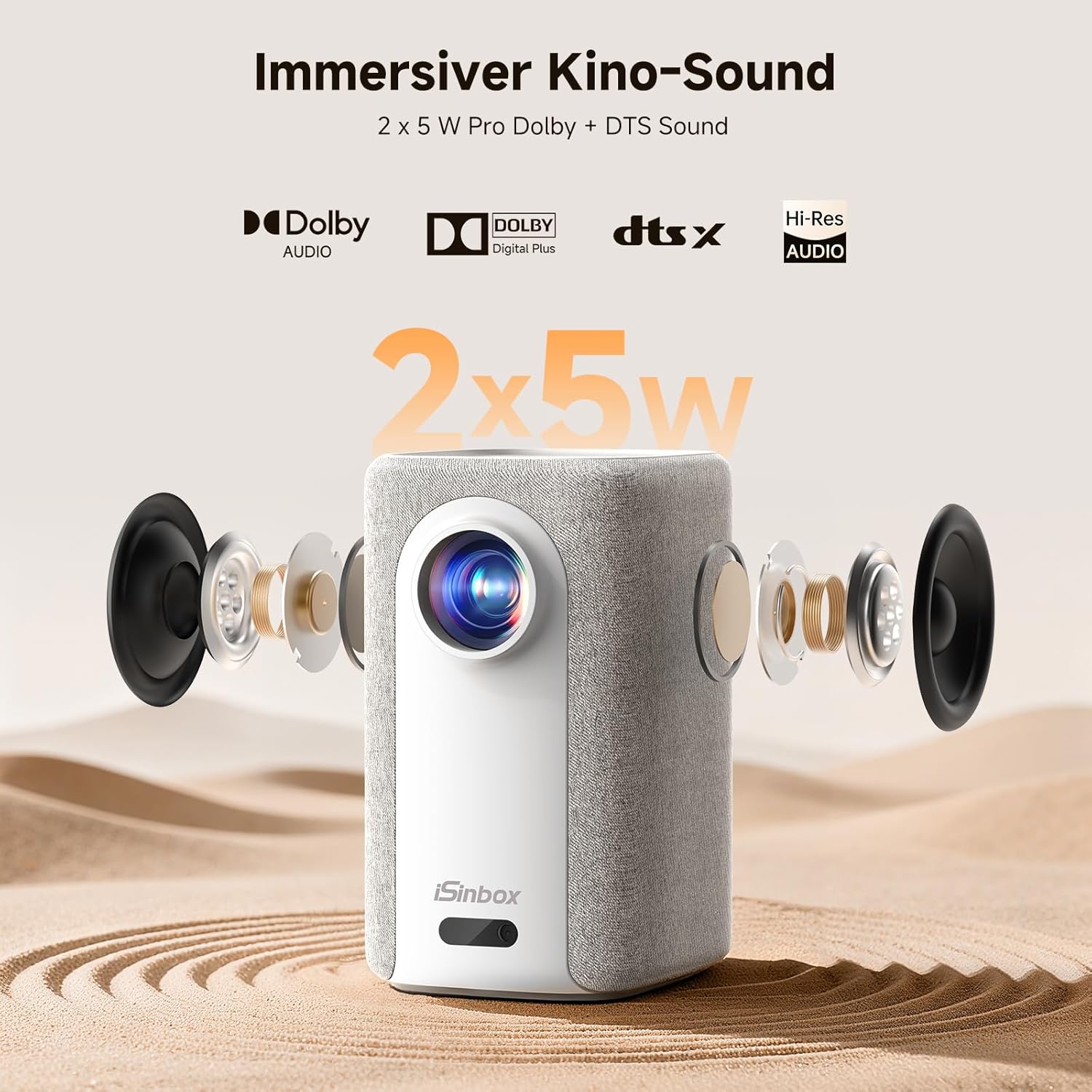
Image: A split-screen comparison demonstrating the superior image quality, vibrant colors, and detail of the iSinbox AC311 Projector (AC311) compared to other projectors.
6.5 Cysylltedd Bluetooth
The projector features bidirectional Bluetooth 5.4, allowing you to connect external speakers or headphones for enhanced audio, or use the projector as a Bluetooth speaker.

Image: Illustration of the iSinbox AC311 Projector's advanced WiFi 6 and Bluetooth 5.4 capabilities, highlighting smooth and low-latency connections.
6.6 Allbwn Sain
The projector is equipped with 2 x 5W speakers and supports Dolby Audio and DTS Sound for an immersive audio experience.

Delwedd: Ffrwydrodd view of the iSinbox AC311 Projector, detailing its 2x5W speakers and support for Dolby Audio and DTS Sound.
6.7 360-Degree Projection
The projector's design, including a dual-mode stand and integrated handle, allows for flexible placement and 360-degree projection, enabling you to project onto ceilings or walls from various angles.
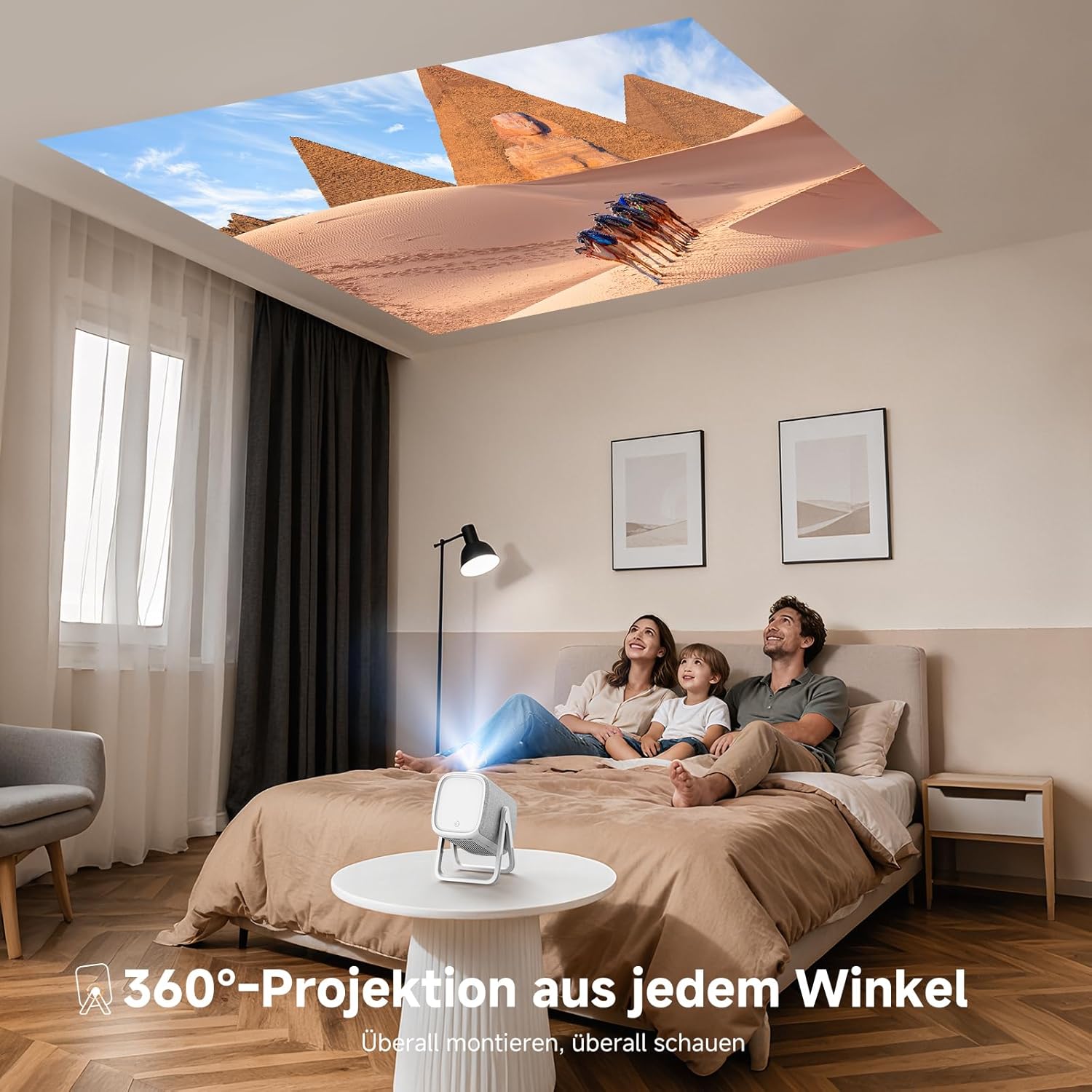
Image: The iSinbox AC311 Projector projecting an image onto a ceiling, illustrating its 360-degree projection feature and portable design.
7. cynnal
- Glanhau'r Lens: Defnyddiwch frethyn meddal, di-flwff sydd wedi'i gynllunio'n benodol ar gyfer lensys optegol. Peidiwch â defnyddio glanhawyr sgraffiniol na thoddyddion.
- Glanhau'r Casing: Sychwch du allan y taflunydd gyda lliain meddal, sych. Ar gyfer marciau ystyfnig, defnyddiwch frethyn ychydig yn sych.amp brethyn ac yna sychu'n drylwyr.
- Awyru: Gwnewch yn siŵr bod yr agoriadau awyru yn glir o lwch a rhwystrau i atal gorboethi.
- Storio: Pan nad yw'n cael ei ddefnyddio am gyfnodau hir, storiwch y taflunydd mewn lle oer, sych, i ffwrdd o olau haul uniongyrchol a thymheredd eithafol.
8. Datrys Problemau
| Problem | Achos Posibl | Ateb |
|---|---|---|
| Dim delwedd yn cael ei harddangos | Power cable disconnected; incorrect input source; device not powered on. | Check power connection; select correct input source; ensure connected device is on. |
| Delwedd aneglur | Out of focus; projector not perpendicular to screen. | Allow auto-focus to adjust or manually adjust focus; use keystone correction. |
| Dim sain | Volume too low; external audio device not connected properly; mute enabled. | Increase volume; check audio cable/Bluetooth connection; disable mute. |
| Rheolaeth bell ddim yn gweithio | Batteries depleted; obstruction between remote and projector. | Replace batteries; ensure clear line of sight to IR receiver. |
9. manylebau
| Nodwedd | Manylyn |
|---|---|
| Model | AC311 |
| Brand | iSinbox |
| Technoleg Arddangos | LCD |
| Datrysiad Brodorol | 1920 x 1080 (HD Llawn) |
| Cydraniad Uchaf | 3840 x 2160 (Cefnogaeth 4K) |
| Cymhareb Agwedd | 4:3 |
| Cymhareb Cyferbyniad | Uchel |
| Defnydd Pŵer | 65 wat |
| Cyfradd Adnewyddu | 60 Hz |
| Cysylltedd | Bluetooth 5.4 (Bidirectional), WiFi 6, HDMI, USB, 3.5mm Audio Jack, IR |
| Dyfeisiau Cydnaws | Speakers, Game Consoles, Laptops, Smartphones, Tablets |
| Nodweddion Arbennig | Automatic Focus, 6D Keystone Correction, Dual-mode Stand, Movin Smart OS, Built-in Streaming Apps (Netflix, Prime Video, YouTube, Disney, Apple TV), Dolby Audio, DTS Sound, 360-degree Projection |
| Dimensiynau (L x W x H) | 27.6 x 20.5 x 16.3 cm |
| Pwysau | 1.92 kg |
| Opsiynau Mowntio | Floor, Ceiling, Tripod, Table, Wall |
10. Gwarant a Chefnogaeth
For warranty information and technical support, please refer to the official iSinbox website or contact their customer service directly. Details are typically provided on the product packaging or a separate warranty card.
The product was first available on Amazon.es from October 23, 2025.