
Rhagymadrodd
This manual provides essential information for the safe and efficient use of your Google Pixel 9 Pro 5G smartphone. Please read these instructions carefully before operating your device.

Ffigur 1: Blaen view of the Google Pixel 9 Pro 5G.
Beth Sydd yn y Bocs
Gwiriwch fod yr holl eitemau yn bresennol yn y pecynnu:
- Ffôn Clyfar Google Pixel 9 Pro
- Cebl USB-C i USB-C (1m, USB 2.0)
- Offeryn Alldaflu Hambwrdd SIM
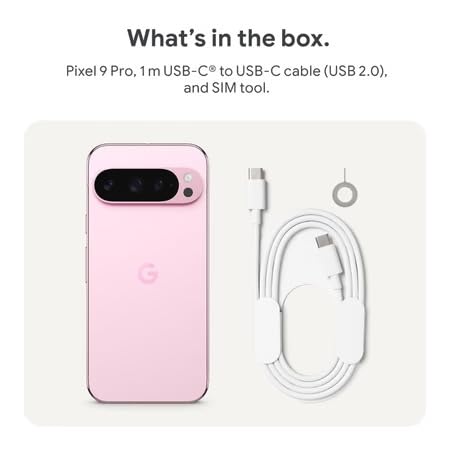
Figure 2: Included items in the Pixel 9 Pro packaging.
Gosod
1. Mewnosod Cerdyn SIM
- Locate the SIM tray on the side of your Pixel 9 Pro.
- Insert the provided SIM ejector tool into the small hole on the SIM tray and press gently until the tray pops out.
- Rhowch eich cerdyn Nano-SIM yn y hambwrdd gyda'r cysylltiadau aur yn wynebu i lawr. Gwnewch yn siŵr ei fod wedi'i osod yn gywir.
- Carefully push the SIM tray back into the device until it is flush.
2. Gwefru Cychwynnol
Cyn ei ddefnyddio gyntaf, argymhellir gwefru'ch dyfais yn llawn.
- Cysylltwch y cebl USB-C â'r porthladd gwefru ar waelod eich ffôn.
- Connect the other end of the cable to a compatible USB power adapter (sold separately) and plug it into a power outlet.
- Bydd yr eicon batri ar y sgrin yn nodi statws codi tâl.
3. Pweru Ymlaen / I ffwrdd
- I Bweru Ymlaen: Press and hold the Power button (located on the right side) until the Google logo appears on the screen.
- I Bweru i ffwrdd: Pwyswch a daliwch y botwm Pŵer, yna tapiwch 'Diffoddwch' ar y sgrin.

Figure 3: Power and volume buttons on the side of the device.
4. Dewin Gosod y Tro Cyntaf
Upon powering on for the first time, follow the on-screen instructions to:
- Dewiswch eich iaith a'ch rhanbarth.
- Cysylltwch â rhwydwaith Wi-Fi.
- Mewngofnodwch gyda'ch cyfrif Google neu crëwch un newydd.
- Set up security features such as fingerprint unlock, face unlock, PIN, pattern, or password.
- Trosglwyddo data o hen ddyfais (dewisol).
Cyfarwyddiadau Gweithredu
Llywio Sylfaenol
- Ystumiau Sgrin Gyffwrdd: Interact with the device using taps, swipes, pinches (for zoom), and long presses.
- Sgrin Cartref: Access your applications, widgets, and customize your layout.
- Hysbysiadau: Sychwch i lawr o frig y sgrin i view hysbysiadau.
- Gosodiadau Cyflym: Swipe down twice from the top of the screen to access quick settings toggles (Wi-Fi, Bluetooth, etc.).
Gweithrediad Camera
The Pixel 9 Pro features a powerful triple rear camera system.

Figure 4: Rear camera system of the Pixel 9 Pro.
- Agor y Camera: Tap the Camera app icon on your home screen or lock screen.
- Switching Lenses: Tap the icons on the viewfinder to switch between wide, ultrawide, and 5x telephoto lenses.
- Dulliau saethu: Select from various modes such as Night Sight for low-light conditions, Astroffotograffiaeth for capturing stars, Macro for close-up shots, Amlygiad Hir for creative effects, and Portread for depth-of-field effects.
- Super Res Zoom: Pinch the screen to digitally zoom up to 30x. For video, Super Res Zoom supports up to 20x.
- Rheolyddion Proffesiynol: Access advanced camera settings like shutter speed and manual focus for greater creative control.
Rheoli Batri
- Gwirio lefel y batri: View y batri y canttage in the status bar or in Settings > Battery.
- Arbedwr Batri Eithafol: Enable this mode in Settings > Battery > Extreme Battery Saver to significantly extend battery life.
- Codi tâl: Use the provided USB-C cable and a compatible power adapter for optimal charging speed.
Nodweddion Diogelwch
Your Pixel 9 Pro incorporates multiple hardware security layers to protect your data.
- Datgloi Olion Bysedd: Register your fingerprints in Settings > Security & privacy > Device unlock.
- Datgloi wynebau: Set up facial recognition for convenient unlocking.
- PIN/Patrwm/Cyfrinair: Always set a strong screen lock method.
- Diweddariadau Meddalwedd: Regularly install system updates to ensure your device has the latest security patches.
Synhwyrydd Tymheredd
The Pixel 9 Pro includes a thermometer for measuring temperature.
- Open the dedicated Thermometer app.
- Follow the on-screen instructions to measure body temperature or the temperature of objects.
- Temperature data can be saved and tracked within the Fitbit application.
Cynnal a chadw
Glanhau'ch Dyfais
- Use a soft, lint-free cloth to clean the screen and body of your phone.
- Avoid using abrasive materials, harsh chemicals, or aerosol sprays.
- Do not submerge the device in water, despite its water-resistant rating.
Diweddariadau Meddalwedd
Google regularly releases software updates to improve performance, add features, and enhance security.
- To check for updates, go to Settings > System > System update.
- Ensure your device is connected to Wi-Fi and has sufficient battery charge before installing updates.
Gofal Corfforol
The Pixel 9 Pro is built with Corning Gorilla Glass Victus 2 and is water-resistant, offering durability against everyday drops and spills.
- While durable, avoid excessive impacts or drops to prevent damage.
- Consider using a screen protector and a protective case for additional safeguarding.
Datrys problemau
Dyfais Ddim yn Ymateb
If your phone becomes unresponsive, perform a force restart:
- Press and hold the Power button for approximately 10-15 seconds until the device restarts.
Apiau'n Chwalu neu'n Rhewi
- Caewch yr ap problemus a'i ailagor.
- Clear the app's cache: Go to Settings > Apps > See all apps > [App Name] > Storage & cache > Clear cache.
- Gwnewch yn siŵr bod yr ap wedi'i ddiweddaru i'w fersiwn ddiweddaraf o Google Play Store.
- Ailgychwyn eich ffôn.
Network Connectivity Issues (Wi-Fi/Cellular)
- Toggle Wi-Fi or cellular data off and then back on.
- Ailgychwyn eich ffôn.
- Verify that your SIM card is correctly inserted.
- Reset network settings: Go to Settings > System > Reset options > Reset Wi-Fi, mobile & Bluetooth.
Batri'n Draenio'n Gyflym
- Check battery usage in Settings > Battery to identify power-consuming apps.
- Reduce screen brightness and screen timeout duration.
- Disable unnecessary features like GPS, Bluetooth, and Wi-Fi when not in use.
- Enable Extreme Battery Saver mode.
Ailosodiad Ffatri (Dewis Olaf)
Warning: A factory reset will erase all data from your phone. Back up all important data before proceeding.
- Ewch i Gosodiadau > System > Ailosod opsiynau > Dileu'r holl ddata (ailosod ffatri).
- Confirm your decision when prompted.
Manylebau
| Nodwedd | Manylyn |
|---|---|
| Brand | |
| Model | Pixel 9 Pro |
| System Weithredu | Android 15 |
| Prosesydd | Google Tensor G4 (3.1 GHz) |
| HWRDD | 16 GB |
| Storio Mewnol | 256 GB |
| Arddangos | 6.3 Inches LTPO OLED (Actua), 1280 x 2856 Pixels, 120 Hz Refresh Rate |
| Camera Cefn | 50 MP wide + 48 MP ultrawide (Macro) + 48 MP 5x telephoto |
| Camera blaen | 42 AS |
| Gallu Batri | 4700 Miliamp Hours (up to 24 hours average life) |
| Cysylltedd | 5G, Wi-Fi 7, Bluetooth 5.3, NFC, UWB, USB-C |
| Cerdyn SIM | Single Nano SIM |
| Gwrthiant Dŵr | Gwrth-ddŵr |
| Dimensiynau | 8 x 72 x 153 Milimetr |
| Pwysau | 198 gram |
Gwarant a Chefnogaeth
Gwybodaeth Gwarant
Your Google Pixel 9 Pro 5G comes with a Gwarant Gwneuthurwr Blwyddyn o ddyddiad y pryniant. Mae'r warant hon yn cwmpasu diffygion gweithgynhyrchu o dan ddefnydd arferol. Cadwch eich prawf prynu ar gyfer hawliadau gwarant.
Cefnogaeth i Gwsmeriaid
For technical assistance, warranty claims, or other support inquiries, please contact Google customer service:
- Gwneuthurwr: Google LLC, 1600 Amphitheatre Parkway, Mynydd View, CA 94043, UDA
- Phone Support (India): +91 7718892303. XNUMX
- Cyswllt Mewnforiwr (India): Nexora Axis Private Limited (+91 7718892303)
For the most up-to-date support information, please visit the official Google Pixel support websafle.