
1. Rhagymadrodd
Welcome to the user manual for your NIMO N152S 15.6-inch Laptop. This guide provides essential information on setting up, operating, maintaining, and troubleshooting your new device. Please read this manual thoroughly to ensure optimal performance and longevity of your laptop.
2. Cynnyrch Drosview
2.1 Nodweddion Allweddol
- Perfformiad pwerus: Equipped with an AMD Ryzen 5 3500U processor and integrated Radeon graphics for smooth multitasking and efficient performance.
- Arddangosfa HD Llawn trochi: A 15.6-inch Full HD (1920x1080) IPS display with a 180° wide hinge for vibrant visuals and wide viewing onglau.
- Dyluniad slim ac ysgafn: Crafted with a sleek metal top cover, weighing under 3.7 lbs and measuring just 19.2 mm thin.
- Cysylltedd Gwell: Features 2 USB-A, 2 USB-C (full function PD/DP/Data), HDMI, MicroSD, and a 3.5mm audio jack.
- Expandable Memory & Storage: Supports up to 32GB DDR4 RAM and M.2 PCIe 3.0 x4 SSD for future-proof upgrades.
- Smart Security & Comfort: Includes a fingerprint reader on the touchpad, a backlit keyboard for low-light use, and dual microphones.
2.2 Adnabod Cydran
Familiarize yourself with the various components of your NIMO N152S laptop as illustrated below.

Ffigur 2.1: Blaen view of the NIMO N152S laptop, showcasing its sleek design and key features like Windows 11, 32GB RAM, 1TB SSD, Full HD display, AMD Ryzen 5, Type-C PD Charger, Backlit Keyboard, and Fingerprint Reader.

Figure 2.2: Illustration of the AMD Ryzen 5 processor, detailing its specifications including 4 Cores, 8 Threads, 15W Power Consumption, and 3.7 GHz Turbo Boost, indicating its capability for daily tasks and light gaming.

Figure 2.3: The NIMO laptop screen showcasing a vivid Full HD (1920x1080) IPS display, highlighting features like bright view and eye protection, with an 85% screen-to-body ratio.

Ffigur 2.4: Manwl view of the NIMO laptop's expanded connectivity options, labeling ports such as Type-C (Charge Only), USB 3.0, HDMI, Type-C (Full Function), Charge LED, Micro SD Reader, USB 2.0, USB 3.0, Headphone Combo, and Kensington Lock.
3. Gosodiad Cychwynnol
3.1 Gwefru'r Gliniadur
Before first use, fully charge your NIMO laptop. Connect the provided 65W Type-C PD charger to the USB-C charging port on the laptop and then to a power outlet. The charge LED indicator will illuminate to confirm charging.

Figure 3.1: The 65W Type-C PD Charger, designed for universal compatibility with laptops, tablets, and smartphones, simplifying your charging needs compared to multiple chargers.
3.2 Troi Ymlaen am y Tro Cyntaf
- Agorwch gaead y gliniadur.
- Pwyswch y botwm pŵer sydd wedi'i leoli ar y bysellfwrdd.
- Dilynwch y cyfarwyddiadau ar y sgrin i gwblhau'r gosodiad cychwynnol ar Windows 11, gan gynnwys dewis iaith, cysylltiad rhwydwaith, a chreu cyfrif defnyddiwr.
4. Operating Your NIMO Laptop
4.1 Pŵer Ymlaen/Diffodd a Modd Cysgu
- Pŵer Ymlaen: Pwyswch y botwm pŵer.
- Cau i Lawr: Cliciwch y botwm Cychwyn, yna Pŵer > Cau i Lawr.
- Modd Cwsg: Caewch y caead neu cliciwch y botwm Cychwyn, yna Pŵer > Cysgu.
4.2 Defnyddio'r Bysellfwrdd a'r Pad Cyffwrdd
Your NIMO laptop features a full-sized keyboard with a numeric keypad and a responsive touchpad.
- Bysellfwrdd ôl-oleuo: Gwasgwch Fn + F10 (or the key with the backlight icon) to toggle the keyboard backlight on/off or adjust brightness levels.
- Touchpad: Yn cefnogi ystumiau aml-gyffwrdd ar gyfer llywio. Cyfeiriwch at osodiadau Windows i gael eu haddasu.
- Bysellbad rhifol: Use the dedicated numeric keypad for efficient data entry.

Figure 4.1: The NIMO laptop keyboard, emphasizing its backlit keys, integrated touchpad, fingerprint reader, and numeric keypad, designed for comfortable typing in various lighting conditions.
4.3 Darllenydd Olion Bysedd
The integrated fingerprint reader on the touchpad provides quick and secure access to your laptop.
- Ewch i Gosodiadau Windows > Cyfrifon > Dewisiadau mewngofnodi.
- Set up Windows Hello Fingerprint.
- Follow the on-screen prompts to register your fingerprints.
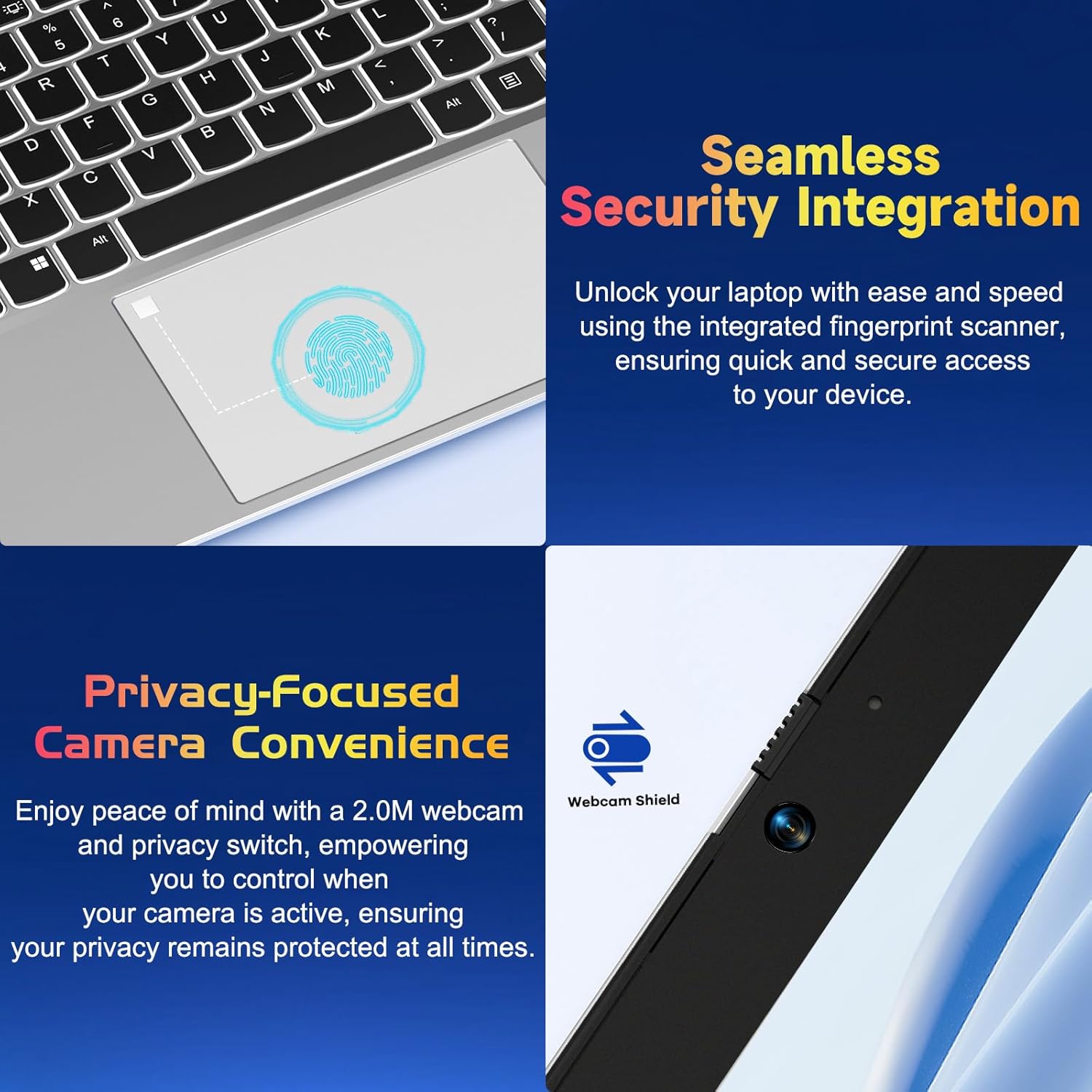
Ffigur 4.2: Agos view of the NIMO laptop's touchpad, highlighting the integrated fingerprint scanner for seamless security integration, alongside the privacy-focused webcam with a physical shield.
4.4 Cysylltu Perifferolion
Your laptop offers various ports for connecting external devices:
- Porthladdoedd USB-A: For connecting standard USB devices like mice, keyboards, or external drives.
- Porthladdoedd USB-C: Two full-function USB-C ports support Power Delivery (PD), DisplayPort (DP), and data transfer. One is dedicated for charging.
- Porthladd HDMI: Connect to external monitors or projectors.
- Darllenydd Cerdyn MicroSD: Insert a MicroSD card for additional storage or data transfer.
- Jac Sain 3.5mm: Ar gyfer clustffonau neu siaradwyr allanol.
4.5 Webcam Privacy
The laptop includes a 2.0MP webcam with a physical privacy shield. Slide the shield to cover the camera lens when not in use to ensure your privacy.
5. Cynnal a Chadw a Gofal
- Glanhau: Defnyddiwch frethyn meddal, di-lint ychydig dampened with water or a screen cleaner to clean the display and exterior. Avoid harsh chemicals.
- Diweddariadau Meddalwedd: Diweddarwch eich system weithredu a'ch gyrwyr Windows yn rheolaidd i sicrhau'r perfformiad a'r diogelwch gorau posibl.
- Gofal Batri: I ymestyn oes y batri, osgoi tymereddau eithafol a cheisiwch gadw gwefr y batri rhwng 20% ac 80% pan fo'n bosibl.
- Storio: Storiwch y gliniadur mewn lle oer, sych i ffwrdd o olau haul uniongyrchol a thymheredd eithafol.
6. Datrys Problemau
This section addresses common issues you might encounter with your NIMO laptop.
| Mater | Ateb Posibl |
|---|---|
| Nid yw'r gliniadur yn troi ymlaen. | Ensure the laptop is charged. Connect the charger and wait a few minutes before attempting to power on again. If unresponsive, perform a hard reset by holding the power button for 15 seconds. |
| Mae'r sgrin yn wag neu'n fflachio. | Try adjusting the screen brightness (Fn + F5/F6). If connected to an external monitor, ensure the cable is secure. Restart the laptop. |
| Keyboard backlight is not working. | Press Fn + F10 (or the key with the backlight icon) to cycle through backlight settings. Ensure the function keys are enabled. |
| Fingerprint reader not recognized. | Ensure your finger is clean and dry. Re-register your fingerprint in Windows Hello settings if the issue persists. |
| Problemau cysylltiad Wi-Fi. | Check if Wi-Fi is enabled (Fn + F12 or Windows settings). Restart your router and laptop. Update Wi-Fi drivers if necessary. |
| Mae'r gliniadur yn rhedeg yn araf. | Close unnecessary applications. Check Task Manager for resource-intensive processes. Ensure Windows and drivers are up to date. Consider running a disk cleanup. |
7. Manylebau Technegol
| Nodwedd | Manyleb |
|---|---|
| Brand | NIMO |
| Enw Model | NIMO N152S |
| Rhif Model yr Eitem | NIMO N152 |
| Maint Sgrin | 15.6 modfedd |
| Cydraniad Sgrin Max | 1920 x 1080 picsel (HD Llawn) |
| Prosesydd | AMD Ryzen 5 3500U (3.7 GHz) |
| HWRDD | 32 GB DDR4 (3200 MHz) |
| Gyriant Caled | SSD 1024 GB (Cyflwr Solet) |
| Cydbrosesydd graffeg | AMD Integrated graphics |
| System Weithredu | Windows 11 |
| Math Di-wifr | 802.11abg |
| Nifer y Porthladdoedd USB 2.0 | 1 |
| Bywyd Batri Cyfartalog | 5 Awr |
| Pwysau Eitem | 3.8 pwys |
| Dimensiynau Cynnyrch | 14.07 x 8.98 x 0.76 modfedd |
| Lliw | Arian Clasurol |
| Cefn Webcam Datrys | 2 AS |
| Ffynhonnell Pwer | Wedi'i Bweru â Batri |
| Batris | Angen 1 batris lithiwm polymer (wedi'u cynnwys) |
8. Gwarant a Chymorth i Gwsmeriaid
8.1 Gwybodaeth Gwarant
Your NIMO N152S laptop comes with a comprehensive warranty:
- Polisi Dychwelyd Am Ddim 90 Diwrnod: You may return your NIMO laptop for any reason within 90 days of purchase.
- Gwarant 2 Flwyddyn: All NIMO products are covered by a 2-year warranty for after-sales support.

Figure 8.1: NIMO's commitment to customer satisfaction, featuring a 90-day free return policy and a 2-year warranty for reliable support.
8.2 Cefnogaeth i Gwsmeriaid
For any product-related questions, technical assistance, or warranty claims, please contact our U.S.-based support team:
- Visit the official NIMO website for support resources and contact options.
- Refer to your purchase documentation for specific contact details.
Our team is dedicated to providing professional and high-quality customer service to resolve any issues you may encounter.