
1. Rhagymadrodd
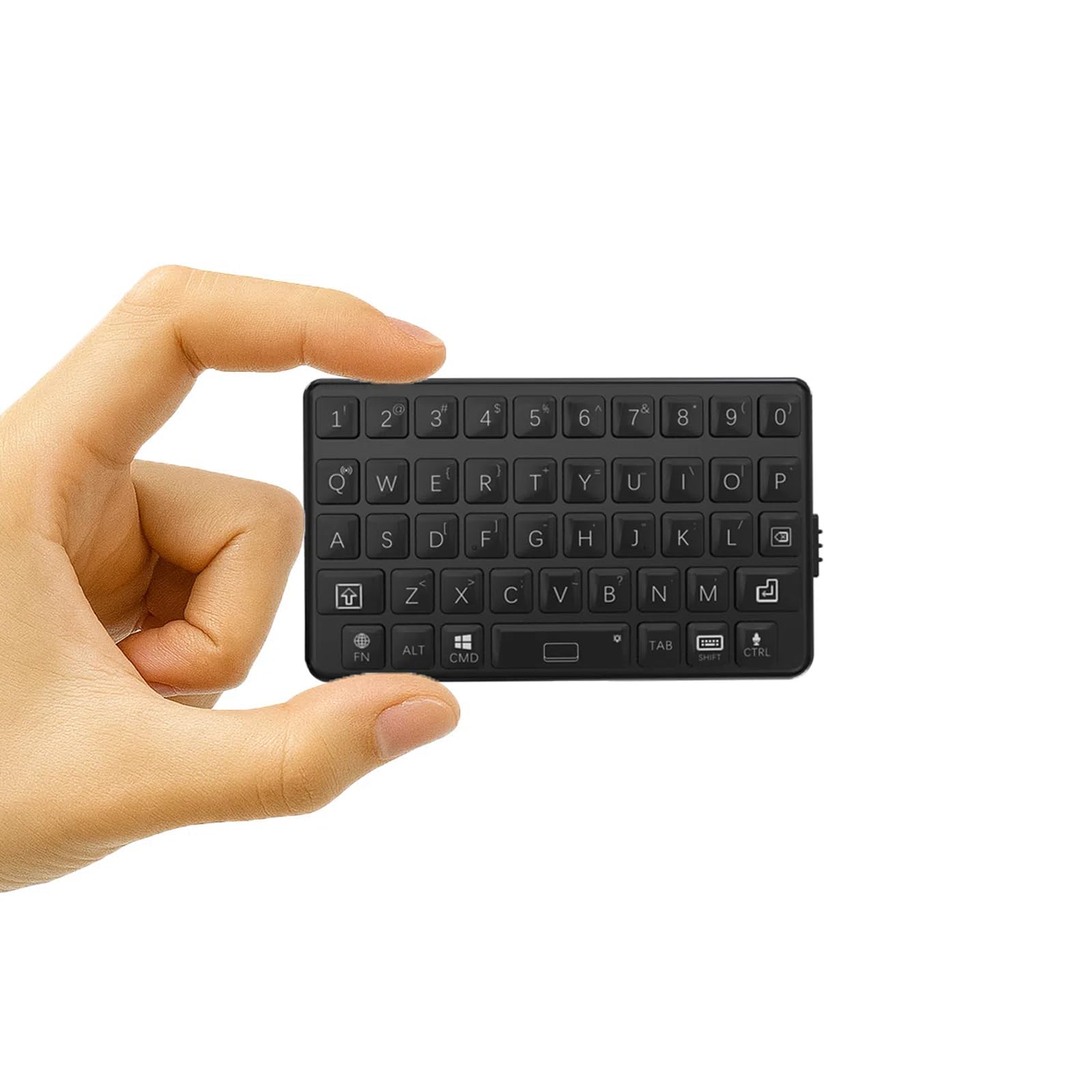
Diolch am brynuasing the DarkWalker M4 Mini Bluetooth Keyboard. This ultra-portable wireless keyboard is designed for seamless compatibility with a wide range of devices, including smartphones, tablets, iPads, iPhones, Macs, Android devices, and Windows PCs. Its compact design and tactile keys provide an efficient and comfortable typing experience, making it ideal for mobile professionals and everyday use.
2. Gosod
2.1 Gwefru'r Bysellfwrdd
Before initial use, fully charge the keyboard. Connect the provided USB charging cable to the keyboard's charging port and to a USB power source (e.g., computer, wall adapter). The charging indicator light will illuminate during charging and turn off when fully charged.
2.2 Pâr Bluetooth
- Pŵer Ymlaen: Locate the power switch on the side of the keyboard and slide it to the "ON" position.
- Rhowch y Modd Pâr: Pwyswch a dal y Fn allweddol a'r Bluetooth icon key (usually located on one of the number keys or a dedicated key) simultaneously for a few seconds until the Bluetooth indicator light starts blinking. This indicates the keyboard is in pairing mode.
- Galluogi Bluetooth ar Eich Dyfais: Ar eich ffôn clyfar, tabled, neu gyfrifiadur, ewch i'r gosodiadau Bluetooth.
- Dewiswch Allweddell: In the list of available Bluetooth devices, select "DarkWalker M4" or a similar name.
- Cadarnhau Paru: Follow any on-screen prompts to complete the pairing process. The Bluetooth indicator light on the keyboard will stop blinking and remain solid (or turn off) once successfully paired.
2.3 Multi-OS Automatic Recognition
The DarkWalker M4 keyboard features multi-OS automatic recognition. Upon powering on, it will automatically detect and configure itself for iOS, Mac, Android, or Windows operating systems, ensuring optimal key functionality without manual switching.

3. Cyfarwyddiadau Gweithredu
3.1 Teipio Sylfaenol
The keyboard features a standard QWERTY layout. Simply type as you would on a full-sized keyboard. The tactile switches provide precise feedback for comfortable and efficient typing.
3.2 Special Functions (Fn Key Combinations)
Mae'r Fn key allows access to secondary functions printed on certain keys. Press and hold the Fn key, then press the desired function key.
- Bysellau Saeth: To use arrow keys (Up, Down, Left, Right), press and hold Fn and then press the keys corresponding to 7 (Up), 8 (Down), 9 (Left), and 0 (Right).
- Swyddogaethau Eraill: Refer to the keycaps for additional functions accessible via the Fn key, such as multimedia controls or system shortcuts.

3.3 Rheoli Pŵer
- Modd Cwsg Awtomatig: The keyboard will enter sleep mode after a period of inactivity to conserve battery. Press any key to wake it up.
- Bywyd batri: The keyboard provides up to 12 hours of continuous operation on a full charge.
4. cynnal
4.1 Glanhau
To clean the keyboard, power it off and gently wipe the surface with a soft, damp cloth. Avoid using harsh chemicals or abrasive materials. Do not immerse the keyboard in water.
4.2 Storio
When not in use for extended periods, store the keyboard in a cool, dry place. Ensure it is powered off to prevent battery drain.
5. Datrys Problemau
5.1 Bysellfwrdd Ddim yn Cysylltu/Paru
- Gwnewch yn siŵr bod y bysellfwrdd wedi'i droi ymlaen ac wedi'i wefru'n llawn.
- Sicrhewch fod Bluetooth wedi'i alluogi ar eich dyfais.
- Place the keyboard within close proximity to your device.
- Rhowch gynnig ar ddadbaru ac ail-baru'r bysellfwrdd o osodiadau Bluetooth eich dyfais.
- Restart both the keyboard (power off/on) and your device.
5.2 Allweddi Ddim yn Ymateb
- Gwiriwch a yw'r bysellfwrdd wedi'i gysylltu'n iawn trwy Bluetooth.
- Gwnewch yn siŵr nad yw batri'r bysellfwrdd wedi'i wagio.
- Clean any debris around the keys.
5.3 Oedi Mewnbwn neu Ddatgysylltiadau
- Symudwch yn agosach at eich dyfais i leihau ymyrraeth.
- Gwnewch yn siŵr nad oes unrhyw ddyfeisiau eraill yn achosi ymyrraeth Bluetooth.
- Ailwefru'r bysellfwrdd.
6. manylebau
| Brand | Cerddwr Tywyll |
| Rhif Model | M4 |
| Technoleg Cysylltedd | Bluetooth 5.0 |
| Dyfeisiau Cydnaws | Android, iOS, iPad, iPhone, Mac, PC, Windows |
| Cynllun Bysellfwrdd | QWERTY |
| Newid Math | Cyffyrddol |
| Dimensiynau Cynnyrch (L x W x H) | 7.5 x 4.5 x 1.2 cm |
| Pwysau | 40g |
| Amser Gweithredu Parhaus | Hyd at 12 awr |
| Gwlad Tarddiad | Tsieina |
| UPC | 739608135400 |
| ASIN | B0FNK4BWM2 |
7. Gwarant a Chefnogaeth
7.1 Gwybodaeth Gwarant
This DarkWalker M4 Mini Bluetooth Keyboard comes with a Gwarant 1 mlynedd o ddyddiad y pryniant. Mae'r warant hon yn cwmpasu diffygion gweithgynhyrchu a chamweithrediadau o dan ddefnydd arferol. Nid yw'n cwmpasu difrod a achosir gan gamddefnydd, damweiniau, addasiadau heb awdurdod, na thraul a rhwyg arferol.
7.2 Cefnogaeth i Gwsmeriaid
For technical assistance, troubleshooting, or warranty claims, please contact DarkWalker customer support. Refer to the product packaging or the official DarkWalker websafle am y wybodaeth gyswllt ddiweddaraf.