
Rhagymadrodd
Thank you for choosing the EUQQ YYK-Q10 AI Translator Earbuds. These earbuds are designed to provide seamless real-time language translation, high-quality audio, and effective noise cancellation, making them ideal for communication across language barriers, business meetings, and everyday use. This manual will guide you through the setup, operation, and maintenance of your new device to ensure optimal performance and user experience. Please read this manual thoroughly before using the product.
Cynnwys Pecyn
Gwiriwch y pecyn am yr eitemau canlynol:
- EUQQ YYK-Q10 AI Translator Earbuds (L/R)
- Achos Codi Tâl
- Cebl Codi Tâl USB
- Meintiau Lluosog o Awgrymiadau Clust
- Llawlyfr Defnyddiwr
Os oes unrhyw eitemau ar goll neu wedi'u difrodi, cysylltwch â chymorth cwsmeriaid.
Cynnyrch Drosview
The EUQQ YYK-Q10 features a compact design with intuitive controls and a smart charging case. Familiarize yourself with the components below.
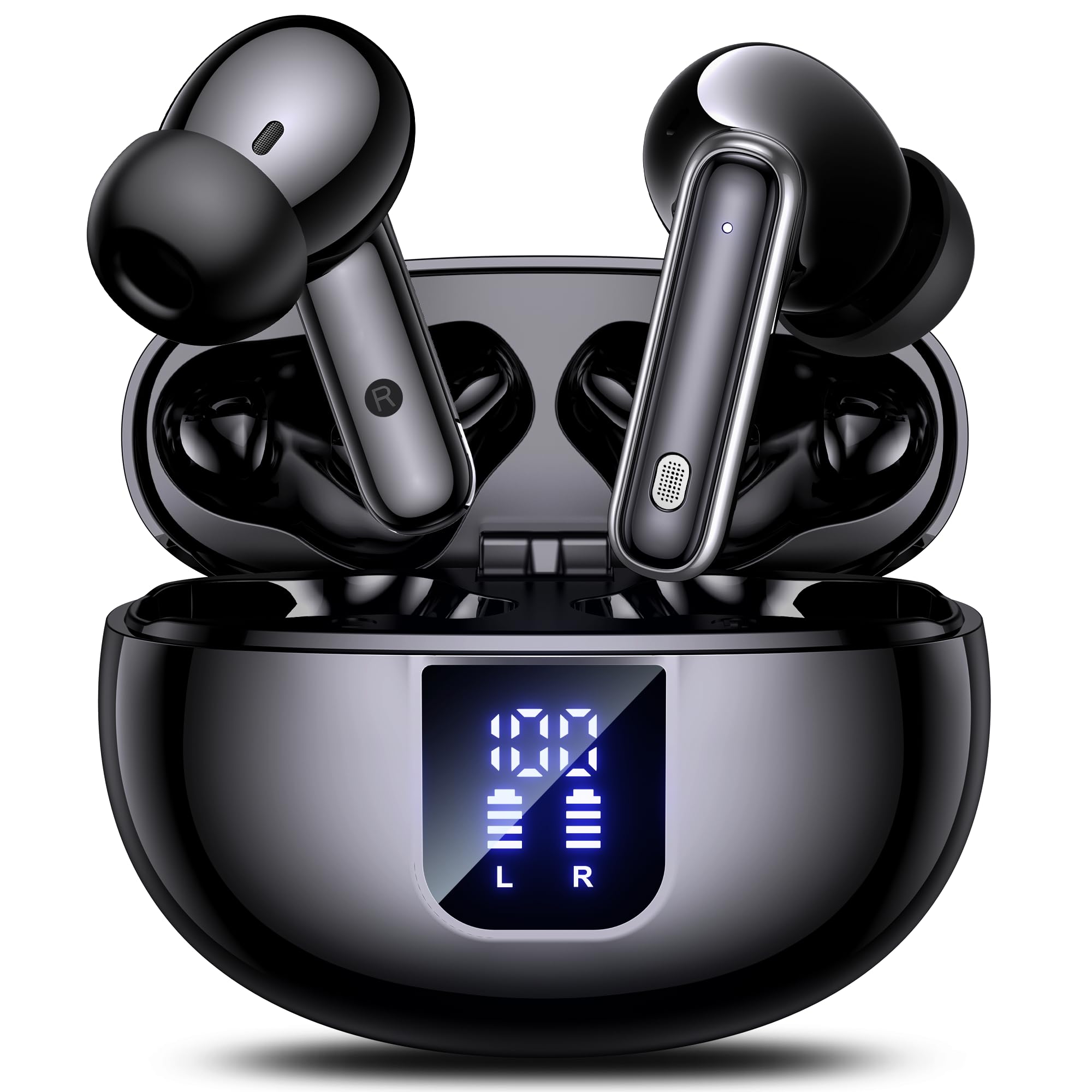
Image: The EUQQ YYK-Q10 AI Translator Earbuds are shown inside their open charging case. The case is black and features a digital display on the front, indicating battery levels for both the case and individual earbuds (L and R). The earbuds themselves are black with silver accents.
Cydrannau Allweddol:
- Clustffonau: Left (L) and Right (R) earbuds with touch control areas and microphones.
- Achos Codi Tâl: Stores and charges the earbuds. Features a digital display for battery status.
- Porth Codi Tâl: USB-C port on the charging case for power input.
- Dangosyddion LED: On earbuds and case to show charging status and connection.
Gosod
1. Gwefru Cychwynnol
- Rhowch y ddau earbuds yn yr achos gwefru.
- Connect the USB charging cable to the charging port on the case and a power source.
- The digital display on the case will show the charging status. Ensure both earbuds and the case are fully charged before first use (approximately 1-2 hours).
2. Pâr Bluetooth
- Agorwch y cas gwefru. Bydd y clustffonau'n mynd i mewn i'r modd paru yn awtomatig, a nodir gan oleuadau LED sy'n fflachio.
- Ar eich ffôn clyfar neu ddyfais, galluogwch Bluetooth a chwiliwch am y dyfeisiau sydd ar gael.
- Select "EUQQ YYK-Q10" from the list of devices.
- Once connected, the earbud LEDs will stop flashing, and a voice prompt will confirm the connection.
3. App Installation (for Translation Features)
To utilize the real-time translation features, download the dedicated EUQQ translation app from your device's app store (iOS App Store or Google Play Store). Follow the in-app instructions to connect your earbuds and configure language settings.
Cyfarwyddiadau Gweithredu
Pŵer Ymlaen / Diffodd
- Pŵer Ymlaen: Agorwch y cas gwefru, neu tynnwch y clustffonau allan o'r cas. Byddant yn troi ymlaen yn awtomatig.
- Pwer i ffwrdd: Rhowch y clustffonau yn ôl yn y cas gwefru a chau'r caead. Byddant yn diffodd yn awtomatig.
Music Playback Controls (Touch Controls)
- Chwarae/Seibiant: Tap sengl ar y naill glust neu'r llall.
- Trac Nesaf: Tapiwch ddwywaith ar y glustffon dde.
- Trac Blaenorol: Tapiwch ddwywaith ar y glustffon chwith.
- Cyfrol i Fyny: Tapiwch driphlyg ar y glustffon dde.
- Cyfrol i Lawr: Tapiwch driphlyg ar y glustffon chwith.
Call Management (Touch Controls)
- Ateb / Diwedd Galwad: Tap sengl ar y naill glust neu'r llall.
- Gwrthod Galwad: Pwyswch a daliwch y naill glust neu'r llall am 2 eiliad.
Translation Mode
Activate translation mode through the dedicated EUQQ app. The app will guide you through selecting source and target languages. Depending on the app's features, you may use different modes:
- Modd Sgwrsio: Speak into your earbud's microphone, and the translation will be played through the other person's earbud or your phone's speaker.
- Interpreter Mode: One person wears an earbud, the other speaks into the phone.
- Touch-to-Speak Mode: Tap an earbud to speak, release to translate.
Refer to the EUQQ app's help section for detailed instructions on specific translation modes and features.
Canslo Sŵn
The earbuds feature dual-mic noise cancelling. This feature is typically active by default or can be toggled via the companion app. It helps reduce ambient noise during calls and translation sessions for clearer communication.
Cynnal a chadw
- Glanhau: Glanhewch y clustffonau a'r cas gwefru yn rheolaidd gyda lliain meddal, sych, heb lint. Peidiwch â defnyddio cemegau llym na deunyddiau sgraffiniol.
- Cynghorion Clust: Tynnwch a glanhewch flaenau clustiau o bryd i'w gilydd gyda dŵr a sebon ysgafn. Gwnewch yn siŵr eu bod yn hollol sych cyn eu hailgysylltu.
- Cysylltiadau Codi Tâl: Glanhewch y cysylltiadau gwefru ar y clustffonau a'r cas yn ysgafn gyda swab cotwm sych i sicrhau gwefru priodol.
- Storio: Pan nad ydynt yn cael eu defnyddio, storiwch y clustffonau yn eu cas gwefru i'w hamddiffyn a'u cadw'n wefredig. Osgowch dymheredd a lleithder eithafol.
Datrys problemau
| Problem | Ateb |
|---|---|
| Clustffonau ddim yn paru |
|
| Dim sain na chyfaint isel |
|
| Materion codi tâl |
|
| Cyfieithiad ddim yn gweithio |
|
Manylebau
| Nodwedd | Manylyn |
|---|---|
| Brand | EUQQ |
| Enw Model | YYK-C10 |
| Technoleg Cysylltedd | Di-wifr |
| Ffactor Ffurflen Clustffon | Yn-Glust |
| Lliw | Du |
| Cydrannau wedi'u Cynnwys | Instruction Manual (and other standard accessories like earbuds, case, cable, ear tips) |
| Nifer yr Eitemau | 1 (product unit) |
| Batris Angenrheidiol | No (built-in rechargeable) |
| Rhif Model Gwneuthurwr | YYK-C10 |
| Dimensiynau Pecyn | 0.1 x 0.1 x 0.1cm; 45.36g |
| ASIN | B0FN3WC8LW |
Gwybodaeth Gwarant
The EUQQ YYK-Q10 AI Translator Earbuds come with a standard manufacturer's warranty. For detailed information regarding warranty coverage, terms, and conditions, please refer to the warranty card included in your package or visit the official EUQQ websafle. Cadwch eich prawf prynu ar gyfer hawliadau gwarant.
Cefnogaeth i Gwsmeriaid
If you encounter any issues or have questions regarding your EUQQ YYK-Q10 AI Translator Earbuds, please do not hesitate to contact our customer support team. You can find contact information on the official EUQQ website or through the support section of the EUQQ translation app.
Adnoddau Ar-lein:
- Official EUQQ Websafle: Visit EUQQ Store on Amazon
- EUQQ Translation App (for in-app support)