
1. Rhagymadrodd
Thank you for choosing the T-Wolf T61 60% Wired Mechanical Gaming Keyboard. This manual provides detailed instructions for setting up, operating, and maintaining your keyboard to ensure optimal performance and longevity. Please read this manual carefully before using the product.
2. Cynnyrch Drosview
2.1 Nodweddion Allweddol
- Switsys Mecanyddol: Delivers precise tactile feedback and long-lasting performance.
- Cysylltiad USB â Gwifrau: Stable USB 2.0 plug-and-play interface; no drivers required.
- Cynllun Cryno 60%: Functional design that saves space while maintaining key usability.
- Multi-Key Rollover: Supports simultaneous key presses without input errors, ensuring precise performance during intense typing or gaming sessions.
- Goleuadau Cefn RGB: Customizable vibrant RGB backlighting for enhanced aesthetics.
- Gweithrediad Sŵn Isel: Moderate sound level suitable for various environments.
- Dyluniad Gwrth-ollwng: Helps protect against light spills (not waterproof).
2.2 Cynnwys Pecyn
- 1 x T-Wolf T61 60% Wired Mechanical Gaming Keyboard
- 1 x Llawlyfr Defnyddiwr (y ddogfen hon)
2.3 Diagram Bysellfwrdd
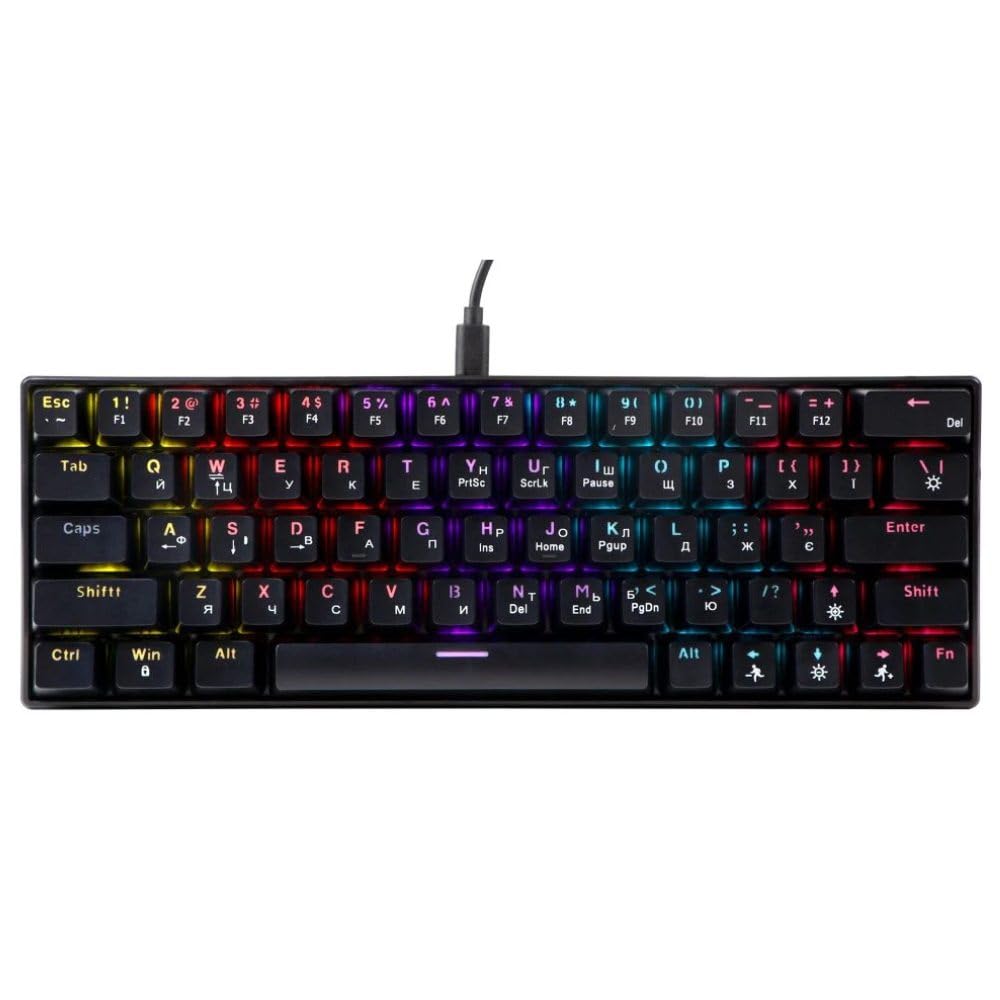
An image showing the T-Wolf T61 60% Wired Mechanical Gaming Keyboard, highlighting its compact layout and design.
3. Gosod
- Dadbacio'r bysellfwrdd: Tynnwch y bysellfwrdd a'r holl ategolion o'r pecynnu yn ofalus.
- Cysylltwch â'ch Dyfais: Locate an available USB port on your computer (PC, laptop) or gaming console. Insert the USB connector of the T-Wolf T61 keyboard into the USB port.
- Gosod Gyrrwr Awtomatig: The keyboard is plug-and-play. Your operating system will automatically detect and install the necessary drivers. This process may take a few moments.
- Yn barod i'w Ddefnyddio: Once the drivers are installed, the keyboard is ready for immediate use.
4. Cyfarwyddiadau Gweithredu
The T-Wolf T61 keyboard functions as a standard QWERTY layout keyboard. Its 60% compact design means some functions are accessed via key combinations.
Rheolaeth Goleuo Cefn RGB 4.1
The keyboard features customizable RGB backlighting. Specific key combinations are used to change lighting modes and effects. Refer to the keyboard's function layer markings for exact controls, typically involving the Fn key combined with other keys (e.g., Fn+\\ for mode changes, Fn + [{ or Fn + ]} for brightness/speed adjustments).
- Newid dulliau goleuo: Gwasgwch Fn+\\ to cycle through various RGB lighting effects.
- Addasu Disgleirdeb: Defnydd Fn + [{ to decrease brightness and Fn + ]} i gynyddu disgleirdeb.
- Addasu Cyflymder: Defnydd Fn+;: to decrease effect speed and Fn + '" to increase effect speed.
4.2 Multi-Key Rollover
The T61 keyboard supports multi-key rollover, allowing multiple keys to be pressed simultaneously without ghosting or missed inputs. This feature is particularly beneficial for fast typing and complex gaming commands.
5. cynnal
Mae cynnal a chadw priodol yn sicrhau hirhoedledd a pherfformiad eich bysellfwrdd.
- Glanhau: Use a soft, dry cloth to wipe the surface of the keyboard. For deeper cleaning, use a can of compressed air to remove dust and debris from between the keycaps. For stubborn dirt, a slightly damp cloth with a mild cleaning solution can be used, ensuring no liquid enters the keyboard.
- Dyluniad Gwrth-ollwng: While the keyboard features a spill-resistant design to protect against light spills, it is ddim yn dal dŵr. In case of a spill, immediately disconnect the keyboard from your device, gently wipe away any liquid, and allow it to air dry completely before reconnecting.
- Storio: Storiwch y bysellfwrdd mewn lle oer, sych i ffwrdd o olau haul uniongyrchol a thymheredd eithafol.
6. Datrys Problemau
If you encounter issues with your T-Wolf T61 keyboard, please refer to the following common solutions:
- Bysellfwrdd Ddim yn Ymateb:
- Ensure the USB cable is securely connected to both the keyboard and your device.
- Rhowch gynnig ar gysylltu'r bysellfwrdd â phorthladd USB gwahanol.
- Profwch y bysellfwrdd ar gyfrifiadur arall i ddiystyru problem sy'n benodol i'r ddyfais.
- Ailgychwyn eich cyfrifiadur.
- RGB Backlighting Not Working/Incorrect:
- Gwnewch yn siŵr bod y bysellfwrdd wedi'i bweru'n iawn.
- Cycle through the RGB modes using the designated key combinations (e.g., Fn+\\).
- Adjust brightness settings (e.g., Fn + [{ / Fn + ]}).
- Allweddi Ddim yn Cofrestru neu'n Teipio Dwbl:
- Clean the affected keycap and switch area using compressed air to remove any debris.
- Ensure no software conflicts are present (e.g., other keyboard drivers or utilities).
Os yw'r broblem yn parhau ar ôl rhoi cynnig ar y camau hyn, cysylltwch â chymorth cwsmeriaid.
7. manylebau
| Nodwedd | Disgrifiad |
|---|---|
| Brand | T-BLAIDD |
| Model | T61 |
| Technoleg Cysylltedd | USB â gwifrau |
| Disgrifiad Bysellfwrdd | Mecanyddol |
| Nifer yr Allweddi | 65 |
| Cynllun Bysellfwrdd | QWERTY |
| Nodweddion Arbennig | RGB Backlit, Multi-Key Rollover, Low-Noise Operation, Spill-Resistant Design |
| Dyfeisiau Cydnaws | PC, laptop, gaming consoles |
| Deunydd | Metel, Plastig |
| Lliw | Du |
| Gwlad Tarddiad | Tsieina |
8. Gwarant a Chefnogaeth
The T-Wolf T61 keyboard comes with a standard manufacturer's warranty. Please refer to the warranty card included with your purchase or contact your retailer for specific warranty terms and conditions.
For technical support, troubleshooting assistance, or warranty claims, please contact the retailer where you purchased the product or visit the official T-Wolf websafle ar gyfer adnoddau cymorth.