
1. Rhagymadrodd
This manual provides essential information for the proper setup, operation, and maintenance of your NIMO 15.6 inch Laptop Computer. Please read this manual thoroughly before using your device to ensure optimal performance and longevity. Keep this manual for future reference.
2. Cynnyrch Drosview
2.1. Laptop Components
The NIMO 15.6 inch Laptop features a Full HD display, a backlit keyboard, and an integrated fingerprint reader for secure access. It is powered by an AMD Ryzen 5 3500U processor and runs on Windows 11.

Ffigur 2.1: Blaen view of the NIMO 15.6 inch Laptop, showcasing its display and keyboard layout.
2.2. Porthladdoedd a Chysylltwyr
Your NIMO laptop is equipped with various ports for comprehensive connectivity, allowing you to connect peripherals and external devices.

Figure 2.2: Expanded Connectivity Options. This image illustrates the location and type of ports available on the laptop, including Type-C (Charge Only), USB 3.0, HDMI, Type-C (Full Function), Charge LED, Micro SD Reader, USB 2.0, USB 3.0, Headphone Combo, and Kensington Lock.
- Type-C (Charge Only): Ar gyfer mewnbwn pŵer.
- USB 3.0: Ar gyfer trosglwyddo data cyflym.
- HDMI: Ar gyfer cysylltu ag arddangosfeydd allanol.
- Type-C (Full Function): Supports Power Delivery (PD), DisplayPort (DP), and data transfer.
- Tâl LED: Yn dynodi statws codi tâl.
- Micro SD Reader: For reading Micro SD cards.
- USB 2.0: Ar gyfer dyfeisiau USB safonol.
- USB 3.0: Ar gyfer trosglwyddo data cyflym.
- Headphone Combo: Ar gyfer allbwn sain a mewnbwn meicroffon.
- Lock Kensington: Ar gyfer diogelwch corfforol.
3. Gosod
3.1. Gwefru Cychwynnol
Before first use, connect the laptop to a power outlet using the provided 65W PD Type-C charger. The Charge LED indicator will illuminate. Allow the battery to charge fully.

Figure 3.1: Type-C 65W PD Charger. This image highlights the versatility of the 65W Power Delivery charger, capable of charging the laptop, tablets, and smartphones, reducing cable clutter.
3.2. Pweru Ymlaen
Open the laptop lid. Press the power button located on the keyboard deck. The laptop will boot up, and you will be guided through the Windows 11 initial setup process.
3.3. Windows 11 Setup
Follow the on-screen instructions to configure your Windows 11 operating system. This includes selecting your region, language, connecting to a Wi-Fi network, and setting up your user account.
4. Cyfarwyddiadau Gweithredu
4.1. Bysellfwrdd a Mewnbwn
The laptop features a backlit keyboard for comfortable typing in various lighting conditions, a responsive touchpad, and a numeric keypad for data entry.

Figure 4.1: Effortless Typing in Any Environment. This image demonstrates the backlit keyboard, touchpad, fingerprint reader, and numeric keypad, enhancing user experience and productivity.
- Bysellfwrdd ôl-oleuo: Gwasgwch y Fn key and the appropriate function key (usually F3 or F4, indicated by a keyboard icon) to adjust the backlight brightness or turn it on/off.
- Touchpad: Use the touchpad for navigation. Supports multi-touch gestures for scrolling, zooming, and other functions.
- Bysellbad rhifol: Provides dedicated number keys for efficient data entry.
4.2. Adnabod Olion Bysedd
The integrated fingerprint reader allows for secure and quick login. Set up your fingerprint in Windows Settings under 'Sign-in options'.
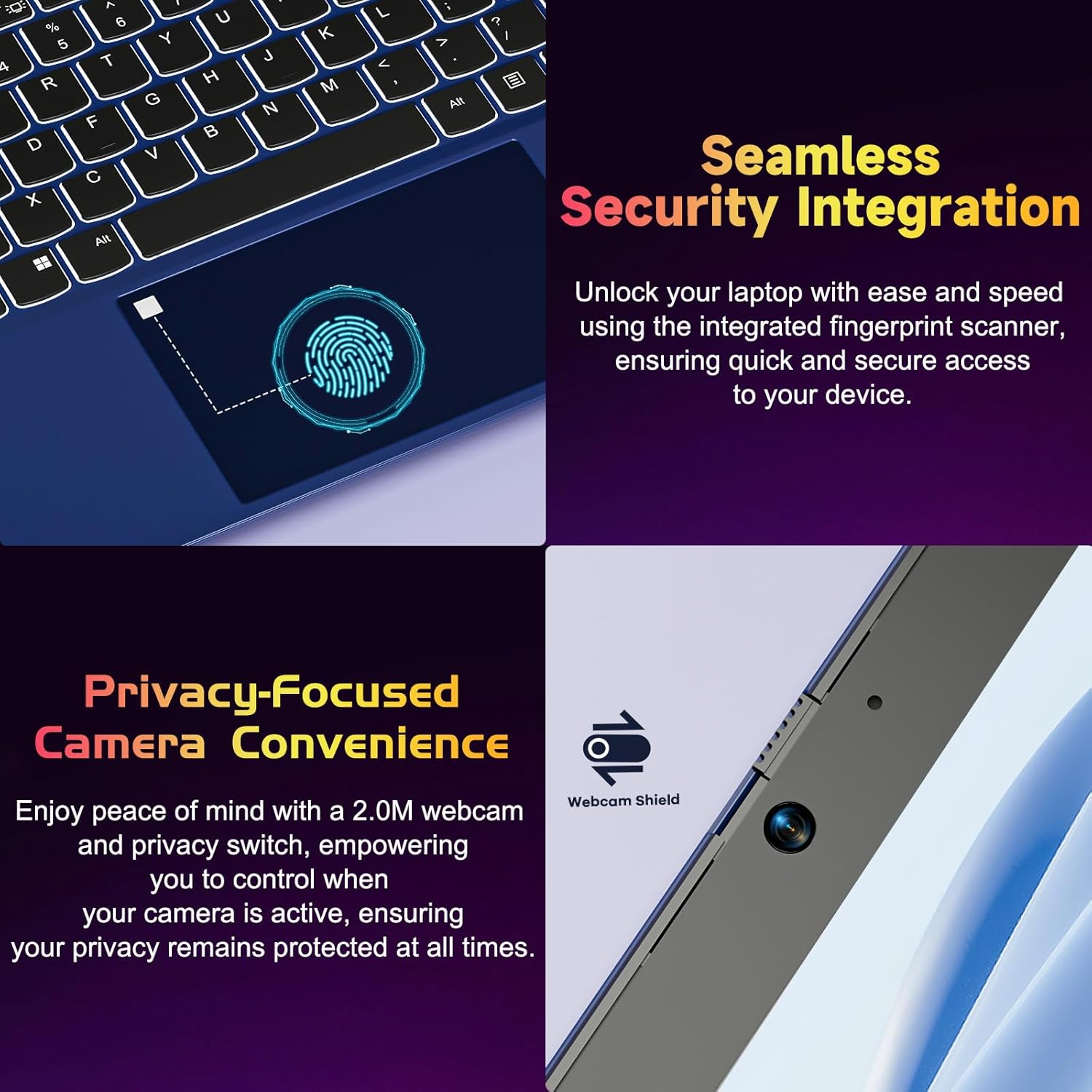
Figure 4.2: Seamless Security Integration and Privacy-Focused Camera. This image highlights the fingerprint scanner for quick and secure access, and the 2.0MP webcam with a physical privacy switch for enhanced user privacy.
4.3. Nodweddion Arddangos
The 15.6 inch Full HD (1920 x 1080 Pixel) IPS display offers vivid visuals and a wide viewing angle. The 180° lay-flat hinge allows for flexible screen positioning, ideal for sharing content.

Figure 4.3: Vivid Full HD Display. This image emphasizes the laptop's 15.6-inch Full HD (1920x1080) IPS display, offering bright visuals and eye protection.

Figure 4.4: 180° Lay-Flat Hinge. This image illustrates the laptop's ability to lay flat, expanding usage scenarios and facilitating content sharing.
4.4. Webcam Privacy
The laptop includes a 2.0MP webcam with a physical privacy switch (Webcam Shield). Slide the switch to cover the camera lens when not in use to ensure your privacy.
5. cynnal
- Glanhau: Defnyddiwch frethyn meddal, di-flwff i lanhau'r sgrin a'r tu allan. Ar gyfer marciau ystyfnig, rhwbiwch ychydigampgolchwch y lliain gyda dŵr neu lanhawr sgrin. Osgowch gemegau llym.
- Gofal Batri: Er mwyn ymestyn oes y batri, osgoi rhyddhau'r batri'n llwyr yn aml. Storiwch y gliniadur mewn lle oer, sych os na chaiff ei ddefnyddio am gyfnodau hir.
- Diweddariadau Meddalwedd: Diweddarwch eich system weithredu a'ch gyrwyr Windows yn rheolaidd i sicrhau'r perfformiad a'r diogelwch gorau posibl.
- Ehangu Storio: The laptop supports dual DDR4 SO-DIMM slots and M.2 NVMe SSD for memory and storage expansion. Consult a qualified technician for upgrades.
6. Datrys Problemau
6.1. Problemau Pŵer
- Nid yw'r gliniadur yn troi ymlaen: Ensure the laptop is charged. Connect the charger and wait a few minutes before attempting to power on again.
- Batri ddim yn codi tâl: Verify the charger is properly connected to both the laptop and the power outlet. Try a different outlet.
6.2. Materion Arddangos
- Mae'r sgrin yn wag: Check if the laptop is powered on. Try adjusting screen brightness using the function keys. If an external monitor is connected, ensure it is properly configured.
6.3. Problemau Perfformiad
- Mae'r gliniadur yn araf: Close unnecessary applications. Check for background processes consuming high resources. Ensure sufficient free storage space. Consider performing a system scan for malware.
6.4. Problemau Cysylltedd
- Wi-Fi ddim yn cysylltu: Ensure Wi-Fi is enabled. Restart your router and the laptop. Check network settings in Windows.
7. manylebau
| Nodwedd | Manylyn |
|---|---|
| Brand | NIMO |
| Enw Model | NIMO N152R |
| Maint Sgrin | 15.6 modfedd |
| Cydraniad Sgrin | 1920 x 1080 picsel (HD Llawn) |
| Prosesydd | AMD Ryzen 5 3500U (3.7 GHz, 4 Cores, 8 Threads) |
| HWRDD | 8 GB DDR4 (Upgradable) |
| Cyflymder Cof | 3200 MHz |
| Gyriant Caled | 256 GB SSD (Upgradable M.2 NVMe) |
| Cydbrosesydd graffeg | AMD Integrated graphics (Vega) |
| System Weithredu | Windows 11 |
| Math Di-wifr | 802.11abg |
| Porthladdoedd USB | 1x USB 2.0, 2x USB 3.0, 2x USB-C (1x Charge Only, 1x Full Function) |
| Porthladd HDMI | Oes |
| Darllenydd Micro SD | Oes |
| Bywyd Batri Cyfartalog | 5 Awr |
| Pwysau Eitem | 3.8 pwys (1.72 kg) |
| Dimensiynau Cynnyrch | 14.07 x 8.98 x 0.76 modfedd |
| Lliw | Rhosyn |
| Cefn Webcam Datrys | 2 AS |
8. Gwarant a Chefnogaeth
Your NIMO laptop comes with a 2-year warranty, covering manufacturing defects and hardware malfunctions under normal use. Additionally, a 90-day free return policy is provided.

Figure 8.1: After-Sales Support. This image outlines the 2-year warranty, 90-day return policy, and professional customer service available for NIMO products.
8.1. Cysylltu â Chymorth
For technical assistance, warranty claims, or product-related questions, please contact the NIMO U.S.-based support team. Contact information can typically be found on the official NIMO websafle neu becynnu cynnyrch.
9. Gwybodaeth Diogelwch
To prevent injury or damage to your device, observe the following safety precautions:
- Peidiwch ag amlygu'r gliniadur i dymheredd eithafol, golau haul uniongyrchol, na lleithder uchel.
- Osgowch osod gwrthrychau trwm ar y gliniadur.
- Use only the provided charger or a compatible 65W PD Type-C charger.
- Peidiwch â cheisio dadosod na thrwsio'r gliniadur eich hun. Cyfeiriwch at bersonél gwasanaeth cymwys.
- Cadwch hylifau i ffwrdd o'r gliniadur i atal sioc drydanol neu ddifrod.
- Sicrhewch awyru digonol wrth ddefnyddio'r gliniadur i atal gorboethi.