
1. Rhagymadrodd
Diolch am brynuasing the Surge Wireless Pro Controller. This controller is designed for multi-platform compatibility, offering an enhanced gaming experience across various devices. Please read this manual carefully before use to ensure proper operation and to maximize your gaming enjoyment.
Nodweddion Allweddol:
- Multi-Platform Compatibility: Nintendo Switch/Switch 2 (Note: No C Button/Audio Port support for Switch 2), Windows PC, Steam Deck, Android, and iOS devices.
- Hall Effect Thumb Sticks & Triggers: Provides precise control and reduces the likelihood of stick drift.
- Turbo Functionality: Offers three adjustable turbo levels for rapid-fire control.
- Vibration Feedback: Four adjustable vibration levels for customizable haptic feedback.
- Motion Controls: Supports motion sensing in compatible games.
- Console Wake Up: Ability to wake the Nintendo Switch console from sleep mode (Nintendo Switch only).
- Rechargeable Battery: Built-in 600mAh Li-polymer battery provides up to 10 hours of play.
- USB-C Charging: Includes a 1-meter USB-C charging cable.
2. Cynnwys Pecyn
- 1 x Surge Wireless Pro Controller
- 1 x Cebl Codi Tâl USB-C (1 metr)
- 1 x Llawlyfr Cyfarwyddiadau
3. Cynllun y Rheolydd
Familiarize yourself with the buttons and features of your Surge Wireless Pro Controller.
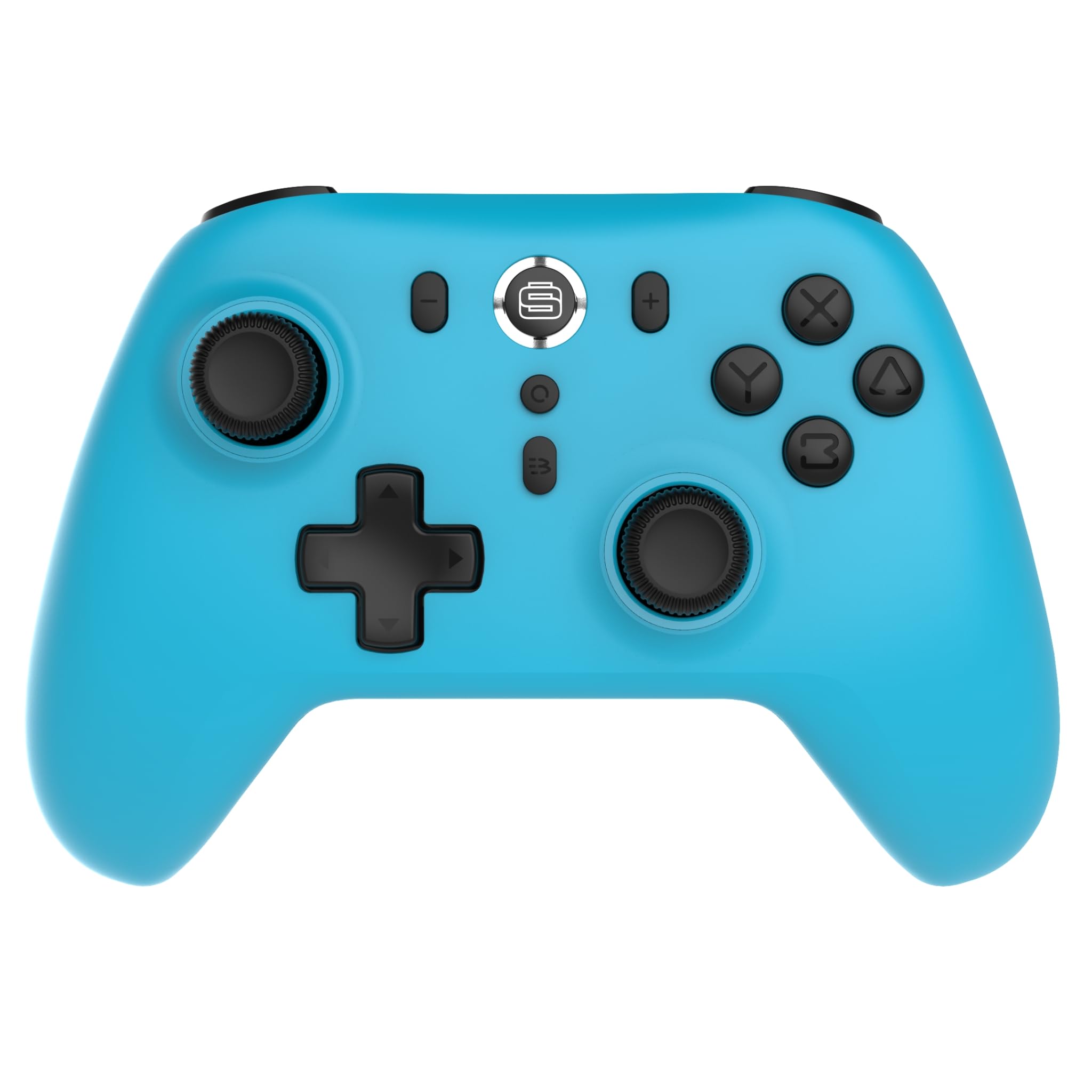
Blaen view of the Surge Wireless Pro Controller, showing the D-pad, left and right analog sticks, A/B/X/Y buttons, Home button, Capture button, Plus and Minus buttons, and the Surge logo button.

Yn ol view of the Surge Wireless Pro Controller, showing the textured grips and the charging port.
4. Gosod a Pharu
The Surge Wireless Pro Controller supports multiple connection methods depending on your device.

This image displays the various platforms compatible with the Surge Wireless Pro Controller, including Nintendo Switch, Nintendo Switch 2, Windows PC, Android, and iOS.
4.1. Pairing with Nintendo Switch / Switch 2
- O'r Ddewislen CARTREF, dewiswch Rheolwyr > Newid Grip/Trefn.
- Ar y rheolydd, pwyswch a dal y Botwm cartref for 3-5 seconds until the indicator lights begin to flash rapidly.
- Once paired, the indicator light(s) on the controller will remain solid.
- To wake the console from sleep mode, press the Botwm cartref ar y rheolydd.
4.2. Pairing with Windows PC
- Gwnewch yn siŵr bod Bluetooth wedi'i alluogi ar eich cyfrifiadur.
- Ewch i Bluetooth & other devices settings ar eich cyfrifiadur.
- Dewiswch Ychwanegu Bluetooth neu ddyfais arall > Bluetooth.
- Ar y rheolydd, pwyswch a dal y Botwm cartref for 3-5 seconds until the indicator lights begin to flash rapidly.
- Select the controller from the list of available devices on your PC.
- Once paired, the indicator light(s) on the controller will remain solid.
4.3. Pairing with Android / iOS Devices
- Galluogi Bluetooth ar eich dyfais Android neu iOS.
- Go to the Bluetooth settings menu on your device.
- Ar y rheolydd, pwyswch a dal y Botwm cartref for 3-5 seconds until the indicator lights begin to flash rapidly.
- Select the controller from the list of available devices.
- Once paired, the indicator light(s) on the controller will remain solid.
5. Nodweddion Gweithredu
5.1. Hall Effect Thumb Sticks & Triggers
The controller is equipped with Hall Effect technology for its thumb sticks and triggers. This technology uses magnets and electrical conductors to detect position, providing enhanced precision and significantly reducing the risk of stick drift over time compared to traditional potentiometers.

This image highlights the Hall Effect thumbsticks and triggers, emphasizing their role in providing precise inputs and preventing stick drift.
5.2. Swyddogaeth Turbo
The Turbo function allows for rapid, repeated input of a button press. This controller features 3 adjustable turbo levels.
- I actifadu Turbo: Pwyswch a dal y Botwm Turbo, then press the desired action button (A/B/X/Y, L1/R1, L2/R2, D-pad directions). The button will now rapidly repeat its input when held.
- I addasu cyflymder Turbo: With Turbo active on a button, press and hold the Botwm Turbo a symud y Right Analog Stick Up or Down to cycle through the 3 speed levels.
- To deactivate Turbo: Pwyswch a dal y Botwm Turbo, yna pwyswch yr un botwm gweithredu eto.
5.3. Vibration Feedback
The controller provides haptic feedback through vibration. You can choose from 4 vibration levels.
- To adjust Vibration level: Pwyswch a dal y Botwm dirgryniad (if present, or a designated button combination, refer to specific button mapping if available) and move the Left Analog Stick Up or Down to cycle through the 4 levels (Off, Low, Medium, High).
5.4. Rheolyddion Symudiad
The controller supports motion controls for compatible games, particularly on Nintendo Switch/Switch 2. This allows for intuitive gameplay where physical movement of the controller translates into in-game actions.

This image visually represents the controller's advanced features, including Turbo Function, Motion Controls, and Rumble Vibration, enhancing the gaming experience.
6. Codi tâl
The controller is equipped with a built-in 600mAh Li-polymer battery, providing up to 10 hours of gameplay on a single charge.

This image shows the controller being held, emphasizing its internal rechargeable battery for extended play sessions.
- Connect the included USB-C charging cable to the controller's USB-C port.
- Connect the other end of the cable to a USB power source (e.g., console, PC, USB wall adapter).
- The indicator lights on the controller will show charging status (e.g., blinking while charging, solid when fully charged).
- Mae gwefr lawn fel arfer yn cymryd tua 2-3 awr.
7. cynnal
Er mwyn sicrhau hirhoedledd a pherfformiad gorau posibl eich rheolydd, dilynwch y canllawiau cynnal a chadw hyn:
- Glanhau: Defnyddiwch frethyn meddal, sych i sychu'r rheolydd. Ar gyfer baw ystyfnig, sychwch ychydigampgolchwch y lliain gyda dŵr. Osgowch ddefnyddio cemegau llym neu lanhawyr sgraffiniol.
- Storio: Storiwch y rheolydd mewn lle oer, sych i ffwrdd o olau haul uniongyrchol a thymheredd eithafol.
- Osgoi diferion: Amddiffynwch y rheolydd rhag cwympiadau ac effeithiau, a all niweidio cydrannau mewnol.
- Amlygiad Hylif: Do not expose the controller to water or other liquids.
8. Datrys Problemau
If you encounter issues with your Surge Wireless Pro Controller, please refer to the following common solutions:
| Problem | Ateb |
|---|---|
| Nid yw'r rheolydd yn troi ymlaen. | Gwnewch yn siŵr bod y rheolydd wedi'i wefru. Cysylltwch ef â ffynhonnell bŵer gan ddefnyddio'r cebl USB-C. |
| Controller does not pair. | Ensure the controller is in pairing mode (indicator lights flashing rapidly). Check that Bluetooth is enabled on your device. Try restarting both the controller and the device. |
| Oedi mewnbwn neu ddatgysylltiad. | Ensure the controller is within range of the device. Reduce interference from other wireless devices. Ensure the controller is fully charged. |
| Buttons or sticks are unresponsive. | Try resetting the controller (if a reset button is available, typically a small pinhole on the back). Ensure no debris is obstructing the buttons. |
| Dirgryniad ddim yn gweithio. | Check the vibration settings on the controller and in the game. Ensure the vibration level is not set to 'Off'. |
9. manylebau
| Nodwedd | Manylyn |
|---|---|
| Rhif Model | SG60095 |
| Math Batri | 1 Nonstandard Battery (Li-polymer, 600mAh) |
| Bywyd Batri | Hyd at 10 awr (tua) |
| Porthladd Codi Tâl | USB-C |
| Dimensiynau | 20.5 x 14 x 6.6 cm |
| Pwysau | 320 g |
| Gwlad Tarddiad | Tsieina |
10. Gwarant a Chefnogaeth
For warranty information and customer support, please refer to the documentation included with your purchase or visit the official Surge websafle. Cadwch eich prawf prynu ar gyfer hawliadau gwarant.