
1. Rhagymadrodd
This manual provides detailed instructions for the installation, operation, and maintenance of the mGYDY KT-TF02H E-Bike LCD Intelligent Control Panel. This display is designed to enhance your electric bicycle experience by providing essential riding data and control functions. It is compatible with 24V, 36V, and 48V e-bike systems and features a 5-pin waterproof connector for reliable performance.
Mae nodweddion allweddol yn cynnwys:
- Accurate and sensitive operation with stable performance.
- Durable ABS material construction, lightweight, rainproof, and IP65 waterproof.
- Clear display of e-bike status and data, with backlight for dim environments.
- Comprehensive travel and speed tracking: single travel time (TM), total travel time (TTM), real-time speed (km/h or MPH), single maximum speed (MXS), and single average speed (AVS).
- One-way distance (DST) and total travel distance (ODO) display.
- 6km/h push function and cruise control.
- Headlight, taillight, and brake status display.
- Torque sensor analog speed sensor 0-5 level display and battery capacity indicator.
- Reprogrammable controller parameters.
- Data reset, parameter copy, and fault code display.
- Motor working power (W) and motor working temperature display with overheat alarm.
2. Cydrannau Cynnyrch
The package for your KT-TF02H display includes the following items:
- 1 x KT LCD TF02H Display Unit
- 1 x Stondin Arddangos
- 1 x Set of Adjustable Washers
- Installation Tools (screws)
- Llawlyfr Cyfarwyddiadau (y ddogfen hon)

Ffigur 2.1: Contents of the product package, including the display unit, mounting bracket, and installation hardware.
3. manylebau
Refer to the table below for detailed technical specifications of the KT-TF02H display.

Ffigur 3.1: Dimensions and key parameters of the KT-TF02H display, showing a width of 97.5mm (3.8in) and height of 63.5mm (2.5in).

Ffigur 3.2: Comprehensive specifications including brand (KT), model (TF02H), voltage (24V/36V/48V), weight (188g), color (black), size (97.5*63.5*22mm), line length (210mm), material (ABS), wire core (5pin), and gear range (0-5).
| Nodwedd | Manyleb |
|---|---|
| Brand | mGYDY (KT) |
| Model | TF02H |
| Cyftage Cydnawsedd | 24V, 36V, 48V |
| Math o Gysylltydd | 5-pin WP (Waterproof) |
| Deunydd | ABS |
| Lefel dal dŵr | IP65 |
| Maint Arddangos | 97.5mm x 63.5mm x 22mm |
| Pwysau | 188g |
| Hyd Cebl | 210mm (8.3 modfedd) |
| Ystod Gêr | 0-5 lefel |
4. Gosod
Follow these steps to properly install your KT-TF02H display on your electric bicycle:
- Gosod yr Arddangosfa: Attach the display stand to your bicycle's handlebars using the provided screws and adjustable washers. Ensure the display is securely fastened and positioned for optimal visibility while riding.
- Cysylltu'r cebl: Locate the 5-pin waterproof connector on your e-bike's wiring harness. Connect the display's 5-pin waterproof cable to this connector. Ensure the connection is firm and fully seated to maintain its waterproof integrity.
- Rheoli Ceblau: Route the display cable along your bicycle frame, securing it with cable ties (not included) to prevent interference with moving parts and to protect it from damage.

Ffigur 4.1: Illustration of the 5-pin waterproof connector and its 210mm cable length, essential for connecting the display to the e-bike system.
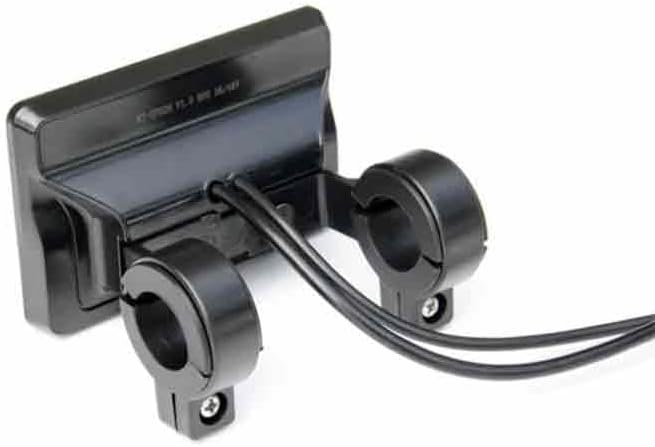
Ffigur 4.2: Cefn view of the display mounted on handlebars, showing the secure cable connection and screw reinforcement for stability.
5. Cyfarwyddiadau Gweithredu
The KT-TF02H display provides a range of functions to monitor and control your e-bike. Familiarize yourself with the display interface and button operations.

Ffigur 5.1: The display showing various data points such as speed (23.5 km/h), battery level, motor power (000W), distance (DST), time (TIM), and temperature, demonstrating its clear visibility even in wet conditions.
5.1 Pŵer Ymlaen/Diffodd
Press and hold the power button (usually located on the display unit) for a few seconds to turn the display on or off. The backlight will activate automatically in low light conditions.
5.2 Swyddogaethau Arddangos
The display provides real-time information about your ride:
- Cyflymder: Current speed in km/h or MPH.
- TM (Single Travel Time): Duration of the current ride.
- TTM (Total Travel Time): Cumulative duration of all rides.
- MXS (Single Maximum Speed): Y cyflymder uchaf a gyflawnwyd yn ystod y daith gyfredol.
- AVS (Single Average Speed): Average speed of the current ride.
- DST (One-way Distance): Pellter a gwmpesir yn y daith gyfredol.
- ODO (Total Travel Distance): Cumulative distance covered by the e-bike.
- Cynhwysedd Batri: Graphical and/or numerical indication of remaining battery charge.
- Motor Working Power (W): Real-time power output of the motor.
- Motor Working Temperature: Current temperature of the motor.
- Gear Level: Current assist level (0-5).
5.3 Swyddogaethau Arbennig
- 6km/h Push Function: Activates a low-speed assist for walking the bike. Consult your e-bike controller manual for specific activation methods.
- Cruise Function: Maintains a set speed without continuous pedal input. Refer to your e-bike controller manual for activation.
- Headlights/Taillights Control: The display may offer optional switches to control connected lights.
- Brake Status Display: Indicates when brakes are applied.
- Torque Sensor Analog Speed Sensor: Displays input from these sensors, typically indicating assist levels.
5.4 Gosodiadau Paramedr
The controller can be reprogrammed through parameter settings accessible via the display. This allows for customization of various e-bike parameters. Accessing and modifying these settings typically involves a specific button sequence or menu navigation. Refer to the detailed controller manual for specific instructions on parameter adjustment. Incorrect settings can affect e-bike performance or safety.
5.5 Rheoli Data
- Ailosod Data: Allows resetting of single trip data (TM, DST, MXS, AVS).
- Parameter Copy: Functionality to copy display parameters.
6. cynnal
Proper maintenance ensures the longevity and optimal performance of your KT-TF02H display.
- Glanhau: Defnyddiwch feddal, damp cloth to wipe the display screen and body. Avoid abrasive cleaners, solvents, or harsh chemicals that could damage the plastic or screen coating.
- Gwrthiant Dŵr: The display has an IP65 waterproof rating, making it resistant to rain and splashes. However, avoid submerging the unit in water or exposing it to high-pressure water jets. Ensure the 5-pin connector remains securely attached to maintain its waterproof seal.
- Tymheredd: The display is designed for high temperature resistance. However, prolonged exposure to extreme temperatures (very hot or very cold) outside typical operating ranges should be avoided to prevent potential damage.
- Amddiffyniad Corfforol: Er ei fod yn wydn, osgoi gollwng yr arddangosfa na'i rhoi dan effeithiau cryf.

Ffigur 6.1: Illustration of ABS material, highlighting the display's construction from environmental-friendly and durable plastic.
7. Datrys Problemau
This section addresses common issues you might encounter with your KT-TF02H display.
- Arddangosfa Ddim yn Troi Ymlaen:
- Check if the e-bike battery is charged and turned on.
- Ensure the 5-pin waterproof connector is securely plugged in.
- Verify that the power button is being pressed correctly and held for the required duration.
- Darlleniadau Cyflymder/Pellter Anghywir:
- Confirm that the wheel circumference setting in the display parameters is correct for your e-bike.
- Check the speed sensor and its magnet for proper alignment and function.
- Motor Overheat Alarm:
- If the display shows a motor overheat alarm, stop riding immediately and allow the motor to cool down.
- Check for any obstructions to motor cooling or signs of excessive load.
- Fault Code Display:
The display can show fault codes to indicate specific system errors. Refer to your e-bike controller's manual for a list of fault codes and their corresponding troubleshooting steps. Common fault codes might relate to motor, controller, or battery issues.
- Display Not Responding to Buttons:
- Try restarting the display by turning the e-bike off and on again.
- Ensure buttons are not stuck or obstructed.
8. Gwarant a Chefnogaeth
This product is covered by a manufacturer's warranty. For specific warranty terms, duration, and conditions, please refer to the documentation provided with your purchase or contact the seller directly. Keep your proof of purchase for warranty claims.
For technical support, troubleshooting assistance beyond this manual, or inquiries regarding parts and service, please contact the mGYDY customer support or the retailer from whom you purchased the product. Provide your product model (KT-TF02H) and purchase details when seeking support.