
Cyfarwyddiadau Diogelwch Pwysig
Please read these instructions carefully before using the Avtech DGM5907SVSGAT IP Dome Camera. Keep this manual for future reference.
- Ensure proper power supply (PoE or compatible adapter) to prevent damage.
- Do not expose the camera to extreme temperatures, humidity, or direct sunlight beyond its operating specifications.
- Handle the camera with care. Avoid dropping or subjecting it to strong vibrations.
- Installation should be performed by qualified personnel and comply with local electrical codes.
- Peidiwch â cheisio dadosod na newid y camera. Bydd hyn yn gwneud y warant yn ddi-rym.
- Clean the camera lens and housing with a soft, dry cloth. Avoid harsh chemicals.
Cynnyrch Drosview
The Avtech DGM5907SVSGAT is a 5MP AI IP Dome Camera designed for advanced surveillance. It features AI-based human and vehicle detection to minimize false alarms, ONVIF support for system integration, and Power-over-Ethernet (PoE) for simplified installation. The camera provides clear images with Starlight visibility, an integrated microphone for audio recording, and an effective IR range of up to 50 meters for night surveillance. Its WDR (Wide Dynamic Range) function enhances image clarity in challenging lighting conditions, and the IP66 housing ensures durability in various environments.
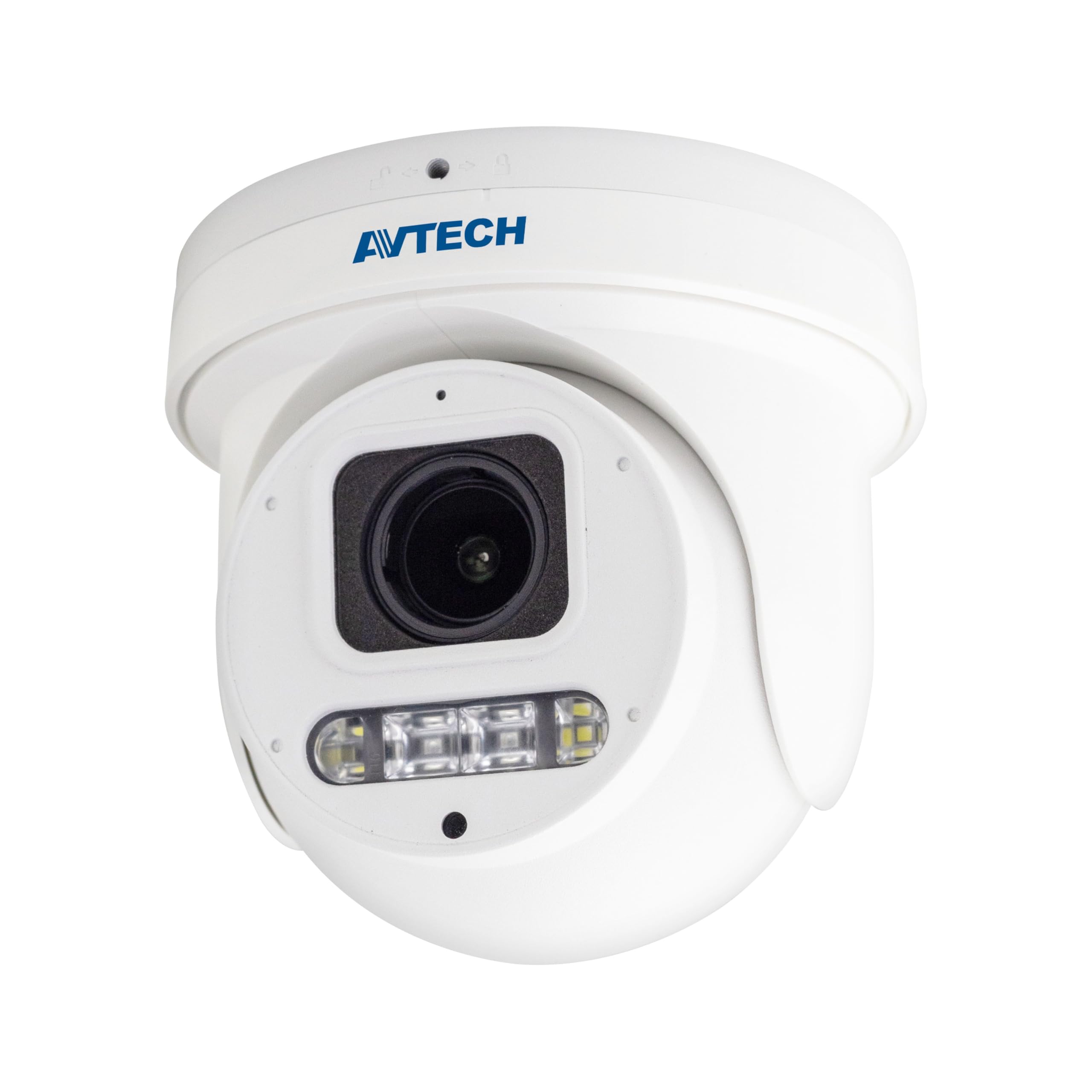
Ffigur 1: Blaen view of the Avtech DGM5907SVSGAT 5MP AI IP Dome Camera. This image shows the dome-shaped camera housing, the lens assembly, and the IR LEDs visible around the lens.
Cynnwys Pecyn
Verify that all items are present in the package. If any items are missing or damaged, contact your dealer immediately.
- Avtech DGM5907SVSGAT 5MP AI IP Dome Camera
- Mounting Screw Kit (screws, wall anchors)
- Cysylltydd Diddos ar gyfer Cebl Ethernet
- Canllaw Cychwyn Cyflym
- Templed Drilio
Gosod
1. Gosod Corfforol
Before mounting, ensure the installation location provides a clear field of view and is within range of your network infrastructure (PoE switch/injector).
- Paratoi'r Arwyneb Mowntio: Use the provided drilling template to mark the screw holes on the wall or ceiling.
- Tyllau Dril: Drill pilot holes at the marked positions. Insert wall anchors if mounting on drywall or masonry.
- Secure the Camera Base: Atodwch sylfaen mowntio'r camera i'r wyneb gan ddefnyddio'r sgriwiau a gyflenwir.
- Cysylltu cebl rhwydwaith: Connect an Ethernet cable (RJ-45) from your PoE switch/injector to the camera's network port. Ensure the waterproof connector is properly sealed if installing outdoors.
- Addasu Ongl Camera: Loosen the adjustment screws on the dome to position the camera lens for the desired viewing angle. Tighten the screws once adjusted.
Ffigur 2: Illustrative diagram of the Avtech DGM5907SVSGAT camera mounting process. This image depicts the camera base being secured to a surface, with an Ethernet cable connected.
2. Ffurfweddiad Rhwydwaith
The camera typically obtains an IP address automatically via DHCP. If your network does not use DHCP, you may need to use a discovery tool provided by Avtech or manually configure the IP address.
- Cysylltu â'r Rhwydwaith: Ensure the camera is powered via PoE and connected to your local network.
- Discover IP Address: Use the Avtech IP Camera Utility software (available on the Avtech websafle) i ddarganfod cyfeiriad IP y camera ar eich rhwydwaith.
- Mynediad Web Rhyngwyneb: Agor a web browser (Internet Explorer 6+, Microsoft Edge, or Google Chrome) and enter the camera's IP address in the address bar.
- Mewngofnodi: Enter the default username and password (refer to the Quick Start Guide for default credentials). It is highly recommended to change the default password immediately for security.
- Dewin Gosod Cychwynnol: Follow the on-screen wizard to configure basic network settings, date/time, and user accounts.
Cyfarwyddiadau Gweithredu
1. Yn fyw View a Chofnodi
Unwaith y byddwch wedi mewngofnodi i'r web interface, you can access the live video feed and manage recording settings.
- Byw View: Llywio i'r 'Byw View' section to see the real-time video feed from the camera.
- Recording to MicroSD: The camera supports a MicroSD card up to 256 GB. Insert the card into the designated slot (usually accessible by opening the dome cover). Configure recording schedules and event-triggered recording (e.g., motion detection, AI detection) in the 'Storage' or 'Recording' settings.
- Cywasgiad Fideo: The camera supports H.265 and H.264 compression. H.265 offers better compression efficiency, reducing storage and bandwidth requirements. Adjust this in the 'Video Settings'.
2. AI Detection (Human and Vehicle)
The AI detection feature helps reduce false alarms by distinguishing between humans/vehicles and other moving objects.
- Enable AI Detection: Go to 'Event' or 'AI Settings' in the web interface. Enable 'Human Detection' and/or 'Vehicle Detection'.
- Ffurfweddu Parthau Canfod: Draw specific areas on the live view where you want AI detection to be active.
- Gosod Sensitifrwydd: Adjust the sensitivity levels to optimize detection performance and minimize false positives.
- Configure Actions: Specify actions to be taken upon detection, such as recording, sending notifications, or triggering alarms.
3. Image Enhancement Features
- Gweledigaeth Nos IR: The camera automatically switches to IR mode in low light conditions, providing clear black and white images up to 50 meters. Ensure the IR LEDs are not obstructed.
- WDR (Ystod Dynamig Eang): Enable WDR in 'Image Settings' to improve image quality in scenes with both very bright and very dark areas, such as entrances or windows.
- Starlight Visibility: This feature enhances low-light performance, allowing the camera to capture color images in very dim conditions before switching to IR mode.
Cynnal a chadw
Mae cynnal a chadw rheolaidd yn sicrhau perfformiad a hirhoedledd gorau posibl eich camera.
- Glanhau: Periodically clean the camera lens and housing with a soft, lint-free cloth. For stubborn dirt, use a mild cleaning solution specifically designed for optical lenses. Do not use abrasive cleaners.
- Diweddariadau Cadarnwedd: Check the Avtech official website regularly for firmware updates. Firmware updates can improve performance, add new features, and enhance security. Follow the instructions provided with the firmware update package carefully.
- Rheoli Storio: If using a MicroSD card for recording, periodically review foo wedi'i recordiotage and manage storage space. Format the MicroSD card occasionally to maintain performance.
- Archwiliad cebl: For outdoor installations, inspect network cables and waterproof connectors for any signs of wear or damage.
Datrys problemau
Mae'r adran hon yn mynd i'r afael â phroblemau cyffredin y gallech ddod ar eu traws gyda'ch camera.
| Problem | Achos Posibl | Ateb |
|---|---|---|
| No image/video feed | No power; Network connection issue; Incorrect IP address | Check PoE connection; Verify network cable; Use IP utility to find camera IP; Ensure firewall is not blocking access. |
| Camera all-lein | Network cable disconnected; Router/switch issue; IP address conflict | Check physical network connections; Restart network equipment; Verify unique IP address. |
| Ansawdd delwedd wael | Dirty lens; Incorrect resolution settings; Insufficient lighting; WDR not enabled | Clean the lens; Adjust resolution in settings; Ensure adequate lighting or enable IR; Enable WDR for high contrast scenes. |
| Galwadau diangen yn aml | Sensitivity too high; Detection zone too wide; Environmental factors (e.g., moving branches) | Adjust AI detection sensitivity; Refine detection zones; Ensure AI detection is enabled for human/vehicle only. |
| Methu cyrchu web rhyngwyneb | Incorrect IP address; Browser compatibility; Firewall blocking | Verify IP address; Use recommended browsers (IE, Edge, Chrome); Temporarily disable firewall for testing. |
Manylebau
Detailed technical specifications for the Avtech DGM5907SVSGAT IP Dome Camera.
- Synhwyrydd Delwedd: 1/2.8” CMOS
- Cydraniad Uchaf: 2592 x 1944 (5MP)
- Lens: f2.7 ~ 13.5mm / F1.6 ~ F2.2
- Viewing Angle (Diagonal): Tele 40° ~ Wide 117°
- Isafswm goleuo: 0.001 Lux (IR off), 0 Lux (IR on)
- Cyflymder caead: AUTO, 1/25s ~ 1/100000s
- LEDs IR: 4 o unedau
- Effective IR Distance: Hyd at 50 metr
- Modd Dydd / Nos: Awtomatig
- WDR: Ydw (120dB)
- RTC (Cloc Amser Real): Oes
- Slot MicroSD: Hyd at 256 GB
- Cywasgiad Fideo: H.265 / H.264
- Main Stream Resolution: 5MP (2592x1944) / 4MP (2560x1440) / 3MP (2304x1296) / 2MP (1080P) / 720P
- Cyfradd Ffrâm: 5MP @ 25FPS
- Multiple Video Streams: 2 ffrwd
- Rheoli Bitrate: 512Kbps - 12Mbps, VBR/CBR
- Gwella Delwedd: WDR / BLC / HLC / 2D DNR / 3D DNR
- Sain: Meicroffon Integredig
- Protocolau Rhwydwaith: ONVIF supported
- Pwer: PoE (Power-over-Ethernet)
- Tai: Gwrth-dywydd IP66
- Cydnawsedd: Internet Explorer 6+, Microsoft Edge, Google Chrome, Windows 10/8/7, DirectX 9.0+
Gwarant a Chefnogaeth
Avtech products are designed for reliability and performance. This product comes with a standard manufacturer's warranty against defects in materials and workmanship.
- Cyfnod Gwarant: Please refer to your purchase documentation or the Avtech official weby wefan am delerau gwarant penodol a'r hyd sy'n berthnasol yn eich rhanbarth.
- Cymorth Technegol: For technical assistance, troubleshooting, or warranty claims, please contact Avtech customer support.
- Adnoddau Ar-lein: Visit the official Avtech website for FAQs, driver downloads, firmware updates, and additional product information.
Gwybodaeth Gyswllt:
Websafle: www.avtech.com.tw
E-bost: support@avtech.com
Ffôn: +1-XXX-XXX-XXXX