
1. Rhagymadrodd
Thank you for choosing the THOMSON WS902DUO Cosy Bookshelf Speakers. These active stereo speakers deliver a powerful 150W audio experience with deep bass from two 10 cm woofers. They offer versatile connectivity options including Bluetooth 5.3, Optical, HDMI (ARC), RCA, and USB playback. The included remote control and side panel adjustments provide precise control over your audio. Please read this manual carefully before use to ensure proper operation and to maximize your listening experience.

Image 1.1: THOMSON WS902DUO Bookshelf Speakers in a living space, showcasing their elegant wood finish.
2. Cyfarwyddiadau Diogelwch Pwysig
- Read these instructions thoroughly before operating the product.
- Cadwch y cyfarwyddiadau hyn er mwyn cyfeirio atynt yn y dyfodol.
- Gwrandewch ar bob rhybudd ar y cynnyrch ac yn y cyfarwyddiadau gweithredu.
- Dilynwch yr holl gyfarwyddiadau.
- Peidiwch â defnyddio'r offer hwn ger dŵr.
- Glanhewch â lliain sych yn unig.
- Peidiwch â rhwystro unrhyw agoriadau awyru. Gosodwch yn unol â chyfarwyddiadau'r gwneuthurwr.
- Peidiwch â gosod yn agos at unrhyw ffynonellau gwres fel rheiddiaduron, cofrestrau gwres, stofiau, neu gyfarpar arall (gan gynnwys amplifyddion) sy'n cynhyrchu gwres.
- Peidiwch â threchu pwrpas diogelwch y plwg polariaidd neu'r math o sylfaen. Mae gan blwg polariaidd ddau lafn gydag un yn lletach na'r llall. Mae gan blwg math sylfaen ddau lafn a thrydydd prong sylfaen. Darperir y llafn llydan neu'r trydydd prong er eich diogelwch. Os nad yw'r plwg a ddarperir yn ffitio i mewn i'ch allfa, ymgynghorwch â thrydanwr i gael gwared ar yr allfa ddarfodedig.
- Amddiffynnwch y llinyn pŵer rhag cael ei gerdded ymlaen neu ei binsio, yn enwedig wrth blygiau, cynwysyddion cyfleustra, a'r pwynt lle maent yn gadael y cyfarpar.
- Defnyddiwch atodiadau/ategolion a nodir gan y gwneuthurwr yn unig.
- Defnyddiwch gyda'r drol, stand, trybedd, braced, neu fwrdd a bennir gan y gwneuthurwr yn unig, neu a werthir gyda'r offer. Pan ddefnyddir trol, byddwch yn ofalus wrth symud y cyfuniad cart/offer i osgoi anaf rhag tip-over.
- Tynnwch y plwg o'r cyfarpar hwn yn ystod stormydd mellt neu pan na chaiff ei ddefnyddio am gyfnodau hir o amser.
- Cyfeirio pob gwasanaeth i bersonél gwasanaeth cymwys. Mae angen gwasanaethu pan fydd y cyfarpar wedi'i ddifrodi mewn unrhyw ffordd, fel llinyn cyflenwad pŵer neu blwg wedi'i ddifrodi, hylif wedi'i ollwng neu wrthrychau wedi disgyn i'r offer, mae'r cyfarpar wedi bod yn agored i law neu leithder, nid yw'n gweithredu'n normal , neu wedi cael ei ollwng.
3. Cynnwys Pecyn
Gwiriwch fod yr holl eitemau a restrir isod wedi'u cynnwys yn eich pecyn:
- THOMSON WS902DUO Bookshelf Speakers (2 units)
- Rheolaeth Anghysbell
- Cebl Pŵer
- Cebl Cysylltiad Siaradwr
- 3.5mm Jack to RCA Adapter Cable
- Llawlyfr Defnyddiwr (y ddogfen hon)

Image 3.1: Packaging of the THOMSON WS902DUO Bookshelf Speakers.
4. Cynnyrch Drosview
4.1. Side Control Panel (Active Speaker)
The active speaker features a side control panel for easy access to essential functions.

Image 4.1: Side control panel.
- Rheoli Bas: Yn addasu'r allbwn amledd isel.
- Rheoli trebl: Yn addasu'r allbwn amledd uchel.
- Rheoli cyfaint: Yn addasu'r gyfrol sain gyffredinol.
- Newid Pwer: Turns the speakers on or off.
- Dangosydd LED: Shows the current status or selected input.
4.2. Rear Panel (Active Speaker)
The rear panel of the active speaker provides all necessary input and output connections.
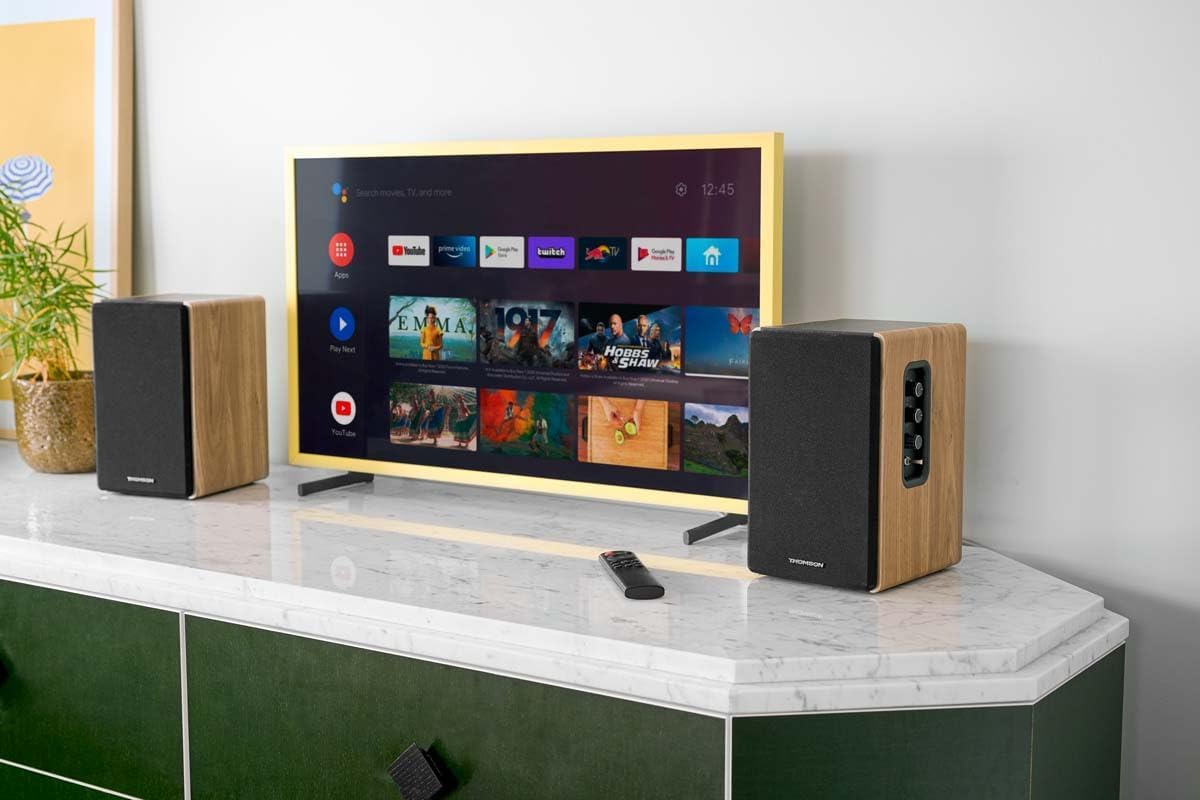
Image 4.2: Rear panel connections.
- Mewnbwn Optegol: For connecting digital audio sources like TVs, game consoles, or Blu-ray players.
- Mewnbwn Aux (RCA): For connecting analog audio sources such as turntables, CD players, or PCs. A 3.5mm jack adapter is provided.
- TV Audio (HDMI ARC): For connecting to a TV's HDMI ARC port, allowing TV remote control of the speaker volume.
- Chwarae USB: Ar gyfer chwarae MP3 files uniongyrchol o yriant fflach USB.
- Is-allan: For connecting an external active subwoofer for enhanced bass.
- Allbwn Siaradwr: Connects to the passive speaker.
- Mewnbwn pŵer: Yn cysylltu â'r prif gyflenwad pŵer.
4.3. Rheolaeth Anghysbell
The remote control provides convenient access to all speaker functions from a distance.

Image 4.3: Remote control.
- Botwm Pŵer: Turns the speakers on/off.
- Botwm Munud: Yn tewi/daddewi'r sain.
- Cyfrol +/-: Yn addasu lefel y sain.
- Playback Controls (Play/Pause, Skip): Ar gyfer chwarae USB.
- Source Selection Buttons (OPT, BT, ARC, USB, LINE): Selects the audio input source.
- EQ Mode Buttons (MOVIE, MUSIC, DIALOG): Selects preset equalization modes.
5. Gosod
5.1. Lleoliad Siaradwr
Place the speakers on a stable, flat surface such as a bookshelf, desk, or speaker stands. For optimal stereo imaging, position the speakers equidistant from your listening position and at ear level. Ensure there is adequate space around the speakers for ventilation.
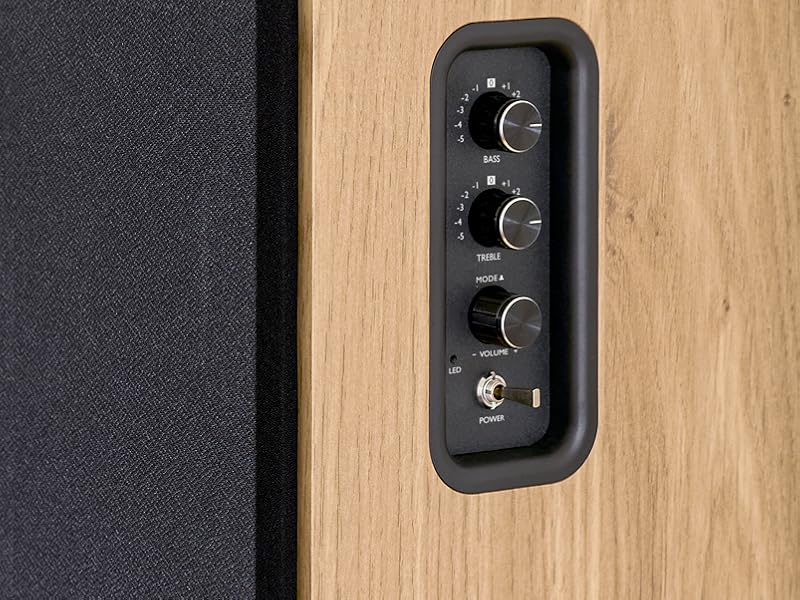
Image 5.1: Recommended speaker placement on a desk.
5.2. Cysylltu'r Siaradwyr
- Identify the active speaker (with controls and inputs) and the passive speaker.
- Connect the included speaker cable from the speaker output terminals on the active speaker to the input terminals on the passive speaker. Ensure correct polarity (+ to + and - to -).
5.3. Cysylltu Ffynonellau Sain
Connect your desired audio sources to the active speaker using the appropriate cables.
- Mewnbwn Optegol: Use an optical cable to connect your TV, game console, or Blu-ray player to the OPTICAL IN port.
- Mewnbwn HDMI (ARC): Use an HDMI cable to connect your TV's HDMI ARC port to the TV AUDIO (HDMI) port on the speaker. This allows your TV remote to control the speaker volume.
- RCA (AUX) Input: Use an RCA cable (or the provided 3.5mm jack to RCA adapter) to connect devices like a turntable, CD player, or PC to the AUX IN (RCA) ports.
- Mewnbwn USB: Mewnosod gyriant fflach USB sy'n cynnwys MP3 files into the USB PLAY port.

Image 5.2: Speakers connected to a television via HDMI ARC.
5.4. Pâr Bluetooth
- Gwnewch yn siŵr bod y siaradwyr wedi'u troi ymlaen.
- Press the 'BT' button on the remote control or the side panel to select Bluetooth input. The LED indicator will flash, indicating pairing mode.
- Ar eich ffôn clyfar, tabled, neu gyfrifiadur, galluogwch Bluetooth a chwiliwch am ddyfeisiau sydd ar gael.
- Select "THOMSON WS902DUO" from the list of devices.
- Once paired, the LED indicator will stop flashing and remain solid. You can now stream audio wirelessly.
5.5. Subwoofer Connection (Optional)
If you wish to enhance bass further, connect an active subwoofer to the 'Sub Out' port on the rear panel of the active speaker using an RCA cable.
6. Cyfarwyddiadau Gweithredu
6.1. Pŵer Ymlaen / I ffwrdd
Use the power switch on the side control panel or the power button on the remote control to turn the speakers on or off.
6.2. Dewis Ffynhonnell
Press the corresponding source button on the remote control (OPT, BT, ARC, USB, LINE) to switch between connected audio inputs. The LED indicator will change to reflect the selected source.
6.3. Rheoli Cyfrol
Adjust the volume using the 'Volume' knob on the side control panel or the 'VOL+/-' buttons on the remote control.
6.4. Addasiadau Sain
Fine-tune the sound to your preference:
- Bas/Trebl: Use the 'Bass' and 'Treble' knobs on the side control panel to adjust the low and high frequencies.
- Dulliau EQ: Press the 'MOVIE', 'MUSIC', or 'DIALOG' buttons on the remote control to select preset equalization settings optimized for different content types.
6.5. Chwarae USB
When a USB flash drive with MP3 files is inserted and USB source is selected, the speakers will automatically begin playing. Use the playback control buttons on the remote control (Play/Pause, Skip) to manage your music.
6.6. Gweithrediad Bluetooth
After successful pairing (see Section 5.4), you can stream audio from your Bluetooth device. Use your device's controls or the speaker's remote control for playback and volume adjustments.
7. cynnal
Proper maintenance ensures the longevity and performance of your speakers.
- Glanhau: Wipe the speaker surfaces with a soft, dry cloth. Do not use liquid cleaners or abrasive materials.
- Awyru: Sicrhewch nad yw'r agoriadau awyru wedi'u rhwystro i atal gorboethi.
- Storio: If storing the speakers for an extended period, unplug them from the power outlet and store them in a cool, dry place.
- Osgoi Lleithder: Keep the speakers away from water and high humidity.
8. Datrys Problemau
Os byddwch yn dod ar draws unrhyw broblemau, cyfeiriwch at y canllaw datrys problemau canlynol:
| Problem | Achos Posibl | Ateb |
|---|---|---|
| Dim pŵer | Power cable not connected; Power switch off; Wall outlet not working. | Ensure power cable is securely connected. Turn on the power switch. Test the wall outlet with another device. |
| Dim sain | Incorrect input source selected; Volume too low; Mute function active; Audio cable not connected properly. | Select the correct input source. Increase volume. Press Mute button on remote. Check all audio cable connections. |
| Mae paru Bluetooth yn methu | Speakers not in pairing mode; Device too far; Bluetooth disabled on source device. | Ensure speakers are in Bluetooth pairing mode (flashing LED). Move device closer to speakers. Enable Bluetooth on your source device. |
| Chwarae USB ddim yn gweithio | USB drive not formatted correctly; Files not MP3; USB drive not inserted properly. | Ensure USB drive is FAT32 formatted. Verify files are in MP3 format. Re-insert USB drive firmly. |
| Afluniad sain | Volume too high; Source audio quality poor; Bass/Treble settings too extreme. | Lower the volume. Test with a different audio source. Adjust Bass and Treble controls. |
9. manylebau
| Nodwedd | Manyleb |
|---|---|
| Brand | THOMSON |
| Rhif Model | WS902DUO |
| Pŵer Allbwn Siaradwr Uchaf | 150 Wat |
| Ymateb Amlder | 60 Hz |
| Technoleg Cysylltedd | Bluetooth, HDMI (ARC), Optical, RCA, USB |
| Fersiwn Bluetooth | 5.3 |
| Modd Allbwn Sain | Stereo (2.0 channels) |
| Mewnbwn Voltage | 230 folt (AC) |
| Math Mowntio | Mount Silff |
| Math o Siaradwr | Multimedia Bookshelf |
| Nodweddion Arbennig | Stereo Pairing, USB Port, Sub-Out, Remote Control, EQ Modes |
| Defnyddiau a Argymhellir | Smartphone, Tablet, PC, TV, Game Console, DVD Player, Turntable |
| Lliw | Gorffeniad Pren Naturiol |
| Dull Rheoli | Remote Control, Side Panel Knobs |
| Maint Woofer | 10 Centimedr |
| Dimensiynau (H x W x D) | 28 cm x 24 cm x 47 cm (approximate, per speaker) |
| Pwysau | 5048 Grams (total for pair) |
| Nifer yr Eitemau | 2 |
| Gwlad Tarddiad | Tsieina |
10. Gwybodaeth Gwarant
This THOMSON WS902DUO product comes with a Gwarant cyfyngedig 1 mlynedd o ddyddiad y pryniant. Mae'r warant hon yn cwmpasu diffygion gweithgynhyrchu a chrefftwaith o dan ddefnydd arferol. Nid yw'n cwmpasu difrod a achosir gan gamddefnydd, damweiniau, addasiadau heb awdurdod, na thraul a rhwyg arferol. Cadwch eich prawf prynu ar gyfer hawliadau gwarant.
11. Cefnogaeth i Gwsmeriaid
For technical assistance, warranty claims, or any questions regarding your THOMSON WS902DUO speakers, please contact your retailer or visit the official THOMSON support website. Please have your model number (WS902DUO) and proof of purchase ready when contacting support.
Cymorth Ar-lein: www.thomsonconsumer.com (Please check for regional support contacts)