
1. Rhagymadrodd
Thank you for choosing the UGREEN Nexode Pro 200W 25000mAh Power Bank. This portable power bank is designed to provide high-capacity, fast charging for a wide range of devices, including laptops, tablets, and smartphones. Please read this manual carefully before use to ensure proper operation and to maximize the lifespan of your device.
2. Cynnyrch Drosview
Nodweddion Allweddol:
- Capasiti Uchel 25000mAh: Capable of recharging a MacBook Air 13" approximately 1.3 times, an iPhone 17 Pro 4.7 times, a Galaxy S25 Ultra 3.4 times, or an iPad Pro 11" 1.8 times.
- Cyfanswm Allbwn 200W: Delivers a total output of 200W, allowing simultaneous charging of up to two laptops.
- 100W Fast Charging per USB-C: USB-C1 and USB-C2 ports/cables each support PD3.0 100W, charging a MacBook Pro 16'' to 54% in 30 minutes.
- 4-in-1 Simultaneous Charging: Features 2 built-in USB-C cables (USB-C1, USB-C2) and 2 additional USB ports (USB-C3, USB-A) for charging up to 4 devices concurrently.
- Intelligent TFT Display: Provides real-time information on battery level, current, voltage, and power output for each interface, along with battery health and cycle count.
- Modd Cyfredol Isel: Activate with a 3-second long press of the button for charging delicate accessories like AirPods and smartwatches.
- Rapid Recharge: The power bank can be fully recharged in 2.2 hours when using a 100W+ charger (not included).
- System Aml-Amddiffyn: Built with flame-retardant material and ThermalGuard system, offering protection against overvoltage, overcurrent, overcharge, over-discharge, high temperatures, and short circuits.
Cynnwys y Pecyn:
- UGREEN Nexode Pro 200W 25000mAh Power Bank (Model PB728)
- Integrated USB-C Cables (2)
- Llawlyfr Defnyddiwr
Diagram Cynnyrch:
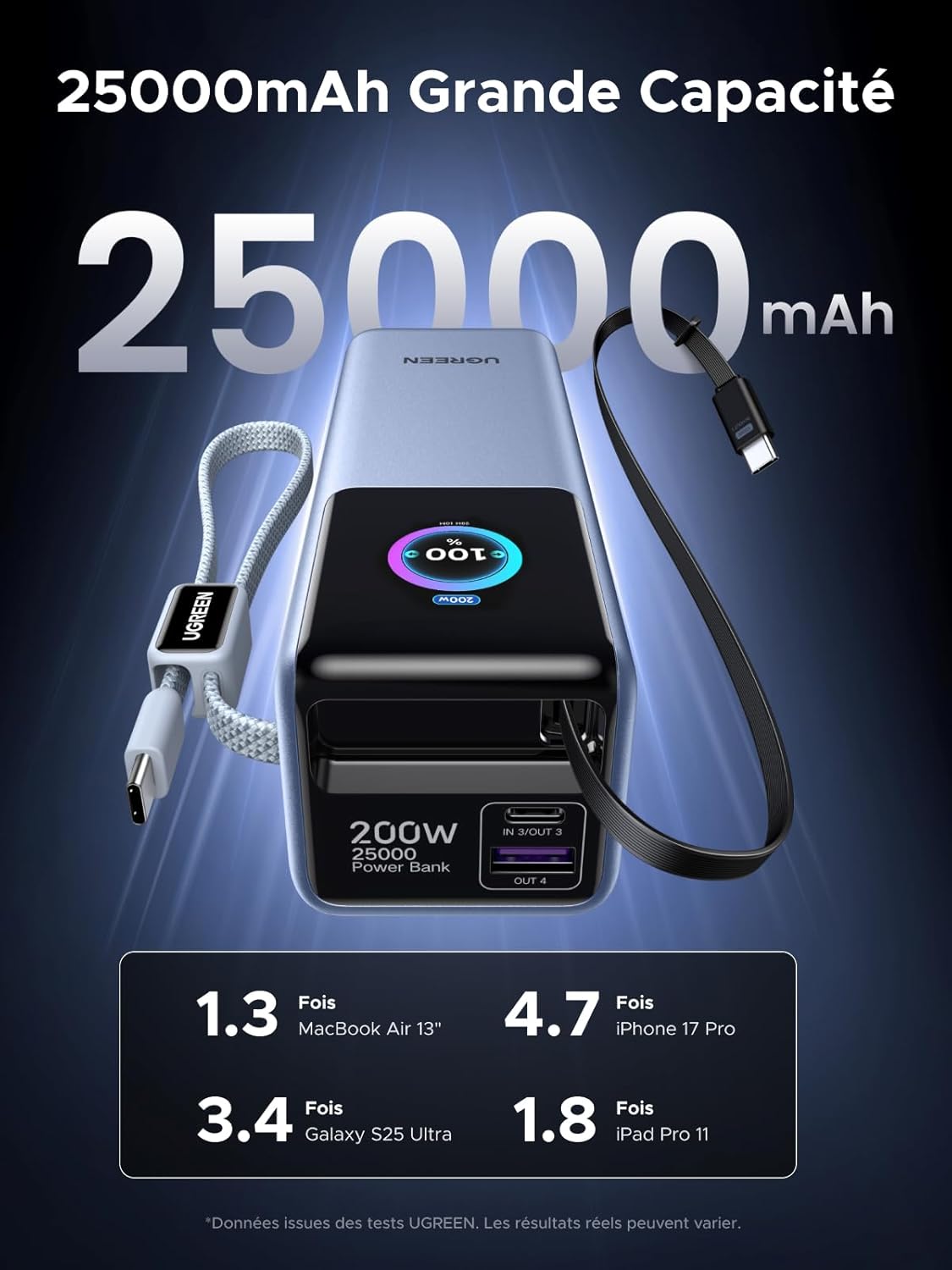 Image: The UGREEN Nexode Pro 200W 25000mAh Power Bank, showcasing its compact design and integrated USB-C cables.
 Image: A diagram illustrating the power bank simultaneously charging a laptop, tablet, phone, and earphones using its two built-in USB-C cables and two additional USB ports.
3. Gosod
The UGREEN Nexode Pro Power Bank comes pre-charged to some extent, but it is recommended to fully charge it before first use.
Codi tâl ar y Banc Pŵer:
- Connect a USB-C charger (100W+ recommended, not included) to one of the power bank's USB-C input ports (USB-C1 or USB-C2 built-in cables, or USB-C3 port).
- Plygiwch y gwefrydd i mewn i allfa wal.
- The TFT display will show the charging status and estimated time to full charge. The power bank will be fully charged in approximately 2.2 hours with a 100W+ charger.
 Image: The UGREEN Nexode Pro Power Bank connected to a wall charger for recharging, illustrating its fast recharge capability.
4. Cyfarwyddiadau Gweithredu
Codi Tâl ar Eich Dyfeisiau:
- Connect your device to one of the power bank's output ports/cables:
- Use the built-in USB-C1 or USB-C2 cables for devices supporting USB-C.
- Use the USB-C3 port for devices requiring a separate USB-C cable.
- Use the USB-A port for devices requiring a separate USB-A cable.
- The power bank will automatically begin charging your device. The TFT display will show the real-time output power for each connected device.
- I roi'r gorau i wefru, datgysylltwch eich dyfais yn unig.
 Image: The UGREEN Nexode Pro Power Bank connected to a MacBook Pro, demonstrating its 100W fast charging capability for laptops.
Modd Cyfredol Isel:
Mae'r modd hwn yn ddelfrydol ar gyfer gwefru dyfeisiau pŵer isel fel clustffonau diwifr, oriorau clyfar, neu dracwyr ffitrwydd.
- With no devices connected, press and hold the power button for 3 seconds until the low-current mode icon appears on the TFT display.
- Connect your low-power device to any available port.
- To exit low-current mode, press and hold the power button for 3 seconds again, or disconnect all devices and the mode will automatically deactivate after a short period.
5. TFT Display Information
The intelligent TFT display provides comprehensive information about the power bank's status:
- Lefel Batri: Yn dangos y canran batri sy'n weddilltage.
- Real-time Power Output/Input: Displays the current wattage being delivered to or received from devices for each port (C1 IN/OUT, C2 IN/OUT, C3 IN/OUT, A OUT).
- Cyftage a Chyfredol: Cyftage and current readings for active ports.
- Iechyd Batri: Indicates the overall health of the internal battery.
- Cyfrif Beiciau: Tracks the number of charge/discharge cycles.
- Amser sy'n weddill: Estimated time to full charge (when charging the power bank) or estimated remaining usage time (when discharging).
- Low-Current Mode Indicator: Icon appears when low-current mode is active.
 Delwedd: Manwl view of the power bank's TFT display, highlighting indicators for real-time power, battery percentage, remaining charge time, and battery health.
6. cynnal
- Keep the power bank away from water, fire, and extreme temperatures.
- Osgoi gollwng neu orfodi'r ddyfais i effeithiau cryf.
- Clean the power bank with a dry, soft cloth. Do not use corrosive cleaners.
- Store the power bank in a cool, dry place when not in use. For long-term storage, it is recommended to keep the battery level between 50% and 70%.
- Do not attempt to disassemble, repair, or modify the power bank yourself.
7. Datrys Problemau
| Problem | Achos Posibl | Ateb |
|---|---|---|
| Nid yw'r banc pŵer yn gwefru dyfeisiau. | Low battery on power bank; incorrect cable; device not compatible; low-current mode not activated for small devices. | Recharge the power bank; ensure cable is functional and correctly connected; check device compatibility; activate low-current mode for small devices. |
| Banc pŵer ddim yn ailwefru. | Charger not powerful enough; faulty charger/cable; loose connection. | Use a 100W+ PD charger; try a different charger and cable; ensure all connections are secure. |
| TFT display is off or unresponsive. | Power bank is off; battery is completely depleted; temporary software glitch. | Press the power button to turn on; recharge the power bank; try restarting by connecting/disconnecting a charger. |
| Cyflymder codi tâl araf. | Device does not support fast charging; multiple devices connected; cable limitation. | Ensure your device and cable support fast charging protocols; disconnect other devices to maximize output to one device. |
8. manylebau
| Nodwedd | Manylyn |
|---|---|
| Rhif Model | PB728 |
| Gallu Batri | 25000mAh |
| Cyfanswm Allbwn Pwer | 200W (Uchafswm) |
| Allbwn USB-C1/C2 | PD3.0 100W (Max per port) |
| Allbwn USB-C3 | PD3.0 100W (Max) |
| Allbwn USB-A | 22.5W (Uchafswm) |
| Input (USB-C1/C2/C3) | 100W (Uchafswm) |
| Math Batri | Lithiwm-ion |
| Dimensiynau (L x W x H) | 15.8 x 5.4 x 5 cm |
| Pwysau | 631 g |
| Nodweddion Arbennig | Digital Display, Fast Charging, Integrated Cables, Multi-Protection |
9. Gwybodaeth Diogelwch
- Do not expose the power bank to direct sunlight, heat sources, or high humidity.
- Avoid using the power bank in environments with extreme temperatures (below 0°C or above 45°C).
- Cadwch allan o gyrraedd plant.
- Peidiwch â byr-gylched y banc pŵer.
- Cael gwared ar y banc pŵer yn unol â rheoliadau lleol. Peidiwch â'i waredu gyda gwastraff y cartref.
- Os bydd y banc pŵer yn chwyddo, yn gollwng, neu'n allyrru arogl anarferol, stopiwch ei ddefnyddio ar unwaith.
 Image: The UGREEN Nexode Pro Power Bank highlighting its multi-protection features, including safeguards against overvoltage, overcurrent, overcharge, over-discharge, high temperatures, and short circuits.
10. Gwarant a Chefnogaeth
UGREEN products come with a standard warranty. For detailed warranty information, product support, or technical assistance, please refer to the official UGREEN website or contact UGREEN customer service directly. Please have your model number (PB728) and purchase information ready when contacting support.