
1. Rhagymadrodd
The NZXT H2 Flow (CI-H21FB-01) is a compact vertical Mini-ITX PC case designed to maximize airflow and save space while accommodating high-performance components. It features smart cable management, tool-less access, and includes dual top fans and a premium PCIe 5.0 riser cable for a streamlined building experience.
Nodweddion Allweddol:
- Hybrid Glass-and-Mesh Side Panel: Showcases your build while supporting up to a 280 mm radiator for efficient cooling.
- Dyluniad Compact: A 20.7 L volume fits most GPUs up to 331 mm, offering high-end power in a small footprint.
- High Airflow Panels: Ultra-fine mesh panels on multiple sides maximize fresh air intake and filter dust, keeping components cooler and cleaner.
- Effortless Building: Tool-less panels, integrated cable routing Velcro straps, and intuitive wire management channels simplify installation.
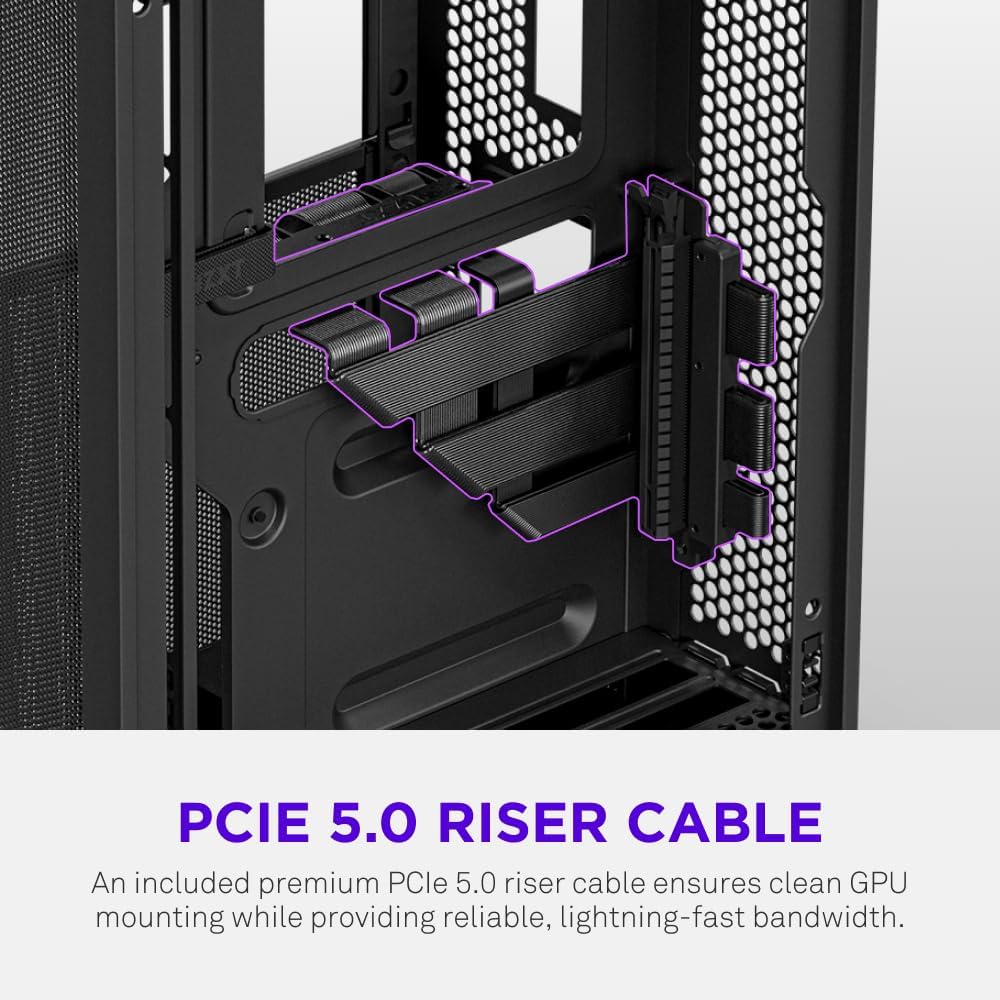
- Pre-Installed Performance: Includes a premium PCIe 5.0 riser cable for vertical GPU mounting and dual F120Q CV fans for immediate exhaust cooling.
2. Gwybodaeth Diogelwch
WARNING: Always disconnect power from your PC before performing any installation, maintenance, or troubleshooting. Failure to do so may result in personal injury or damage to components.
- Darllenwch yr holl gyfarwyddiadau yn ofalus cyn gosod.
- Wear an anti-static wrist strap or frequently touch a grounded metal object to prevent electrostatic discharge (ESD) damage to components.
- Handle components with care. Avoid touching pins or exposed circuitry.
- Cadwch rannau bach a deunyddiau pecynnu i ffwrdd o blant.
- Sicrhewch awyru digonol o amgylch cas y cyfrifiadur i atal gorboethi.
3. Cynnwys Pecyn
Verify that all items are present in your NZXT H2 Flow package:
- NZXT H2 Flow Mini-ITX PC Case
- 2 x 120mm F120Q CV Top Fans (pre-installed)
- Premium PCIe 5.0 Riser Cable (pre-installed)
- Blwch Affeithwyr (sy'n cynnwys sgriwiau, teiau cebl, a rhannau bach eraill)
4. Component Compatibility
The NZXT H2 Flow case is designed to accommodate specific component sizes for optimal performance and fit:
- Motherboard: ITX Mini
- Cerdyn Graffeg (GPU): Up to 331 mm in length
- Rheiddiadur: Up to 280 mm (for liquid cooling solutions)
- Cyflenwad Pŵer (PSU): SFX/SFXL form factor is recommended for best compatibility and cable management.
- Cefnogwyr: Includes 2 x 120mm top fans. Additional fan mounting options may be available depending on other component choices.
5. Gosod a Gosod
Follow these steps to assemble your PC within the NZXT H2 Flow case. Refer to your individual component manuals for specific installation details.
5.1. Case Overview a Dimensiynau
The NZXT H2 Flow is a compact vertical Mini-ITX case. Understanding its dimensions is crucial for planning your build.

5.2. Accessing the Case Interior
The H2 Flow features tool-less panels for easy access to the interior.

5.3. Motherboard and CPU Installation
Install your Mini-ITX motherboard and CPU (with cooler) before placing it into the chassis.
5.4. Gosod yr Uned Cyflenwad Pŵer (PSU)
The case supports SFX/SFXL power supplies. Mount the PSU in its designated area, typically at the bottom of the case.

5.5. Rheoli Ceblau
Utilize the integrated cable routing channels and Velcro straps for a clean and organized interior.
5.6. Gosod y Cerdyn Graffeg (GPU)
The H2 Flow supports GPUs up to 331 mm in length and includes a premium PCIe 5.0 riser cable for vertical mounting.

5.7. System Oeri
The case comes with two pre-installed 120mm F120Q CV fans at the top for exhaust. It also supports up to a 280mm radiator for liquid cooling.


5.8. Cynnyrch Drosview Fideo
Gwyliwch y fideo swyddogol hwn am drosolwg gweledolview of the NZXT H2 Flow Mini-ITX PC Gaming Case.
6. Cyfarwyddiadau Gweithredu
6.1. Pŵer Ymlaen / I ffwrdd
Press the power button located on the front I/O panel to turn your PC on or off.
6.2. Porthladdoedd Mewnbwn/Allbwn Blaen
The front I/O panel provides convenient access to:
- Porthladdoedd USB 3.0
- Porthladd USB-C
- Audio Jack (if applicable)
Connect your peripherals such as keyboards, mice, and headsets to these ports.
7. cynnal
7.1. Cleaning Dust Filters
The NZXT H2 Flow features ultra-fine mesh panels that act as dust filters. Regularly clean these panels to maintain optimal airflow and prevent dust buildup inside your PC.
- Gently remove the mesh panels from the case.
- Use compressed air or a soft brush to remove accumulated dust.
- Reattach the panels securely.
7.2. Glanhau Cyffredinol
Defnyddiwch feddal, damp cloth to wipe down the exterior of the case. Avoid abrasive cleaners or solvents.
8. Datrys Problemau
If you encounter issues with your PC build, consider the following common troubleshooting steps:
- Dim pŵer: Ensure all power cables (PSU to wall, PSU to motherboard, CPU, GPU) are securely connected. Check the power switch on the PSU.
- Dim Arddangosfa: Verify that your monitor is connected to the graphics card (not the motherboard I/O unless using integrated graphics) and that the GPU has proper power connections. Reseat the GPU and RAM.
- Gorboethi: Check fan connections and orientation. Ensure mesh panels are clean and not obstructed. Verify CPU cooler installation and thermal paste application.
- Cydran Heb ei Chanfod: Reseat the component (GPU, RAM, storage drives). Check power and data connections.
For more complex issues, consult your individual component manuals or NZXT customer support.
9. manylebau
| Nodwedd | Manylyn |
|---|---|
| Brand | NZXT |
| Enw Model | NZXT H2 Flow |
| Math o Achos | Tŵr Bach |
| Cydnawsedd Motherboard | ITX Mini |
| GPU Length Support | Hyd at 331 mm |
| Cymorth Rheiddiadur | Hyd at 280 mm |
| Cefnogwyr wedi'u cynnwys | 2 x 120mm F120Q CV Top Fans |
| Included Riser Cable | Premium PCIe 5.0 |
| Math Mowntio Cyflenwad Pŵer | Bottom Mount (SFX/SFXL recommended) |
| Dull Oeri | Air, Liquid |
| Lliw | Du |
| Deunydd | Gwydr, Metel |
| Pwysau Eitem | 4.55 Cilogram |
| Total USB 3.0 Ports | 1 |
| Other Special Features | Tool-less Installation, Integrated Cable Management |
10. Gwarant a Chefnogaeth
10.1. Gwybodaeth Gwarant
The NZXT H2 Flow Mini-ITX PC Case comes with a Gwarant Gwneuthurwr 2 FlwyddynCadwch eich prawf prynu ar gyfer hawliadau gwarant.
10.2. Cefnogaeth i Gwsmeriaid
For technical assistance, troubleshooting, or warranty inquiries, please visit the official NZXT support websafle neu cysylltwch â'u tîm gwasanaeth cwsmeriaid.
NZXT Store: Visit the NZXT Store on Amazon