
MOZOTER SP9i
Llawlyfr Defnyddiwr Clustffonau Di-wifr MOZOTER SP9i
Model: SP9i
Rhagymadrodd
Thank you for choosing the MOZOTER SP9i Wireless Earbuds. These earbuds are designed to provide a comfortable and stable audio experience with advanced Bluetooth 5.3 technology, deep bass sound, and extended playtime. This manual will guide you through the setup, operation, and maintenance of your new earbuds to ensure optimal performance.
Beth Sydd yn y Bocs
- MOZOTER SP9i Wireless Earbuds (Left and Right)
- Achos Codi Tâl
- Cebl Codi Tâl USB-C
- Eartips (S, M, L sizes)
- Llawlyfr Defnyddiwr
Cynnyrch Drosview
The MOZOTER SP9i earbuds feature an over-ear hook design for secure fit and comfort. Each earbud is equipped with intuitive touch controls for easy management of audio and calls. The compact charging case provides additional battery life and convenient storage.

Image: The MOZOTER SP9i Wireless Earbuds resting in their open charging case, showcasing the over-ear hook design and the charging contacts.
Delwedd: Manwl view of an earbud highlighting the integrated Bluetooth 5.3 technology for stable and efficient wireless connectivity.
Gosod
1. Gwefru'r Clustffonau a'r Cas
Before first use, fully charge the earbuds and the charging case. Connect the provided USB-C cable to the charging port on the case and a power source. The indicator lights on the case will show the charging status.
- Amser Codi Tâl: Tua 1.5 awr am dâl llawn.
- Amser Chwarae Earbud: Hyd at 12 awr ar un tâl.
- Cyfanswm Amser Chwarae gyda'r Cas: Hyd at 60 awr.

Image: The charging case with earbuds inside, illustrating the 60-hour total playtime, 12-hour single charge, and 48-hour case capacity, along with the USB-C charging port.
2. Paru â'ch Dyfais
- Ensure the charging case has power and the earbuds are inside.
- Agorwch y cas gwefru. Bydd y clustffonau'n troi ymlaen yn awtomatig ac yn mynd i mewn i'r modd paru.
- Ar eich dyfais (ffôn clyfar, tabled, gliniadur), galluogwch Bluetooth.
- Chwiliwch am dyfeisiau Bluetooth sydd ar gael a dewis "SP9i" o'r rhestr.
- Once connected, you will hear a confirmation tone, and the earbuds' indicator lights will turn off or flash slowly.
Bydd y clustffonau'n ailgysylltu'n awtomatig â'r ddyfais a barwyd ddiwethaf pan gânt eu tynnu o'r cas, os yw Bluetooth wedi'i alluogi ar y ddyfais.

Image: An illustration showing the MOZOTER SP9i earbuds in their open case, with a smartphone screen displaying a successful Bluetooth connection to "SP9i".
Cyfarwyddiadau Gwisgo
For optimal sound quality and comfort, it is important to wear the earbuds correctly and choose the appropriate eartip size.
1. Dewis Clustffonau
The earbuds come with small (S), medium (M), and large (L) eartips. Experiment with different sizes to find the pair that provides the best seal and comfort for your ears. A good seal enhances bass response and passive noise cancellation.
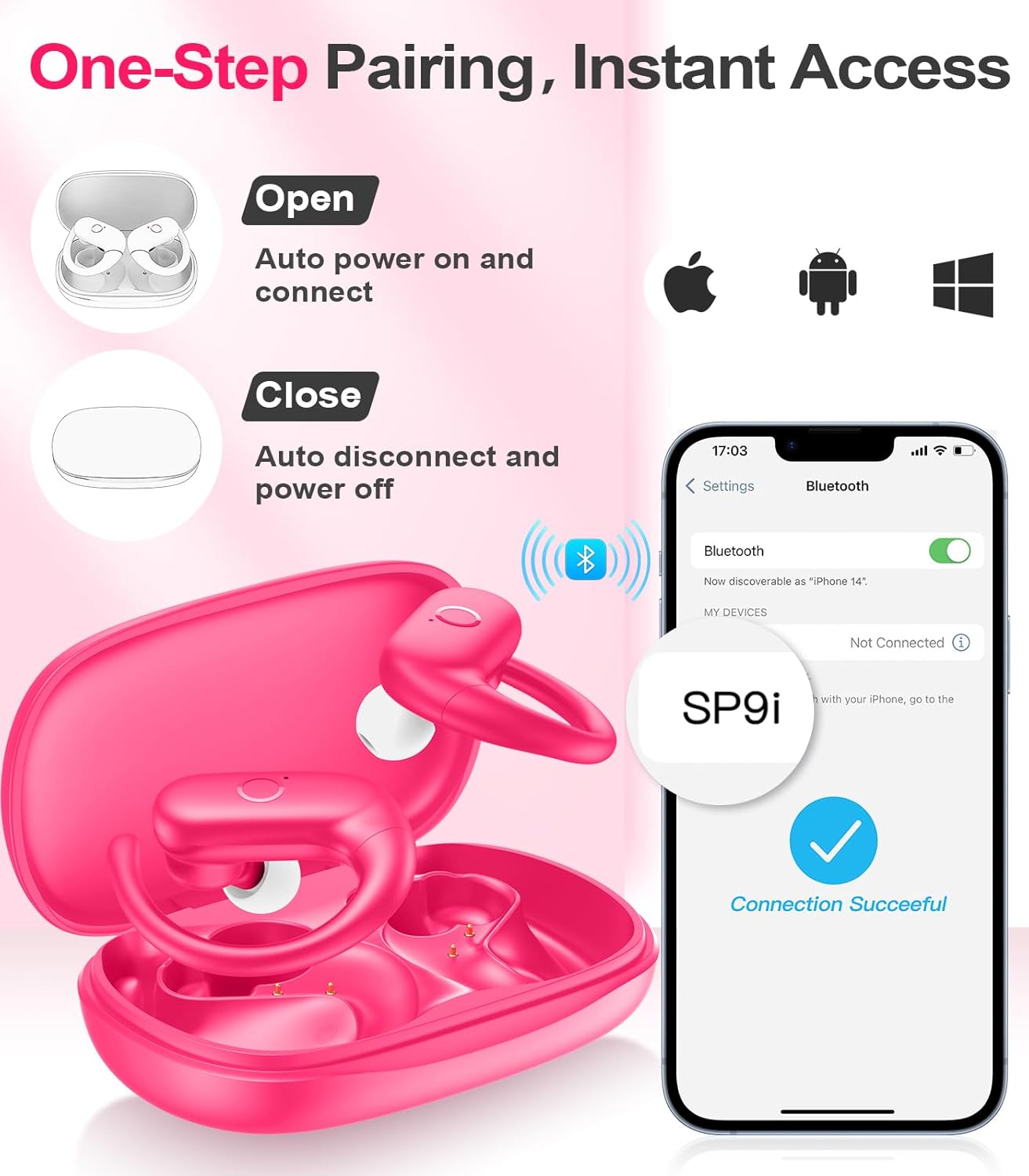
Image: A woman wearing an earbud, with an inset showing the three available eartip sizes (S, M, L) for a customized and comfortable fit.
2. Sicrhau Ffit Diogel
- Cam 1: Rhowch y bachyn clust dros eich clust.
- Cam 2: Rhowch y earbud i mewn i gamlas eich clust yn ysgafn.
- Cam 3: Rotate the earbud slightly to find a comfortable and secure angle. The flexible ear hooks ensure a stable fit, ideal for sports and active use.

Image: A three-step diagram illustrating the correct method to wear the MOZOTER SP9i earbuds, ensuring a secure and comfortable fit with the ear hook.

Image: A woman wearing the MOZOTER SP9i earbuds, demonstrating the ergonomic design that rests comfortably and securely on the ear.
Cyfarwyddiadau Gweithredu
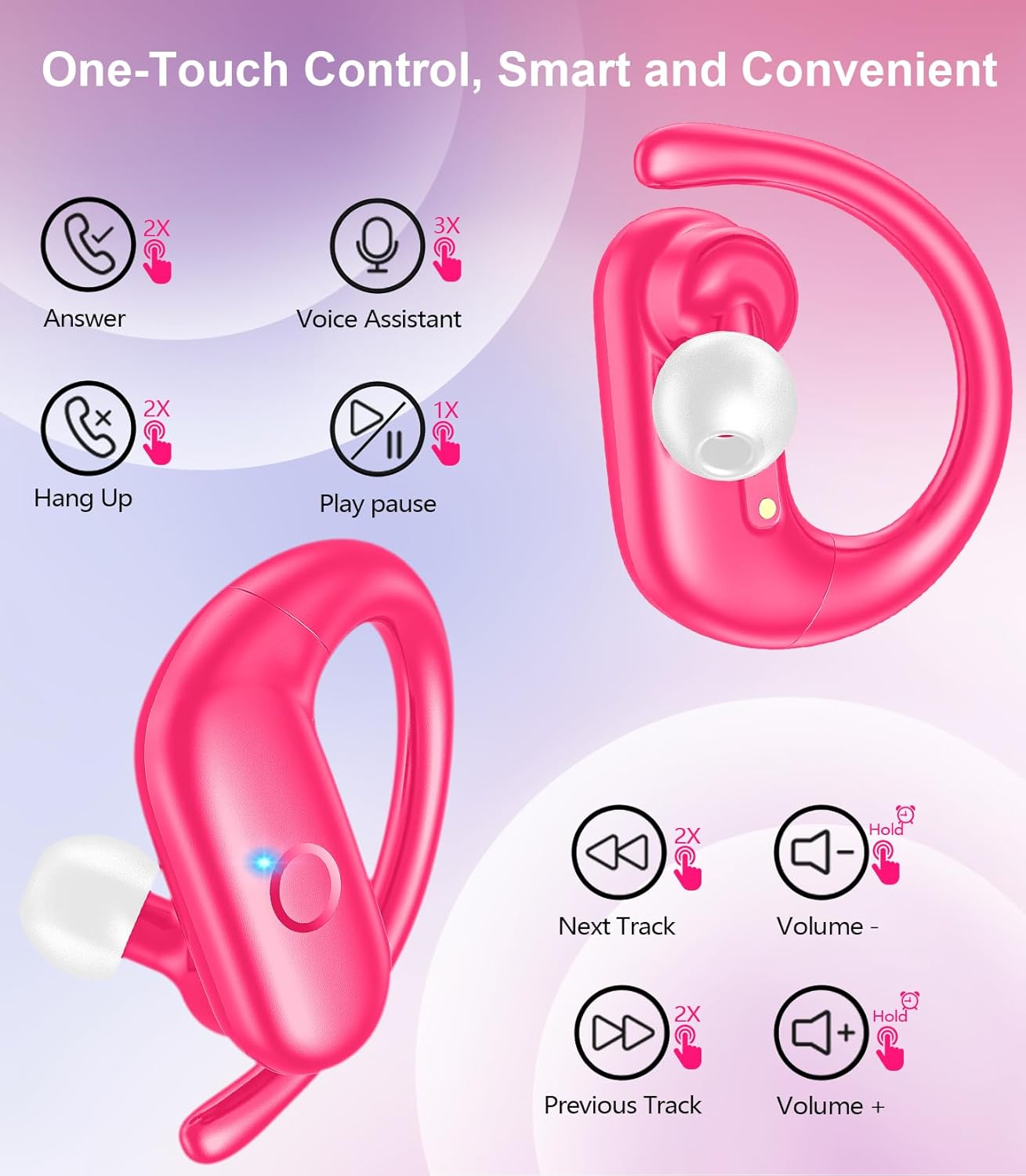
The MOZOTER SP9i earbuds feature intuitive touch controls on each earbud. The following table outlines the functions:
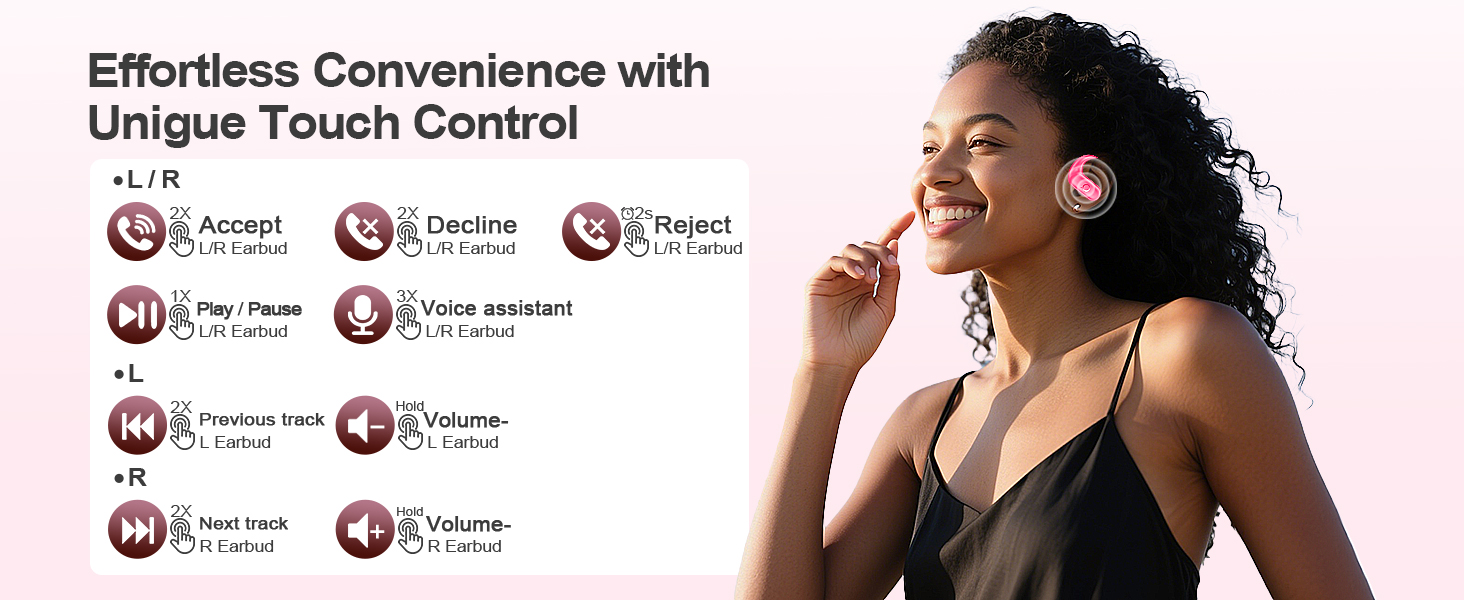
Image: A visual guide detailing the various touch control gestures for the MOZOTER SP9i earbuds, including call management, music playback, and volume adjustments.
| Gweithred | Ystum (Clustffon Chwith/Dde) |
|---|---|
| Ateb Galwad | Double-tap (2X) |
| Galwad Hang Up | Double-tap (2X) |
| Gwrthod Galwad | Triple-tap (3X) |
| Chwarae/Seibiant Cerddoriaeth | Single-tap (1X) |
| Actifadu Cynorthwyydd Llais | Triple-tap (3X) |
| Trac Nesaf | Double-tap (2X) on Iawn earbud |
| Trac Blaenorol | Double-tap (2X) on Chwith earbud |
| Cyfrol i Fyny | Daliwch ymlaen Iawn earbud |
| Cyfrol Lawr | Daliwch ymlaen Chwith earbud |
Cynnal a chadw
Mae cynnal a chadw priodol yn sicrhau hirhoedledd a pherfformiad eich clustffonau.
- Glanhau: Regularly clean the eartips and the charging contacts on both the earbuds and the case with a soft, dry, lint-free cloth. Avoid using harsh chemicals or abrasive materials.
- Storio: Pan nad ydynt yn cael eu defnyddio, storiwch y clustffonau yn eu cas gwefru i'w hamddiffyn rhag llwch a difrod.
- Amlygiad Dŵr: While designed for sports, avoid submerging the earbuds in water. Wipe off sweat or moisture immediately after use.
Datrys problemau
If you encounter any issues with your MOZOTER SP9i earbuds, please refer to the following common solutions:
- Clustffonau ddim yn paru: Ensure both earbuds are charged and removed from the case. Turn off and on your device's Bluetooth. If issues persist, try resetting the earbuds (refer to manufacturer's websafle ar gyfer cyfarwyddiadau ailosod penodol os nad ydynt yn y llawlyfr).
- Dim ond un clustffon sy'n gweithio: Place both earbuds back into the charging case, close the lid, wait a few seconds, then open the lid and remove them. This often resynchronizes them.
- Ansawdd sain gwael: Ensure the eartips provide a good seal in your ear. Clean any debris from the earbud speakers. Check your device's volume and audio settings.
- Materion codi tâl: Ensure the charging cable is securely connected to both the case and the power source. Clean the charging contacts on the earbuds and inside the case.
- Clustffonau'n cwympo allan: Experiment with different eartip sizes and adjust the ear hooks for a more secure fit as described in the Wearing Instructions section.
Manylebau
| Nodwedd | Manylyn |
|---|---|
| Enw Model | SP9i |
| Technoleg Cysylltedd | Di-wifr (Bluetooth 5.3) |
| Rheoli Sŵn | Canslo Sŵn Goddefol |
| rhwystriant | 4 Ohm |
| Pwysau Earbud | Approximately 8g per earbud |
| Amser Chwarae Earbud | Hyd at 12 awr |
| Cyfanswm Amser Chwarae (gyda chas) | Hyd at 60 awr |
| Porthladd Codi Tâl | USB-C |
| Cydrannau wedi'u Cynnwys | Earbuds, Charging Case, Eartips, User Manual |
Gwarant a Chefnogaeth
MOZOTER products are designed and manufactured to the highest quality standards. For warranty information and customer support, please refer to the documentation included with your purchase or visit the official MOZOTER website. If you require further assistance, please contact our customer service team.
Ask a question about this manual
Ask about setup, troubleshooting, compatibility, parts, safety, or missing instructions. Manuals+ will review the question and use this page’s manual context to help answer it.