
1. Rhagymadrodd
Thank you for choosing the Schneider 43A1 4K UHD LED TV. This television combines advanced display technology with smart features to provide an immersive viewing experience. Featuring a 4K Ultra High Definition display, QLED-LCD technology with Direct LED backlighting, and the VIDAA Smart TV platform, your new TV offers vibrant colors, deep blacks, and access to a wide range of entertainment.
This manual provides essential information for the safe and efficient use of your television. Please read it thoroughly before operating the device and retain it for future reference.
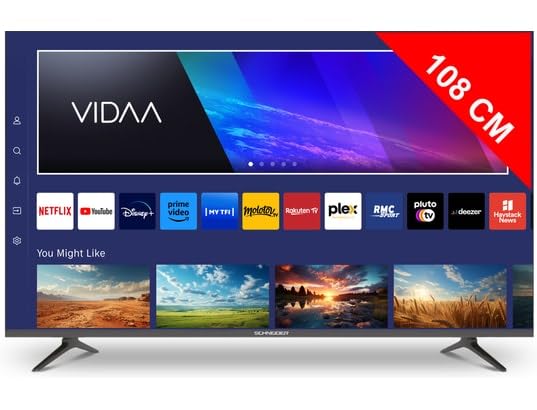
Delwedd 1.1: Blaen view of the Schneider 43A1 TV with VIDAA interface.
2. Gwybodaeth Diogelwch
Er mwyn sicrhau gweithrediad diogel ac atal difrod, dilynwch y rhagofalon diogelwch canlynol:
- Lleoliad: Position the TV on a stable, level surface. Avoid placing it in direct sunlight, near heat sources, or in environments with high humidity or dust.
- Awyru: Ensure adequate ventilation around the TV. Do not block ventilation openings. Maintain a minimum distance of 10 cm from walls or other objects.
- Cyflenwad Pŵer: Defnyddiwch y cyflenwad pŵer penodedig yn unig cyftage. Ensure the power cord is not pinched or walked on. Disconnect the power plug during lightning storms or when unused for extended periods.
- Glanhau: Datgysylltwch y teledu cyn glanhau. Defnyddiwch frethyn meddal, sych. Peidiwch â defnyddio glanhawyr hylif na glanhawyr aerosol.
- Hylifau: Peidiwch ag amlygu'r teledu i hylifau sy'n diferu neu'n tasgu. Peidiwch â gosod gwrthrychau sy'n llawn hylifau, fel fasys, ar y teledu.
- Plant: Supervise children to ensure they do not climb on the TV or furniture.
- Mowntio Wal: If wall-mounting, use a VESA compatible bracket (200 x 200 mm) and ensure proper installation by qualified personnel to prevent injury.
3. Cynnwys Pecyn
Gwiriwch fod yr holl eitemau yn bresennol ac mewn cyflwr da:
- Schneider 43A1 4K UHD LED TV
- Rheolaeth Anghysbell
- Cebl Pŵer
- Stand Teledu (2 ddarn)
- Sgriwiau ar gyfer Stand Teledu
- Llawlyfr Defnyddiwr (y ddogfen hon)
4. Gosod
4.1 Dadbacio
Carefully remove the TV from its packaging. It is recommended to keep the original packaging for potential future transport or service needs.
4.2 Gosod Stondin
If you are not wall-mounting the TV, attach the included stand pieces to the bottom of the TV using the provided screws. Ensure the stand is securely fastened before placing the TV upright.
4.3 Gosod ar y Wal (Dewisol)
The Schneider 43A1 is compatible with VESA 200 x 200 mm wall mounts. For safe installation, it is highly recommended to use a professional installer. Refer to your wall mount's instructions for specific details.
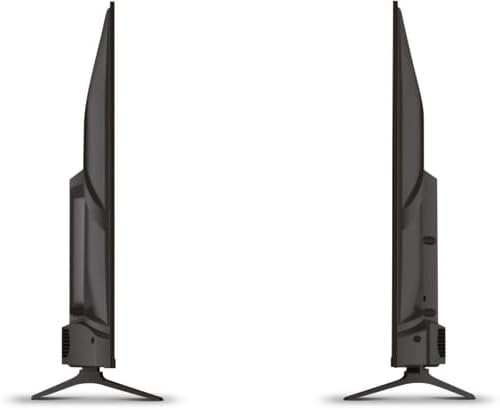
Delwedd 4.1: Ochr view of the Schneider 43A1 TV, illustrating its profile for placement or wall mounting.
4.4 Cysylltu Dyfeisiau Allanol
Mae eich teledu yn cynnig amryw o opsiynau cysylltedd:
- HDMI: Connect up to three HDMI 2.0 devices (e.g., Blu-ray player, game console, set-top box) to the HDMI ports.
- USB: Two USB ports are available for connecting USB storage devices to play media.
- AV/Audio Input: For older devices requiring composite video and stereo audio.
- Allbwn cyfechelog: Ar gyfer cysylltu â system sain allanol.
- Mewnbwn Antena/Cebl: Connect your antenna or cable TV signal for DVB-T/T2/C/S2 reception.
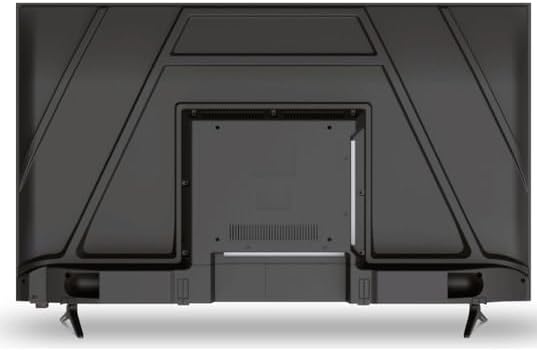
Delwedd 4.2: Cefn view of the Schneider 43A1 TV, highlighting connection ports.
4.5 Pŵer Cysylltu
Plug the power cable into the TV's power input, then into a suitable wall outlet.
4.6 Dewin Gosod Cychwynnol
Upon first power-on, the TV will guide you through an initial setup process. This includes selecting your language, connecting to a Wi-Fi network, and scanning for available channels (DVB-T/T2/C/S2).
5. Gweithredu
5.1 Swyddogaethau Rheoli o Bell
Mae'r teclyn rheoli o bell yn caniatáu ichi lywio nodweddion y teledu:
- Botwm Pŵer: Yn troi'r teledu ymlaen neu i ffwrdd.
- Cyfrol i fyny/i lawr: Yn addasu'r lefel sain.
- Sianel i fyny/i lawr: Yn newid sianeli teledu.
- Mewnbwn/Ffynhonnell: Selects the input source (HDMI, USB, TV Tuner).
- Botymau Llywio: Ar gyfer llywio dewislen.
- Botymau Teledu Clyfar: Direct access to popular apps like Netflix, Prime Video, YouTube.
5.2 Smart TV (VIDAA)
The integrated VIDAA Smart TV platform provides access to a variety of applications and streaming services. Connect your TV to the internet via Wi-Fi to enjoy features like Netflix, Prime Video, and YouTube. Bluetooth connectivity allows for wireless connection to compatible audio devices.

Delwedd 5.1: Blaen onglog view of the Schneider 43A1 TV, displaying the VIDAA Smart TV interface.
5.3 Dewis Mewnbwn
Press the 'Input' or 'Source' button on your remote control to switch between connected devices (HDMI 1, HDMI 2, HDMI 3, USB, AV, TV Tuner).
5.4 Gosodiadau Llun a Sain
Access the TV's menu to adjust picture and sound settings. The 4K UHD resolution, QLED-LCD technology, and Direct LED backlighting ensure a high-quality visual experience. The TV also features upscaling to enhance lower-resolution content. Audio is delivered via 2 x 8 W RMS stereo speakers with Dolby Audio support.
5.5 PC Monitor Mode
The TV can be used as a PC monitor by connecting your computer via an HDMI cable. This mode optimizes the display for computer use.
6. cynnal
6.1 Glanhau'r teledu
Before cleaning, ensure the TV is unplugged from the power outlet.
- Sgrin: Sychwch y sgrin yn ysgafn gyda lliain meddal, di-flwff. Ar gyfer marciau ystyfnig, sychwch yn ysgafnamprhowch y brethyn gyda dŵr neu lanhawr sgrin arbenigol (peidiwch â chwistrellu'n uniongyrchol ar y sgrin).
- Tu allan: Defnyddiwch frethyn meddal, sych i sychu'r teleduasing. Osgowch lanhawyr neu doddyddion sgraffiniol.
6.2 Diweddariadau Meddalwedd
Your TV may receive software updates to improve performance and add new features. Ensure your TV is connected to the internet to receive these updates automatically or check for them manually through the settings menu.
7. Datrys Problemau
Os byddwch chi'n dod ar draws problemau gyda'ch teledu, cyfeiriwch at y problemau a'r atebion cyffredin canlynol:
- Dim pŵer:
- Check if the power cable is securely plugged into the TV and the wall outlet.
- Gwnewch yn siŵr bod y soced wal yn gweithio (profwch gyda dyfais arall).
- Pwyswch y botwm pŵer ar y teclyn rheoli o bell neu ar y teledu ei hun.
- Dim Llun/Sain:
- Gwiriwch fod y ffynhonnell fewnbwn gywir wedi'i dewis (e.e., HDMI 1, teledu).
- Gwiriwch yr holl gysylltiadau cebl rhwng y teledu a dyfeisiau allanol.
- Gwnewch yn siŵr nad yw'r gyfrol wedi'i mud na'i gosod i'r lleiafswm.
- Os ydych chi'n defnyddio antena, gwiriwch y cysylltiad antena a pherfformiwch sgan sianel.
- Rheolaeth Anghysbell Ddim yn Gweithio:
- Amnewid y batris yn y teclyn rheoli o bell.
- Gwnewch yn siŵr nad oes unrhyw rwystrau rhwng y teclyn rheoli o bell a synhwyrydd IR y teledu.
- Smart TV/Network Issues:
- Gwiriwch eich llwybrydd Wi-Fi a'ch cysylltiad rhyngrwyd.
- Go to the TV's network settings to re-connect to your Wi-Fi network.
- Restart the TV and your router.
Os yw'r broblem yn parhau ar ôl rhoi cynnig ar yr atebion hyn, cysylltwch â chymorth cwsmeriaid.
8. manylebau
| Nodwedd | Manyleb |
|---|---|
| Model | Schneider 43A1 |
| Maint Arddangos | 109 cm (43 fodfedd) |
| Datrysiad | 4K Ultra HD (3840 x 2160 picsel) |
| Technoleg Arddangos | QLED-LCD with Direct LED Backlight |
| Cymhareb Cyferbyniad | 1100:1 |
| Disgleirdeb | 200 cd/m² |
| Allbwn Sain | 2 x 8 W RMS Stereo |
| Technoleg Sain | Sain Dolby |
| Porthladdoedd HDMI | 3 (HDMI 2.0) |
| Porthladdoedd USB | 2 |
| Mewnbynnau Eraill | AV/Audio Input |
| Allbynnau | Allbwn Cyfechelog |
| Tiwniwr | DVB-T/T2/C/S2 |
| Llwyfan Teledu Clyfar | VIDAA (Netflix, Prime Video, YouTube) |
| Cysylltedd Di-wifr | Wi-Fi, Bluetooth |
| Cydnawsedd VESA | 200 x 200 mm |
| Pwysau | 7.5 Cilogram |