
NEEWER 10106963
NEEWER QZ-S TTL Wireless Flash Trigger Transmitter User Manual
Model: 10106963
1. Rhagymadrodd
The NEEWER QZ-S TTL Wireless Flash Trigger Transmitter is a professional device designed for seamless control of NEEWER Q system flashes with Sony cameras. It features an intuitive OLED touchscreen, multiple flash modes, and robust wireless capabilities, making it an essential tool for photographers seeking precise lighting control.

Image: The NEEWER QZ-S flash trigger, showcasing its compact design and OLED display.
2. Cynnwys Pecyn
Gwiriwch fod yr holl eitemau yn bresennol yn eich pecyn:
- 1 x NEEWER QZ-S Flash Trigger
- 1 x USB i Gebl Math-C
- 1 x Achos Storio
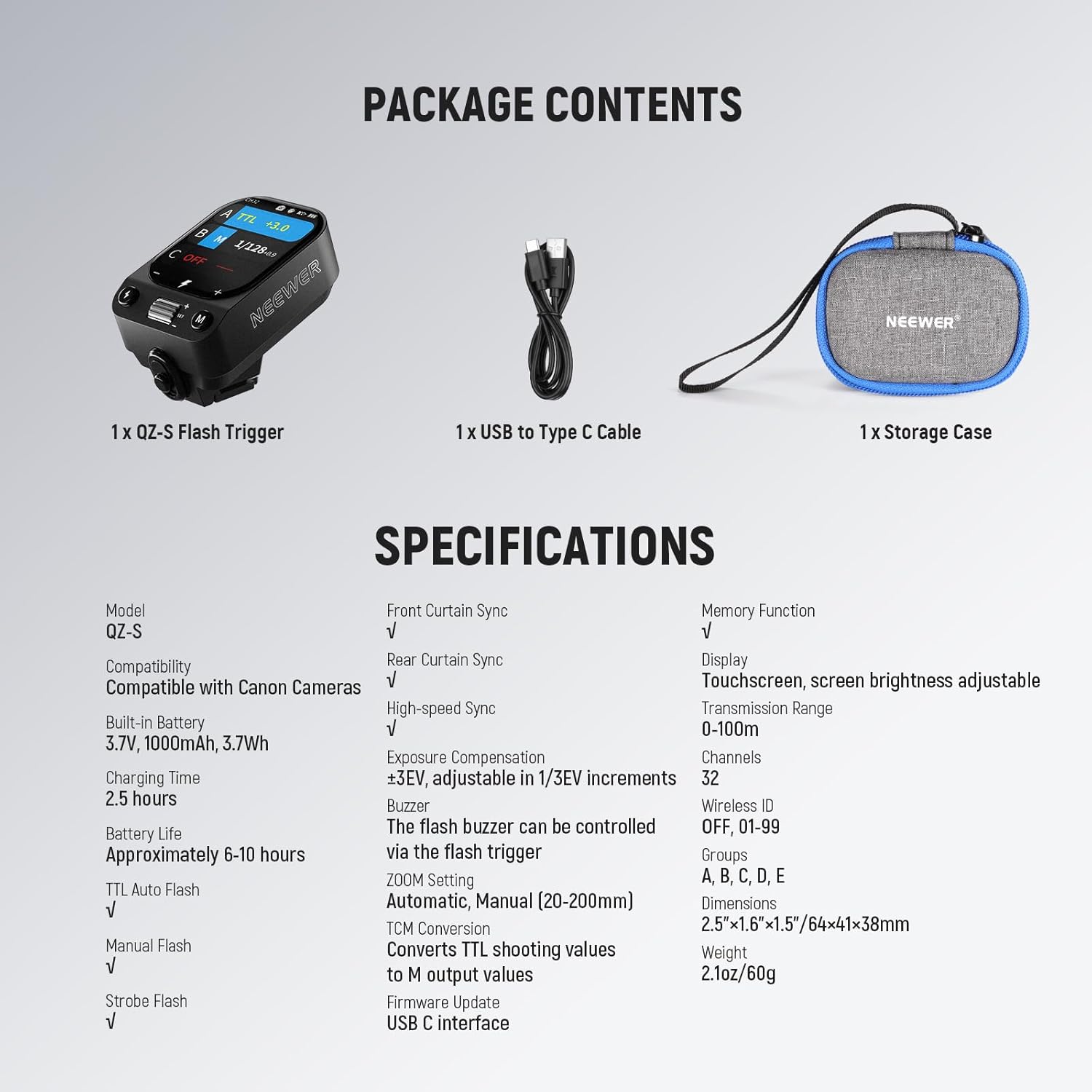
Image: All components included in the NEEWER QZ-S flash trigger package.
3. Cynnyrch Drosview
Familiarize yourself with the components and controls of your NEEWER QZ-S flash trigger.

Image: Labeled diagram of the NEEWER QZ-S flash trigger's physical features.
Arddangos a Rheolaethau
- Sgrin Gyffwrdd OLED: Provides a clear interface for all settings and functions.
- Botymau a Deialau: For quick adjustments and menu navigation.

Image: The high-definition OLED touchscreen in operation.
4. Gosod
4.1 Codi Tâl ar y Batri
The QZ-S flash trigger is equipped with a built-in 1000mAh lithium battery. To charge:
- Connect the included USB Type-C cable to the charging port on the side of the trigger.
- Cysylltwch ben arall y cebl â ffynhonnell pŵer USB (e.e., cyfrifiadur, addasydd wal USB).
- The battery icon on the OLED screen will indicate charging status. A full charge takes approximately 2.5 hours.
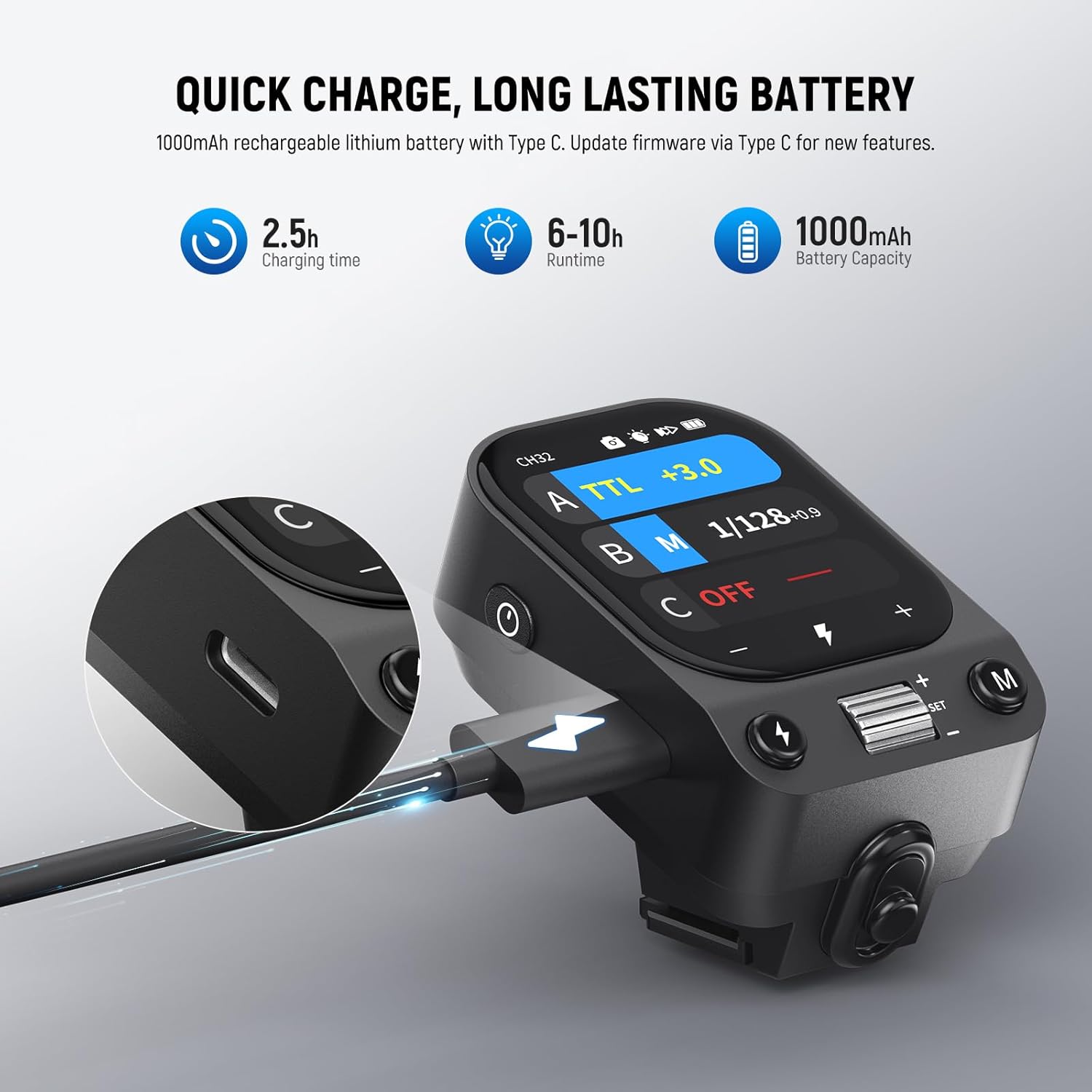
Image: The USB-C charging port on the NEEWER QZ-S flash trigger.
4.2 Mounting the Flash Trigger
To mount the QZ-S on your Sony camera:
- Slide the flash trigger onto your camera's hot shoe.
- Secure it in place using the quick lock mechanism. Ensure it is firmly attached to prevent accidental dislodgement.

Image: Demonstrating the quick mount hot shoe installation.
4.3 Pŵer Ymlaen/Diffodd
To power on the device, long press the power button. To power off, long press the power button again. The device also features an auto-shutdown function after prolonged inactivity to conserve battery.
5. Cyfarwyddiadau Gweithredu
5.1 Gweithrediad Sylfaenol
Llywio'r Sgrin Gyffwrdd
The QZ-S features an intuitive OLED touchscreen. Swipe and tap gestures are used to access and adjust various settings.

Image: User interacting with the touchscreen for light control.
Addasu Disgleirdeb Sgrin
Swipe down on the screen to access the settings menu, then tap the brightness icon to adjust the display brightness. This ensures clear visibility in various lighting conditions.
Page Lock Function
To prevent accidental touches during shooting, long press the flash trigger button for 2 seconds or the screen for 3 seconds to lock/unlock the display.
5.2 Modd Flash
TTL Automatic Flash
In TTL (Through-The-Lens) mode, the flash trigger automatically determines the correct flash output for optimal exposure. This mode is ideal for fast-paced shooting where lighting conditions may change rapidly.
Fflach â llaw (M)
Manual mode allows you to precisely control the flash output from 1/128 to 1/1 power. This mode is suitable for controlled environments where consistent lighting is desired.
TCM (TTL to Manual) Conversion
The TCM function allows you to convert TTL shooting values into manual output values, providing the flexibility of manual control while leveraging the initial convenience of TTL metering.

Image: Visual representation of the TCM conversion process.
Fflach Strobosgopig
This mode allows the flash to fire multiple times during a single exposure, creating a stroboscopic effect. Useful for capturing motion sequences.
Optical Slave Modes (S1/S2)
Available only in Manual Mode, S1 and S2 optical slave modes allow the QZ-S to trigger other flashes wirelessly by detecting their light output. S1 triggers on the first flash, S2 ignores the pre-flash.
5.3 Swyddogaethau Uwch
Sync Cyflymder Uchel (HSS)
HSS enables flash synchronization at shutter speeds up to 1/8000s, allowing you to use flash with wide apertures in bright conditions.
Iawndal Amlygiad Fflach (FEC)
Adjust the flash output in TTL mode with ±3 EV compensation in 1/3 EV increments to fine-tune exposure.
Rheoli Chwyddo
The flash trigger supports manual or automatic adjustment of the flash zoom from 20mm to 200mm to match your lens's focal length.
Modelu L.amp Rheolaeth
Rheoli'r modelu lamp of compatible NEEWER Q system flashes directly from the QZ-S trigger.

Image: Display options for modeling light control and other functions.
Single Point Triggering
Ensures accurate triggering with minimal lag.
Rheolaeth Grŵp
Control up to 5 groups (A, B, C, D, E) of compatible flashes independently.
5.4 Wireless Q System
The QZ-S features a built-in 2.4G wireless Q system, allowing it to remotely trigger and control compatible NEEWER Q system flashes within a 100m (328') range. Compatible flashes include Z2PRO-S, Z2II-S, Z2-S, Z1-S, Z880-S, NW760-S, S101-400W Pro, S102-400W Pro, Q4, Q6, Q300, and Q200 (off-camera triggering only).

Image: The QZ-S trigger controlling multiple studio lights wirelessly.
Sganio Sianel
To minimize signal interference, the QZ-S can scan for idle channels. It supports 32 channels and 01-99 IDs.
6. cynnal
- Glanhau: Use a soft, dry cloth to clean the exterior of the flash trigger. Avoid using harsh chemicals or abrasive materials.
- Storio: When not in use, store the trigger in its provided storage case in a cool, dry place away from direct sunlight and extreme temperatures.
- Diweddariadau Cadarnwedd: The QZ-S supports firmware upgrades via its USB-C port. Check the official NEEWER website for the latest firmware versions and instructions to ensure optimal performance and access to new features.
7. Datrys Problemau
| Problem | Achos Posibl | Ateb |
|---|---|---|
| Nid yw'r sbardun yn troi ymlaen | Batri isel; Botwm pŵer heb ei wasgu'n ddigon hir | Charge the battery; Long press the power button for 2 seconds |
| Fflach ddim yn tanio | Incorrect channel/ID; Trigger not securely mounted; Flash not compatible or powered on | Ensure trigger and flash are on the same channel/ID; Re-mount trigger securely; Check flash power and compatibility |
| Sgrin ddim yn ymateb | Screen lock engaged; Software glitch | Long press screen for 3 seconds to unlock; Restart the device |
| Allbwn fflach anghyson | Interference; Incorrect settings | Use channel scanning to find an idle channel; Verify flash mode and exposure compensation settings |
If you encounter issues not listed here, please refer to the support section or contact NEEWER customer service.
8. manylebau
| Model | QZ-S |
| Cydweddoldeb | Sony Cameras (A9 III, A7R V, A6700, ZV-E1, etc.) |
| Batri adeiledig | 3.7V, 1000mAh, 3.7Wh Lithium |
| Amser Codi Tâl | Tua 2.5 awr (trwy USB-C) |
| Bywyd Batri | Tua. 6-10 awr |
| Moddau Fflach | TTL Auto Flash, Manual Flash, Strobe Flash, S1/S2 Optical Slave |
| Dulliau Cysoni | Front Curtain Sync, Rear Curtain Sync, High-speed Sync (HSS) up to 1/8000s |
| Iawndal Amlygiad | ±3 EV in 1/3 EV increments |
| Gosodiad Chwyddo | Automatic, Manual (20-200mm) |
| TCM Conversion | Converts TTL shooting values to Manual output values |
| Arddangos | OLED Touchscreen (brightness adjustable) |
| System Ddi-wifr | Built-in 2.4G Wireless Q System |
| Ystod Trosglwyddo | 0-100m (328') |
| Sianeli | 32 |
| ID diwifr | 01-99 |
| Grwpiau | A, B, C, D, E |
| Dimensiynau | 2.5"x1.6"x1.5" / 64x41x38mm |
| Pwysau | 2.1 owns / 60g |
9. Gwarant a Chefnogaeth
For warranty information and technical support, please refer to the documentation included with your product or visit the official NEEWER website. You can also contact NEEWER customer service directly for assistance with product operation, troubleshooting, or service inquiries.
Ask a question about this manual
Ask about setup, troubleshooting, compatibility, parts, safety, or missing instructions. Manuals+ will review the question and use this page’s manual context to help answer it.