
1. Rhagymadrodd
Thank you for choosing the roborock Q10 S5 Robot Vacuum and Mop Cleaner. This manual provides essential information for setting up, operating, and maintaining your device to ensure optimal performance and longevity. Please read this manual thoroughly before using the product and keep it for future reference.
2. Gwybodaeth Diogelwch
To reduce the risk of injury, electric shock, fire, or damage, please observe the following safety precautions:
- Gall y teclyn hwn gael ei ddefnyddio gan blant 8 oed a hŷn a phobl â galluoedd corfforol, synhwyraidd neu feddyliol llai neu ddiffyg profiad a gwybodaeth os ydynt wedi cael goruchwyliaeth neu gyfarwyddyd ynghylch defnyddio’r teclyn mewn ffordd ddiogel a’u bod yn deall y peryglon dan sylw. .
- Dylid goruchwylio plant i sicrhau nad ydynt yn chwarae gyda'r teclyn.
- Ni ddylai plant wneud gwaith glanhau a chynnal a chadw defnyddwyr heb oruchwyliaeth.
- Do not use the robot in areas with open flames or fragile objects.
- Ensure the charging dock is placed on a level surface against a wall.
- Defnyddiwch yr addasydd pŵer gwreiddiol a ddarperir gyda'r ddyfais yn unig.
- Do not expose the robot to direct sunlight or moisture.
- Before cleaning, remove power cords, small objects, and fragile items from the floor.
3. Cynnyrch Drosview
Familiarize yourself with the components of your roborock Q10 S5 robot vacuum.
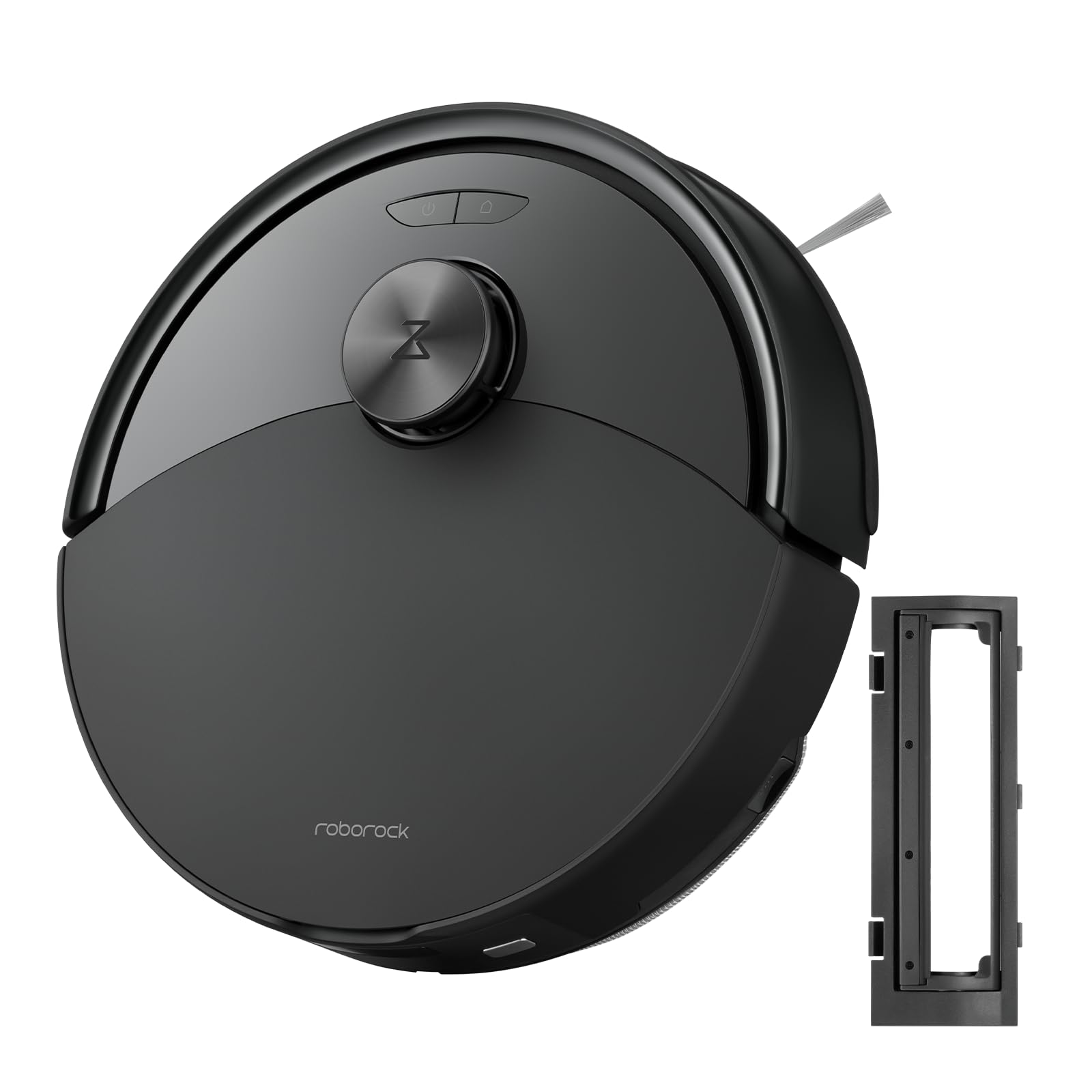
Ffigur 1: The roborock Q10 S5 Robot Vacuum and Mop Cleaner. This image shows the top view of the robot, highlighting its sleek black design and main control buttons.
Cydrannau Robot:
- Clawr Uchaf: Lifts to reveal the dustbin and Wi-Fi indicator.
- Botwm Pŵer/Glan: Press to start/pause cleaning, hold to turn on/off.
- Dock/Spot Clean Button: Press to send the robot back to the dock, hold for spot cleaning.
- LDS Sensor: Ar gyfer llywio a mapio.
- Bumper: Yn canfod rhwystrau.
- Brws Ochr: Yn ysgubo malurion o ymylon a chorneli.
- Prif Frwsh: Collects dirt and debris from floors. Features a floating design for better contact.
- Omnidirectional Wheel: For movement.
- Cysylltiadau Codi Tâl: Yn cysylltu â'r doc gwefru.
- Synwyryddion Clogwyni: Yn atal y robot rhag cwympo i lawr y grisiau.
- Water Tank & Mop Pad: For mopping functionality.
Doc Codi Tâl:
- Dock Location Beacon: Helps the robot locate the dock.
- Cysylltiadau Codi Tâl: Yn trosglwyddo pŵer i'r robot.
- Porthladd Cebl Pŵer: Yn cysylltu'r addasydd pŵer.
4. Gosod
- Dadbacio'r Robot: Carefully remove the robot and all accessories from the packaging. Remove any protective films or shipping materials.
- Install the Side Brush: Press the side brush onto its post until it clicks into place.
- Gosodwch y Doc Gwefru:
- Rhowch y doc gwefru ar arwyneb caled, gwastad yn erbyn wal.
- Gwnewch yn siŵr bod o leiaf 0.5 metr (1.6 troedfedd) o le clir ar y ddwy ochr ac 1.5 metr (4.9 troedfedd) o flaen y doc.
- Connect the power cable to the charging dock and plug it into a wall outlet.
- Tâl Cychwynnol: Place the robot on the charging dock. The robot will automatically turn on and begin charging. For first-time use, fully charge the robot before operation (approximately 4-6 hours). The power indicator light will breathe white during charging and turn solid white when fully charged.
- Lawrlwythwch yr Ap: Chwiliwch am "Roborock" in the App Store or Google Play Store, or scan the QR code on the packaging to download and install the app.
- Cysylltu â Wi-Fi:
- Open the Roborock app and follow the on-screen instructions to add your device.
- Sicrhewch fod eich ffôn wedi'i gysylltu â rhwydwaith Wi-Fi 2.4 GHz.
- Pwyswch a dal y Doc a Grym buttons simultaneously for 3 seconds until you hear the "Resetting Wi-Fi" voice alert.
- Follow the app's instructions to complete the connection.
5. Cyfarwyddiadau Gweithredu
Dechrau Glanhau:
- From Robot: Gwasgwch y Grym button once. The robot will start cleaning.
- O'r Ap: Open the Roborock app and tap the "Clean" button.
Pausing/Resuming/Stopping:
- Saib: Pwyswch unrhyw fotwm ar y robot neu tapiwch "Saib" yn yr ap.
- Ailddechrau: Gwasgwch y Grym button or tap "Resume" in the app.
- Stopiwch: To stop a cleaning cycle, press the Doc button to send the robot back to the charging dock, or tap "Stop" in the app.
Swyddogaeth Mopio:
- Llenwch y tanc dŵr: Open the water tank cover, fill with clean water, and close securely.
- Atodwch y Pad Mop: Wet the mop pad and wring it out. Slide it into the mop pad slot until it is securely attached.
- Start Mopping: The robot will automatically detect the mop module and switch to mopping mode. You can adjust water flow levels in the app.
Nodweddion Ap:
- Rheoli Mapiau: Create and save maps, set no-go zones, virtual walls, and invisible barriers.
- Selective Room Cleaning: Choose specific rooms to clean.
- Glanhau wedi'i Drefnu: Gosodwch amserlenni glanhau ar gyfer gwahanol amseroedd a dyddiau.
- Moddau Glanhau Personol: Adjust suction power and water flow levels.
- Rheolaeth Anghysbell: Rheolwch symudiad y robot â llaw.
6. cynnal
Regular maintenance ensures your roborock Q10 S5 operates efficiently. Always turn off the robot and unplug the charging dock before performing any maintenance.
Dustbin and Filter (Weekly):
- Lift the top cover of the robot.
- Tynnwch y bin sbwriel.
- Agorwch glawr y bin sbwriel a gwagiwch ei gynnwys i mewn i fin sbwriel.
- Remove the filter. Tap it gently to remove dust. The filter can be rinsed with water; ensure it is completely dry before reinstallation (allow 24 hours).
- Rinse the dustbin with water if necessary and allow it to dry completely.
- Reinstall the dry filter and dustbin.
Main Brush (Weekly):
- Trowch y robot drosodd.
- Press the tabs to remove the main brush cover.
- Lift out the main brush.
- Use the cleaning tool (if provided) or scissors to cut and remove any hair or debris tangled around the brush.
- Reinstall the main brush and cover, ensuring it clicks into place.
Side Brush (Monthly):
- Dadsgriwiwch y brwsh ochr.
- Tynnwch unrhyw wallt neu falurion.
- Reattach and tighten the screw.
Sensors and Charging Contacts (Monthly):
- Wipe all sensors (cliff sensors, wall sensor, LDS sensor window) and the charging contacts on both the robot and the dock with a soft, dry cloth.
Mop Pad (After Each Use):
- Tynnwch y pad mop o'r tanc dŵr.
- Rinse thoroughly with water and allow it to air dry completely before next use.
7. Datrys Problemau
If you encounter issues with your robot, please refer to the following table before contacting support.
| Problem | Achos Posibl | Ateb |
|---|---|---|
| Nid yw robot yn troi ymlaen. | Batri isel neu heb ei wefru. | Place the robot on the charging dock and ensure it is charging. |
| Ni all robot gysylltu â Wi-Fi. | Incorrect Wi-Fi password, 5GHz network, or poor signal. | Ensure correct 2.4GHz Wi-Fi, reset Wi-Fi on robot, move closer to router. |
| Mae robot yn mynd yn sownd yn aml. | Obstacles, tangled cables, or dirty sensors. | Clear floor, clean sensors, use no-go zones in app. |
| Perfformiad glanhau gwael. | Full dustbin, dirty filter, tangled brushes. | Empty dustbin, clean/replace filter, clean main/side brushes. |
| Mae'r robot yn gwneud sŵn anarferol. | Debris in main brush, side brush, or wheels. | Inspect and clean all brushes and wheels for obstructions. |
If the problem persists, please refer to the Roborock app for more detailed error messages or contact customer support.
8. manylebau
| Nodwedd | Manylyn |
|---|---|
| Model | Q10 S5 |
| Dimensiynau | Tua 353 x 350 x 96.5 mm (13.9 x 13.8 x 3.8 modfedd) |
| Pwysau | Tua. 3.7 kg (8.16 pwys) |
| Batri | Lithium-Ion (Capacity not specified, typical for robot vacuums) |
| Pŵer â Gradd | Approx. 60W (Typical for robot vacuums) |
| Gallu bin sbwriel | Approx. 470 ml (Typical for robot vacuums) |
| Cynhwysedd Tanc Dŵr | Approx. 300 ml (Typical for robot vacuums) |
| Pŵer sugno | Up to 10,000 Pa (HyperForce Suction Power from feature bullets) |
| Cysylltedd Wi-Fi | 2.4 GHz |
Nodyn: Gall manylebau newid heb rybudd.
9. Gwarant a Chefnogaeth
roborock products are manufactured to the highest quality standards. For detailed warranty information, please refer to the warranty card included in your product packaging or visit the official roborock website. For technical support, troubleshooting assistance, or to purchase replacement parts, please contact roborock customer service through the app or their official websafle.
Swyddogol Websafle: www.roborock.com