
1. Croeso
Thank you for choosing the AWEI T1 Pro Wireless Bluetooth Headphones. This manual provides detailed instructions for setting up, operating, and maintaining your new earbuds. Please read this manual carefully before use to ensure optimal performance and longevity of your device.
2. Cynnyrch Drosview
2.1. Cynnwys Pecyn
- Clustffonau Di-wifr (Chwith a Dde)
- Achos Codi Tâl
- Cebl Codi Tâl USB
- Clustffonau (amrywiol feintiau)
- Llawlyfr Defnyddiwr
2.2. Earbud and Charging Case Components
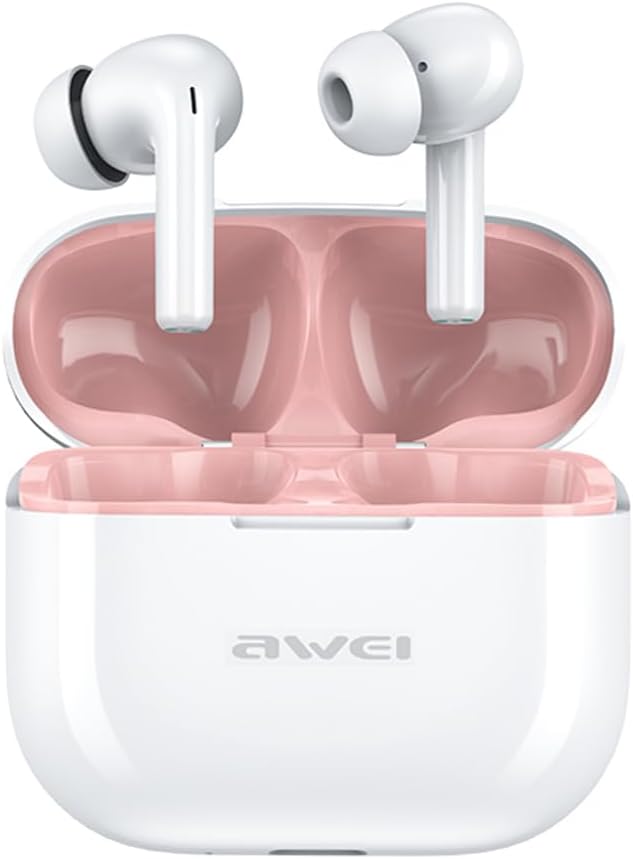
Image: The AWEI T1 Pro wireless earbuds are shown in their open charging case. The earbuds are white with a stem design, and the interior of the charging case is a light pink color. The AWEI logo is visible on the front of the white charging case.
The AWEI T1 Pro earbuds feature an ergonomic in-ear design for a comfortable and secure fit. The compact charging case not only protects the earbuds but also provides multiple charges on the go.
2.3. Nodweddion Allweddol
- Ansawdd sain Hi-Fi: Equipped with 13mm speakers for an immersive audio experience and clear call performance.
- Technoleg Bluetooth 5.4: Ensures a faster, more stable signal transmission with low latency and a wireless range of up to 10 meters. (Note: Some packaging may indicate Bluetooth 5.3, but the device supports 5.4 for enhanced performance).
- Rheoli Cyffyrddiad Clyfar: Intuitive touch sensors on each earbud allow for easy control of music playback, calls, and voice assistant activation.
- Bywyd batri hir: Enjoy up to 7 hours of continuous playback per charge. The 300mAh charging case extends total playtime to 36 hours in dual-ear mode or up to 60 hours in single-ear mode. The case fully charges in approximately 1 hour via Type-C.
- Dyluniad gwrth-ddŵr IPX6: Resistant to sweat and rain, making them suitable for sports and outdoor activities.

Image: A detailed diagram illustrating the internal components of an earbud speaker, labeled as 'Drive Units HiFi Stereo', highlighting the layered structure of the audio driver for high-fidelity sound.

Image: A stylized depiction of a microchip labeled '5.3 Bluetooth', surrounded by circuit board elements, emphasizing lower latency and increased stability in wireless communication.

Image: A black earbud is shown next to a smartphone displaying a music player interface. Text indicates 'Touch Control Wake up Voice Assistant', illustrating how touch gestures on the earbud can control phone functions like answering calls or activating a voice assistant.

Image: A smartphone displaying a music player is shown alongside a transparent block, symbolizing extended power. Text highlights 'Full of Energy Long Battery Life', indicating the 300mAh charging case provides 7 hours of continuous use per charge.

Image: Two black earbuds are depicted, one dry and the other surrounded by water droplets, illustrating the 'No Fear of Sweat & Rain IPX6 Waterproof Rate' feature, which prevents water penetration during sports.
3. Gosod
3.1. Gwefru Cychwynnol
- Cyn eu defnyddio gyntaf, rhowch y ddau glustffon yn y cas gwefru.
- Connect the provided USB Type-C charging cable to the charging port on the case and a power source (e.g., USB wall adapter, computer USB port).
- The indicator lights on the charging case will show charging status. A full charge for the case takes approximately 1 hour.
- Ensure the earbuds are fully charged before initial pairing.
3.2. Paru â Dyfais
- Agorwch y cas gwefru. Bydd y clustffonau'n troi ymlaen yn awtomatig ac yn mynd i mewn i'r modd paru.
- Ar eich dyfais (ffôn clyfar, tabled, gliniadur), galluogwch Bluetooth.
- Chwiliwch am dyfeisiau Bluetooth sydd ar gael.
- Select "AWEI T1 Pro" from the list of devices.
- Ar ôl cysylltu, byddwch yn clywed tôn cadarnhau, a bydd y clustffonau'n barod i'w defnyddio.
- Bydd y clustffonau'n ailgysylltu'n awtomatig â'r ddyfais a barwyd ddiwethaf pan gânt eu tynnu allan o'r cas, os yw Bluetooth wedi'i alluogi ar y ddyfais.
4. Cyfarwyddiadau Gweithredu
4.1. Pŵer Ymlaen / I ffwrdd
- Pŵer Ymlaen: Open the charging case, or long-press the touch area on both earbuds for 3 seconds.
- Pwer i ffwrdd: Place the earbuds back into the charging case and close the lid, or long-press the touch area on both earbuds for 5 seconds.
4.2. Rheolaethau Cyffwrdd
| Swyddogaeth | Gweithred |
|---|---|
| Chwarae/Seibiant Cerddoriaeth | Tap sengl ar y naill glust neu'r llall |
| Can nesaf | Tapiwch ddwywaith ar y glustffon dde |
| Caniad Blaenorol | Tapiwch ddwywaith ar y glustffon chwith |
| Cyfrol i Fyny | Tap triphlyg ar y earbud dde |
| Cyfrol Lawr | Tap triphlyg ar y earbud chwith |
| Ateb/Diwedd Galwad | Tap sengl ar y naill glust neu'r llall |
| Gwrthod Galwad | Long press on either earbud for 2 seconds |
| Actifadu Cynorthwyydd Llais | Long press on either earbud for 2 seconds (when not on a call) |
4.3. Gwneud a Derbyn Galwadau
When a call comes in, you can answer or reject it using the touch controls as described above. During a call, a single tap will end the conversation.
4.4. Chwarae Cerdd
Control your music directly from the earbuds. Use single, double, or triple taps to play, pause, skip tracks, or adjust volume.
5. cynnal
5.1. Glanhau
- Glanhewch y clustffonau a'r cas gwefru yn rheolaidd gyda lliain meddal, sych, heb lint.
- Peidiwch â defnyddio glanhawyr sgraffiniol, alcohol na thoddyddion cemegol.
- Gently remove any earwax or debris from the earbud mesh and charging contacts using a dry cotton swab or a small, soft brush.
5.2. Storio
- Pan nad ydynt yn cael eu defnyddio, storiwch y clustffonau yn eu cas gwefru bob amser i'w hamddiffyn rhag llwch a difrod.
- Storiwch y ddyfais mewn lle oer, sych, i ffwrdd o dymheredd eithafol a golau haul uniongyrchol.
5.3. Gwrthiant Dŵr
The AWEI T1 Pro earbuds are rated IPX6 waterproof, meaning they are protected against high-pressure water jets from any direction. This makes them suitable for workouts and light rain. However, they are not designed for swimming or submersion in water. Ensure the earbuds are dry before placing them back into the charging case to prevent damage.
6. Datrys Problemau
6.1. Problemau Cyffredin ac Atebion
- Nid yw clustffonau'n paru â dyfais:
Ensure both earbuds are charged. Turn off and on your device's Bluetooth. Forget "AWEI T1 Pro" from your device's Bluetooth list and try pairing again. - Dim ond un clustffon sy'n gweithio:
Place both earbuds back into the charging case, close the lid, wait a few seconds, then open the lid and take them out. This should reset their connection. If the issue persists, try resetting the earbuds (refer to manufacturer's websafle am gyfarwyddiadau ailosod penodol os oes angen). - Dim sain neu gyfaint isel:
Check the volume level on both your device and the earbuds. Ensure the earbuds are properly seated in your ears. Try cleaning the earbud mesh for any obstructions. - Achos codi tâl ddim yn codi tâl:
Gwnewch yn siŵr bod y cebl USB wedi'i gysylltu'n ddiogel â'r cas a'r ffynhonnell bŵer. Rhowch gynnig ar gebl gwefru neu addasydd pŵer gwahanol. - Nid yw clustffonau'n gwefru rhag ofn:
Ensure the charging contacts on both the earbuds and the case are clean and free of debris. Make sure the earbuds are correctly seated in the case.
7. manylebau

Image: A graphic displaying the technical specifications of the AWEI T1 Pro, including basic information, horn details, Bluetooth version, and battery capacities.
| Gwybodaeth Gyffredinol | |
|---|---|
| Enw Model | T1 Pro |
| Math o Gynnyrch | Clustffonau Stereo TWS |
| Pwysau Net | 36g |
| Dimensiynau (Achos) | 58*50*24mm |
| Lleoliad Clust | Mewn Clust |
| Math o Reoli | Rheoli Cyffwrdd |
| Lefel Gwrthsefyll Dŵr | IPX6 dal dŵr |
| Rheoli Sŵn | Canslo Sŵn Addasol |
| Manylebau Sain | |
| Diamedr Siaradwr | 13mm |
| Sensitifrwydd | 100±3dB |
| Ystod Ymateb Amlder | 20 Hz ~ 20,000 Hz |
| rhwystriant | 32 Ohm |
| Cysylltedd | |
| Fersiwn Bluetooth | 5.4 (Image shows 5.3) |
| Di-wifr Range | Hyd at 10 metr |
| Protocolau â Chymorth | HSP, HFP, A2DP, AVRCP |
| Dyfeisiau Cydnaws | Laptops, Tablets, Mobile Phones |
| Batri a Chodi Tâl | |
| Batri Achos Codi Tâl | 300mAh / 3.7V |
| Cynhwysedd Batri Earbud | 45mAh * 2 |
| Amser Chwarae Cerddoriaeth | Hyd at 7 awr (fesul tâl) |
| Amser Siarad | Hyd at 8 awr |
| Amser Wrth Gefn | Hyd at 300 awr |
| Amser Codi Tâl (Achos) | Tua 1 awr |
| Porthladd Codi Tâl | USB Math-C |
8. Gwarant a Chefnogaeth
AWEI products are designed and manufactured to the highest quality standards. For information regarding warranty coverage, please refer to the warranty card included in your product packaging or visit the official AWEI website. If you encounter any issues or require technical assistance, please contact AWEI customer support through the contact information provided on the official websafle neu'ch platfform prynu.