
1. Cynnyrch Drosview
The SVITOO P108 is a 12-inch Android tablet designed for versatile use, from entertainment to productivity. It features a 2K Full HD display, an Octa-Core processor, ample RAM and storage, and a long-lasting battery.

Image 1.1: The SVITOO P108 tablet showcasing its 2K display, dual-band Wi-Fi, Bluetooth 5.0, GPS, 30GB RAM (6+24), 128GB ROM, 8800mAh battery, T7250 processor, Android 16, and 13MP rear / 8MP front cameras.
Cynnwys y Pecyn:
- SVITOO P108 Tablet x 1
Cynllun Dyfais:

Image 1.2: A detailed diagram illustrating the location of the volume buttons, power button, front camera, flashlight, rear camera, 3.5mm headphone jack, TF card slot, Type-C port, and microphone on the SVITOO P108 tablet.
- Botymau Cyfrol: Addaswch lefel allbwn sain.
- Botwm Pŵer: Turn the device on/off, or put it to sleep/wake it up.
- Camera blaen: Ar gyfer galwadau fideo a hunluniau.
- Camera Cefn: For capturing photos and videos.
- Flashlight: Provides illumination for the rear camera.
- Jack clustffon 3.5mm: Cysylltwch glustffonau â gwifrau.
- Slot Cerdyn TF: Insert a microSD card for expandable storage.
- Porthladd Math-C: Ar gyfer codi tâl a throsglwyddo data.
- Meicroffon: Ar gyfer mewnbwn sain yn ystod galwadau neu recordiadau.
- Uchelseinydd: Ar gyfer allbwn sain.
2. Gosodiad Cychwynnol
2.1 Gwefru'r Tabled
Before first use, fully charge your tablet. Connect the provided USB Type-C cable to the tablet's Type-C port and the other end to a compatible power adapter. The battery indicator on the screen will show charging status.
2.2 Pweru Ymlaen/Diffodd
- I Bweru Ymlaen: Press and hold the Power button until the SVITOO logo appears.
- I Bweru i ffwrdd: Press and hold the Power button until the power options appear on the screen, then select "Power Off".
- I ailgychwyn: Press and hold the Power button until the power options appear, then select "Restart".
2.3 Ffurfweddiad Cychwynnol
Upon first power-on, follow the on-screen prompts to set up your tablet. This includes selecting your language, connecting to a Wi-Fi network, setting up your Google account, and configuring basic security settings.
2.4 Mewnosod Cerdyn MicroSD
To expand storage, insert a microSD card into the TF Card Slot. Ensure the tablet is powered off before inserting or removing the card. Gently push the card until it clicks into place.
3. Gweithredu'r Tabled
3.1 Llywio Rhyngwyneb Android
The tablet runs on Android 15, offering a user-friendly interface. Swipe up from the bottom to access the app drawer, swipe down from the top for notifications and quick settings, and use the navigation buttons (back, home, recent apps) at the bottom of the screen.
3.2 Nodweddion Arddangos
The 12-inch 2K Full HD display (2000x1200 resolution) provides a clear and vibrant viewing experience. The screen has a 5:3 aspect ratio and 380 nits brightness.
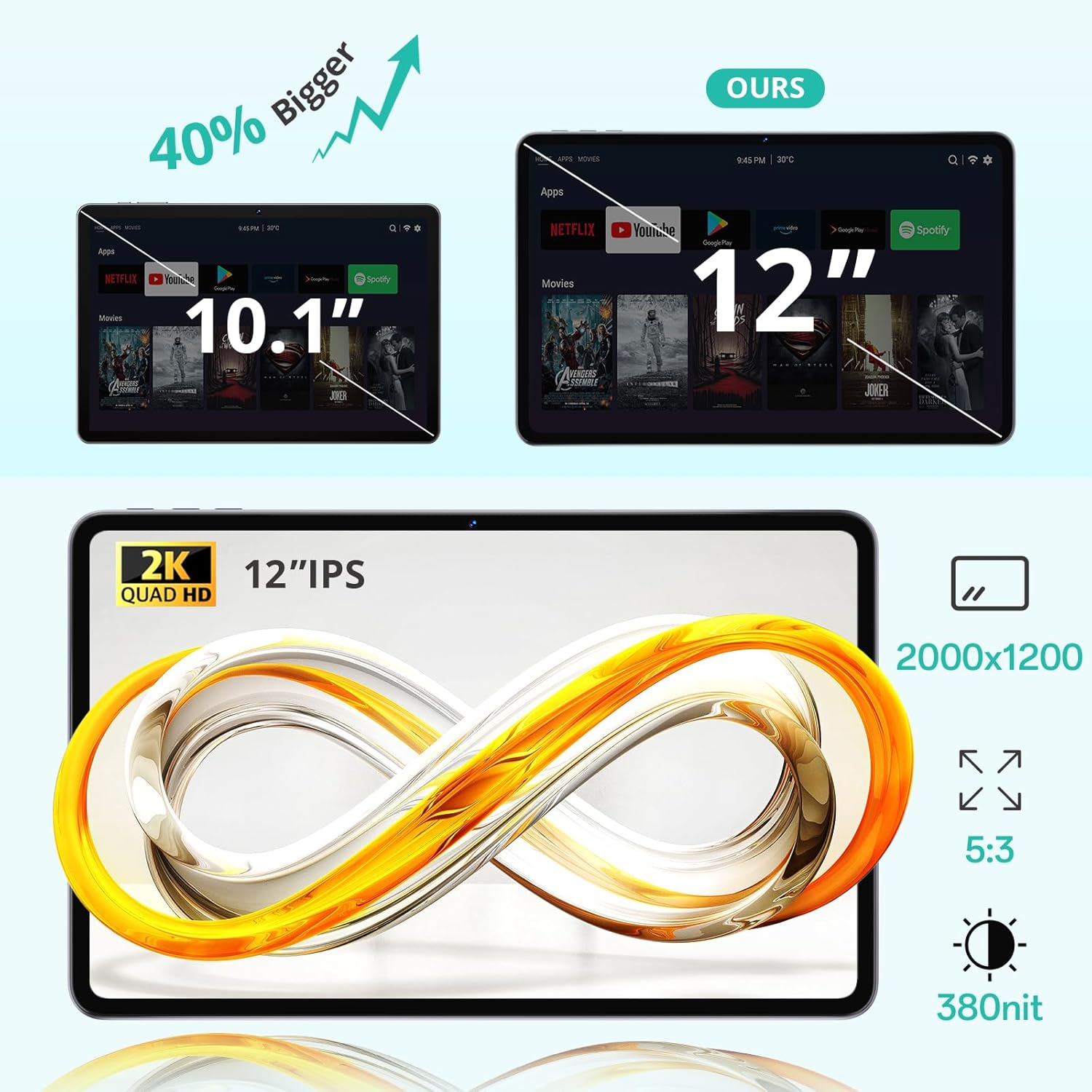
Image 3.1: The 12-inch display of the SVITOO P108 tablet, highlighting its 2K Quad HD resolution of 2000x1200, 5:3 aspect ratio, and 380 nit brightness, shown alongside a size comparison to a 10.1-inch tablet.
Cymorth 3.3 Widevine L1
The tablet supports Widevine L1, enabling high-definition streaming from popular services like Netflix, YouTube, and Prime Video. This ensures a premium viewing experience with crisp visuals.

Image 3.2: The SVITOO P108 tablet displaying a high-definition image, indicating Widevine L1 support for streaming content from platforms such as Disney+, Netflix, YouTube, and Prime Video.
3.4 Multitasking with Split-Screen
Utilize the split-screen feature to run two applications simultaneously. This enhances productivity, allowing you to watch videos while chatting or browse the web while taking notes.

Image 3.3: Step-by-step guide on how to activate split-screen mode on the tablet, showing how to tap the recent apps button, select an app, and choose 'Split screen' to open a second app alongside it.
3.5 Modd Darllen
The tablet offers a dedicated reading mode that reduces blue light and optimizes brightness for a more comfortable and eye-friendly reading experience.

Image 3.4: The tablet displaying text in reading mode, emphasizing features like reduced blue light, optimized brightness, and overall eye-friendliness.
3.6 Parental Controls and Child-Friendly Interface
The tablet includes features for parental controls, allowing parents to manage content, screen time, and ensure a safe browsing environment for children. A child-friendly interface is also available for educational content.

Image 3.5: The tablet displaying a child-friendly interface with educational content and parental control options, indicating features like child-safe browsing and screen time management.
4. Cynnal a Chadw a Gofal
4.1 Glanhau'r Tabled
Defnyddiwch frethyn meddal, di-flwff i lanhau'r sgrin a chorff y dabled. Ar gyfer staeniau ystyfnig, sychwch ychydigampen the cloth with water or a screen-cleaning solution. Avoid using harsh chemicals or abrasive materials.
4.2 Gofal Batri
The tablet is equipped with an 8000 mAh lithium-ion battery. To prolong battery life:
- Osgoi tymereddau eithafol.
- Peidiwch â gadael i'r batri ddraenio'n llwyr yn aml.
- Defnyddiwch y gwefrydd gwreiddiol neu wefrydd cydnaws ardystiedig.

Image 4.1: The tablet highlighting its 8800mAh battery, with icons indicating usage times for video, music, web browsing, and standby.
4.3 Diweddariadau Meddalwedd
Regularly check for and install software updates to ensure optimal performance, security, and access to the latest features. Go to Gosodiadau > System > Diweddariad system i wirio am ddiweddariadau.
5. Datrys Problemau
5.1 Tabled Ddim yn Troi Ymlaen
- Gwnewch yn siŵr bod y batri wedi'i wefru. Cysylltwch y gwefrydd ac aros ychydig funudau cyn ceisio ei droi ymlaen eto.
- Pwyswch a daliwch y botwm Pŵer am 10-15 eiliad i gyflawni ailgychwyn gorfodol.
5.2 Perfformiad Araf
- Caewch gymwysiadau cefndir diangen.
- Clear cache for frequently used apps (Settings > Apps > [App Name] > Storage > Clear Cache).
- Sicrhewch fod digon o le storio ar gael.
- Ailgychwyn y tabled.
5.3 Problemau Cysylltedd Wi-Fi
- Toggle Wi-Fi off and on in Quick Settings.
- Ailgychwynwch eich llwybrydd Wi-Fi.
- Forget the network and reconnect (Settings > Network & internet > Wi-Fi > [Network Name] > Forget).
5.4 Sgrin yn Anymatebol
- Perfformiwch ailgychwyn gorfodol trwy ddal y botwm Pŵer am 10-15 eiliad.
- Ensure the screen is clean and free of moisture.
6. manylebau
| Nodwedd | Manylyn |
|---|---|
| Enw Model | P108 |
| Maint Arddangos | 12 modfedd |
| Cydraniad Sgrin Max | 2000 x 1200 picsel |
| System Weithredu | Android 15 |
| Prosesydd | Unisoc T606 Wyth-graidd (1.8 GHz) |
| HWRDD | 6 GB (ehangadwy i 24 GB) |
| Storio | 128 GB (expandable via microSD up to 1TB) |
| Gallu Batri | 8000 mAh |
| Bywyd Batri | Up to 8 hours (general use) |
| Camera Cefn | 13 AS |
| Camera blaen | 5 AS |
| Cysylltedd | Wi-Fi (2.4G/5G, 802.11ac/b/g/n), Bluetooth 5.0, GPS |
| Porthladdoedd | 1x USB Type-C, 1x 3.5mm Audio Jack, 1x TF Card Slot |
| Dimensiynau | 28.23 x 17.84 x 0.98 cm |
| Pwysau | 940 g |
| Nodweddion Arbennig | Widevine L1, GPS |
7. Gwarant a Chefnogaeth
7.1 Gwybodaeth Gwarant
The SVITOO P108 tablet comes with a gwarant gwneuthurwr blwyddynMae'r warant hon yn cwmpasu diffygion mewn deunyddiau a chrefftwaith o dan ddefnydd arferol. Cadwch eich prawf prynu ar gyfer hawliadau gwarant.
7.2 Cefnogaeth i Gwsmeriaid
For technical assistance, troubleshooting, or warranty inquiries, please contact SVITOO customer service. Support is available 24 hours a day, 7 days a week. Please refer to the contact information provided with your purchase or on the official SVITOO websafle.