
Rhagymadrodd
This manual provides essential information for setting up, operating, maintaining, and troubleshooting your NIMO 15.6" FHD IPS Student-Laptop-Computer. Please read this guide thoroughly to ensure optimal performance and longevity of your device.

The NIMO 15.6" FHD IPS Student-Laptop-Computer, featuring a vibrant display and sleek design.
Beth sy'n Gynwysedig
Gwiriwch fod yr holl eitemau yn bresennol yn y pecynnu:
- 1 x Nimo N157 Laptop
- 1 x Type-C 65W GaN PD Fast Charger
- 1 x Llawlyfr Defnyddiwr
- Windows 11 Home (Pre-installed)
- 2 Years Warranty, 90 Days Return Information
Nodweddion Allweddol
Your NIMO laptop is equipped with advanced features designed for productivity and convenience:
Vibrant FHD IPS Display
Experience stunning visuals on the 15.6" FHD IPS (1920x1080) Anti-Glare Display. With an 85% screen-to-body ratio and 16:9 aspect ratio, enjoy precise color accuracy and sharp detail for all your tasks.

The 15.6-inch FHD IPS display provides a bright and clear visual experience.
Perfformiad Pwerus
Equipped with a 13th Gen Intel N150 processor (up to 3.6GHz), 16GB DDR4 RAM, and a 512GB PCIe SSD, this laptop delivers lightning-fast performance, rapid startup times, and accelerated data transfer for seamless multitasking and storage.
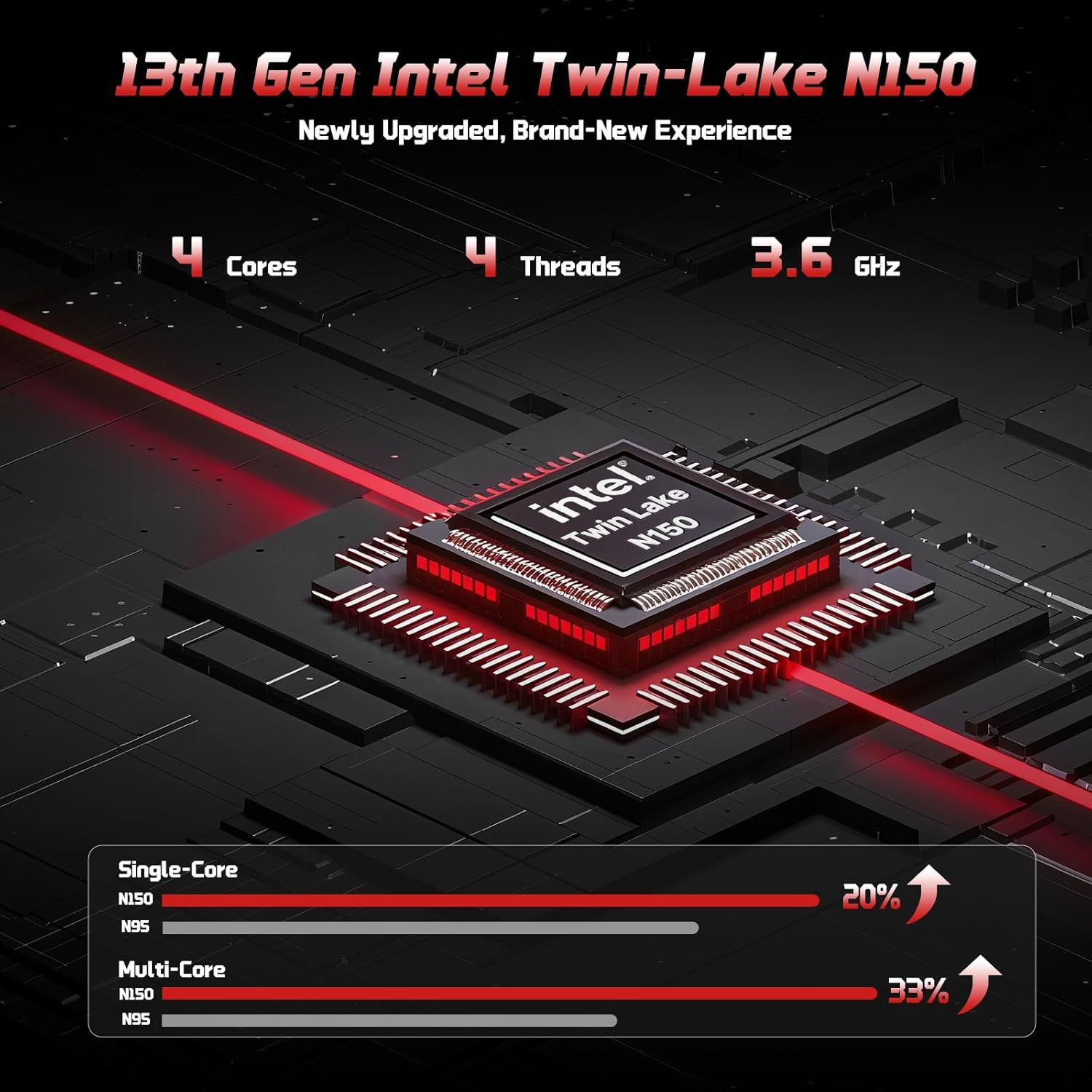
The 13th Gen Intel Twin-Lake N150 processor ensures efficient performance.

The laptop supports user-upgradable RAM and SSD for future expansion.
Fast Charging with GaN PD Charger
The included 65W GaN PD fast charger and 6.56ft USB-C to USB-C cable allow for quick power-ups. Charge for 15 minutes to get 2 hours of standby time. This versatile charger can also power your iPad, phone, and other compatible devices.

The 65W GaN PD charger provides fast and convenient charging for multiple devices.
Humanized Design & Security
Features a built-in fingerprint reader on the touchpad for secure, one-touch login. The backlit keyboard allows for easy typing in dim or dark environments, with adjustable brightness. The touchpad supports scroll and multi-touch gestures.

Secure fingerprint login and a comfortable backlit keyboard enhance usability.
Cysylltedd Cynhwysfawr
The laptop includes a variety of ports for all your peripheral needs, including USB 3.0, USB 2.0, HDMI, and multiple Type-C ports (one for PD Charge Only, one for Multifunction). It also features Wi-Fi 6 and Bluetooth 5.2 for robust wireless connections.

Manwl view of the laptop's ample ports for various connections.
Preifatrwydd Webcam
A 720p HD camera with a physical privacy switch ensures your personal space is always secure. Easily slide the switch to cover the camera when not in use.

The physical privacy switch on the webcam provides enhanced security.
Canllaw Gosod
1. Troi ymlaen yn gychwynnol
- Unpack your NIMO laptop and all accessories.
- Connect the Type-C 65W GaN PD Fast Charger to the laptop's Type-C PD Charge Only port and plug it into a power outlet.
- Open the laptop lid. The laptop may power on automatically, or you may need to press the power button (located on the top-right of the keyboard).
- Dilynwch y cyfarwyddiadau ar y sgrin i gwblhau'r gosodiad Windows 11 Home, gan gynnwys iaith, rhanbarth, cysylltiad rhwydwaith, a chreu cyfrif defnyddiwr.
2. Cysylltu Perifferolion
Utilize the available ports to connect external devices:
- Dyfeisiau USB: Connect USB drives, external keyboards, or mice to the USB 3.0 or USB 2.0 ports.
- Arddangosfa Allanol: Use an HDMI cable to connect to an external monitor or projector via the HDMI port.
- Dyfeisiau Sain: Plug in headphones or external speakers into the 3.5mm headphone jack.
- Cerdyn MicroSD: Insert a MicroSD card into the dedicated slot for expanded storage.
Cyfarwyddiadau Gweithredu
Defnyddio'r bysellfwrdd a'r pad cyffwrdd
- Bysellfwrdd ôl-oleuo: Gwasgwch Fn + F10 (or the key with the keyboard backlight icon) to cycle through backlight brightness levels or turn it off.
- Bysellbad rhifol: The integrated numeric keypad provides convenient data entry.
- Touchpad: Supports standard Windows gestures, including two-finger scroll, pinch-to-zoom, and multi-finger taps for various functions.
Mewngofnodi Olion Bysedd
To set up fingerprint login for enhanced security:
- Ewch i Gosodiadau Windows > Cyfrifon > Dewisiadau mewngofnodi.
- Select "Fingerprint Recognition (Windows Hello)" and follow the on-screen prompts to register your fingerprint.
- Once registered, you can simply touch the fingerprint sensor on the touchpad to log in.
Gosodiadau Arddangos
Addaswch y gosodiadau arddangos ar gyfer y gorau posibl viewing:
- Penderfyniad: Right-click on the desktop, select "Display settings", and choose "1920 x 1080" for the best resolution.
- Disgleirdeb: Adjust screen brightness using the function keys (Fn + F5/F6) or through Display settings.
Sain a Fideo
- Rheoli cyfaint: Use the function keys (Fn + F2/F3/F4) or the Windows volume mixer to adjust audio levels.
- Webcam Privacy: Slide the physical switch next to the webcam to cover or uncover the camera lens for privacy.
Cynnal a chadw
Glanhau Eich Gliniadur
- Defnyddiwch frethyn meddal, di-lint ychydig dampwedi'i olchi â dŵr neu lanhawr sgrin i sychu'r arddangosfa.
- Ar gyfer y bysellfwrdd a'r siasi, defnyddiwch frethyn meddal, sych. Osgowch gemegau llym neu ddeunyddiau sgraffiniol.
- Periodically use compressed air to clear dust from the vents to ensure proper heat dissipation.
Gofal Batri
To maximize your laptop's battery life and health:
- Osgowch ollwng y batri'n llwyr yn aml.
- Storiwch y gliniadur mewn lle oer, sych pan nad yw'n cael ei ddefnyddio am gyfnodau hir.
- Use the provided NIMO 65W GaN PD Fast Charger for optimal charging performance.

The laptop features smart battery optimization for extended lifespan and safe charging.
RAM and SSD Upgrades
Your NIMO laptop supports detachable RAM and SSD, allowing for user upgrades. Consult a qualified technician or refer to detailed upgrade guides on the NIMO support website before attempting any internal component changes.
Datrys Problemau Cyffredin
If you encounter problems with your laptop, try the following solutions:
- Dim pŵer: Ensure the charger is securely connected to both the laptop and a working power outlet. Try a different outlet. If the battery is completely drained, allow it to charge for at least 30 minutes before attempting to power on.
- Problemau Arddangos: Os yw'r sgrin yn wag, ceisiwch wasgu Fn + F7 (or the display toggle key) to switch display outputs. Check external monitor connections if applicable.
- Perfformiad Araf: Close unnecessary applications. Check for Windows updates. Ensure sufficient free space on the SSD. Restarting the laptop can often resolve temporary slowdowns.
- Wi-Fi/Bluetooth Connectivity: Ensure Wi-Fi and Bluetooth are enabled in Windows settings. Restart your router/modem. Update network drivers if necessary.
- Keyboard/Touchpad Unresponsive: Ailgychwynwch y gliniadur. Chwiliwch am ddiweddariadau gyrwyr yn y Rheolwr Dyfeisiau.
If problems persist, please contact NIMO customer support for further assistance.
Manylebau Technegol
| Nodwedd | Manyleb |
|---|---|
| Brand | NIMO |
| Enw Model | Nimo N157 |
| Maint Sgrin | 15.6 modfedd |
| Cydraniad Sgrin | 1920 x 1080 picsel (FHD IPS) |
| Prosesydd | 13th Gen Intel N150 (up to 3.6 GHz) |
| HWRDD | 16 GB DDR4 (3200 MHz) |
| Gyriant Caled | 512 GB PCIe SSD |
| Cydbrosesydd graffeg | Integrated Graphics (Intel) |
| System Weithredu | Windows 11 Cartref |
| Math Di-wifr | 802.11a/b/g/n/ac (Wi-Fi 6), Bluetooth 5.2 |
| Porthladdoedd USB | 3 x USB 3.0, 1 x USB 2.0, 2 x Type-C (1 PD Charge Only, 1 Multifunction) |
| Porthladd HDMI | Oes |
| Bywyd Batri Cyfartalog | 5 Awr |
| Pwysau Eitem | 3.8 pwys |
| Dimensiynau Cynnyrch | 14.07 x 8.98 x 0.76 modfedd |
| Nodweddion Arbennig | Backlit Keyboard, Fingerprint Reader, HD Audio, Numeric Keypad, Privacy Webcam |
Gwarant a Chefnogaeth
NIMO is committed to providing excellent customer service and support for your product.
Gwarant y Gwneuthurwr
Your NIMO laptop is covered by a comprehensive Gwarant gwneuthurwr 2 flynedd. This warranty ensures that your device is free from defects in materials and workmanship under normal use.

NIMO products are covered by a 2-year support period.
Dychweliadau Di-drafferth 90 Diwrnod
NIMO offers a 90-day hassle-free return and exchange service. If you have any concerns or are not satisfied with your product within 90 days of purchase, you may return it for any reason.

You may return any NIMO product for any reason within 90 days of purchase.
Cysylltu â Chefnogaeth
Our dedicated support team is ready to assist you. If any concerns arise or you have product-related questions, you can contact us through our official website, email, or telephone. We strive to swiftly resolve issues or facilitate replacements.

Contact our professional after-sales team via phone and live chat.
NIMO Direct Inc. is a family-owned small business founded in New Castle DE. We are committed to providing affordable, high-quality, and innovative products, while also supporting US manufacturing and local employment.


