
NIMO Nimo N157L
NIMO 15.6" FHD IPS Student Laptop Computer User Manual
Model: Nimo N157L
Rhagymadrodd
Thank you for choosing the NIMO 15.6" FHD IPS Student Laptop Computer. This manual provides essential information for setting up, operating, maintaining, and troubleshooting your new device. Please read this manual thoroughly to ensure optimal performance and longevity of your laptop.
Beth Sydd yn y Bocs
Gwiriwch fod yr holl eitemau a restrir isod wedi'u cynnwys yn eich pecyn:
- 1 x Nimo N157 Laptop
- 1 x Type-C 65W PD Fast Charger
- 1 x Llawlyfr Defnyddiwr (y ddogfen hon)
- Windows 11 Home Operating System (pre-installed)
- Warranty Information (2 Years Warranty, 90 Days Return)
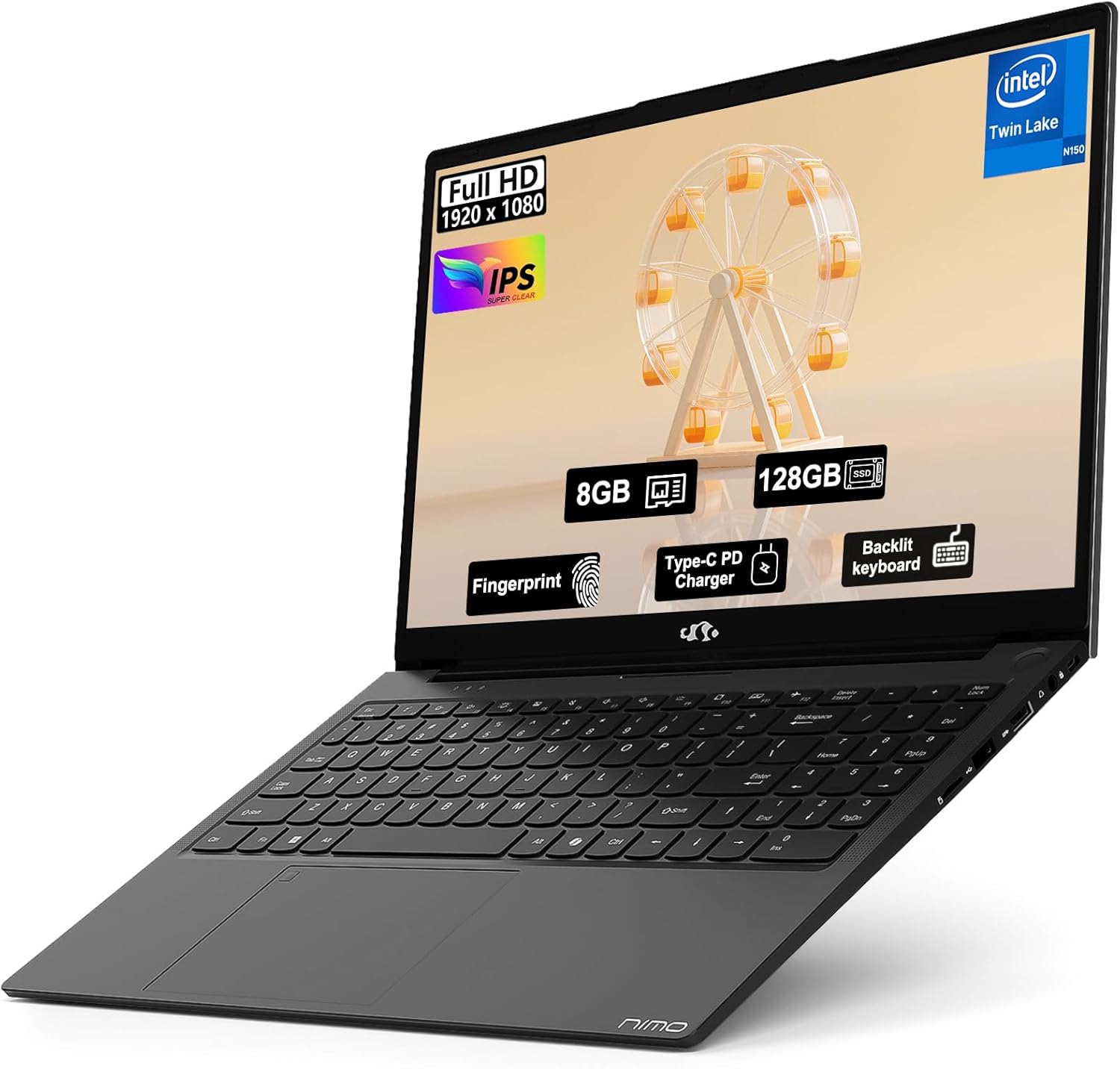
Image: The NIMO 15.6" FHD IPS Student Laptop Computer. The screen highlights key features such as Full HD 1920x1080 resolution, IPS display, 8GB RAM, 128GB SSD, Fingerprint reader, Type-C PD Charger, and Backlit keyboard. The laptop is shown in a sleek black finish.
Canllaw Gosod
1. Troi ymlaen a gwefru cychwynnol
Before first use, it is recommended to fully charge your NIMO laptop. Connect the included Type-C 65W PD Fast Charger to the laptop's Type-C port and a power outlet. The charging indicator light will illuminate. A 15-minute charge can provide approximately 2 hours of standby time.
2. Gosod System Weithredu
Your NIMO laptop comes with Windows 11 Home pre-installed. Upon first boot, follow the on-screen instructions to complete the initial Windows setup, including language selection, network connection, and user account creation.
3. Gosod Darllenydd Olion Bysedd
For enhanced security and convenient login, set up the fingerprint reader. Navigate to Settings > Accounts > Sign-in options > Fingerprint recognition (Windows Hello) and follow the prompts to register your fingerprints. The fingerprint sensor is integrated into the touchpad.
4. Backlit Keyboard Adjustment
The backlit keyboard allows for comfortable typing in low-light environments. Use the dedicated function keys (usually Fn + a specific F-key, refer to keyboard legends) to turn the backlight on/off and adjust its brightness levels.
Cyfarwyddiadau Gweithredu
1. Nodweddion Arddangos
Your laptop features a 15.6-inch Full HD (1920x1080) IPS Anti-Glare Display. This provides wide viewing angles, accurate colors, and reduces reflections for a comfortable viewing experience. The 85% screen-to-body ratio and 16:9 aspect ratio optimize screen real estate.
2. Touchpad Usage
The integrated touchpad supports multi-touch gestures for intuitive navigation. Common gestures include:
- Tap bys sengl: Cliciwch ar y chwith
- Two-finger tap: De-gliciwch
- Sgrôl dau fys: Scroll up/down or left/right
- Pinsio i chwyddo: Chwyddo i mewn/allan
3. Cysylltedd
The NIMO laptop supports various connectivity options:
- Wi-Fi 6: For high-speed wireless internet connection.
- Bluetooth 5.2: For connecting wireless peripherals such as headphones, mice, and keyboards.
- Porthladdoedd USB: Includes 1 x USB 2.0 port and 3 x USB 3.0 ports for connecting external devices.
- Porthladd Math-C: Defnyddir ar gyfer codi tâl a throsglwyddo data.
4. Rheoli Batri
The laptop is equipped with a Lithium Polymer battery providing an average battery life of approximately 5 hours. To maximize battery life, adjust screen brightness, close unused applications, and utilize power-saving modes in Windows settings.
Cynnal a chadw
1. RAM and SSD Upgrade
The NIMO laptop supports user-detachable RAM and SSD, allowing for future upgrades. If you plan to upgrade, ensure you use compatible components (DDR4 RAM, PCIe SSD) and follow proper electrostatic discharge (ESD) precautions. Consult a professional if you are unsure.
2. Glanhau Eich Gliniadur
I gynnal ymddangosiad a swyddogaeth eich gliniadur:
- Defnyddiwch frethyn meddal, di-lint i lanhau'r sgrin a'r tu allan.
- Ar gyfer smwtshis ystyfnig, ychydig yn damprhowch y lliain gyda dŵr neu doddiant glanhau sgrin.
- Avoid using harsh chemicals, abrasive cleaners, or direct spraying of liquids onto the laptop.
- Glanhewch y bysellfwrdd a'r pad cyffwrdd yn rheolaidd i gael gwared â llwch a malurion.
Datrys problemau
Mae'r adran hon yn darparu atebion i broblemau cyffredin y gallech ddod ar eu traws.
| Problem | Ateb Posibl |
|---|---|
| Nid yw'r gliniadur yn troi ymlaen. | Ensure the charger is properly connected and the power outlet is functional. Allow the battery to charge for at least 30 minutes before attempting to power on again. |
| Mae'r sgrin yn wag neu'n fflachio. | Check display cable connections (if external monitor is used). Restart the laptop. Update graphics drivers. |
| Problemau cysylltiad Wi-Fi. | Gwnewch yn siŵr bod Wi-Fi wedi'i alluogi yng ngosodiadau Windows. Ailgychwynwch eich llwybrydd/modem. Diweddarwch yrwyr Wi-Fi. |
| Nid yw'r bysellfwrdd na'r pad cyffwrdd yn ymateb. | Restart the laptop. Check for driver updates. Ensure no external devices are interfering. |
If you encounter issues not covered here or require further assistance, please contact NIMO customer support.
Manylebau
Detailed technical specifications for your NIMO N157L laptop:
| Nodwedd | Manylyn |
|---|---|
| Enw Model | Nimo N157L |
| Maint Sgrin | 15.6 modfedd |
| Cydraniad Sgrin | 1920 x 1080 pixels (FHD IPS Anti-Glare) |
| Prosesydd | Intel 4 Core N150 (up to 3.6 GHz) |
| HWRDD | 8 GB DDR4 (3200 MHz, detachable) |
| Gyriant Caled | 128 GB PCIe SSD (detachable) |
| Cydbrosesydd graffeg | Graffeg Integredig |
| System Weithredu | Windows 11 Cartref |
| Math Di-wifr | 802.11a/b/g/n/ac (Wi-Fi 6), Bluetooth 5.2 |
| Porthladdoedd USB | 1 x USB 2.0, 3 x USB 3.0 |
| Porthladdoedd Eraill | Type-C (65W PD Fast Charging), Memory Card Slot |
| Nodweddion Arbennig | Backlit Keyboard, Fingerprint Reader, HD Audio, Numeric Keypad |
| Bywyd Batri | Approx. 5 Hours (Lithium Polymer) |
| Pwysau Eitem | 3.8 pwys |
| Dimensiynau Cynnyrch | 14.07 x 8.98 x 0.76 modfedd |
| Lliw | Du |
| Cefn Webcam Datrys | 2 AS |
Gwarant a Chefnogaeth
NIMO Direct Inc. offers a comprehensive Gwarant Gwneuthurwr 2 Flwyddyn for your laptop. This warranty covers defects in materials and workmanship under normal use. Additionally, a 90-Day Hassle-Free Return and Exchange Service is provided from the date of purchase.
For warranty claims, technical support, or any concerns regarding your NIMO laptop, please contact the manufacturer's dedicated support team. Refer to the contact information provided on the product packaging or the official NIMO websafle.
Nodyn: The laptop is partially assembled in the USA. Please retain your proof of purchase for warranty purposes.
Ask a question about this manual
Ask about setup, troubleshooting, compatibility, parts, safety, or missing instructions. Manuals+ will review the question and use this page’s manual context to help answer it.