
Rhagymadrodd
Thank you for choosing the Amazon Basics Single Outlet Hose Watering Timer. This device is designed to simplify your garden irrigation by providing flexible and automated watering schedules. Please read this manual carefully before installation and use to ensure proper operation and longevity of your product.
Nodweddion Cynnyrch
- Smart Watering Timer: Program flexible watering schedules from 1 minute to 3 hours 59 minutes for hassle-free garden irrigation.
- Rheolaethau sythweledol: Activate manual watering with customizable duration when needed. The program can be paused for 24, 48, or 72 hours.
- Angled Screen Design: The 45% adjustable tilted screen ensures optimal visibility from any angle, displaying time, program, and battery status.
- Leak-Free Connection: Rubber gaskets ensure a tight seal and prevent water waste. Standard 1.9cm BSP thread. Operates on 2 AA alkaline batteries (not included).

Ffigur 1: Blaen view of the Amazon Basics Single Outlet Hose Watering Timer, showing the digital display and control buttons.
Cynnwys Pecyn
Dylai eich pecyn gynnwys yr eitemau canlynol:
- 1 x Amazon Basics Single Outlet Hose Watering Timer
- 1 x Llawlyfr Defnyddiwr
- Rubber gaskets (pre-installed or included for leak-free connection)
Note: 2 AA alkaline batteries are required and are NOT included in the package.
Gosod
1. Gosod Batri
- Lleolwch yr adran batri ar gefn yr amserydd.
- Agorwch y clawr adran batri.
- Mewnosodwch 2 batri alcalïaidd AA newydd, gan sicrhau'r polaredd cywir (+/-).
- Caewch glawr adran y batri yn ddiogel i gynnal gwrthiant dŵr.

Figure 2: Top connection of the timer, showing the filter and threaded inlet. Ensure rubber gaskets are in place for a leak-free seal.
2. Connecting to the Faucet
- Gwnewch yn siŵr bod y tap yn lân ac yn rhydd o falurion.
- Check that the rubber gasket is properly seated inside the timer's inlet connector.
- Screw the timer onto your standard 1.9cm (3/4 inch) outdoor faucet by hand until it is snug. Do not overtighten.
- Connect your garden hose to the outlet of the timer.
- Slowly turn on the faucet. Check for any leaks. If leaks occur, tighten the connections slightly or adjust the rubber gaskets.
Cyfarwyddiadau Gweithredu
1. Gosod yr Amser Cyfredol
Refer to the angled screen for clear visibility of settings.
- Pwyswch y botwm "SET" i fynd i mewn i'r modd gosod amser.
- Use the "+" and "-" buttons to adjust the hour. Press "SET" to confirm.
- Use the "+" and "-" buttons to adjust the minute. Press "SET" to confirm.
2. Programming a Watering Schedule
The timer allows flexible schedules from 1 minute to 3 hours 59 minutes.
- Press the "PROG" button to enter program setting mode.
- Set the START TIME: Use "+" and "-" to adjust the hour and minute, pressing "PROG" to confirm each.
- Set the WATERING DURATION: Use "+" and "-" to adjust the duration (minutes/hours), pressing "PROG" to confirm.
- Set the WATERING FREQUENCY: Use "+" and "-" to select how often the timer should water (e.g., every 12 hours, every 24 hours, specific days). Press "PROG" to confirm.
- Once all settings are confirmed, the timer will display the next scheduled watering time.
3. Dyfrio â Llaw
I ddyfrio â llaw y tu allan i'r amserlen wedi'i rhaglennu:
- Press the "MANUAL" button.
- Use "+" and "-" buttons to set the desired manual watering duration.
- Press "MANUAL" again to start manual watering. The timer will automatically stop after the set duration.
4. Pause Function (Rain Delay)
If it rains or you don't need to water for a few days, you can pause the program:
- Press the "DELAY" button.
- Use "+" and "-" buttons to select the pause duration (24, 48, or 72 hours).
- Press "DELAY" again to confirm. The timer will resume its programmed schedule after the delay period.

Figure 3: Visual representation of the timer's main features, including flexible schedules, manual watering, and secure sealing.
Cynnal a chadw
- Amnewid Batri: Replace batteries when the low battery indicator appears on the screen to ensure continuous operation.
- Glanhau hidlydd: Periodically check and clean the filter located in the inlet connector to prevent blockages and maintain water flow.
- Storio Gaeaf: During freezing temperatures, remove the timer from the faucet, drain any remaining water, and store it indoors to prevent damage.
- Glanhau cyffredinol: Sychwch yr amserydd gyda meddal, damp brethyn. Peidiwch â defnyddio glanhawyr neu doddyddion sgraffiniol.
Datrys problemau
| Problem | Achos Posibl | Ateb |
|---|---|---|
| Nid yw'r amserydd yn dyfrio. | Low batteries, incorrect program, faucet off, water pressure too low. | Check battery status and replace if needed. Verify program settings. Ensure faucet is fully open. Check water supply. |
| Dŵr yn gollwng o gysylltiadau. | Loose connection, damaged gasket, missing gasket. | Tighten connections. Check and replace rubber gaskets if damaged or missing. |
| Mae'r arddangosfa'n wag neu'n dywyll. | Batris marw neu isel. | Amnewidiwch y batris gyda batris alcalïaidd AA newydd. |
Manylebau
- Rhif Model: AMZ622617EU
- Dimensiynau: 8.2cm x 13.7cm x 18.5cm (Hyd x Lled x Uchder)
- Pwysau: 383.4 g
- Math o edau: Standard 1.9cm (3/4 inch) BSP
- Ffynhonnell Pwer: 2 x Batris Alcalïaidd AA (heb eu cynnwys)
- Hyd Dyfrio: 1 munud i 3 awr 59 munud
- Swyddogaeth Saib: 24, 48, neu 72 awr
- Lliw: Grey, Black, Blue
- Gwlad Tarddiad: Tsieina
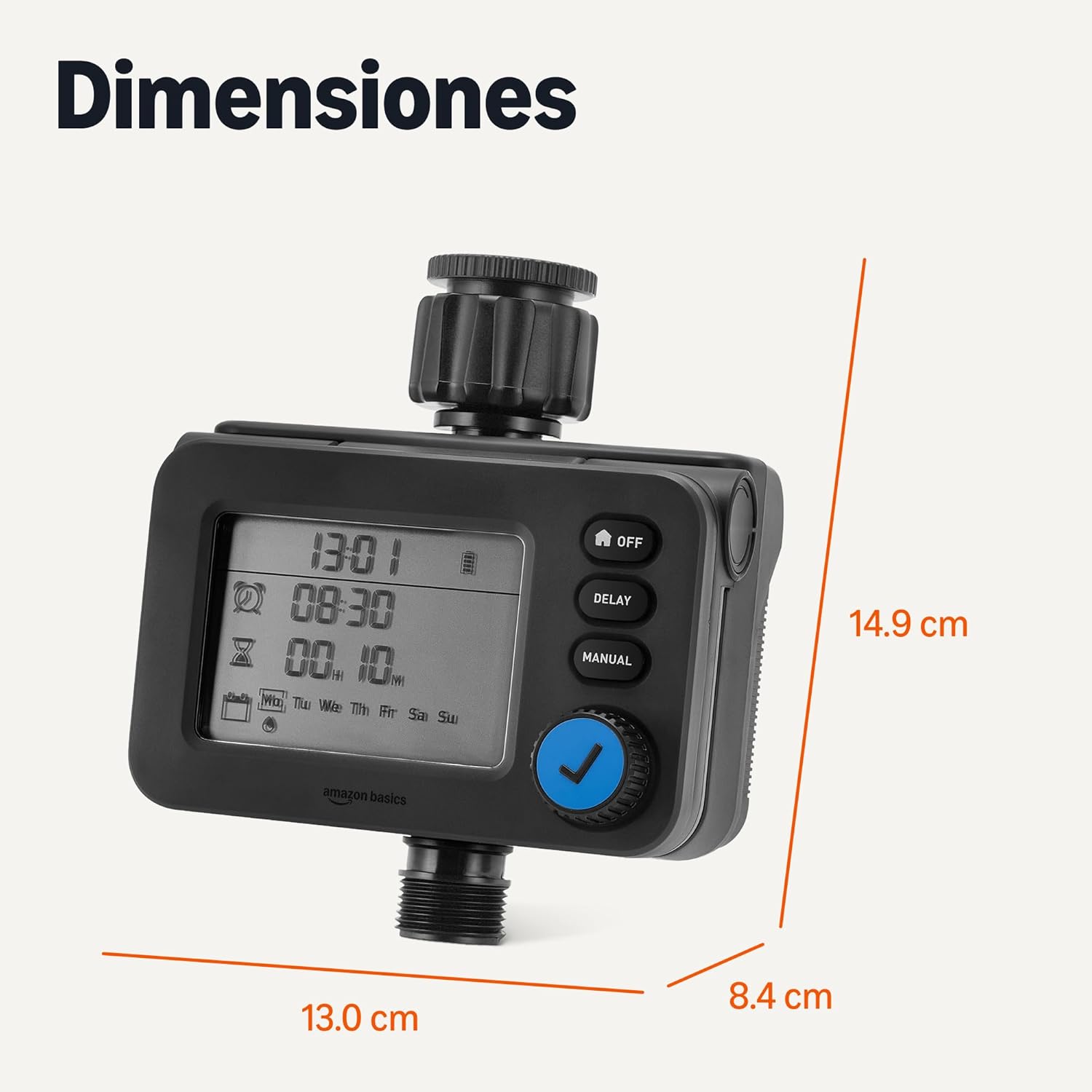
Ffigur 4: Dimensiynau'r cynnyrch ar gyfer cynllunio gosod.
Gwarant a Chefnogaeth
For warranty information and customer support, please refer to the documentation included with your purchase or visit the official Amazon Basics websafle.