
Rhagymadrodd
Thank you for choosing the HULALA HOME Office Chair. This manual provides essential information for the safe assembly, operation, maintenance, and troubleshooting of your new chair. Please read these instructions carefully before use and retain them for future reference.
Gwybodaeth Diogelwch
- Gwnewch yn siŵr bod yr holl gydrannau wedi'u clymu'n ddiogel cyn defnyddio'r gadair.
- Do not stand on the chair. Use it only for seating purposes.
- The maximum weight capacity for this chair is 275 pounds (125 kg). Do not exceed this limit.
- Keep children away from moving parts during assembly and operation.
- Avoid placing the chair near heat sources or in direct sunlight for prolonged periods to prevent material degradation.
Cynnwys Pecyn
Your HULALA HOME Office Chair is shipped in one box and includes the following main components:
- Seat Cushion with Armrests and Backrest (pre-assembled)
- Chair Base (star base)
- Silindr Codi Nwy
- Castwyr (5 darn)
- Pecyn Caledwedd (sgriwiau, golchwyr, wrench Allen)
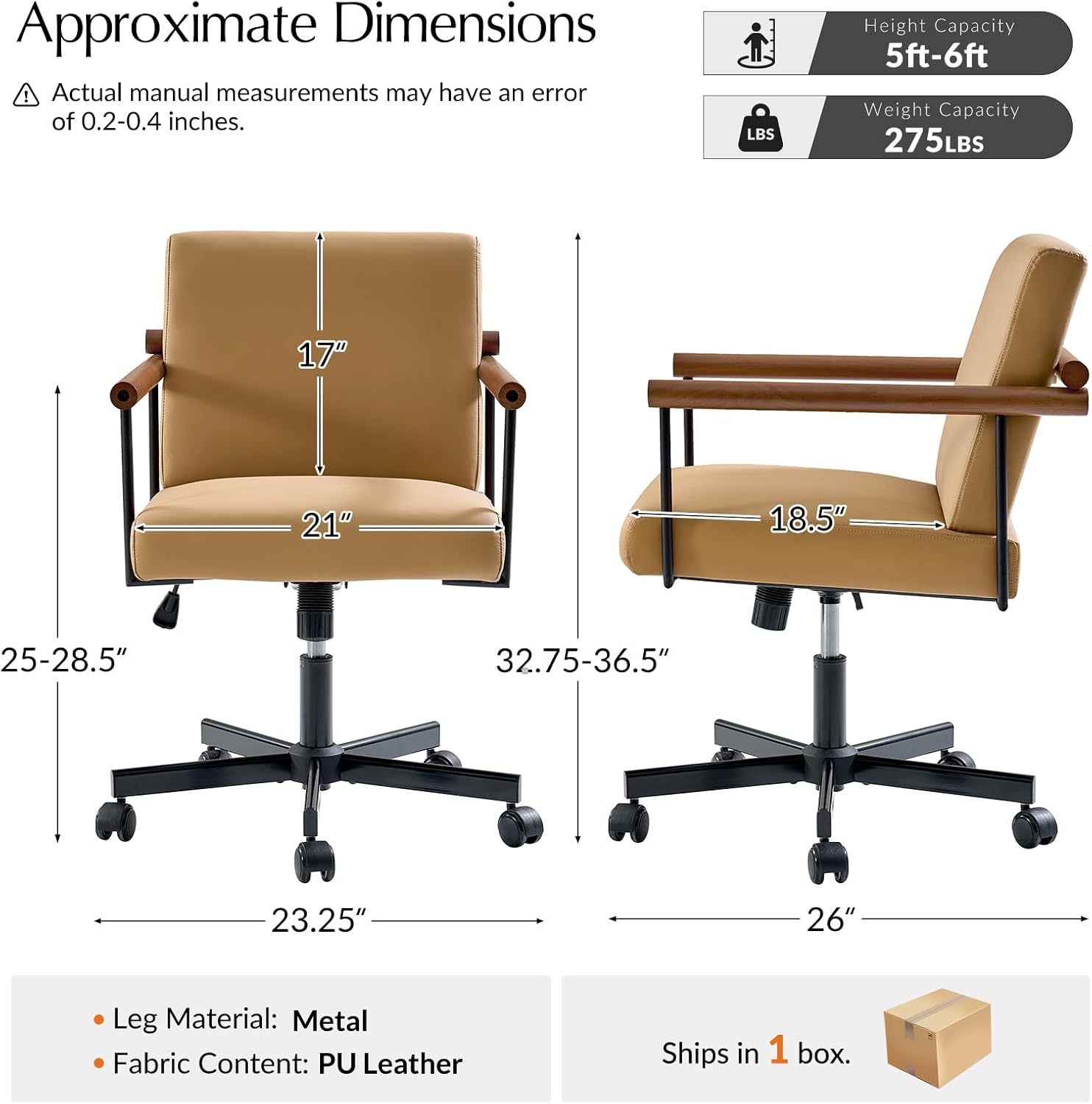
Image: Approximate dimensions and components of the HULALA HOME Office Chair.
Cyfarwyddiadau Gosod a Chynulliad
Follow these steps to assemble your office chair:
- Atodwch olwynion: Insert each of the five casters into the holes at the end of each leg of the chair base. Push firmly until they click into place.
- Mewnosod Codiad Nwy: Rhowch y silindr codi nwy yng nghanol sylfaen y gadair wedi'i chydosod.
- Cysylltwch y Sedd â'r Lifft Nwy: Carefully align the center mechanism under the seat cushion with the top of the gas lift cylinder. Lower the seat onto the gas lift, applying gentle pressure to secure it.
- Gwiriad Terfynol: Ensure all connections are secure and the chair is stable before sitting on it.
Cyfarwyddiadau Gweithredu
Addasiad Uchder
To adjust the seat height, locate the lever on the right side under the seat:
- I godi'r sedd: While standing, pull the lever upwards. The seat will rise. Release the lever at the desired height.
- I ostwng y sedd: While seated, pull the lever upwards. The seat will lower. Release the lever at the desired height.
Tilt and Tension Control
The chair features synchronous tilt and tension control for personalized comfort:
- Lock Upright/Enable Rocking: Push the same lever (used for height adjustment) inwards to lock the chair in an upright position. Pull the lever outwards to enable the rocking (tilting) function.
- Adjust Tilt Tension: Rotate the round knob located under the front of the seat. Turn clockwise to increase tension (making it harder to recline) or counter-clockwise to decrease tension (making it easier to recline).

Image: Synchronous Tilt & Tension Control mechanisms.
Troelli a Symudedd 360°
The chair is designed with a 360-degree swivel function and smooth-rolling casters for effortless movement in various directions.
- troi: The seat can rotate freely 360 degrees on its axis.
- Symudedd: The casters allow the chair to be moved easily across most floor surfaces.

Image: 360-degree swivel and smooth casters.
Cynnal a chadw
- Glanhau: Sychwch yn lân â meddal, damp cloth. Avoid using harsh chemicals or abrasive cleaners, as these can damage the faux leather and wood finish.
- Gwiriadau Rheolaidd: Gwiriwch yr holl sgriwiau a bolltau o bryd i'w gilydd i sicrhau eu bod yn dynn. Ail-dynhau os oes angen.
- Gofal Castiwr: Cadwch y castell yn rhydd o wallt a malurion i sicrhau rholio llyfn.

Image: Scratch-resistant PU Leather and comfortable cushion.
Datrys problemau
- Nid yw'r gadair yn addasu uchder: Gwnewch yn siŵr bod lifer y lifer nwy wedi'i gysylltu'n llawn. Os yw'r broblem yn parhau, efallai y bydd angen newid y lifer nwy.
- Cadair yn gwichian: Check all screws and bolts for tightness. Apply a small amount of silicone lubricant to moving metal parts if necessary.
- Casters do not roll smoothly: Remove any hair or debris from the caster wheels. Ensure casters are fully inserted into the base.
- Mae'r gadair yn teimlo'n ansefydlog: Verify that all assembly steps were followed correctly and all fasteners are tight. Ensure the chair is on a flat, even surface.
Manylebau
| Nodwedd | Manyleb |
|---|---|
| Brand | CARTREF HULALA |
| Rhif Model | ZOFXH0472 |
| Lliw | Camel |
| Deunydd | Faux Leather, Wood |
| Dimensiynau Cynnyrch (D x W x H) | 26"D x 32.75"L x 23.25"-36.5"U |
| Dyfnder y Sedd | 18.5 modfedd |
| Pwysau Eitem | 33 Bunt |
| Argymhelliad Pwysau Uchaf | 275 Bunt |
| Nodweddion Arbennig | Adjustable Height, Arm Rest, Back Support, Rolling, Swivel, Tilting |
| Cyfarwyddiadau Gofal Cynnyrch | Sychwch yn Glân |
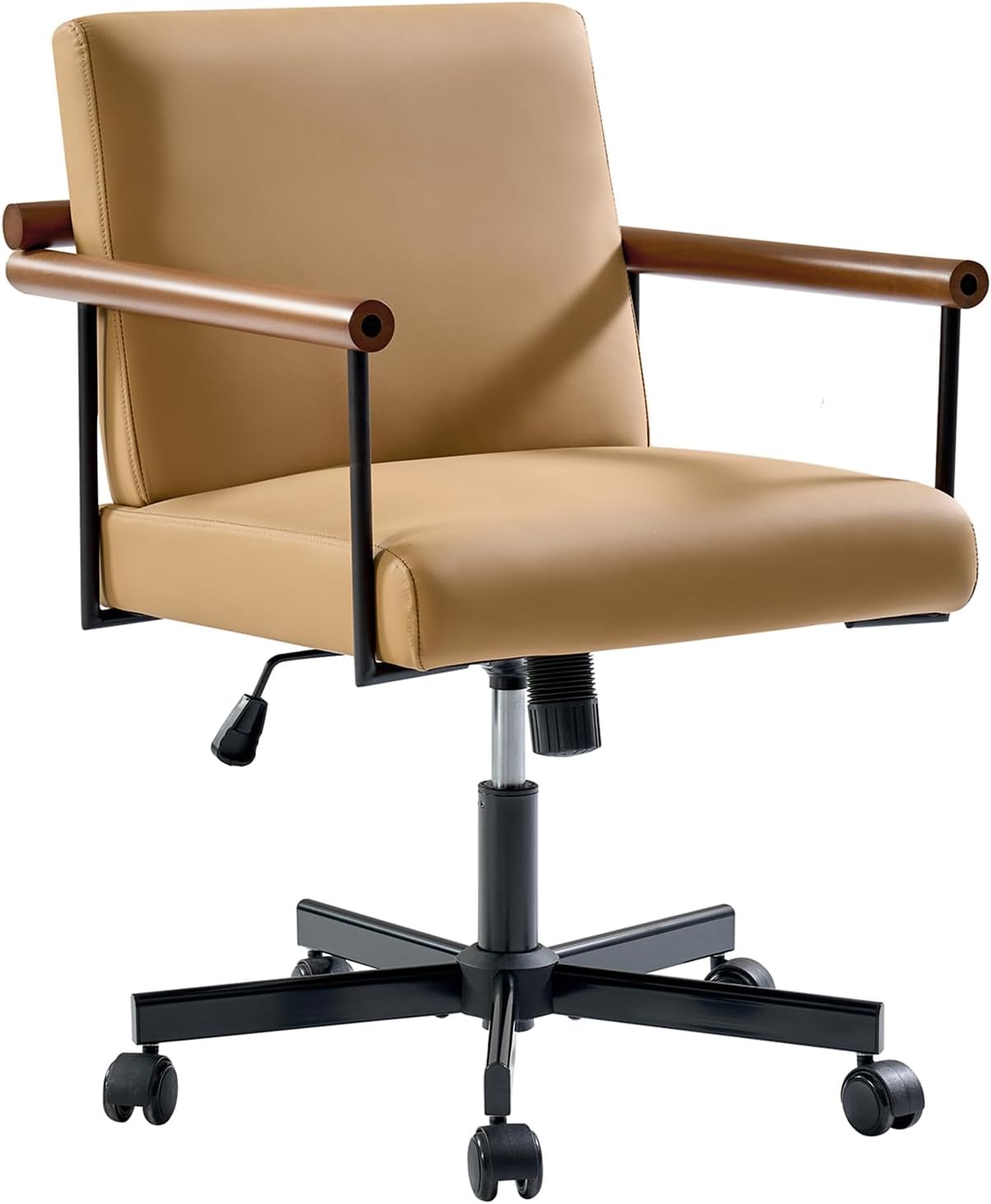
Image: HULALA HOME Office Chair, Model ZOFXH0472.
Gwybodaeth Gwarant
HULALA HOME provides a limited warranty for this product against manufacturing defects. Please retain your proof of purchase for any warranty claims. For specific warranty terms and conditions, refer to the documentation included with your purchase or contact HULALA HOME customer support.
Cefnogaeth i Gwsmeriaid
If you have any questions, require assistance with assembly, or encounter any issues not covered in this manual, please contact HULALA HOME customer support through the retailer where the product was purchased or visit the official HULALA HOME websafle ar gyfer gwybodaeth cyswllt.


