
1. Rhagymadrodd
The Hushing Sound Machine Alarm Clock F4 is a versatile 3-in-1 device designed to enhance sleep and simplify daily routines. It combines a sound machine with 30 soothing sounds, a dual alarm clock with 15 wake-up sounds, and a night light with 12 color options. This device features a backup battery for alarm functionality during power outages, a memory function to retain settings, and adjustable display brightness.

Ffigur 1: Blaen view of the Hushing Sound Machine Alarm Clock F4.
2. Nodweddion Cynnyrch
- Ymarferoldeb 3-mewn-1: Integrates a sound machine, dual alarm clock, and night light.
- Peiriant sain: Offers 30 soothing sounds, including white noise, pink noise, brown noises, lullabies, and natural sounds (rain, thunderstorm, sea waves, river, campfire, water drop, singing birds).
- Larymau Deuol: Two independent alarms for different schedules.
- Wake-up Sounds: 15 options, including classic beeps, light music, and ambient sounds.
- Swyddogaeth Snooze: Provides an additional 9 minutes of rest.
- Golau Nos: 12 colors with 10 adjustable brightness levels. Can be turned off independently.
- Arddangosfa Amser: 12/24-hour mode with 4 levels of adjustable brightness.
- Rheoli cyfaint: 32 lefel cyfaint addasadwy.
- Sleep Timers: Auto-off options for 30, 60, 90, or 120 minutes, or continuous playback.
- Swyddogaeth Cof: Retains last settings after power failure or reboot.
- Batri wrth gefn: Ensures alarm functionality during power outages (device requires constant power for full operation).

Ffigur 2: Drosoddview o'r swyddogaeth 3-mewn-1.

Figure 3: Detailed list of 30 soothing sounds available.
3. Gosod
- Cysylltiad Pwer: Connect the device to a power source using the provided USB cable and adapter. The device requires continuous power for full operation. The internal battery serves as a backup for the alarm function only.
- Tâl Cychwynnol: For optimal performance, ensure the device is fully charged before first use.
- Gosod Amser:
- Press and hold the "12/24H Time Set" button to enter time setting mode.
- Defnyddiwch y botymau "+" neu "-" i addasu'r awr.
- Press the "Next Song" button (right arrow) to move to minute adjustment.
- Defnyddiwch y botymau "+" neu "-" i addasu'r munudau.
- Press the "Next Song" button again to confirm and exit time setting.
- Fformat 12/24 Awr: Short press the "12/24H Time Set" button to toggle between 12-hour (AM/PM) and 24-hour formats.
Video 1: Guide on how to set the alarm clock and other settings.
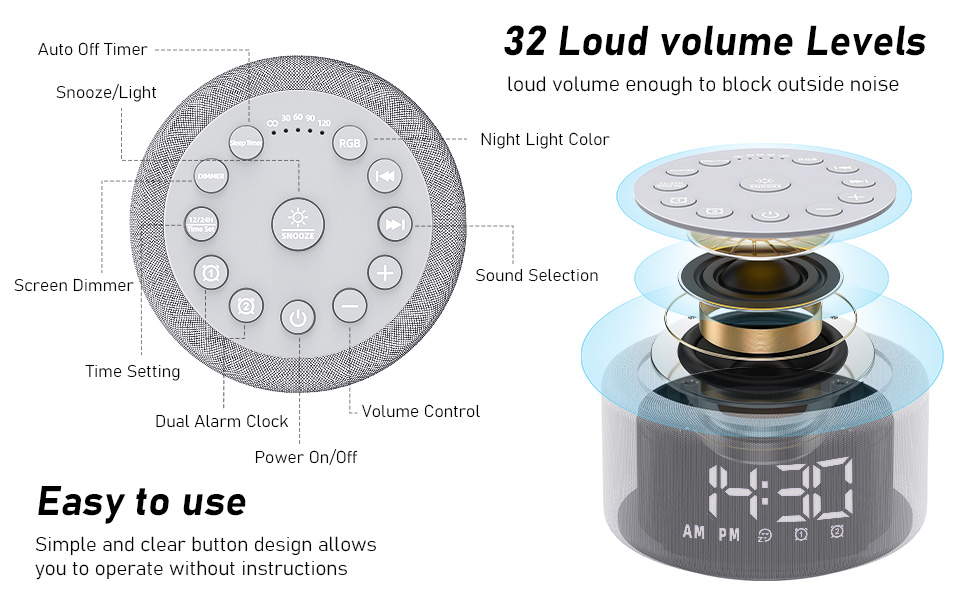
Figure 4: Button layout and functions for easy operation.
4. Cyfarwyddiadau Gweithredu
4.1. Gosod Larymau
- Set Alarm 1 or 2:
- Press and hold the "Alarm 1" or "Alarm 2" button to enter alarm setting mode.
- Use the "+" or "-" buttons to adjust the alarm hour.
- Press the "Next Song" button (right arrow) to move to minute adjustment.
- Use the "+" or "-" buttons to adjust the alarm minutes.
- Press the "Next Song" button again to select the alarm sound (15 options). Use "+" or "-" to cycle through sounds.
- Press the "Next Song" button again to adjust alarm volume. Use "+" or "-" to set the volume.
- Press the "Next Song" button again to confirm and exit alarm setting. The alarm icon will appear on the display.
- Turn Alarm On/Off: Short press the "Alarm 1" or "Alarm 2" button to activate or deactivate the alarm. The alarm icon will appear/disappear on the display.
- Ailatgoffa: When the alarm sounds, press the "Snooze" button to temporarily silence it for 9 minutes.
- Larwm Stop: To turn off the alarm completely, press any button other than "Snooze" when the alarm is sounding.
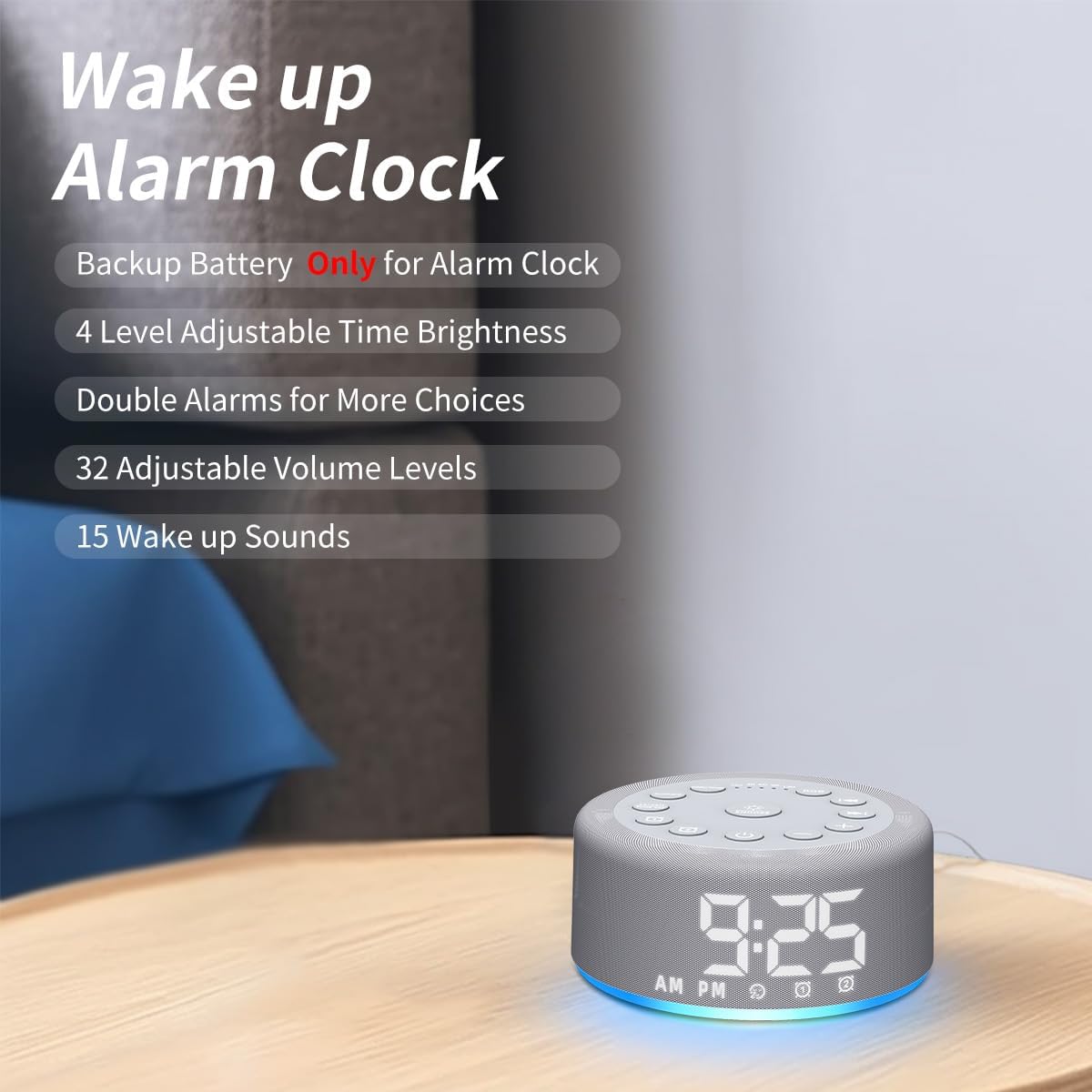
Figure 5: Key features of the alarm clock function.

Ffigur 6: Examples of wake-up sounds.
4.2. Using the Sound Machine
- Troi ymlaen / i ffwrdd: Press the power button (bottom center) to turn the sound machine on or off.
- Dewiswch Sain: Use the "Previous Song" (left arrow) or "Next Song" (right arrow) buttons to cycle through the 30 available sounds.
- Addasu Cyfrol: Use the "+" or "-" buttons to increase or decrease the volume (32 levels).
- Gosod Amserydd Cwsg: Short press the "Sleep Timer" button to set an auto-off timer for 30, 60, 90, or 120 minutes. Press repeatedly to cycle through options or select continuous play (indicated by "CO").

Figure 7: Internal speaker design and volume capabilities.
4.3. Gweithrediad Goleuadau Nos
- Troi ymlaen / i ffwrdd: Press the "RGB" button to turn the night light on or off.
- Newid lliw: Short press the "RGB" button to cycle through 12 different colors.
- Addasu Disgleirdeb: Use the "+" or "-" buttons to adjust the brightness of the night light (10 levels).

Figure 8: Night light features and benefits.
4.4. Disgleirdeb Arddangos
- Addasu Disgleirdeb Arddangos: Short press the "Dimmer" button to cycle through 4 levels of display brightness (low, medium, high, off).
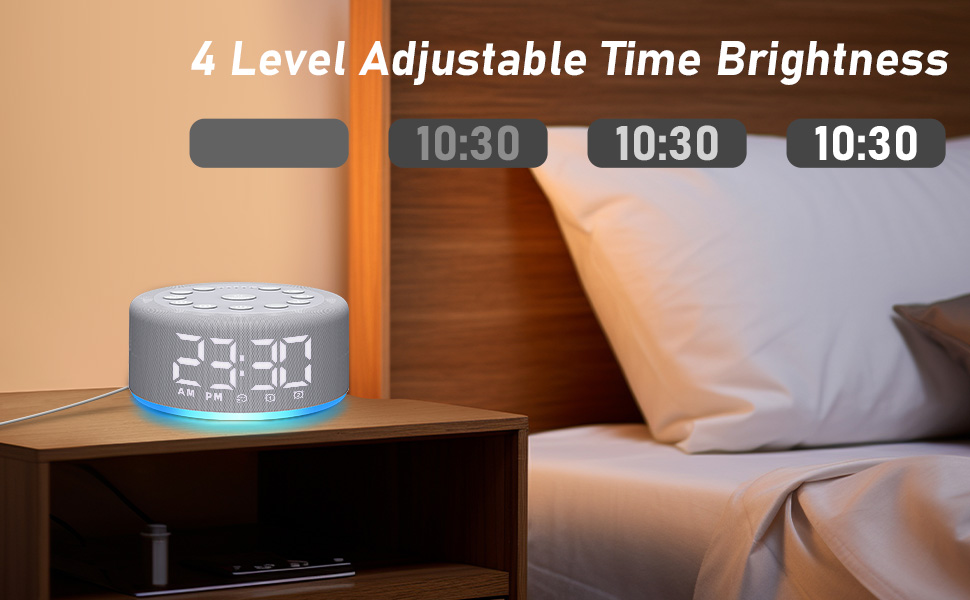
Figure 9: Adjustable time display brightness levels.
5. cynnal
- Glanhau: Sychwch y ddyfais gyda lliain meddal, sych. Peidiwch â defnyddio glanhawyr hylif na deunyddiau sgraffiniol.
- Storio: Storio mewn lle oer, sych pan nad yw'n cael ei ddefnyddio am gyfnodau estynedig.
- Pwer: Ensure the device remains plugged into a power source for continuous functionality, especially for the sound machine and night light features. The backup battery is solely for the alarm function during power interruptions.
6. Datrys Problemau
- Dyfais ddim yn troi ymlaen: Ensure the device is properly plugged into a working power outlet. Check the USB cable and adapter for damage.
- Larwm ddim yn seinio: Verify that the alarm is set and activated (alarm icon visible on display). Check the alarm volume setting. Ensure the device is plugged in, as the backup battery only supports the alarm function for a limited time during power outages.
- Problemau ansawdd sain: Ensure the device is placed on a flat, stable surface. The speaker is located on the bottom of the unit, so avoid placing it on soft surfaces that might muffle the sound.
- Arddangosfa rhy llachar/tywyll: Use the "Dimmer" button to adjust the display brightness to your preference.
- Settings not saving: The device has a memory function. If settings are not retained, ensure the device is not completely losing power for extended periods beyond the backup battery's capacity.
7. manylebau
- Dimensiynau Cynnyrch: 4.25 x 4.25 x 2.2 modfedd
- Pwysau Eitem: 7.68 owns
- Enw'r Model: HAC-F4
- Batris: 1 Lithium Polymer battery required (included, for backup alarm function)
- Gwneuthurwr: Hushing
8. Gwarant a Chefnogaeth
For warranty information or technical support, please refer to the contact details provided with your purchase or visit the official Hushing websafle. Cadwch eich derbynneb prynu ar gyfer unrhyw hawliadau gwarant.