
1. Rhagymadrodd
Diolch am brynuasing the Philips Series 700 Compact Electric Shaver S791/06. This manual provides essential information for the safe and effective use, maintenance, and troubleshooting of your new shaver. Please read these instructions carefully before first use and retain them for future reference.
2. Gwybodaeth Diogelwch
WARNING: To reduce the risk of electric shock, injury, or damage to the appliance:
- Avoid contact with water and electricity.
- Exercise extreme caution when handling the blades.
- Due to the wireless charging function, avoid contact with water or moisture when charging.
- Peidiwch â throchi'r cebl gwefru na'r addasydd mewn dŵr.
- Cadwch y teclyn allan o gyrraedd plant.
- Defnyddiwch yr offeryn at ei ddiben bwriadedig yn unig fel y disgrifir yn y llawlyfr hwn.
3. Cynnyrch Drosview
The Philips Series 700 Compact Electric Shaver S791/06 is designed for a close and comfortable shave. It features a compact design, powerful motor, and durable blades for efficient performance.
Nodweddion Allweddol:
- Deep Shave Technology: Lifts hairs from the root for a deep shave of -0.08mm below the skin.
- Codi Tâl Di-wifr: Supports Qi-compatible wireless charging pads for convenient cable-free charging. (Wireless charging pad not included; charging is also possible with the included cable.)
- Swipe Power Operation: Touch-sensor power button for intuitive on/off control.
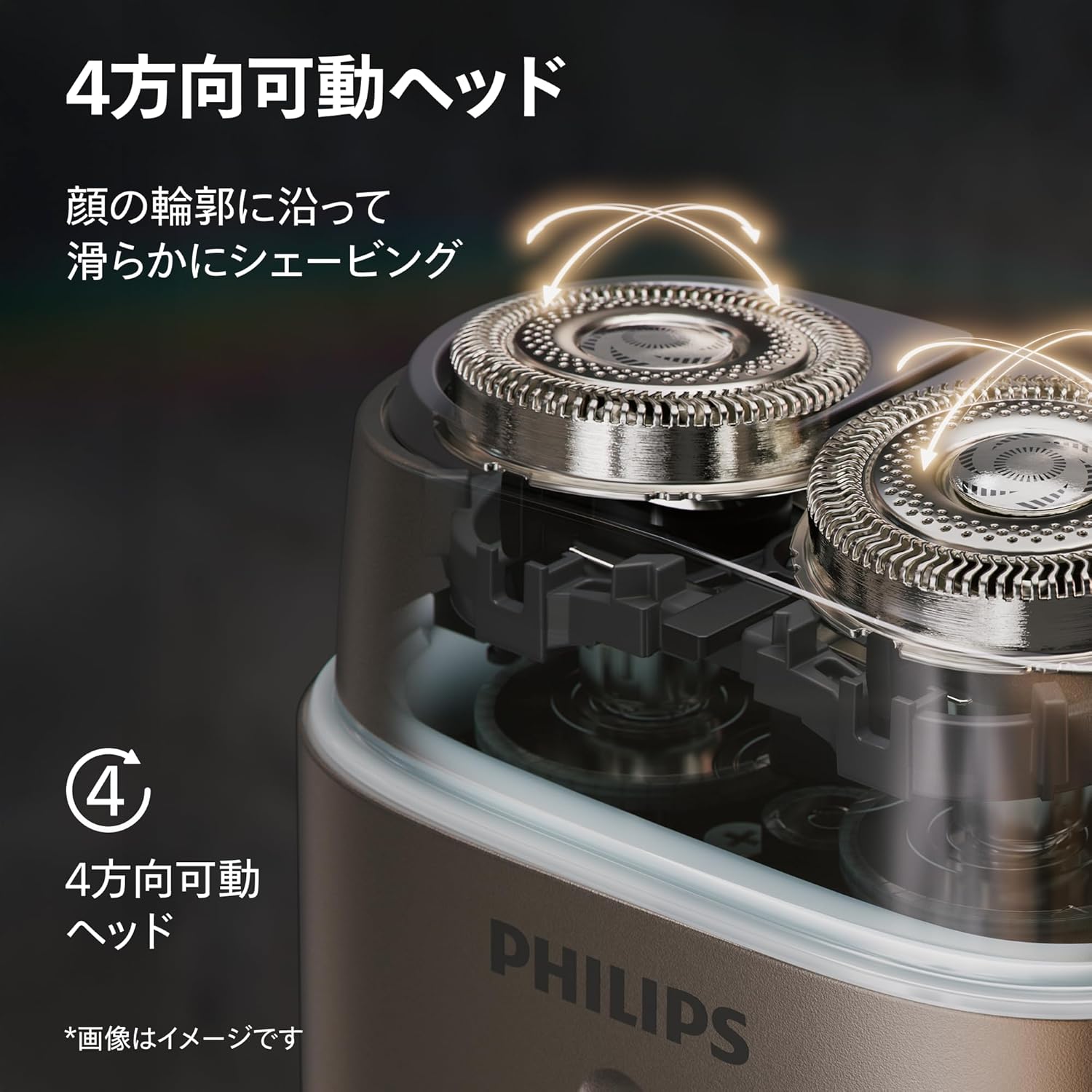
- 4-Direction Flexible Head: Yn addasu i gyfuchliniau'r wyneb am eilliad llyfn.
- Modur pwerus: Ensures a robust and efficient shaving experience.
- Llafnau Gwydn: European-made stainless steel blades for long-lasting sharpness.
- Defnydd Gwlyb a Sych: Suitable for wet shaving with foam or gel, and the body is fully washable.
- Nose Trimmer Attachment: For additional grooming needs.
- Cludadwyedd: Includes a protective cap and travel case for easy transport and storage.


4. Gosod
4.1 Codi Tâl Cychwynnol
Before using your shaver for the first time, ensure it is fully charged. A full charge provides approximately 60 minutes of shaving time.
- Using the Charging Cable: Connect the small end of the included charging cable to the shaver's charging port and the USB end to a compatible USB power adapter (not included) or a powered USB port.
- Using a Wireless Charging Pad (Sold Separately): Place the shaver directly onto a Qi-compatible wireless charging pad. Ensure the shaver is correctly positioned for charging to begin.
The charging indicator light on the shaver will illuminate during charging and change when fully charged (refer to the indicator light section in your quick start guide for specific behavior).

5. Cyfarwyddiadau Gweithredu
5.1 Pŵer Ymlaen/Diffodd
The shaver features a touch-sensor power button for intuitive control.
- To turn on, slide your finger upwards along the touch-sensor power button.
- To turn off, slide your finger downwards along the touch-sensor power button.

5.2 Eillio
For optimal results, ensure your skin is clean and dry for a dry shave, or apply shaving foam/gel for a wet shave.
- Trowch yr eillio ymlaen.
- Gently press the shaver head against your skin.
- Move the shaver in small, circular motions across your face and neck. The 4-direction flexible head will adapt to your facial contours.
- For a closer shave, stretch your skin with your free hand.
- Ar ôl eillio, trowch yr eillio i ffwrdd.

5.3 Using the Nose Trimmer Attachment
The nose trimmer attachment can be used for grooming nose and ear hair.
- Sicrhewch fod yr eillio wedi'i ddiffodd.
- Remove the shaving head by gently pulling it upwards.
- Attach the nose trimmer by aligning it with the shaver body and pushing it down until it clicks into place.
- Trowch yr eillio ymlaen.
- Mewnosodwch y trimmer yn ofalus i mewn i'ch ffroen neu gamlas eich clust.
- Symudwch y trimmer yn ysgafn i gael gwared â gwallt diangen.
- After use, turn off the shaver and remove the trimmer for cleaning.

6. cynnal
Bydd glanhau a chynnal a chadw rheolaidd yn sicrhau perfformiad gorau posibl ac yn ymestyn oes eich eilliwr.
6.1 Glanhau'r Eilliwr
The shaver body is fully washable, making cleaning simple.
- Ar ôl pob defnydd, diffoddwch y peiriant eillio.
- Hold the shaver under warm running water to rinse the shaving head.
- For a more thorough cleaning, remove the shaving head by gently pulling it upwards.
- Rinse the inside of the shaving unit and the individual cutters under running water.
- Shake off excess water and allow the components to air dry before reassembling.
- Peidiwch â defnyddio cyfryngau glanhau sgraffiniol na chemegau llym.

6.2 Amnewid Pennau Eillio
Er mwyn sicrhau perfformiad gorau posibl parhaus, argymhellir disodli'r pennau eillio tua phob 12 mis. Gellir prynu pennau newydd gan fanwerthwyr Philips awdurdodedig neu ar-lein.
- Diffoddwch y peiriant eillio a'i ddatgysylltu o unrhyw ffynhonnell bŵer.
- Remove the old shaving head by gently pulling it upwards.
- Dispose of the old shaving head responsibly.
- Place the new shaving head onto the shaver body, ensuring it aligns correctly, and push down until it clicks into place.
7. Datrys Problemau
If you encounter any issues with your Philips Series 700 Compact Electric Shaver, refer to the following common problems and solutions:
| Problem | Achos Posibl | Ateb |
|---|---|---|
| Nid yw'r eillydd yn troi ymlaen. | Battery is depleted. Incorrect swipe gesture. | Charge the shaver fully. Ensure you slide your finger firmly upwards along the power button. |
| Perfformiad eillio gwael. | Shaving heads are dirty or worn. | Glanhewch y pennau eillio yn drylwyr. Rhowch bennau eillio newydd yn eu lle os ydyn nhw'n hŷn na 12 mis. |
| Mae'r eillydd yn gwneud sŵn anarferol. | Shaving head not properly attached. Debris inside the shaver head. | Ensure the shaving head is securely attached. Clean the shaving head thoroughly. |
| Nid yw codi tâl diwifr yn gweithio. | Shaver not correctly positioned on the charging pad. Charging pad is not Qi-compatible or not powered. | Adjust the shaver's position on the charging pad. Ensure the charging pad is powered and Qi-compatible. Use the included charging cable as an alternative. |
Os yw'r broblem yn parhau ar ôl rhoi cynnig ar yr atebion hyn, cysylltwch â chymorth cwsmeriaid Philips.
8. manylebau
| Nodwedd | Manyleb |
|---|---|
| Rhif Model | S791/06 |
| Brand | Philips |
| Lliw | Ash Gold |
| Maint | Compact |
| Wattage | 5 Gw |
| Math Batri | Ion Lithiwm (Wedi'i gynnwys) |
| Bywyd Batri | 60 munud |
| Deunydd Blade | Dur Di-staen |
| Math Pen | Rotari |
| Pwysau Pecyn | 0.45 kg |
| Nodweddion Eraill | Portable, Rechargeable, Wet & Dry Use, Wireless Charging Compatible |
9. Gwarant a Chefnogaeth
9.1 Gwarant y Gwneuthurwr
This Philips Series 700 Compact Electric Shaver S791/06 comes with a Gwarant gwneuthurwr 2 flynedd from the date of purchase. This warranty covers defects in materials and workmanship under normal use. It does not cover damage caused by misuse, neglect, accidents, or unauthorized modifications.
9.2 Cefnogaeth i Gwsmeriaid
For product support, warranty claims, or to purchase replacement parts and accessories, please visit the official Philips website or contact their customer service department. You can find contact information on the Philips websafle neu yn y ddogfennaeth sydd wedi'i chynnwys gyda'ch cynnyrch.
Adnoddau Ar-lein:
- Swyddogol Philips Websafle: www.philips.com
- Siop Philips ar Amazon: Siop Philips