
1. Gwybodaeth Diogelwch
Please read all instructions carefully before using this monitor. Keep this manual for future reference.
- Peidiwch ag amlygu'r monitor i law na lleithder i atal tân neu sioc drydanol.
- Peidiwch ag agor y monitor casing. Nid oes unrhyw rannau y gall y defnyddiwr eu gwasanaethu y tu mewn. Cyfeiriwch yr holl waith cynnal a chadw at bersonél cymwys.
- Rhowch y monitor ar arwyneb sefydlog, gwastad i'w atal rhag cwympo.
- Sicrhewch awyru digonol o amgylch y monitor. Peidiwch â rhwystro agoriadau awyru.
- Defnyddiwch yr addasydd pŵer a gyflenwir gyda'r monitor yn unig.
- Datgysylltwch y monitor o'r soced pŵer yn ystod stormydd mellt a phan na chaiff ei ddefnyddio am gyfnodau hir.
2. Cynnwys Pecyn
Gwiriwch fod yr holl eitemau yn bresennol yn eich pecyn:
- Amzfast AMZG25F6F 24.5 Inch Gaming Monitor
- Stand Monitor (Sylfaen a Gwddf)
- Addasydd Pŵer
- Cebl DisplayPort (DP)
- Cebl HDMI
- Llawlyfr Defnyddiwr

Image: Amzfast Gaming Monitor with key features and included accessories.
3. Cynnyrch Drosview
3.1 Nodweddion y Monitro
- Arddangos: 24.5-inch Fast IPS Panel, Full HD (1920x1080) Resolution
- Cyfradd Adnewyddu: 320Hz for ultra-smooth visuals
- Amser ymateb: 1ms MPRT (Moving Picture Response Time)
- Gamut lliw: 120% sRGB coverage, 8-bit (16.7 Million Colors)
- Ystod Dynamig Uchel: HDR support for enhanced contrast and color
- Cysoni Addasol: Eliminates screen tearing and stuttering
- Technoleg Gofal Llygaid: Anti-flicker, Anti-glare, Blue Light Filter to reduce eye strain
- Dulliau Hapchwarae: Optimized presets for FPS, RTS, and RPG games
- Special Gaming Functions: AI Crosshair, Night Vision, Screen Size Adjustment (4:3/16:9)
- Cydnawsedd VESA: 100x100mm for wall mounting or alternative stands
3.2 Porthladdoedd a Rheolyddion

Delwedd: Cefn view of the monitor highlighting input ports and the 5-way joystick control.
The monitor features a 5-way joystick for easy navigation of the On-Screen Display (OSD) menu. The rear panel includes the following ports:
- Mewnbwn Pwer DC: Cysylltwch yr addasydd pŵer yma.
- Porthladdoedd HDMI 2.0 (x2): Yn cefnogi cyfradd adnewyddu hyd at 240Hz.
- DisplayPort 1.4 Ports (x2): Yn cefnogi cyfradd adnewyddu hyd at 320Hz.
- Allbwn sain: Ar gyfer cysylltu clustffonau neu siaradwyr allanol.
4. Gosod
4.1 Cydosod y Stand
- Tynnwch gydrannau'r monitor a'r stondin o'r pecynnu yn ofalus.
- Cysylltwch wddf y stondin â phanel y monitor. Gwnewch yn siŵr ei fod yn clicio'n ddiogel i'w le neu ei fod wedi'i glymu â sgriwiau os darperir rhai.
- Attach the stand base to the stand neck. Tighten the thumb screw or screws at the bottom of the base.
- Rhowch y monitor wedi'i ymgynnull ar arwyneb sefydlog, gwastad.
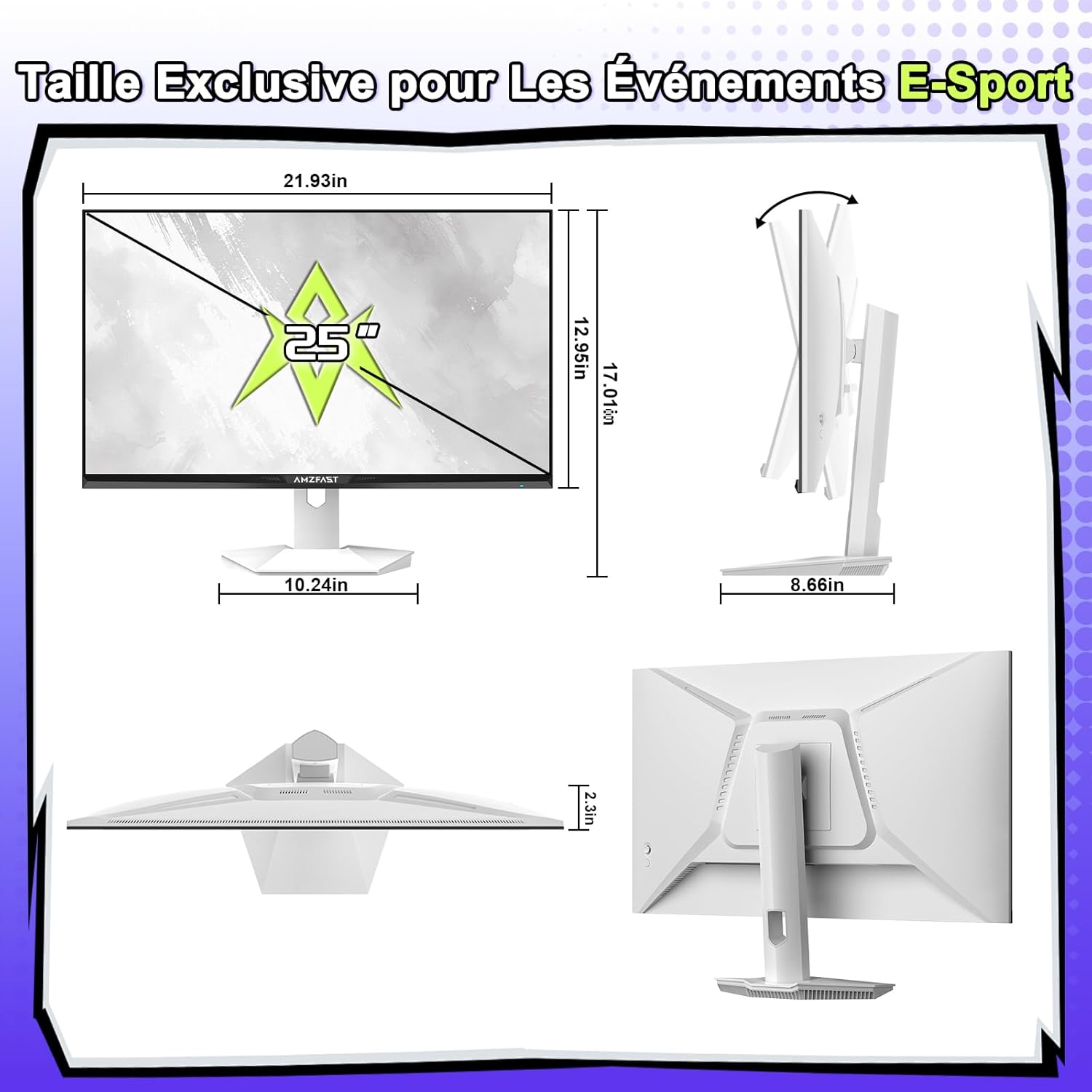
Image: Monitor dimensions and stand assembly diagram.
4.2 Cysylltu â Dyfais
- Connect one end of the provided DisplayPort or HDMI cable to the corresponding port on your computer, console, or laptop.
- Connect the other end of the cable to an available DisplayPort 1.4 or HDMI 2.0 port on the monitor. For optimal performance (320Hz), use a DisplayPort 1.4 cable.
- Connect the power adapter to the DC power input on the monitor, then plug the adapter into a power outlet.
4.3 Pŵer Cychwynnol Ymlaen
Press the power button (often integrated into the joystick) to turn on the monitor. The monitor will automatically detect the input signal. If no signal is detected, ensure your device is powered on and the cables are securely connected.
5. Cyfarwyddiadau Gweithredu
5.1 Llywio Dewislen OSD
Use the 5-way joystick located on the back of the monitor to navigate the On-Screen Display (OSD) menu:
- Pwyswch y ffon reoli: Enters the OSD menu or confirms a selection.
- Move joystick Up/Down: Yn llywio trwy opsiynau'r ddewislen.
- Move joystick Left/Right: Adjusts values or moves to sub-menus.
- Move joystick Left (from main screen): Quick access to input selection.
- Move joystick Right (from main screen): Quick access to exit.
- Move joystick Up (from main screen): Quick access to Game Mode.
- Move joystick Down (from main screen): Quick access to AI Crosshair.
5.2 Gosodiadau Arddangos
Within the OSD menu, you can adjust various display settings:
- Disgleirdeb/Cyferbyniad: Adjust image luminance and distinction.
- Gosodiadau lliw: Mireinio tymheredd lliw, gama, a dirlawnder.
- Modd Llun: Select from various presets (Standard, Movie, Office, Gaming) or customize your own.
- HDR: Enable or disable High Dynamic Range for compatible content.
- Eye-Care: Activate Blue Light Filter and Flicker-Free modes to reduce eye strain during prolonged use.
5.3 Nodweddion Hapchwarae
Gwella eich profiad hapchwarae gyda'r nodweddion pwrpasol hyn:
- Game Modes (FPS/RTS/RPG): Select pre-calibrated settings for specific game genres to optimize visuals and response.
- AI Crosshair: An on-screen crosshair that changes color based on the scene, aiding target acquisition.
- Gweledigaeth Nos: Enhances visibility in dark in-game areas, allowing you to spot enemies more clearly.
- Addasiad Maint y Sgrin: Switch between 4:3 and 16:9 aspect ratios to suit different games or preferences.
- Cysoni Addasol: Ensure this feature is enabled in both the monitor OSD and your graphics card settings to synchronize the monitor's refresh rate with your GPU's frame rate, eliminating screen tearing and stuttering.

Image: Different game modes (FPS, RTS, RPG) for optimized gameplay.

Image: Demonstrating screen size adjustment (4:3 vs 16:9) and Adaptive Sync functionality.
6. cynnal
Mae cynnal a chadw priodol yn sicrhau hirhoedledd a pherfformiad gorau posibl eich monitor.
- Glanhau'r sgrin: Sychwch y sgrin yn ysgafn gyda lliain meddal, di-flwff. Ar gyfer marciau ystyfnig, sychwch yn ysgafnampgolchwch y lliain gyda dŵr neu lanhawr sgrin arbenigol. Peidiwch byth â chwistrellu hylif yn uniongyrchol ar y sgrin.
- Glanhau'r Casing: Defnyddiwch frethyn meddal, sych i sychu'r monitor casing. Osgowch lanhawyr neu doddyddion sgraffiniol.
- Awyru: Ensure the ventilation holes on the back of the monitor are clear of dust and obstructions.
- Storio: When storing the monitor for an extended period, unplug it and cover it to protect it from dust.
7. Datrys Problemau
Os byddwch chi'n dod ar draws problemau gyda'ch monitor, cyfeiriwch at y problemau a'r atebion cyffredin canlynol:
- Dim pŵer:
- Ensure the power adapter is securely connected to both the monitor and a working power outlet.
- Gwiriwch a yw'r botwm pŵer wedi'i wasgu.
- Dim Arwydd:
- Verify that the video cable (DP or HDMI) is securely connected to both the monitor and your source device (PC, console).
- Ensure your source device is powered on.
- Defnyddiwch y ddewislen OSD i ddewis y ffynhonnell fewnbwn gywir â llaw.
- Delwedd sy'n Fflachio neu wedi'i Gwyrdroi:
- Gwiriwch y cebl fideo am ddifrod neu gysylltiadau rhydd. Rhowch gynnig ar gebl gwahanol os yn bosibl.
- Gwnewch yn siŵr bod gyrwyr eich cerdyn graffeg yn gyfredol.
- Disable Adaptive Sync in the OSD and graphics card settings to see if the issue persists.
- Adjust the refresh rate in your operating system display settings.
- picsel marw:
- A small number of bright or dark pixels are common in LCD/LED technology and do not typically indicate a defect. Refer to the warranty policy for specific pixel defect criteria.
8. manylebau
| Nodwedd | Manyleb |
|---|---|
| Brand | Amzfast |
| Rhif Model | AMZG25F6F |
| Maint Sgrin | 24.5 modfedd |
| Datrysiad | FHD 1080p (1920 x 1080 Picsel) |
| Cymhareb Agwedd | 16:9 |
| Math o Banel | IPS cyflym |
| Arwyneb y Sgrin | Matte, Anti-glare |
| Cyfradd Adnewyddu | 320 Hz |
| Amser Ymateb | 1ms MPRT |
| Cymhareb Cyferbyniad | 1000:1 |
| Disgleirdeb | 320 cd/m² |
| Lliw Gamut | 120% sRGB |
| Dyfnder Lliw | 8-bit (16.7 Million Colors) |
| Viewongl ing | 178 Gradd |
| Cysylltedd | 2x HDMI 2.0, 2x DisplayPort 1.4, Allbwn Sain |
| Cysoni Addasol | Yes (G-Sync Compatible) |
| Nodweddion Arbennig | Blue Light Filter, Tilt Adjustment, Flicker-Free, HDR, AI Crosshair, Night Vision |
| Mount VESA | 100x100mm |
| Dimensiynau (D x W x H) | 22D x 55.7W x 43.2U cm |
| Pwysau Eitem | 3.7 Cilogram |
| Mewnbwn Pwer | 240 folt |
9. Gwarant a Chefnogaeth
This Amzfast monitor comes with a Gwarant gwneuthurwr 3 flynedd o ddyddiad y pryniant. Mae'r warant hon yn cwmpasu diffygion gweithgynhyrchu a chrefftwaith o dan ddefnydd arferol.
Nid yw'r warant yn cwmpasu:
- Difrod a achosir gan ddamwain, cam-drin, camddefnydd, llifogydd, tân, daeargryn, neu achosion allanol eraill.
- Damage caused by operating the product outside the permitted or intended uses described by Amzfast.
- Damage caused by service performed by anyone who is not an authorized representative of Amzfast.
- Products or parts that have been modified to alter functionality or capability without the written permission of Amzfast.
For warranty claims or technical support, please contact Amzfast customer service through the retailer where the product was purchased or visit the official Amzfast websafle ar gyfer gwybodaeth cyswllt.