
1. Rhagymadrodd
The OMIZN M5 Global Walkie Talkie is a Push-to-Talk over Cellular (PoC) two-way radio designed for reliable and extensive communication. It offers nationwide coverage through a pre-installed SIM card, supporting communication across various countries. This manual provides essential information for the proper setup, operation, maintenance, and troubleshooting of your OMIZN M5 device.
2. Cynnyrch Drosview
2.1 Nodweddion Allweddol
- Push to Talk Over Cellular (PoC): Nationwide coverage with instant push-to-talk functionality and cross-border support.
- Pre-installed SIM & Global Support: Includes first-year high-speed data service, supporting use in up to 172 countries.
- Bywyd batri hir: 6000mAh battery providing up to 48 hours of continuous use or 168 hours standby.
- Codi tâl USB-C: Fast charging capability with voice battery alerts and power-saving modes.
- Intelligent Noise Cancellation: Shielded speaker and advanced voice coding for clear communication in noisy environments.
- Adeiladu garw: Zinc alloy body for impact resistance, suitable for demanding conditions (IP54 rated).
- Multiple Groups & Unlimited Members: Supports up to 200 groups with virtually unlimited members, including 1-to-1 private calls and multi-group calls.
- Amgryptio AES256: Military-grade encryption for secure communication.
- Flashlight adeiledig: Integrated high-intensity flashlight.

Ffigur 2.1: Visual representation of AES256 encryption, highlighting secure communication capabilities of the OMIZN M5.

Ffigur 2.2: Diagram illustrating the internal components for clear sound quality, including 36mm speakers and composite diaphragms in the OMIZN M5.
2.2 Cydrannau Dyfais
Familiarize yourself with the main components of your OMIZN M5 walkie talkie.

Ffigur 2.3: OMIZN M5 Walkie Talkie with labeled components including Antenna, Indicator light, Flashlight, OLED Display, PTT (Push to Talk) Launch Key, Volume+/Menu+, Volume-/Menu-, Headphone Jack, Menu/Confirmation Key, On/Off Key, Speaker, and Type-C Charging Port.
2.3 Cynnwys Pecyn
Ensure all items are present in your package.

Ffigur 2.4: Contents of the OMIZN M5 package, including the walkie talkie unit, antenna, 6000mAh lithium battery, lanyard, back clip, charger plug, and Type-C data cable.
3. Gosod
3.1 Gosod a Gwefru Batri
- Gosod Batri: Align the 6000mAh lithium battery with the battery compartment on the back of the walkie talkie and gently push until it clicks into place.
- Atodwch yr Antenna: Screw the antenna clockwise onto the connector at the top of the device until secure.
- Tâl Cychwynnol: Connect the provided Type-C charging cable to the charging port on the bottom of the device and plug the charger into a power outlet. The indicator light will show charging status. A full charge can take several hours.
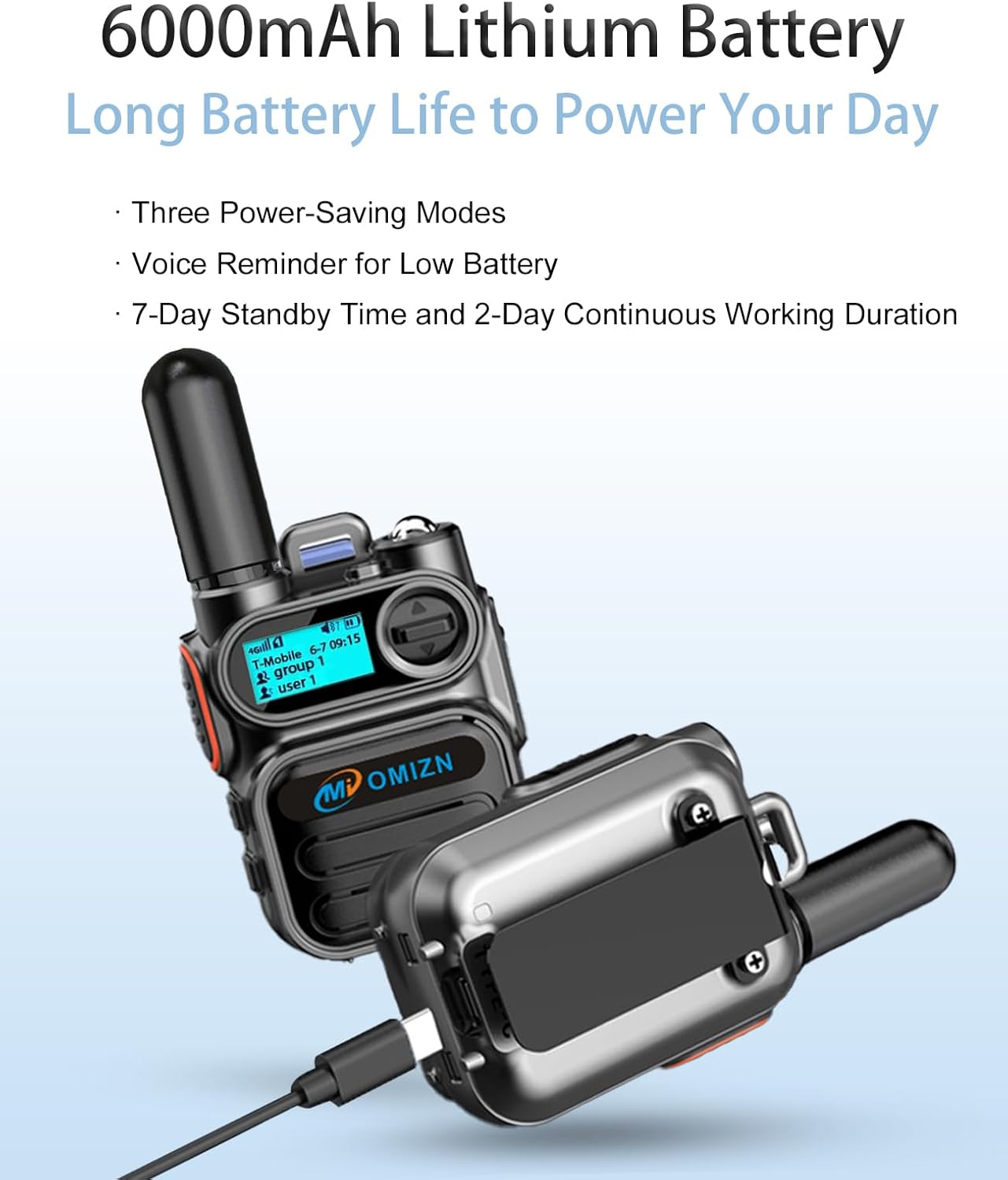
Ffigur 3.1: The OMIZN M5 walkie talkie connected to a Type-C charging cable, illustrating the charging process and highlighting the 6000mAh battery.
3.2 Pweru Ymlaen/Diffodd
- Pŵer Ymlaen: Press and hold the On/Off Key located on the side of the device until the OLED display illuminates.
- Pwer i ffwrdd: Press and hold the On/Off Key until the device powers down.
3.3 SIM Card Activation
Your OMIZN M5 comes with a pre-installed SIM card and includes one year of high-speed data service. No activation is typically required for initial use within the default service region (US carriers). For international travel or if service is unavailable in your area, contact OMIZN support for assistance or SIM replacement.
4. Cyfarwyddiadau Gweithredu
4.1 Basic Communication (Push-to-Talk)
- Select Group/User: Use the Menu/Confirmation Key and Volume+/- buttons to navigate the OLED display and select your desired communication group or individual user.
- Trosglwyddo: Press and hold the PTT (Push to Talk) Launch Key on the side of the device to transmit your voice. Speak clearly into the microphone.
- Derbyn: Release the PTT key to listen for incoming transmissions.

Ffigur 4.1: The OMIZN M5 walkie talkie displaying network signal, time, and active group/user information on its OLED screen, indicating readiness for nationwide communication.
4.2 Volume Adjustment and Menu Navigation
- Rheoli cyfaint: Use the Volume+ and Volume- buttons to adjust the speaker volume during reception.
- Mynediad i'r Ddewislen: Short press the Menu/Confirmation Key to enter the device menu. Use Volume+/- to navigate menu options and the Menu/Confirmation Key to select.
4.3 Gweithrediad y Fflacholau
- Actifadu Flashlight: Long press the Volume+ button to turn on the integrated flashlight.
- Deactivate Flashlight: Long press the Volume- button to turn off the flashlight.
4.4 Advanced Communication Features
- Galwadau Preifat: The device supports 1-to-1 private calls. Select the desired user from the menu.
- Multi-Group Calls: Engage in communication with multiple groups simultaneously.
- Monitoring Feature: The OMIZN M5 includes a monitoring feature. Contact support for setup details.
- Rheoli Grŵp: Groups can be renamed, and members can be managed. Contact support for group renaming or monitoring setup.

Ffigur 4.2: Comparison highlighting advanced features of the OMIZN M5, such as over 199 channels, user-definable settings, edit/delete functions, talker alias, AES256 encryption, unlimited group members, and a built-in monitoring function, distinguishing it from traditional walkie talkies.
5. cynnal
5.1 Glanhau
Sychwch y ddyfais gyda meddal, damp cloth. Do not use harsh chemicals or abrasive cleaners. Ensure the Type-C charging port cover is securely closed to maintain IP54 water and dust resistance.
5.2 Gofal Batri
- Codwch y batri yn llawn cyn ei ddefnyddio gyntaf.
- Osgowch ddraenio'r batri'n llwyr yn aml er mwyn ymestyn ei oes.
- Storiwch y ddyfais mewn lle oer, sych pan nad yw'n cael ei defnyddio am gyfnodau hir.
6. Datrys Problemau
- Dim Arwydd: Check network coverage in your area. If traveling internationally, ensure your SIM service is configured for the region. Contact support if issues persist.
- Ansawdd Sain Gwael: Ensure the antenna is securely attached. Check for obstructions around the speaker and microphone. The device features intelligent noise cancellation, but extreme noise may still affect clarity.
- Dyfais Ddim yn Pweru Ymlaen: Ensure the battery is fully charged. Re-install the battery to ensure proper contact.
- Batri yn draenio'n gyflym: Reduce screen brightness, disable unnecessary features, or activate power-saving modes.
- Cannot Connect to Groups/Users: Verify your group and user settings. Contact OMIZN support for assistance with group configuration.
For any persistent issues, signal problems, malfunctions, or questions not covered in this manual, please contact OMIZN customer support.
7. manylebau
| Nodwedd | Manyleb |
|---|---|
| Brand | OMIZN |
| Rhif Model | OMIZN-M5-B-1set |
| Protocol Cysylltedd | LTE (4G) |
| Nifer y Sianeli | Hyd at 200 grŵp |
| Ystod Siarad Uchafswm | Unlimited (Nationwide Cellular PoC) |
| Gallu Batri | 6000mAh |
| Working / Standby Time | 48 awr / 168 awr |
| Dull Codi Tâl | Math-C Codi Tâl |
| Cyftage | 3.7 folt (DC) |
| Lefel Gwrthsefyll Dŵr | IP54 (Waterproof/Dustproof) |
| Dimensiynau Cynnyrch (D x W x H) | 1.29" x 2.2" x 3.07" |
| Amrediad Tymheredd | -20 ℃ i 55 ℃ (-4 ° F i 131 ° F) |
| Amgryptio | AES256 |
| Bandiau LTE â Chefnogaeth | AT&T LTE Bands 2/4/5/12/14/17/29/30/66, T-Mobile LTE Bands 2/4/5/12/66/71, Verizon LTE Bands 2/4/5/13/46/48/66 |
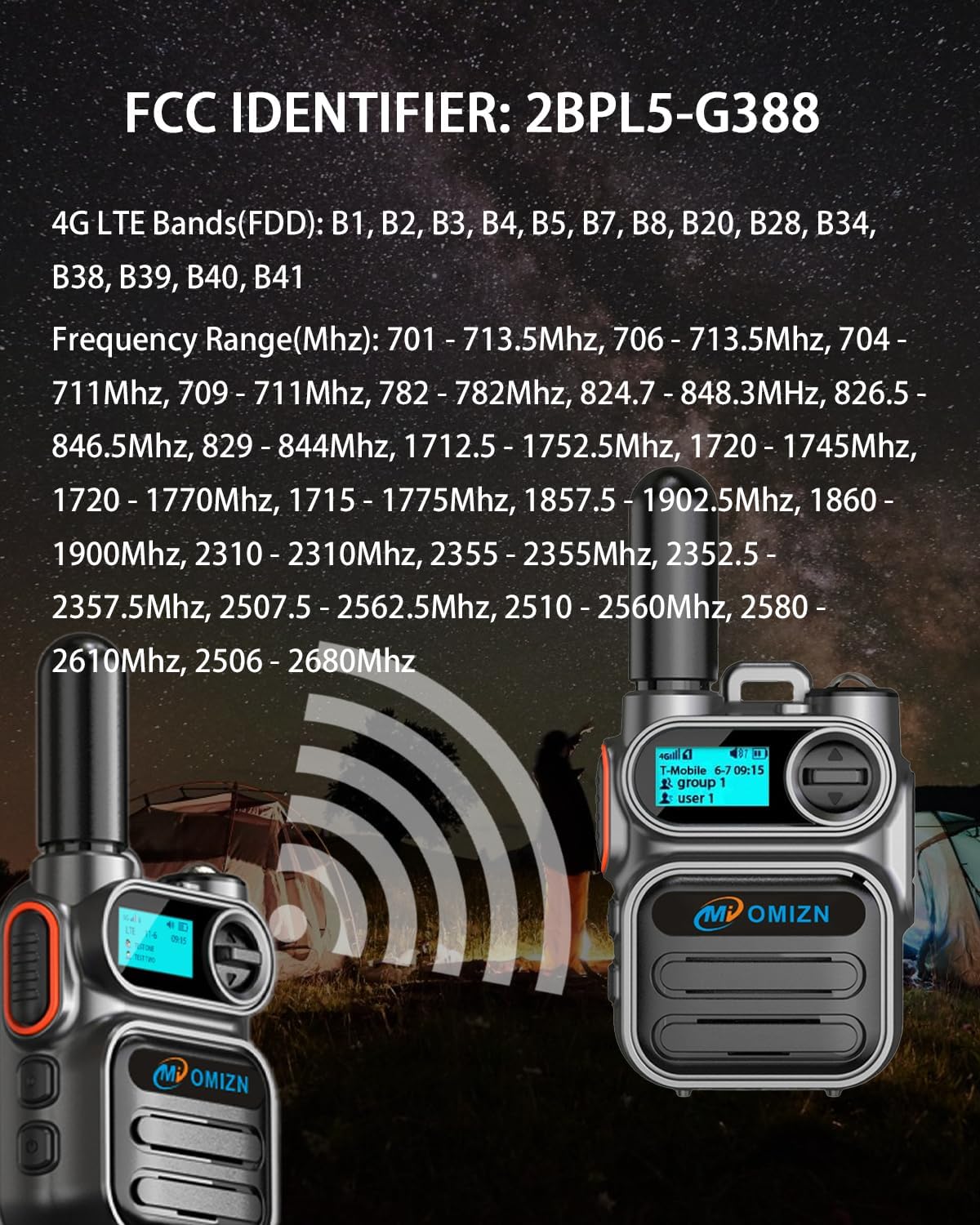
Ffigur 7.1: Image displaying the FCC Identifier (2BPL5-G388) and detailed 4G LTE FDD bands and frequency ranges supported by the OMIZN M5 device.
8. Gwarant a Chefnogaeth
8.1 Cefnogaeth i Gwsmeriaid
OMIZN is committed to providing reliable support. For any issues, including signal problems, malfunctions, or general questions, please contact our support team. We aim to address your concerns promptly upon receiving your message. Your satisfaction is our top priority.
You can typically reach support through the platform where you purchased the product (e.g., Amazon's messaging system for OMIZN seller).
8.2 SIM Service Renewal
The pre-installed SIM card includes one year of high-speed data service. This service can be renewed annually after the first year. Please contact OMIZN support for details on service renewal procedures and pricing.