
1. Rhagymadrodd
This manual provides essential information for setting up, operating, maintaining, and troubleshooting your OnePlus Nord CE5 smartphone. Please read this guide thoroughly to ensure optimal performance and longevity of your device.
2. Beth sydd yn y Bocs
Upon unboxing your OnePlus Nord CE5, verify that all the following items are included:
- OnePlus Nord CE5 Smartphone
- Achos Ffôn
- Addasydd Pŵer
- Ejector Hambwrdd SIM
- Amddiffynnydd Sgrin (wedi'i roi ymlaen llaw neu yn y blwch)
- Cebl USB (Math-C)

Image: Contents of the OnePlus Nord CE5 retail box.
3. Dyfais Drosoddview
Familiarize yourself with the physical components of your OnePlus Nord CE5.
3.1 Blaen View

Delwedd: Blaen view of the OnePlus Nord CE5, highlighting the display and front camera.
The front of the device features the 6.77-inch AMOLED display and the 16 MP front-facing camera.
3.2 Cefn View

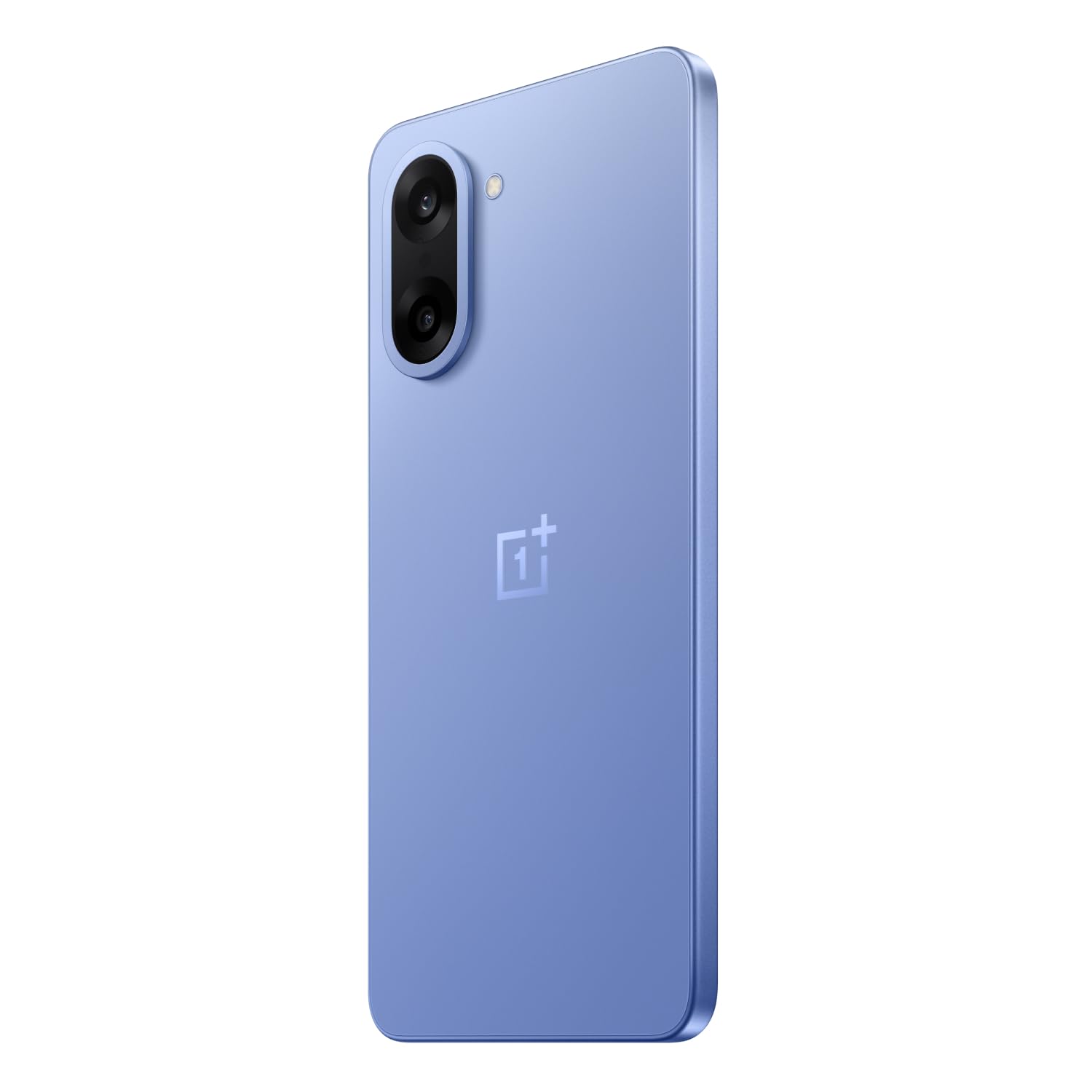
Delwedd: Cefn view of the OnePlus Nord CE5 in Nexus Blue, featuring the dual camera system and OnePlus branding.
The rear panel houses the 50 MP main camera with OIS and an 8 MP ultra-wide angle lens, along with the LED flash.
3.3 Ochr View
Delwedd: Ochr view of the OnePlus Nord CE5, illustrating the placement of the power button and volume controls.
The side of the device includes the power button and volume control buttons. The SIM card tray is also located on one of the sides.
4. Gosod
4.1 Mewnosod Cardiau SIM
- Lleolwch y hambwrdd cerdyn SIM ar ochr eich dyfais.
- Mewnosodwch yr offeryn alldaflu hambwrdd SIM i'r twll bach wrth ymyl yr hambwrdd a gwasgwch yn gadarn nes bod yr hambwrdd yn popio allan.
- Place your Nano SIM cards into the designated slots on the tray. Ensure the gold contacts face downwards.
- Ail-osodwch y hambwrdd SIM yn y ddyfais yn ofalus nes ei fod yn clicio i'w le.
4.2 Pŵer Cychwynnol Ymlaen
Press and hold the power button located on the side of the device until the OnePlus logo appears. Follow the on-screen instructions to complete the initial setup, including language selection, Wi-Fi connection, and Google account setup.
4.3 Codi Tâl ar y Dyfais
Connect the USB Type-C cable to the charging port at the bottom of the phone and the other end to the provided power adapter. Plug the adapter into a power outlet. The device supports 80W SUPERVOOC fast charging.
5. Gweithredu Eich Dyfais
5.1 Arddangos a Llywio
The OnePlus Nord CE5 features a 6.77-inch 120Hz AMOLED display with Ultra HDR. Navigate the OxygenOS 15 interface using touch gestures. The Aqua Touch feature allows for confident swiping even with wet or oily fingers.
5.2 Rheoli Batri
Your device is equipped with a massive 7100mAh battery. To optimize battery life:
- Utilize the 80W SUPERVOOC charger for rapid charging.
- Enable Bypass Charging during extended gaming sessions to reduce battery stress and heat.
- Adjust screen brightness and refresh rate as needed.
- Cau cymwysiadau cefndir nas defnyddir.

Image: Illustration of the 7100mAh battery and 80W SUPERVOOC charging capability.

Image: Explanation of Bypass Charging, which directs power to the phone's system instead of the battery during use.
5.3 Defnyddio'r Camera
The device features a versatile camera system:
- Camera Cefn: 50 MP Sony main sensor with Optical Image Stabilization (OIS) and an 8 MP ultra-wide angle lens. Supports 4K video recording at 60 FPS.
- Camera blaen: 16 MP sensor for selfies and video calls.
Open the Camera app to access various modes, including Photo, Video, Portrait, Night, and more. Tap on the screen to focus and use the zoom controls for magnification.

Delwedd: Manwl view of the OnePlus Nord CE5's dual rear camera setup.

Image: The device's capability to record 4K video at 60 frames per second.
5.4 Perfformiad a Gemau
The OnePlus Nord CE5 is powered by the MediaTek Dimensity 8350 Apex processor, offering high performance for demanding applications and gaming. The device supports gaming at up to 120 FPS for a smooth experience.

Image: The MediaTek Dimensity 8350 Apex processor, emphasizing its performance capabilities.

Image: Gaming experience on the OnePlus Nord CE5 at 120 frames per second.
5.5 Nodweddion AI
The OnePlus Nord CE5 integrates various AI-powered features to enhance user experience:
- Camera AI: Includes AI Eraser for removing unwanted objects, AI Perfect Shot for optimal photo capture, AI Reflection Remover, and AI Reframe for improved composition.
- AI Productivity: Features AI VoiceScribe for in-app call summaries and real-time translation, AI Translation for global communication, and AI Call Assistant for in-call translation and summaries.
- Gemini Google: A personal AI assistant for writing, planning, learning, and more.

Image: Demonstration of AI Camera features, showing an object removed from a photo.
Image: AI VoiceScribe interface for call summaries and translation.
5.6 Multitasking with Open Canvas
The Open Canvas feature allows for enhanced split-screen multitasking, extending apps beyond the physical display. This includes flexible resizing, screencap for split-screen, drag-and-drop sharing, and refreshed floating windows.

Image: Open Canvas feature showing two applications running side-by-side on the display.
6. cynnal
6.1 Diweddariadau Meddalwedd
Chwiliwch am ddiweddariadau meddalwedd a'u gosod yn rheolaidd i sicrhau bod gan eich dyfais y nodweddion, y clytiau diogelwch a'r gwelliannau perfformiad diweddaraf. Ewch i Settings > About device > OxygenOS i wirio am ddiweddariadau.
6.2 Glanhau Eich Dyfais
Use a soft, lint-free cloth to clean the screen and body of your phone. Avoid using harsh chemicals or abrasive materials. For the charging port and speaker grilles, use a soft brush to gently remove dust.
6.3 Rheoli Storfa
Yn achlysurol parthedview your device's storage to free up space. Delete unnecessary files, uninstall unused apps, and clear cache data. You can check storage usage in Gosodiadau > Storio.
6.4 System Oeri
The device features a 7041mm² VC cooling system to manage heat during intensive use. To ensure optimal cooling, avoid blocking the phone's vents (if any) and do not use the device in direct sunlight for extended periods.

Delwedd: Mewnol view sioeasing the 7041mm² VC cooling system for heat dissipation.
7. Datrys Problemau
This section addresses common issues you might encounter with your OnePlus Nord CE5.
7.1 Dyfais Ddim yn Troi Ymlaen
- Gwnewch yn siŵr bod y batri wedi'i wefru. Cysylltwch y ddyfais â'r gwefrydd ac aros ychydig funudau cyn ceisio ei throi ymlaen eto.
- Pwyswch a daliwch y botwm pŵer am o leiaf 10-15 eiliad i orfodi ailgychwyn.
7.2 Apiau'n Chwalu neu'n Rhewi
- Clear the cache and data of the problematic app via Gosodiadau > Apiau > [Enw'r Ap] > Storio > Clirio'r storfa/Clirio data.
- Diweddarwch yr ap i'w fersiwn ddiweddaraf o Google Play Store.
- Ailgychwyn eich dyfais.
7.3 Bywyd Batri Gwael
- Gwiriwch ddefnydd batri yn Gosodiadau > Batri i nodi apiau sy'n llwglyd o ran pŵer.
- Lleihau disgleirdeb y sgrin a gosod amser terfyn sgrin byrrach.
- Analluogwch Wi-Fi, Bluetooth, a GPS pan nad ydynt yn cael eu defnyddio.
- Ensure background app refresh is limited for non-essential apps.
7.4 Problemau Cysylltedd Rhwydwaith
- Togglo Modd Awyren ymlaen ac i ffwrdd.
- Ailgychwyn eich dyfais.
- Gwiriwch a yw eich cerdyn SIM wedi'i fewnosod yn iawn.
- Ailosod gosodiadau rhwydwaith drwy Settings > System settings > Reset phone > Reset Wi-Fi, mobile & Bluetooth.
8. manylebau
Key technical specifications for the OnePlus Nord CE5:
| Nodwedd | Manyleb |
|---|---|
| Brand | OnePlus |
| Model | Gogledd CE5 |
| System Weithredu | Android 15, OxygenOS 15 |
| Prosesydd | MediaTek Dimensity 8350 Apex (3.35 GHz) |
| HWRDD | 8 GB |
| Storio Mewnol | 128 GB |
| Arddangos | 6.77 Inches AMOLED, 2392 x 1080 Pixels, 120Hz Refresh Rate |
| Camera Cefn | 50 MP (Main) + 8 MP (Ultra-wide), OIS, 4K 60 FPS Video |
| Camera blaen | 16 AS |
| Gallu Batri | 7100 mAh |
| Codi tâl | 80W SUPERVOOC |
| Math Cerdyn SIM | SIM Nano Deuol |
| Cysylltedd | 5G, Bluetooth, USB Type-C, Wi-Fi |
| Diogelwch Biometrig | Adnabod Olion Bysedd |
| Dimensiynau | 16.4 x 7.6 x 0.8 centimetr |
| Pwysau | 199 gram |
| Gwrthiant Dŵr | Gwrth-ddŵr |
9. Gwarant a Chefnogaeth
9.1 Gwybodaeth Gwarant
Your OnePlus Nord CE5 comes with a Gwarant Gwneuthurwr Blwyddyn from the date of purchase. This warranty covers manufacturing defects. Additionally, OnePlus offers a Lifetime Display Warranty for industry-wide green line issues. Please retain your proof of purchase for warranty claims.

Image: Lifetime Display Warranty information.
9.2 Cefnogaeth i Gwsmeriaid
For technical assistance, service, or warranty inquiries, please contact OnePlus Customer Service:
- Rhif Cyswllt: 1800 102 8411
- WhatsApp: +91-9289606888
- Gwneuthurwr: OPPO Mobiles India Private Limited, PLOT-NO.1, SECTOR ECOTECH-VII, GREATER, NOIDA, UTTAR PRADESH, India-201306