
1. Rhagymadrodd
This manual provides detailed instructions for the installation, operation, and maintenance of your SOUNDKITS Bluetooth Retro Car Radio. Please read this manual thoroughly before using the product to ensure proper function and safety. This unit combines classic aesthetics with modern audio technology, offering Bluetooth connectivity, AM/FM radio, USB, and AUX input capabilities.
2. Gwybodaeth Diogelwch
Always prioritize safety during installation and operation. Improper installation can lead to electrical hazards or damage to your vehicle. Consult a professional if you are unsure about any installation steps. Do not operate the unit in a way that distracts you from driving. Keep the volume at a level that allows you to hear external traffic sounds.
3. Cynnwys Pecyn
- Bluetooth Vintage Car Stereo Unit
- Mounting Kits & Wires
- Llawlyfr Cyfarwyddiadau
4. Cynnyrch Drosview
The SOUNDKITS Retro Car Radio features a classic design with modern functionality. It includes a high-resolution LCD display, rotary knobs for volume and settings, and push-buttons for various functions such as band selection, mode switching, and clock settings.

Delwedd: Blaen view of the SOUNDKITS Bluetooth Retro Car Radio, showing the display, rotary knobs, and control buttons.
5. Gosod a Gosod
5.1 Dimensions and Compatibility
The unit is designed for a standard single DIN opening, with dimensions of 7.4 inches (L) x 3.8 inches (D) x 2 inches (H). This ensures compatibility with a wide range of classic vehicles.
5.2 Diagram Gwifro
Refer to the following diagram for proper wiring connections. Ensure all connections are secure and correctly matched to avoid damage to the unit or vehicle electrical system.

Image: Detailed diagram illustrating the dimensions of the radio and the wiring harness connections for power, speakers, and auxiliary inputs.
5.3 Mowntio
Secure the unit into the single DIN dashboard opening using the provided mounting kit. Ensure the unit is firmly in place to prevent movement during vehicle operation.
6. Cyfarwyddiadau Gweithredu
6.1 Pŵer Ymlaen/Diffodd a Rheoli Cyfaint
Press the left rotary knob to power the unit on or off. Rotate the left knob to adjust the volume level.
6.2 Dewis Modd
Press the 'MODE' button to cycle through available audio sources: FM, AM, Bluetooth, USB, and AUX. The current mode will be displayed on the LCD screen.
6.3 Cysylltedd Bluetooth
I baru'ch dyfais trwy Bluetooth:
- Select 'Bluetooth' mode using the 'MODE' button.
- Galluogi Bluetooth ar eich dyfais symudol a chwilio am y dyfeisiau sydd ar gael.
- Select 'SOUNDKITS' from the list to pair.
- Ar ôl paru, gallwch ffrydio sain a gwneud/derbyn galwadau di-ddwylo.

Image: Illustration of Bluetooth connectivity, showing hands-free calling and wireless audio streaming capabilities.
6.4 Gweithrediad Radio AM/FM
Press the 'BAND' button to switch between FM1, FM2, FM3, AM1, and AM2 bands. Use the rotary knob on the right to manually tune frequencies or press 'AMS' for automatic station scanning and storage.

Image: Displaying AM/FM radio functionality with 30 station presets and automatic/manual search options.
6.5 Mewnbwn USB ac AUX
Connect a USB drive to the rear-mounted USB port or an audio device to one of the two auxiliary inputs. The unit supports MP3, WMA, and FLAC audio files.

Image: The car radio unit with connected USB and AUX cables, highlighting its digital multimedia playback capabilities.
6.6 Gosodiadau Sain
Press the left rotary knob briefly to access audio settings such as Bass, Treble, Balance, Fader, and EQ presets (Pop, Rock, Classic). Rotate the knob to adjust values. The unit also features a dedicated subwoofer output.
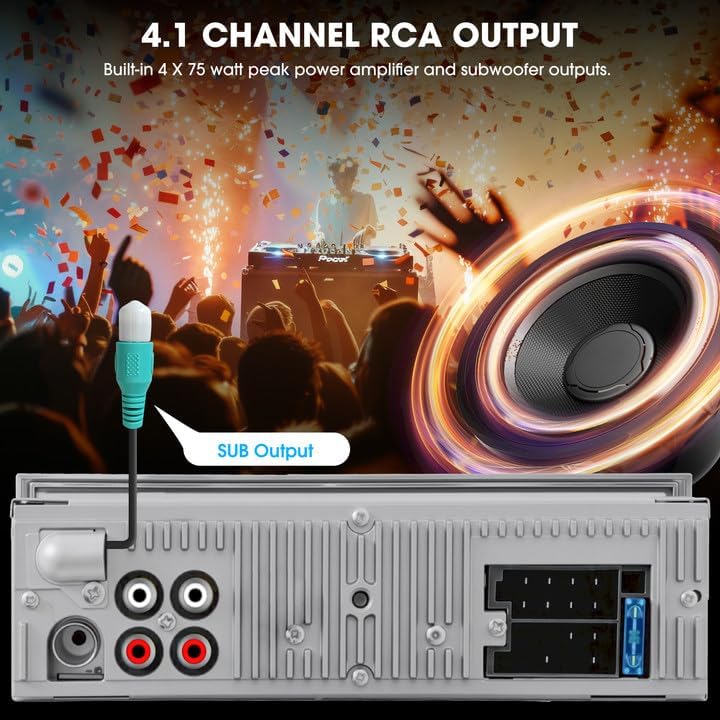
Delwedd: Cefn view of the radio showing the 4.1-channel RCA outputs, including a dedicated subwoofer output.
7. cynnal
To maintain the performance and appearance of your car radio, follow these guidelines:
- Glanhau: Defnyddiwch frethyn meddal, sych i lanhau wyneb yr uned. Osgowch lanhawyr neu doddyddion sgraffiniol.
- Tynnu Llwch: Periodically clean dust from the display and buttons.
- Osgoi hylifau: Peidiwch â gwneud yr uned yn agored i ddŵr neu hylifau eraill.
8. Datrys Problemau
| Problem | Achos Posibl | Ateb |
|---|---|---|
| Dim pŵer | Gwifrau anghywir; Ffiws wedi chwythu | Check power connections; Replace fuse if necessary |
| Dim sain | Gwifrau siaradwr anghywir; Cyfaint yn rhy isel; Mud wedi'i actifadu | Verify speaker connections; Increase volume; Deactivate mute function |
| Bluetooth ddim yn cysylltu | Bluetooth not enabled on device; Unit not in pairing mode | Ensure Bluetooth is on and unit is in Bluetooth mode; Re-attempt pairing |
| Derbyniad radio gwael | Antena heb ei chysylltu; Ardal signal gwan | Check antenna connection; Try tuning in a different location |
9. manylebau
- Dimensiynau Cynnyrch: 3.8"D x 7.4"W x 2"H
- Pwysau Eitem: 1.2 Bunt
- Technoleg Cysylltedd: Cynorthwyol, Bluetooth, USB
- Math o Reolwr: Rheoli Llaw, Botwm Gwthio
- Nodweddion arbennig: 4.1-Chn RCA Subwoofer Outputs 300W Peak Power, AM FM Radio with RDS, Bluetooth Calling Music Streaming, Retro-style Stereo Knob & Buttons Control Digital Display, USB AUX-IN Preset EQ
- Dyfeisiau Cydnaws: Amplifier, Smartphone, Speaker, Subwoofer
- Modd Allbwn Sain: Stereo
- Ffurfweddiad Sianel Sain Amgylchynol: 4.1
10. Gwarant a Chefnogaeth
For product support or inquiries, please refer to the contact information provided by your retailer or the manufacturer's official website. Information regarding extended protection plans may be available through your point of purchase.