
NIMO Nimo N156
NIMO 15.6" FHD Business Laptop User Manual
Model: Nimo N156
Rhagymadrodd
This user manual provides comprehensive instructions for setting up, operating, maintaining, and troubleshooting your NIMO 15.6" FHD Business Laptop. Please read this manual carefully before using your device to ensure optimal performance and longevity. Keep this manual for future reference.
Beth Sydd yn y Bocs
Gwiriwch fod yr holl eitemau yn bresennol yn y pecyn:
- 1 x Nimo N156 Laptop
- 1 x Type-C 100W PD Fast Charger
- 1 x Llawlyfr Defnyddiwr (y ddogfen hon)
- Windows 11 Home (wedi'i osod ymlaen llaw)
- 2 Years Warranty, 90 Days Return information
Cynnyrch Drosview
Familiarize yourself with the key components of your NIMO laptop.

Ffigur 1: Blaen view of the NIMO 15.6 inch FHD Business Laptop, showcasing its full HD IPS display, Intel Core i5 processor, fingerprint reader, Type-C PD charger port, and backlit keyboard.

Ffigur 2: Close-up of the NIMO laptop's backlit full keyboard, highlighting the integrated webcam shield, fingerprint sensor, and numeric keypad for enhanced productivity and security.

Ffigur 3: Diagram illustrating the multiple ports on the NIMO laptop, including Micro SD slot, USB 2.0, USB 3.0, Headphone Jack, Kensington lock, Type-C (multifunction), Type-C (PD Charger Only), HDMI, and Charge LED.
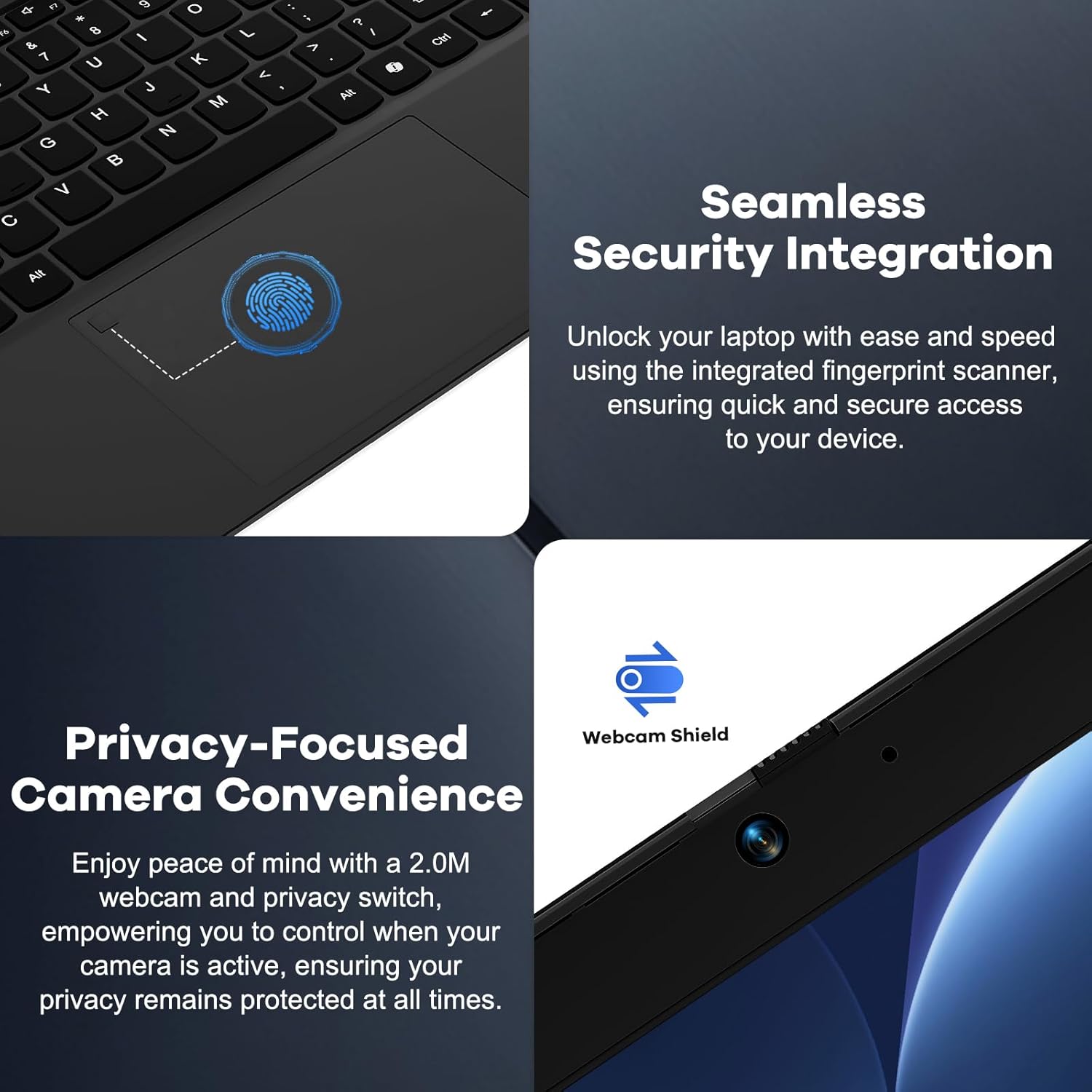
Ffigur 4: Details on the seamless security integration with the fingerprint sensor for quick login and the privacy-focused camera convenience with a built-in webcam shield.

Ffigur 5: The compact 100W GaN Type-C PD Fast Charger included with the NIMO laptop, capable of charging to 50% in 15 minutes and compatible with various devices.
Gosod
1. Troi ymlaen yn gychwynnol
- Dadbacio: Tynnwch y gliniadur a'r holl ategolion o'r pecynnu yn ofalus.
- Pwer Cysylltu: Plug the 100W GaN Type-C PD Fast Charger into a power outlet and connect the USB-C cable to the laptop's Type-C charging port. The Charge LED will illuminate.
- Boot Cyntaf: Open the laptop lid. The system may power on automatically or you may need to press the power button (located on the top right of the keyboard).
- Gosodiad Windows: Dilynwch y cyfarwyddiadau ar y sgrin i gwblhau'r broses sefydlu Windows 11 Home. Mae hyn yn cynnwys dewis eich rhanbarth, iaith, cysylltu â rhwydwaith Wi-Fi, a chreu cyfrif defnyddiwr.
2. Cysylltu Perifferolion
Your NIMO laptop offers various ports for connecting external devices:
- Dyfeisiau USB: Connect USB flash drives, external hard drives, mice, or keyboards to the USB 2.0 or USB 3.0 ports.
- Arddangosfa Allanol: Defnyddiwch y porthladd HDMI i gysylltu monitor neu daflunydd allanol.
- Sain: Plug headphones or external speakers into the 3.5mm Headphone Jack.
- Cardiau Cof: Insert a Micro SD card into the Micro SD slot for additional storage.
Cyfarwyddiadau Gweithredu
1. Gweithrediad Sylfaenol
- Pŵer ymlaen / i ffwrdd: Press the power button to turn the laptop on. To shut down, click the Start button in Windows, then Power > Shut down.
- Modd Cwsg: Close the lid or click the Start button, then Power > Sleep to put the laptop into sleep mode.
- Fingerprint Login: Utilize the integrated fingerprint sensor for quick and secure login to Windows. Register your fingerprints through Windows Settings > Accounts > Sign-in options.
- Bysellfwrdd ôl-oleuo: The keyboard features backlighting for low-light conditions. Use the dedicated function key (Fn + F key combination, typically F3 or F4) to toggle or adjust the backlight brightness.
- Webcam Privacy: The laptop includes a physical webcam shield. Slide the switch next to the webcam to cover or uncover the camera lens for privacy.
2. Windows 11 Features
Your laptop comes with Windows 11 Home pre-installed. Explore its features for enhanced productivity and entertainment:
- Cynlluniau Snap: Easily organize open windows on your screen.
- Teclynnau: Access personalized information at a glance.
- Siop Microsoft: Download and install applications.
- Diogelwch: Windows Defender provides built-in antivirus and firewall protection.
Cynnal a chadw
- Glanhau: Use a soft, lint-free cloth to clean the screen and chassis. For stubborn smudges, slightly dampgolchwch y lliain gyda dŵr neu doddiant glanhau sgrin. Osgowch gemegau llym.
- Gofal Batri: To prolong battery life, avoid fully discharging the battery frequently. It is recommended to keep the battery charge between 20% and 80% when possible. Store the laptop in a cool, dry place if not used for extended periods.
- Diweddariadau Meddalwedd: Regularly check for and install Windows updates and driver updates to ensure system stability and security. Go to Windows Settings > Windows Update.
- Rheoli Storio: Glanhau unrhyw bethau diangen o bryd i'w gilydd files and applications to free up storage space and improve performance.
Datrys problemau
| Problem | Achos Posibl | Ateb |
|---|---|---|
| Nid yw'r gliniadur yn troi ymlaen. | Problem gyda batri neu addasydd pŵer isel. | Ensure the charger is properly connected and the power outlet is working. Allow the laptop to charge for at least 30 minutes before attempting to power on again. |
| Mae'r arddangosfa'n wag neu'n fflachio. | Incorrect display settings or driver issue. | Try connecting an external monitor to check if the issue is with the laptop's display. Update graphics drivers. Restart the laptop. |
| Problemau cysylltiad Wi-Fi. | Incorrect network settings or driver issue. | Ensure Wi-Fi is enabled. Restart your router and laptop. Update Wi-Fi drivers. Forget and reconnect to the network. |
| Nid yw cefn golau'r bysellfwrdd yn gweithio | Backlight feature is off or driver issue. | Press the Fn + F key combination (e.g., F3 or F4) to toggle the backlight. Check keyboard settings in Windows. |
If the problem persists, please refer to the Warranty and Support section for assistance.
Manylebau
| Nodwedd | Manylyn |
|---|---|
| Brand | NIMO |
| Enw Model | Nimo N156 |
| Maint Sgrin | 15.6 modfedd |
| Cydraniad Sgrin | 1920 x 1080 picsel (FHD IPS) |
| Prosesydd | Intel Core i5-12450H (8 Cores, up to 4.4 GHz) |
| HWRDD | 8 GB DDR4 (Upgradable) |
| Gyriant Caled | 256 GB PCIe SSD (Upgradable) |
| Cydbrosesydd graffeg | Graffeg Intel Integredig |
| System Weithredu | Windows 11 Cartref |
| Math Di-wifr | 802.11a/b/g/n/ac (WiFi 6) |
| Bluetooth | BT5.2 |
| Porthladdoedd | 1x USB 2.0, 3x USB 3.0, Type-C (PD Charger Only), Type-C (Multifunction), HDMI, Headphone Jack, Micro SD Slot |
| Addasydd Pŵer | 100W GaN Type-C PD Fast Charger |
| Bywyd Batri Cyfartalog | 5 Hours (54Wh Smart Battery for up to 9 Hours Standby) |
| Pwysau Eitem | 3.8 pwys |
| Dimensiynau Cynnyrch | 14.07 x 8.98 x 0.76 modfedd |
| Nodweddion Arbennig | Backlit Keyboard, Fingerprint Reader, HD Audio, Memory Card Slot, Numeric Keypad, Webcam Shield |
Gwarant a Chefnogaeth
NIMO stands behind the quality of its products. Your NIMO laptop comes with the following:
- Gwarant 2 Flwyddyn: A 2-Year Warranty from NIMO Direct Inc. covers manufacturing defects and hardware failures.
- 90-Day Hassle-Free Returns: Mwynhewch bolisi dychwelyd 90 diwrnod er mwyn tawelwch meddwl.
- 24/7 Dedicated Support: For any issues or inquiries, dedicated support is available to provide instant resolution.
For warranty claims or technical assistance, please contact NIMO customer support through the contact information provided on the official NIMO websafle neu'ch dogfennaeth prynu.
Fideo: Mae drosoddview of the NIMO laptop, highlighting its features, performance, and the comprehensive 90-day return policy and 2-year warranty, demonstrating NIMO's commitment to customer satisfaction.
Ask a question about this manual
Ask about setup, troubleshooting, compatibility, parts, safety, or missing instructions. Manuals+ will review the question and use this page’s manual context to help answer it.