
AJAZZ 308i
AJAZZ 308i Wireless Bluetooth Keyboard User Manual
Model: 308i
Rhagymadrodd
Diolch am brynuasing the AJAZZ 308i Wireless Bluetooth Keyboard. This manual provides detailed instructions on how to set up, operate, and maintain your keyboard. Please read this manual carefully before use to ensure optimal performance and longevity of your device.
Cynnyrch Drosview
The AJAZZ 308i is a compact 84-key wireless Bluetooth keyboard featuring a unique typewriter-inspired design with round keycaps. It offers multi-system compatibility and a comfortable typing experience.

Figure 1: AJAZZ 308i Wireless Bluetooth Keyboard (Gradient Green)
Nodweddion Allweddol:
- Typewriter-Inspired Design: Round keycaps provide a retro aesthetic and comfortable typing feel.
- Cynllun Cryno 84-Allwedd: Lightweight and portable, measuring 32cm x 13.6cm x 3cm, making it easy to carry.
- Cysylltedd Bluetooth Di-wifr: Stable connection up to 10 meters, compatible with various devices.
- Cydnawsedd Aml-System: Supports Windows, Mac OS, iOS, and Android operating systems.
- Arbed Pwer Clyfar: Automatically enters sleep mode after 15 minutes of inactivity to conserve battery.
- Teipio Tawel: Soft chocolate keys ensure a smooth and silent typing experience.
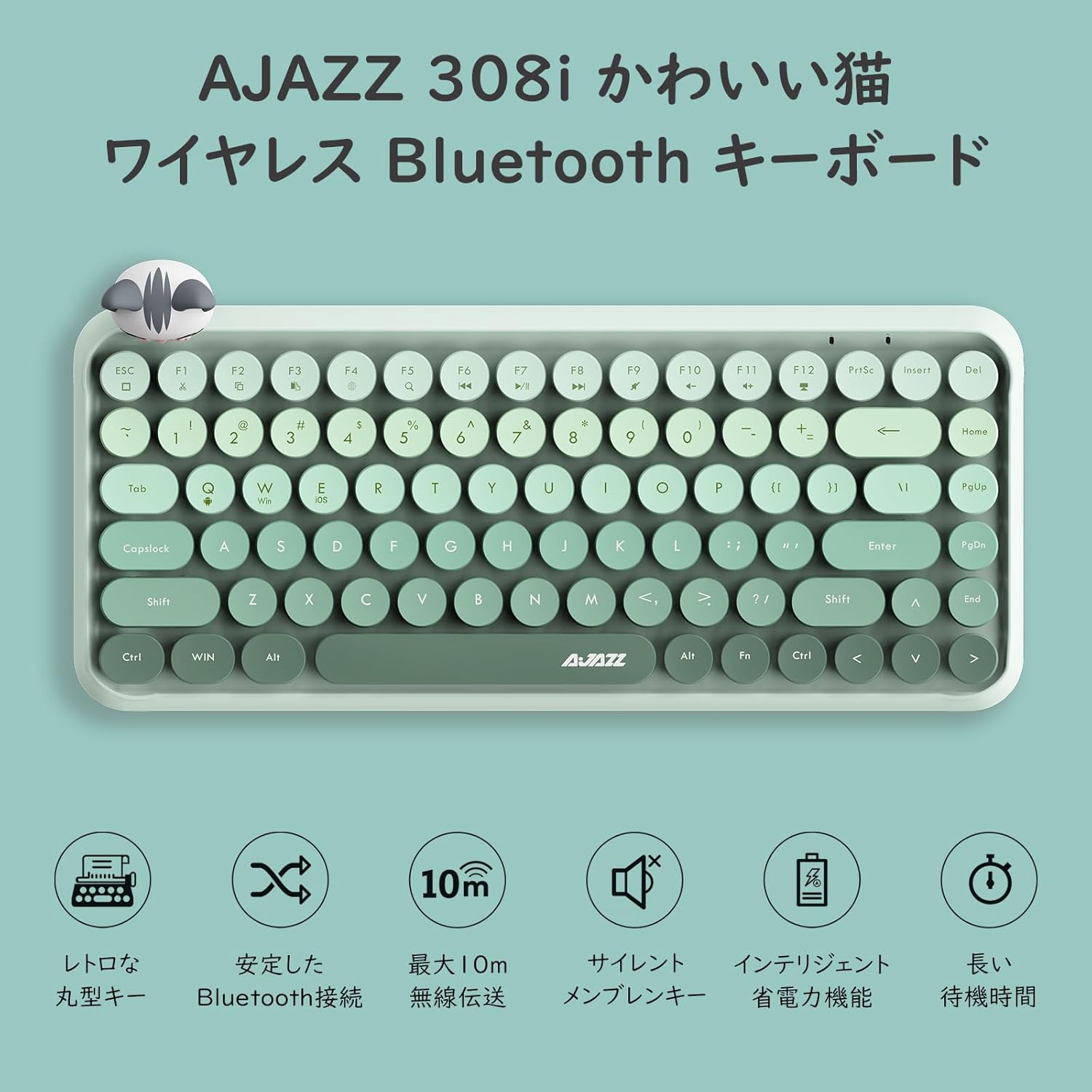
Ffigur 2: Drosoddview of AJAZZ 308i Keyboard Features
Setup: Bluetooth Pairing
Follow these steps to connect your AJAZZ 308i keyboard via Bluetooth:
- Ensure your device's Bluetooth is turned ON.
- Trowch ON the power switch on the keyboard.
- Pwyswch a dal y FN+C keys simultaneously on the keyboard. The keyboard will enter Bluetooth device search mode.
- On your device (tablet, smartphone, computer), search for Bluetooth devices.
- When "AJAZZ BLUETOOTH 5.0 KEYBOARD" appears in the list of available devices, tap or click on it to initiate pairing.
- A code will be displayed on your device's screen. Type this code using the AJAZZ 308i keyboard and press ENWCH.
- The keyboard is now successfully connected to your device.

Figure 3: Multi-device compatibility and connection example
Cyfarwyddiadau Gweithredu
Allweddi Cyfryngau:
The keyboard includes dedicated media function keys, accessible by pressing the FN key in combination with the F-keys:
- FN+F1: Torri
- FN+F2: Copi
- FN+F3: Gludo
- FN+F5: Chwilio
- FN+F6: Trac Blaenorol
- FN+F7: Chwarae/Saib
- FN+F8: Trac Nesaf
- FN+F9: Tewi
- FN+F10: Cyfrol Lawr
- FN+F11: Cyfrol i Fyny
- FN+F12: Cloi
Note: On some devices like iPad, certain F-keys (e.g., F2, F3) might function directly without the FN key for copy/paste. Experimentation may be required depending on your operating system.
Modd Arbed Pwer:
The AJAZZ 308i features a smart power-saving mechanism. If there is no key operation for more than 15 minutes, the keyboard will automatically enter sleep mode. To reactivate it, simply double-click any key.
Cynnal a chadw
Gosod ac Amnewid Batri:
The keyboard is powered by two AAA alkaline batteries. To install or replace batteries:
- Lleolwch yr adran batri ar ochr isaf y bysellfwrdd.
- Agorwch y clawr adran batri.
- Insert two new AAA alkaline batteries, ensuring correct polarity (+/-).
- Caewch y clawr adran batri yn ddiogel.
With smart power-saving technology, two AAA alkaline batteries can last for several months under normal use. Avoid using rechargeable lithium batteries as their performance degradation can lead to keyboard malfunction.
Datrys problemau
Key Layout Differences (English vs. Japanese Input):
The AJAZZ 308i keyboard has an English layout. When using Japanese input, some characters output may not match the characters printed on the keycaps. In such cases:
- Switch your device's input method to English and type according to the characters displayed on the keycaps.
- Alternatively, for Japanese input, refer to the standard Japanese keyboard layout for character mapping.
If you encounter any other issues or have questions, please refer to the warranty and support section for assistance.
Manylebau
| Nodwedd | Manylyn |
|---|---|
| Brand | AJAZZ |
| Rhif Model | 308i |
| Technoleg Cysylltedd | Bluetooth 5.0 |
| Dyfeisiau Cydnaws | Windows, Mac OS, iOS, Android (Bluetooth function required) |
| Nifer yr Allweddi | 84 |
| Cynllun Bysellfwrdd | QWERTY (English Layout) |
| Teip Newid Allweddol | Membrane (Chocolate Key) |
| Di-wifr Range | Hyd at 10 metr |
| Ffynhonnell Pwer | Batris alcalïaidd xNUMX x AAA |
| Pwysau Eitem | 590 gram |
| Dimensiynau | 32cm x 13.6cm x 3cm |
| Cydrannau wedi'u Cynnwys | Magnetic Cat Figurine |
| Lliw | Gwyrdd Graddiant |
Gwarant a Chefnogaeth
The AJAZZ 308i Wireless Bluetooth Keyboard comes with a Gwarant 12 mis o'r dyddiad prynu.
If you have any questions, concerns, or require technical assistance, please do not hesitate to contact our customer support. Contact details can typically be found on the product packaging or the retailer's websafle lle gwnaethoch eich pryniant.
Ask a question about this manual
Ask about setup, troubleshooting, compatibility, parts, safety, or missing instructions. Manuals+ will review the question and use this page’s manual context to help answer it.