
1. Rhagymadrodd
This manual provides instructions for the assembly, operation, and maintenance of your SSUPD Meshroom D Mini-ITX Small Form Factor (SFF) PC case. Please read this manual thoroughly before beginning installation to ensure proper setup and optimal performance.
2. Nodweddion Cynnyrch
- Compact ITX Design: 14.93L footprint, exclusively designed to accommodate Mini-ITX motherboards.
- Large GPU Support: Compatible with 3.5 slot GPUs.
- Dual Radiator Ready: Fully prepared for dual radiator custom loop configurations.
- Ultra Ventilation: Extreme fine mesh panel in 1.5mm aperture on all sides.
- Cymorth Cyflenwad Pwer: Supports SFX/SFX-L/ATX power supply.
- Cefnogaeth Fan Oeri: Interior fits up to 3x 140mm cooling fans, along with multiple radiators.
3. Gosod a Gosod
The SSUPD Meshroom D case is designed for tool-free and easy accessibility. Follow these steps for component installation.
3.1. Mynediad i'r Tu Mewn
The side panels and top panel can be easily removed for access.

Image: The SSUPD Meshroom D case with its side panel removed, revealing the internal structure and mounting points for components.
The mesh panels are flexible for easy removal and reattachment.
Video: This video demonstrates the tool-free removal of the side panels and the flexible nature of the mesh material, highlighting the ease of access for installation.
3.2. Gosod GPU
The case supports large GPUs, up to 3.5 slots.

Image: A large graphics processing unit (GPU) installed within the SSUPD Meshroom D case, demonstrating the amplle ar gyfer cydrannau perfformiad uchel.
Video: This video provides a build reference, showing the installation process of a GPU and other components within the SSUPD Meshroom D case.
3.3. Gosod System Oeri
The Meshroom D supports various cooling configurations, including up to three 140mm fans and dual radiators for custom liquid cooling loops.
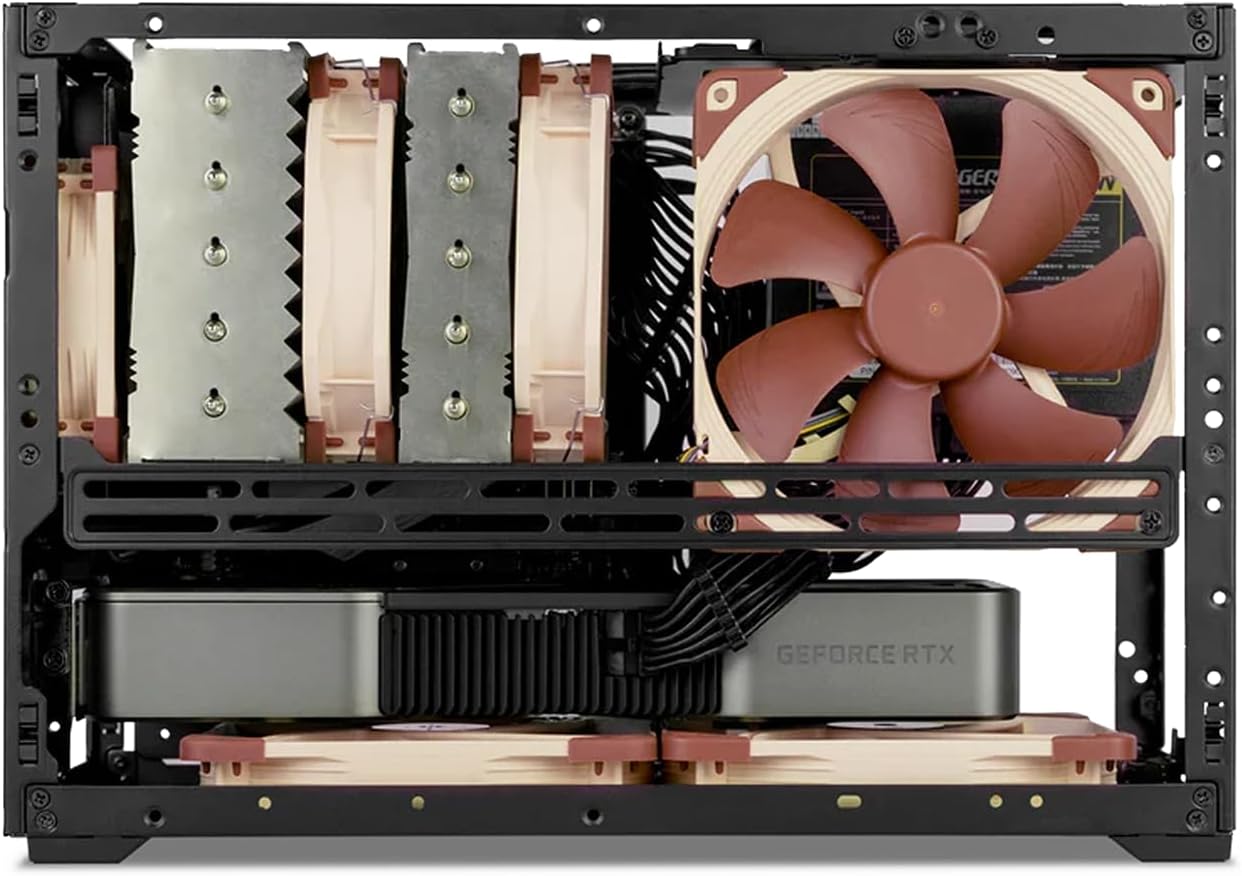
Delwedd: Delwedd fewnol view of the SSUPD Meshroom D case, showcasing a CPU air cooler and two fans installed at the bottom for enhanced airflow.

Image: The SSUPD Meshroom D case configured with dual radiators for a custom liquid cooling setup, illustrating its advanced cooling capabilities.
4. Component Compatibility
The Meshroom D offers flexible compatibility for various PC components.
4.1. Motherboard Compatibility
- ITX Mini
- Mini DTX
- Micro-ATX (requires optional expansion bracket)
4.2. Power Supply Compatibility
- ATX
- SFX-L
- SFX
4.3. Storage Drive Support
- Up to 3 x 3.5" HDDs
- Up to 5 x 2.5" SSDs
4.4. GPU Dimensions
Refer to the specifications table for detailed GPU length and height limitations based on motherboard type and I/O configuration.

Image: A diagram illustrating GPU compatibility for the SSUPD Meshroom D, detailing supported lengths and slot sizes for different configurations.
5. cynnal
5.1. Glanhau
- Regularly clean the mesh panels to ensure optimal airflow. Use a soft brush or compressed air to remove dust.
- For deeper cleaning, panels can be removed and gently washed with water and mild soap, then thoroughly dried before reinstallation.
5.2. Gwiriadau Cydrannau
- Periodically check all internal components for secure connections and dust buildup.
- Ensure cooling fans are free from obstructions and operating correctly.
6. Datrys Problemau
6.1. Problemau Gorboethi
- Verify all fans are spinning and correctly oriented for airflow.
- Check for excessive dust buildup on mesh panels and component heatsinks.
- Ensure proper thermal paste application on the CPU cooler.
6.2. Power On Failure
- Confirm all power cables are securely connected to the motherboard, GPU, and power supply.
- Gwiriwch gysylltiad y botwm pŵer â'r famfwrdd.
- Test the power supply with another system if possible.
7. manylebau
| Nodwedd | Manylyn |
|---|---|
| Dimensiynau Achos (LxWxH) | 17 x 7.7 x 12.4 modfedd |
| Cyfrol | 14.93 litr |
| Deunydd Achos | Alloy Steel, Aluminum, Plastic, Tempered Glass |
| Cydnawsedd Motherboard | Mini ITX, Mini DTX, Micro-ATX (with optional bracket) |
| GPU Max Length (ITX MB) | 3-slot mode: 325mm length x 140mm height; 3.4-slot mode: 325mm length x 136mm height |
| GPU Max Length (MATX MB) | 3-slot mode: 325mm length x 140mm height (with expansion bracket); 4.6-slot mode: 325mm length x 136mm height (with expansion bracket) |
| Uchder Uchder Uchaf Oerach CPU | 142mm (no side fan bracket), 138mm (with side fan bracket) |
| Math o Gyflenwad Pŵer | ATX, SFX-L, SFX |
| Power Supply Max Length | 150mm (PSU left side), 140mm (PSU right side), 130mm (PSU top) |
| 2.5" Drive Mounts | 5 x 2.5" SSD (SFX PSU); 4 x 2.5" SSD (ATX PSU) |
| 3.5" Drive Mounts | 3 x 3.5" HDD (SFX PSU); 2 x 3.5" HDD (ATX PSU) |
| Front Interface (Variant B) | 1x USB 3.2 Gen 2 Type-C (20 Gbps), 1x USB 3.0 Type-A (5 Gbps), 1x Power button |
| Dull Oeri | Dŵr, Aer |
| Pwysau Eitem | 6.16 pwys (2.8 cilogram) |

Image: A comprehensive table detailing the specifications and compatibility of the SSUPD Meshroom D case, including dimensions, component support, and cooling options.
8. Gwarant a Chefnogaeth
For warranty information and technical support, please refer to the official SSUPD websafle neu cysylltwch â'u gwasanaeth cwsmeriaid. Cadwch eich derbynneb prynu ar gyfer hawliadau gwarant.