
1. Rhagymadrodd
This manual provides essential information for the safe and effective operation of your AUCD RGB Animation Scan Projector Laser Light, Model CX338B. Please read this manual thoroughly before use and retain it for future reference.
2. Gwybodaeth Diogelwch
WARNING: LASER RADIATION. AVOID DIRECT EYE EXPOSURE.
- This device emits Class 3a laser radiation. Direct exposure to the laser beam can cause eye injury.
- Do not look directly into the laser aperture.
- Ensure the device is installed in a location where the laser beams are above the audience's head level.
- Cadwch y ddyfais i ffwrdd oddi wrth blant.
- Gweithredwch y ddyfais mewn ardal sydd wedi'i hawyru'n dda.
- Do not operate if the housing is damaged or if the power cable is frayed.
- Datgysylltwch bŵer cyn glanhau neu wasanaethu.
3. Cynnwys Pecyn
- 1 x AUCD ILDA RGB Laser Projector Light (Model CX338B)
- 1 x Power Cable (Universal Plug)
- 1 x Llawlyfr Defnyddiwr
4. Cynnyrch Drosview
The AUCD CX338B is an RGB animation scan projector laser light designed for various event settings. It features multiple control options including a dedicated mobile application, ILDA, and DMX512.

Ffigur 4.1: Blaen view of the AUCD CX338B Laser Light. This image shows the main laser aperture and the overall compact design of the unit.

Figure 4.2: Dimensions of the AUCD CX338B Laser Light and the 'Light Elf' app name. The unit measures approximately 16cm (6.3 inches) in length, 15cm (5.9 inches) in width, and 12cm (4.72 inches) in height. The image also highlights the 'Light Elf' app for iOS and Android control.

Figure 4.3: Rear panel connections of the AUCD CX338B Laser Light. This view details the LCD display, RJ45, ILDA input/output, DMX IN/OUT, power input, and safe lock switch.
5. Gosod
5.1 Gosod Corfforol
- Unpack the laser light and inspect for any damage.
- Place the unit on a stable surface or mount it securely using the integrated bracket. Ensure the mounting location is stable and can support the weight of the device.
- Position the laser light so that the beams project into a safe area, avoiding direct eye contact with the audience. The recommended installation height is above head level.
- Connect the power cable to the unit's power input and then to a suitable AC 110-240V@50/60Hz power outlet.
- Ensure the safety key is inserted and turned to the 'ON' position.
5.2 Gosod Ap a Chysylltiad Bluetooth
- Download the "Light Elf" application from the iOS App Store or Android Play Store.
- Galluogi Bluetooth ar eich dyfais symudol.
- Open the "Light Elf" app. The app will search for available laser devices.
- Select your device (e.g., "Laser_Light_F684") from the discovered list to connect.
- Ensure your device's location services are enabled for Bluetooth functionality, as required by some operating systems.
Video 5.1: AUCD Function Show CX168B. This video demonstrates the Bluetooth connection process and various functions of the laser light controlled via the 'Light Elf' mobile application, including random patterns, animations, and line effects.
6. Dulliau Gweithredu
The AUCD CX338B offers several operating modes for versatile control.
6.1 App Control (Light Elf)
The "Light Elf" app provides comprehensive control over the laser light's functions. After connecting via Bluetooth, you can access various modes:
- Wedi'i dynnu: Create custom patterns by drawing on your device screen.
- Testun: Project custom text messages.
- Rhaglen: Access pre-programmed sequences.
- Ar hap: Generate random laser patterns.
- Animeiddiad: Play pre-loaded animations.
- llinell: Project various line-based patterns.
- Awyr Agored: Optimized patterns for outdoor use.
- DMX/ILDA: Configure DMX and ILDA settings.
Within each mode, you can adjust parameters such as pattern size, speed, rotation, movement, and color changes (Red, Yellow, Green, Cyan, Blue, Purple, White, Jump, RGB).
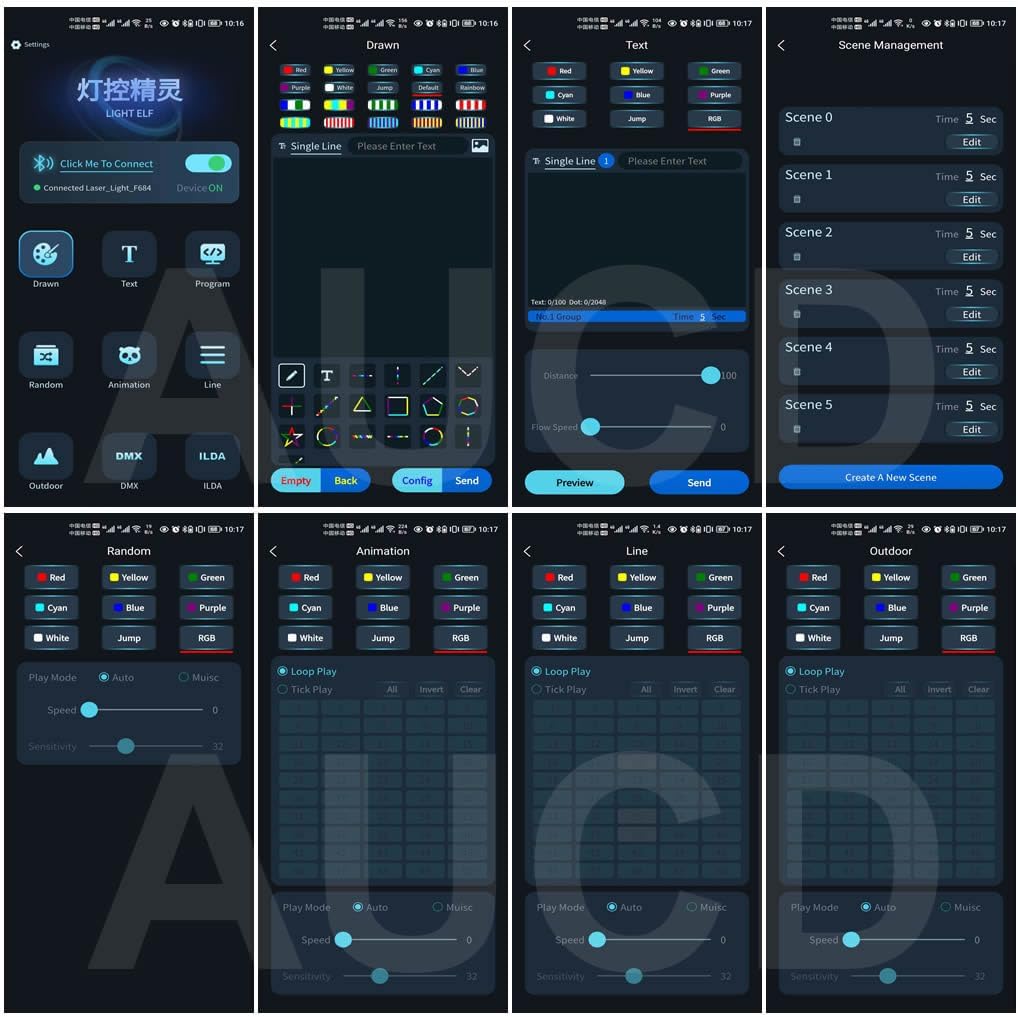
Ffigur 6.1: Drosoddview of the "Light Elf" mobile application interface. This image displays the main menu with options like Drawn, Text, Program, Random, Animation, Line, Outdoor, DMX, and ILDA, along with color and play mode selections.

Figure 6.2: The "Drawn" mode interface within the Light Elf app. Users can draw custom patterns, select colors, and send them to the laser projector.
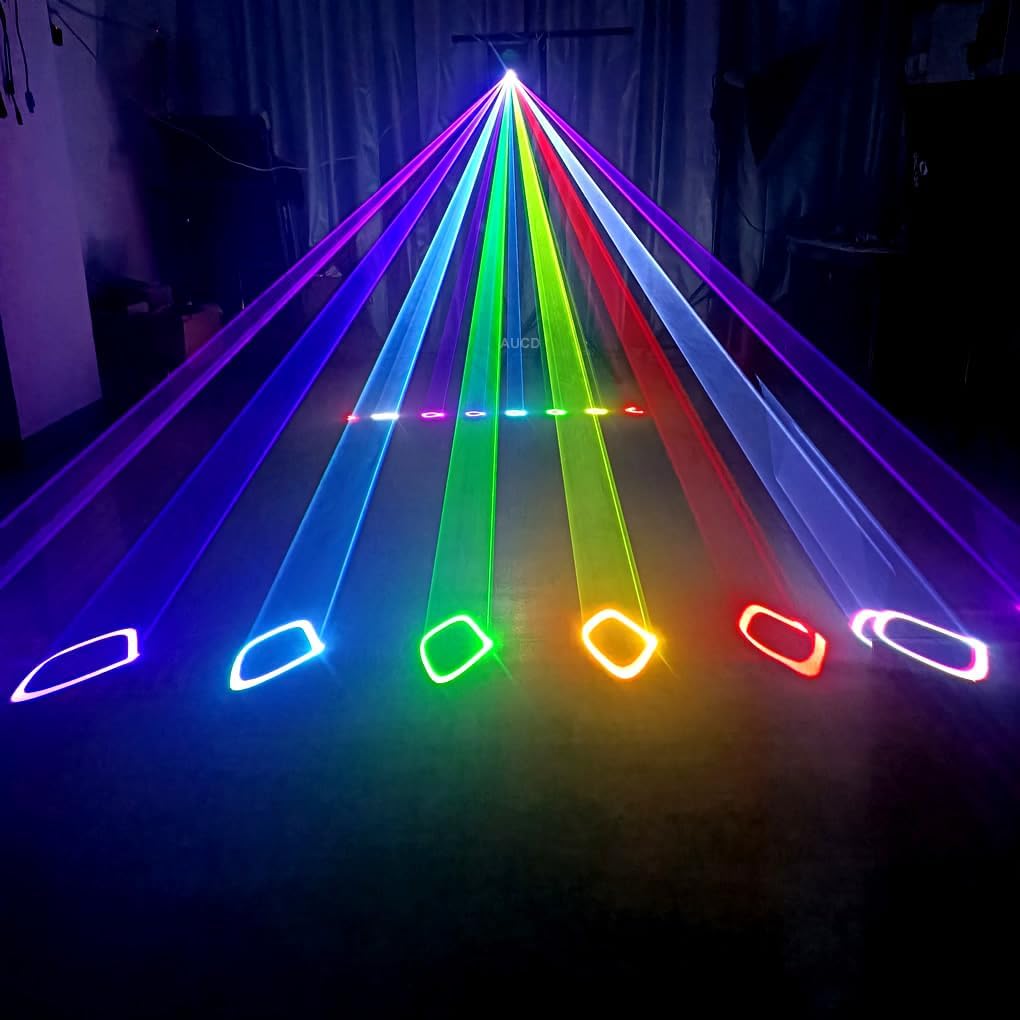
Ffigur 6.3: Examples of various laser patterns projected by the AUCD CX338B. This collage showcases different shapes, lines, and animations achievable with the device.
6.2 Modd Sain Actif
In Sound Active mode, the laser light reacts to ambient sound or music, creating dynamic patterns synchronized with the audio. This mode is typically selected via the unit's menu or the mobile app.
6.3 Modd Auto
Auto mode cycles through a series of pre-programmed patterns and effects automatically. This mode is suitable for continuous operation without external control.
6.4 ILDA Mode
The device supports ILDA (International Laser Display Association) connections via RJ45 & DB25 ports. This allows for professional control using ILDA-compatible software and hardware for advanced laser shows.
6.5 DMX512 Mode
The laser light can be controlled using DMX512 protocol via 3-pin XLR Male/Female connectors. It utilizes 16/20 DMX channels, allowing integration into existing lighting setups. Refer to the DMX channel chart in the appendix (if available) for specific control functions.
6.6 Modd Meistr/Caethwas
For synchronized operation of multiple units, connect them in a master/slave configuration. One unit acts as the master, controlling the patterns and effects of the connected slave units.
7. cynnal
- Glanhau: Regularly clean the exterior of the unit with a soft, dry cloth. For the laser aperture, use a lens cleaning solution and a microfiber cloth to avoid scratches. Ensure the unit is powered off and unplugged before cleaning.
- Awyru: Gwnewch yn siŵr bod yr agoriadau awyru yn glir o lwch a malurion i atal gorboethi.
- Storio: When not in use, store the laser light in a cool, dry place, protected from dust and extreme temperatures.
- Dim Rhannau Defnyddiadwy i Ddefnyddwyr: Do not attempt to open the unit or perform any internal repairs. This will void the warranty and may expose you to hazardous laser radiation.
8. Datrys Problemau
| Problem | Achos Posibl | Ateb |
|---|---|---|
| Dim pŵer | Power cable not connected, power outlet faulty, safety key off. | Check power cable connection, try a different outlet, ensure safety key is in 'ON' position. |
| Dim allbwn laser | Safety key off, laser aperture blocked, internal fault. | Ensure safety key is 'ON', check for obstructions, contact support if problem persists. |
| Cysylltiad Bluetooth yn methu | Bluetooth off on device, location services off, app not searching. | Enable Bluetooth and location services, restart app, ensure laser is powered on. |
| Patterns are dim or distorted | Dirty lens, incorrect settings, environmental factors (e.g., too much ambient light). | Clean the laser aperture, adjust brightness/size settings in the app, reduce ambient light. |
9. manylebau
| Paramedr | Gwerth |
|---|---|
| Model | CX338B |
| Grym | 5 Wat |
| Dosbarthiad Laser | Dosbarth 3a |
| Tymheredd Gweithredu | -10 i +40 ° C |
| Ffynhonnell Golau | Red-650nm@1W, Green-532nm@0.5W, Blue-450nm@3.5W |
| Rhyngwyneb Gweithredu | One-click rotate menu Colorful Screen |
| Iaith System | Chinese, English, French, Russian, Vietnamese |
| Cyflymder sganio | 25 Kpps High Galvanometer, ±25 Degree |
| Modd Chwarae | APP, Sound, Auto, ILDA, DMX512, Master/Slave |
| ILDA Connections | RJ45 & DB25 Male/Female |
| Cysylltiadau DMX | 3 Pins XLR Male/Female |
| Sianel DMX | Sianeli 16/20 |
| Mewnbwn Prif Bibellau | AC 110-240V@50/60Hz |
| Dimensiynau Cynnyrch | 16 x 15 x 12 cm (6.3 x 5.9 x 4.7 modfedd) |
| Pwysau Eitem | 2 kg (4.4 pwys) |
| Deunydd | Metel |
| Ardystiad | CE |
10. Gwybodaeth Gwarant
AUCD products are manufactured to high quality standards. This product is covered by a limited warranty against defects in materials and workmanship for a period specified at the point of purchase. Please retain your proof of purchase for warranty claims. The warranty does not cover damage caused by improper installation, misuse, unauthorized modifications, or normal wear and tear.
11. Cefnogaeth i Gwsmeriaid
For technical assistance, troubleshooting, or warranty inquiries, please contact AUCD customer support through the retailer where the product was purchased or visit the official AUCD websafle ar gyfer gwybodaeth cyswllt.