
NIMO NIMO N152
NIMO 15.6-inch FHD Student Laptop Instruction Manual
Model: NIMO N152
Rhagymadrodd
This manual provides essential information for setting up, operating, maintaining, and troubleshooting your NIMO 15.6-inch FHD Student Laptop. Please read this manual thoroughly to ensure proper use and to maximize the lifespan of your device. The NIMO N152 laptop is designed for work, study, and daily life, featuring a powerful AMD Ryzen 5 3500U processor, ample memory and storage, and user-friendly features like a backlit keyboard and fingerprint reader.

Figure 1: NIMO 15.6-inch FHD Student Laptop. This image displays the silver laptop with its screen showing a vibrant desktop background, highlighting its full HD display, 32GB RAM, 1TB SSD, fingerprint reader, Type-C PD charger, and backlit keyboard features.
1. Gosod
1.1 Dadbocsio ac Archwiliad Cychwynnol
Carefully remove all components from the packaging. Verify that all items listed below are present and undamaged. If any item is missing or damaged, please contact NIMO customer support immediately.
Beth sydd yn y blwch:
- 1 x NIMO N152 Laptop
- 1 x Type-C 65W PD Fast Charger
- 1 x Llawlyfr Defnyddiwr (y ddogfen hon)
- Windows 11 Home (wedi'i osod ymlaen llaw)
- Gwybodaeth Gwarant
1.2 Pŵer Ymlaen a Gwefru Cychwynnol
Before first use, it is recommended to fully charge your laptop. Connect the provided Type-C 65W GaN PD fast charger to the laptop's Type-C charging port and then to a power outlet. The charge LED indicator will illuminate to confirm charging. A full charge typically takes a few hours, but the fast charging feature allows for significant battery life with short charging times.

Figure 2: Type-C 65W PD Fast Charger. This image shows the compact 65W GaN PD charger and its versatility in charging not only the NIMO laptop but also other devices like tablets and smartphones, emphasizing its "One Charger for All" capability.
1.3 Operating System Setup (Windows 11)
Upon first power-on, the laptop will guide you through the Windows 11 initial setup process. Follow the on-screen prompts to configure language, region, network connection, user accounts, and privacy settings. An internet connection is required for activation and updates.
1.4 Fingerprint Reader Setup
For enhanced security and quick login, set up the integrated fingerprint reader. Navigate to Windows Settings > Accounts > Sign-in options > Fingerprint Recognition (Windows Hello Fingerprint) and follow the instructions to register your fingerprints. This allows for password-free login with a single touch.
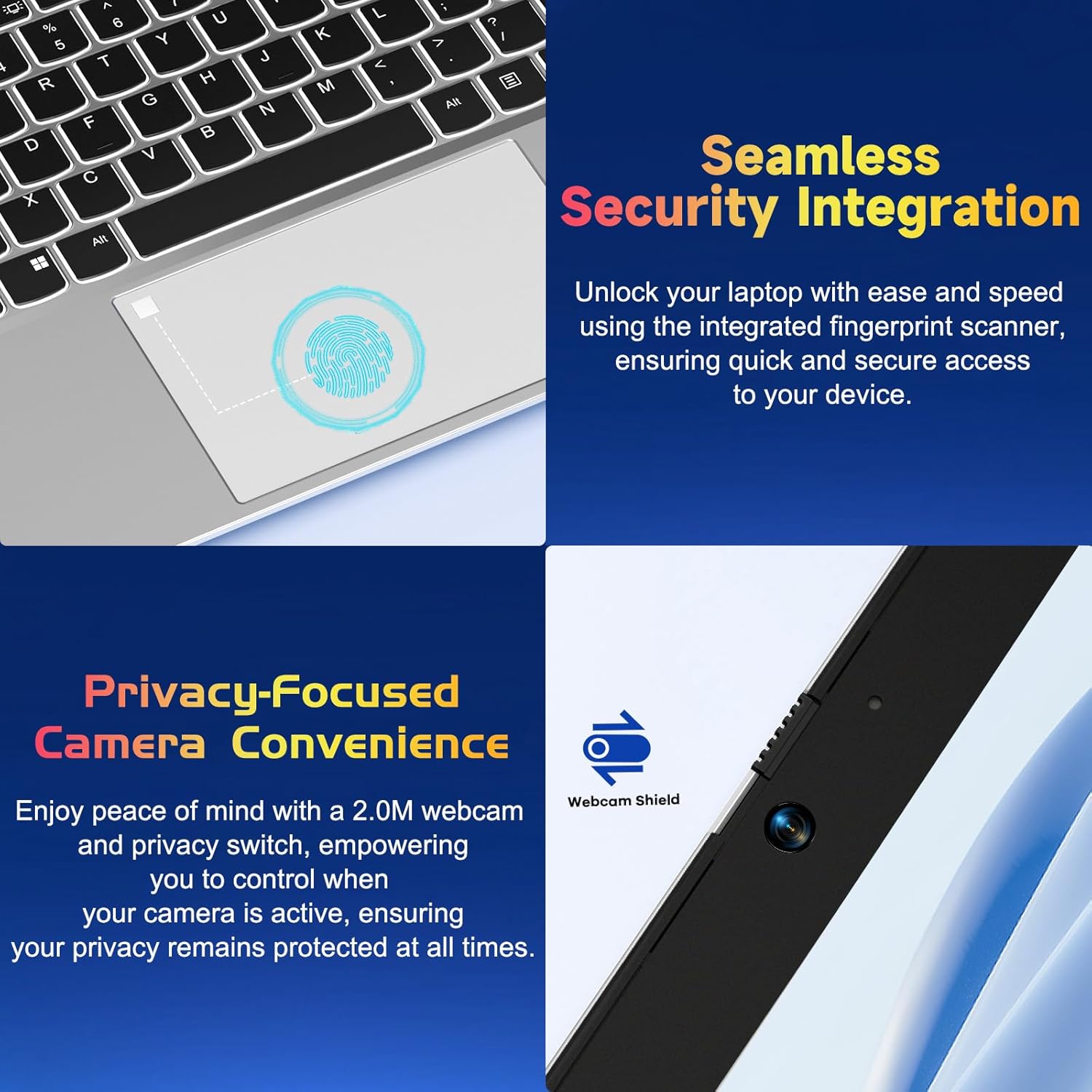
Figure 3: Seamless Security Integration and Privacy-Focused Camera. This image highlights the integrated fingerprint scanner on the touchpad for quick and secure access, and the 2.0M webcam with a privacy switch for enhanced user privacy.
2. Gweithredu Eich Gliniadur
2.1 Rheoli Pŵer
- Pŵer Ymlaen: Pwyswch y botwm pŵer sydd wedi'i leoli ar ochr dde uchaf y bysellfwrdd.
- Modd Cwsg: Caewch y caead neu pwyswch y botwm pŵer yn fyr.
- Cau i Lawr: Go to Start > Power > Shut down in Windows.
- Ailgychwyn: Go to Start > Power > Restart in Windows.
2.2 Bysellfwrdd a Phad Cyffwrdd
The NIMO N152 features a full-size keyboard with a numeric keypad for efficient data entry. The backlit keyboard can be adjusted or turned off using the dedicated function keys (refer to keyboard legends for specific key combinations), allowing for comfortable typing in various lighting conditions.
The precision touchpad supports multi-touch gestures for intuitive navigation, including scrolling, zooming, and switching applications. Refer to Windows settings for customizing touchpad gestures.

Figure 4: Effortless Typing in Any Environment. This image showcases the laptop's backlit keyboard, responsive touchpad, integrated fingerprint reader, and numeric keypad, emphasizing ease of use in various lighting conditions.
2.3 Nodweddion Arddangos
Your laptop is equipped with a 15.6-inch Full HD (1920x1080) IPS Anti-Glare display. This screen offers vibrant visuals, wide viewing angles, and reduced reflections for a comfortable viewing experience. The 85% screen-to-body ratio and micro-edge design maximize your viewing ardal.

Figure 5: Vivid Full HD Display. This image highlights the laptop's 15.6-inch FHD IPS display with 1920x1080 resolution, bright view, and eye protection features, showcasing its immersive visual quality.
The laptop also features a 180-degree lay-flat hinge, allowing the screen to lie completely flat. This feature is useful for sharing content with others or collaborating in various settings.

Figure 6: 180-degree Lay-Flat Hinge. This image demonstrates the laptop's ability to open flat, expanding usage scenarios and making content sharing easier.
2.4 Dewisiadau Cysylltedd
The NIMO N152 offers a variety of ports for connecting peripherals and external devices:
- Type-C (Charge Only): Ar gyfer mewnbwn pŵer.
- Porthladdoedd USB 3.0 (x3): Ar gyfer trosglwyddo data cyflym gyda dyfeisiau cydnaws.
- Porthladd USB 2.0 (x1): Ar gyfer cysylltu dyfeisiau USB safonol.
- HDMI: Ar gyfer cysylltu â monitorau neu daflunyddion allanol.
- Type-C (Full Function): Supports data, video output, and power delivery.
- Micro SD Reader: Ar gyfer ehangu storfa neu drosglwyddo files o gardiau cof.
- Headphone Combo Jack: Ar gyfer cysylltu clustffonau neu glustffonau.
- Slot Clo Kensington: Ar gyfer diogelwch corfforol.

Figure 7: Expanded Connectivity Options. This image illustrates the various ports available on the NIMO laptop, including USB, HDMI, Type-C, Micro SD reader, and headphone jack, providing versatile connectivity.
2.5 Webcam a phreifatrwydd
The laptop includes a 2.0 MP webcam for video calls and conferencing. For privacy, a physical privacy switch is integrated, allowing you to disable the webcam when not in use, ensuring your privacy is protected.
2.6 Perfformiad Drosview
Powered by an AMD Ryzen 5 3500U processor with 4 cores and 8 threads, the NIMO N152 delivers reliable performance for daily tasks, entertainment, and light gaming. Coupled with 32GB DDR4 RAM and a 1TB PCIe SSD, it offers fast startup times, quick application loading, and efficient multitasking.

Figure 8: AMD R5 Processor. This image highlights the laptop's AMD Ryzen 5 processor, detailing its 4 cores, 8 threads, 15W power consumption, and 3.7 GHz turbo boost, indicating its capability for daily tasks and light gaming.
3. cynnal
3.1 Glanhau Eich Gliniadur
To maintain the laptop's appearance and functionality, regularly clean the screen, keyboard, and chassis. Use a soft, lint-free cloth slightly dampened with water or a screen-cleaning solution for the display. For the keyboard and chassis, use a dry or slightly damp brethyn. Osgowch gemegau llym neu ddeunyddiau sgraffiniol.
3.2 Gofal Batri
To prolong battery life, avoid fully discharging the battery frequently. It is recommended to keep the battery charge between 20% and 80% when possible. Store the laptop in a cool, dry place if not used for extended periods.
3.3 RAM and SSD Upgrades
The NIMO N152 laptop supports user-detachable RAM and SSD, allowing for future upgrades. If you plan to upgrade, ensure you use compatible components and follow proper anti-static precautions. Consult a professional if you are unsure about the upgrade process.

Figure 9: Expandable Memory Support. This image illustrates the laptop's support for memory expansion, showing a Micro SD card slot, indicating flexibility for storage upgrades.
4. Datrys Problemau
If you encounter issues with your NIMO N152 laptop, please refer to the following common troubleshooting steps:
- Dim pŵer: Gwnewch yn siŵr bod y gwefrydd wedi'i gysylltu'n iawn a bod yr allfa bŵer yn gweithio'n iawn. Rhowch gynnig ar allfa wahanol.
- Problemau Arddangos: If the screen is blank or flickering, try connecting an external monitor to check if the issue is with the laptop's display or graphics output. Adjust display settings in Windows.
- Keyboard/Touchpad Unresponsive: Restart the laptop. Check for any physical obstructions. Ensure drivers are up to date via Windows Update or NIMO support websafle.
- Perfformiad Araf: Close unnecessary applications. Check for background processes. Ensure sufficient free space on the SSD. Consider running a disk cleanup or antivirus scan.
- Problemau Cysylltedd: For Wi-Fi, ensure the router is working and the laptop is within range. For USB devices, try different ports.
For more complex issues or if the problem persists, please contact NIMO customer support.
5. manylebau
| Nodwedd | Manyleb |
|---|---|
| Enw Model | NIMO N152S |
| Maint Arddangos Sgrin | 15.6 modfedd |
| Cydraniad Sgrin Max | 1920 x 1080 Pixels (FHD IPS) |
| Prosesydd | AMD Ryzen 5 3500U (3.7 GHz) |
| HWRDD | 32 GB DDR4 (3200 MHz) |
| Gyriant Caled | SSD 1 TB PCIe |
| Cydbrosesydd graffeg | AMD Integrated Graphics |
| System Weithredu | Windows 11 Cartref |
| Math Di-wifr | 802.11a/b/g/n/ac |
| Porthladdoedd USB | 3 x USB 3.0, 1 x USB 2.0, 2 x Type-C (1 Charge Only, 1 Full Function) |
| Bywyd Batri Cyfartalog | 5 Awr |
| Pwysau Eitem | 3.8 pwys |
| Dimensiynau Cynnyrch | 14.07 x 8.98 x 0.76 modfedd |
| Lliw | Arian |
| Cefn Webcam Datrys | 2 AS |
| Nodweddion Arbennig | Backlit Keyboard, Fingerprint Reader, HD Audio, Numeric Keypad |
6. Gwarant a Chefnogaeth
NIMO is committed to providing excellent customer service and product support. Your NIMO N152 laptop comes with the following:
- Gwarant Gwneuthurwr 2 Flynedd: Yn cwmpasu diffygion mewn deunyddiau a chrefftwaith o dan ddefnydd arferol.
- 90-Day Hassle-Free Returns: You may return any NIMO product for any reason within 90 days of purchase.
- Partial Assembly in the USA: Demonstrates commitment to quality and local support.
For any questions, technical assistance, or warranty claims, please contact NIMO customer support. Our dedicated team is ready to assist you.

Figure 10: NIMO Customer Service. This image depicts a customer service representative with a headset, symbolizing NIMO's commitment to providing professional after-sales support.
You can also find more information and support resources on the official NIMO websafle.
Gwybodaeth Ddiogelwch Bwysig
Please read and follow all safety instructions provided with your laptop to prevent injury or damage. This product contains chemicals known to the State of California to cause cancer and birth defects or other reproductive harm (Proposition 65 warning).
Ask a question about this manual
Ask about setup, troubleshooting, compatibility, parts, safety, or missing instructions. Manuals+ will review the question and use this page’s manual context to help answer it.