
1. Drosview
The Roku Select Series HD TV provides a streamlined entertainment experience. This 32-inch 720p HD television integrates the Roku operating system for easy access to streaming content, live TV, and various applications. It features a voice remote for convenient control and includes technologies like Bluetooth Headphone Mode and Dolby Audio for enhanced sound.
Nodweddion Allweddol
- Ffrydio Di-dor: Fast Wi-Fi and quick app launches for immediate entertainment access.
- Extensive Content: Access to thousands of streaming apps, free movies, shows, and live TV channels.
- Sgrin Gartref Addasadwy: Organize apps and content for personalized viewing.
- Diweddariadau Meddalwedd Awtomatig: Ensures access to the latest features and applications.
- Integreiddio Cartref Clyfar: Compatible with Roku Voice, Siri, Alexa, and Google Assistant for voice control. Supports Apple AirPlay for content sharing.
- Clear HD Picture: 720p HD resolution with Roku Smart Picture technology for optimized visuals.
- Llais o Bell: Search, play, and control streaming with voice commands.
- Sain Uwch: Designed for clear speech and louder sound with Dolby Audio technology.
- Modd Clustffonau Bluetooth: Private listening with wireless headphones.

Image: Roku 32-inch Select Series HD Smart TV with included remote control.
2. Beth sydd yn y Bocs
Gwiriwch fod yr holl gydrannau yn bresennol cyn bwrw ymlaen â'r gosodiad.
- Roku Select Series 32" HD TV
- Standiau a sgriwiau
- Roku Voice Remote with batteries (2 AAA)
- Cebl Pŵer
- Llawlyfr Defnyddiwr (y ddogfen hon)

Image: Contents of the Roku Select Series TV packaging.
3. Gosod
3.1 Dadbacio
Tynnwch y teledu a'r holl ategolion o'r pecynnu yn ofalus. Cadwch y pecynnu ar gyfer cludiant neu anghenion gwasanaeth yn y dyfodol.
3.2 Atodi'r Stondin
- Rhowch sgrin y teledu i lawr ar arwyneb meddal, glân i atal crafiadau.
- Aliniwch y standiau teledu gyda'r tyllau sgriwio ar waelod y teledu.
- Sicrhewch y stondinau gan ddefnyddio'r sgriwiau a ddarperir. Gwnewch yn siŵr eu bod wedi'u tynhau'n gadarn.
3.3 Cysylltu Perifferolion
Cysylltwch eich dyfeisiau â'r porthladdoedd priodol ar gefn y teledu.
- HDMI: Connect up to three HDMI devices (e.g., cable box, gaming console, Blu-ray player) to the HDMI ports.
- USB: Use the USB port for media playback or connecting compatible accessories.
- Optegol (S/PDIF): Ar gyfer cysylltu â system sain allanol.
- Cebl Pwer: Cysylltwch y cebl pŵer â'r teledu ac yna â soced wal.
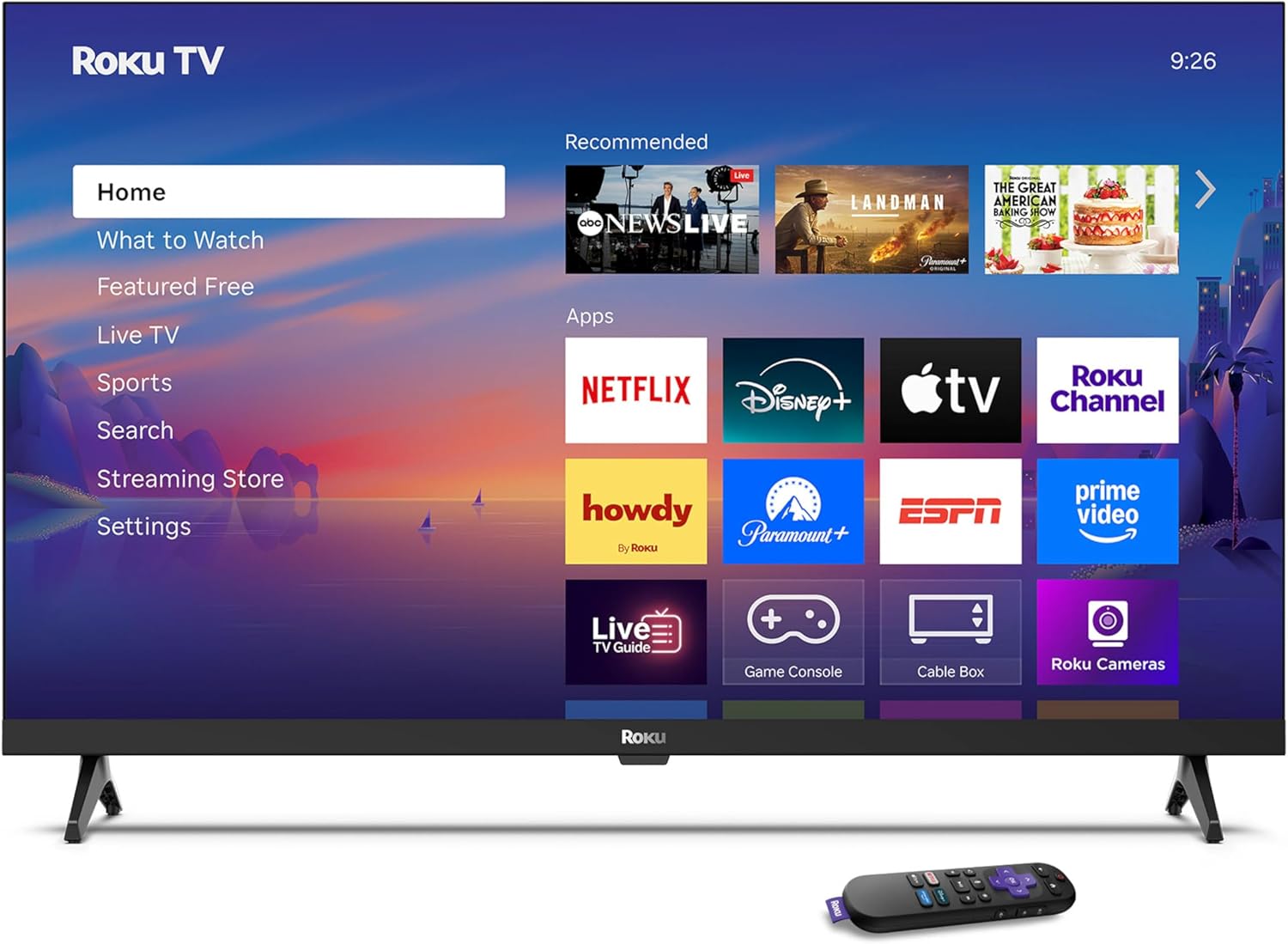
Image: Rear panel connections including HDMI, USB, and optical ports.
3.4 Ymlaen Cychwynnol a Chysylltiad Rhwydwaith
- Plug in the TV and press the power button on the remote or TV.
- Dilynwch y cyfarwyddiadau ar y sgrin i ddewis eich iaith a chysylltu â'ch rhwydwaith Wi-Fi.
- Activate your Roku account or create a new one.
Fideo: Dros benview of the Roku TV operating system, demonstrating its user interface and features. This video is provided by Roku, Inc.
4. Cyfarwyddiadau Gweithredu
4.1 Defnyddio'r Rheolydd Llais
The Roku Voice Remote allows for intuitive control of your TV and streaming content.
- Chwiliad Llais: Press and hold the voice button and speak your command to search for content, launch apps, or control playback.
- Llywio: Use the directional pad to move through menus and select items.
- Llwybrau byr ap: Mae botymau pwrpasol yn darparu mynediad cyflym i wasanaethau ffrydio poblogaidd.

Image: Features of the Roku Voice Remote, highlighting voice control and shortcut buttons.
4.2 Llywio'r Sgrin Gartref
The Roku Home Screen provides access to all your installed apps, inputs, and settings.
- Cartref: Returns you to the main home screen.
- Beth i'w Gwylio: Discover recommended content.
- Teledu byw: Access free live television channels.
- Siop Ffrydio: Browse and add new streaming channels.
- Gosodiadau: Adjust TV and system preferences.

Image: The Roku TV home screen interface.
4.3 Adjusting Picture and Sound Settings
Addasu eich viewprofiad gwrando a chynnig drwy'r ddewislen gosodiadau.
- Modd Llun: Select from predefined modes like Standard, Vivid, Sports, or Movie. Roku Smart Picture automatically optimizes settings.
- Modd Sain: Dewiswch sain profiles or enable features like Night Mode for reduced volume fluctuations.
- Modd Clustffonau Bluetooth: Pair your wireless headphones for private audio.

Image: Picture mode settings on the Roku TV.

Image: Bluetooth Headphone Mode in use.

Image: Dolby Audio technology for clear sound.
5. cynnal
5.1 Glanhau'r Sgrin
To clean the TV screen, gently wipe it with a soft, dry, lint-free cloth. For stubborn marks, lightly dampgolchwch y lliain gyda dŵr neu doddiant glanhau sy'n ddiogel i'r sgrin. Osgowch ddefnyddio cemegau llym neu ddeunyddiau sgraffiniol.
5.2 Diweddariadau Meddalwedd
Your Roku TV automatically receives software updates when connected to the internet. These updates provide new features, performance improvements, and bug fixes. Ensure your TV remains connected to the internet for optimal performance.
6. Datrys Problemau
If you encounter issues with your Roku TV, refer to the following common solutions:
- Dim pŵer: Gwnewch yn siŵr bod y cebl pŵer wedi'i blygio'n ddiogel i'r teledu ac i soced drydan sy'n gweithio. Rhowch gynnig ar soced wahanol.
- Dim Llun/Sain: Verify that the correct input source is selected. Check all cable connections (HDMI, audio). Restart the TV by unplugging it for 30 seconds and plugging it back in.
- Ddim yn Gweithio o Bell: Replace the AAA batteries in the remote. Ensure there are no obstructions between the remote and the TV. For voice remote issues, re-pair the remote if necessary (refer to Roku support for specific steps).
- Problemau Cysylltiad Rhwydwaith: Restart your Wi-Fi router and modem. Go to the TV's settings menu, then Network, and try reconnecting to your Wi-Fi network.
- App Not Loading/Crashing: Try restarting the app. If the issue persists, remove the app from the home screen, restart the TV, and then re-add the app from the Streaming Store.
7. manylebau
| Nodwedd | Manylyn |
|---|---|
| Maint Sgrin | 32 modfedd |
| Technoleg Arddangos | LED |
| Datrysiad | 720p |
| Cyfradd Adnewyddu | 60 Hz |
| Nodweddion Arbennig | Bluetooth Headphone Mode, Dolby Audio, Voice Remote |
| Technoleg Cysylltedd | Bluetooth, WiFi |
| Cyfanswm Porthladdoedd HDMI | 3 |
| Cyfanswm Porthladdoedd USB | 1 |
| Mewnbwn Sain | HDMI |
| System Weithredu | Roku OS |
| Math Mowntio | Mowntio Bwrdd, Mowntio Wal |
| Safon Mowntio VESA | 200 x 200 mm |
| Dimensiynau Cynnyrch (D x W x H) | 7"D x 28.3"W x 18.3"H |
| Pwysau Eitem | 7.5 Bunt |
| Rhif Model | 32R2D5 |
| UPC | 829610008974 |
8. Gwybodaeth Gwarant
8.1 Gwarant Gyfyngedig
Roku warrants the hardware against defects in materials and workmanship under normal use for a period of one (1) year from the date of purchase ("Warranty Period"). If Roku determines that the device’s hardware is defective during the Warranty Period, Roku’s sole obligation, and your exclusive remedy, will be to either repair or replace the unit with either a new or rebuilt device, at its option. This warranty applies if the product is used in accordance with the provided documentation.
8.2 Polisi Dychwelyd
You may return a device for any reason:
- Within thirty (30) days from the date of purchase from Roku.
- Within the applicable return period if purchased from an authorized reseller or distributor.
Additional details regarding product returns can be found on the Roku support site.
9. Cefnogaeth
For further assistance, troubleshooting guides, and frequently asked questions, please visit the official Roku support websafle: