
1. Rhagymadrodd
This manual provides comprehensive instructions for the installation, operation, maintenance, and troubleshooting of your ASUS Z790 MAX Gaming WIFI7 Intel Z790 (LGA 1700) ATX Motherboard. Please read this manual thoroughly before proceeding with installation and retain it for future reference. Proper installation and usage are crucial for optimal performance and longevity of the product.
2. Cynnyrch Drosview
The ASUS Z790 MAX Gaming WIFI7 motherboard is designed to support Intel Core 14th, 13th, and 12th Gen Processors, along with Pentium Gold and Celeron Processors, utilizing the LGA 1700 socket. It features advanced connectivity and power delivery solutions for high-performance computing.
Nodweddion Allweddol:
- Cefnogaeth prosesydd: Intel LGA 1700 socket for 14th, 13th, and 12th Gen Intel Core processors.
- Power Solution: 14+1 DrMOS power stages, 6-layer PCB, ProCool connectors, alloy chokes, and durable capacitors for stable power delivery.
- Cof: Supports DDR5 memory technology.
- Cysylltedd: PCIe 5.0, Wi-Fi 7, Realtek 1Gb LAN, HDMI, rear USB 20Gbps Type-C, front USB 5Gbps Type-C, and Thunderbolt (USB4) header support.
- Storio: Three PCIe 4.0 M.2 slots.
- Oeri: Large VRM heatsinks, PCH heatsink, hybrid fan headers, and Fan Xpert 4 with AI Cooling II.
- Exclusive Technologies: ASUS Gwell Cof Profile II and ASUS OptiMem II.
- Diagnosteg: Q-LED Core for system status indication.
Cynnwys y Pecyn:
The retail package typically includes the following items:

Image: Contents of the ASUS Z790 MAX Gaming WIFI7 motherboard package. This includes the motherboard itself, a Wi-Fi antenna, two SATA data cables, M.2 screw packages for securing SSDs, a rear I/O panel shield, and a quick start guide.

Image: The ASUS Z790 MAX Gaming WIFI7 motherboard displayed alongside its retail packaging and the included Wi-Fi antenna.
3. Gosod a Gosod
Cyn dechrau'r gosodiad, gwnewch yn siŵr bod eich system wedi'i diffodd a'i datgysylltu o'r ffynhonnell bŵer. Daliwch y famfwrdd wrth ei ymylon i osgoi rhyddhau statig.
3.1 Motherboard Preparation
- Dadbacio'r famfwrdd a'i osod ar arwyneb gwrth-statig.
- Install the CPU into the LGA 1700 socket. Carefully align the CPU with the socket's orientation key and lower the load plate.
- Gosodwch yr oerydd CPU yn ôl cyfarwyddiadau'r gwneuthurwr.
- Install DDR5 memory modules into the DIMM slots. Refer to the motherboard's quick start guide for recommended slot population for dual-channel operation.
- Install M.2 SSDs into the available M.2 slots, securing them with the provided screws or retention mechanisms. Remember to remove any protective plastic films from heatsinks before installation.
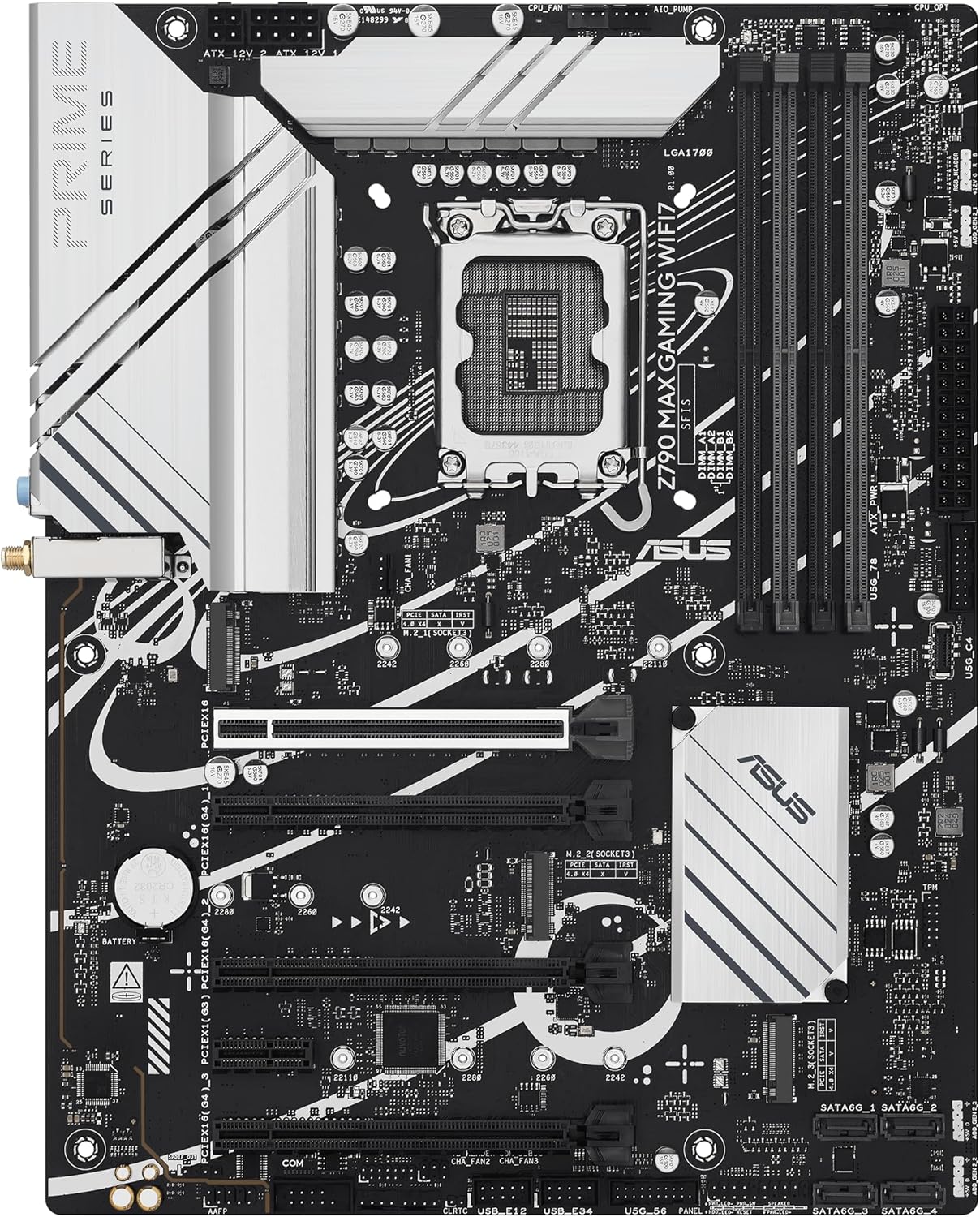
Image: A top-down perspective of the ASUS Z790 MAX Gaming WIFI7 motherboard, illustrating the central LGA 1700 CPU socket, the four DDR5 DIMM slots, and the locations of the M.2 storage slots.
3.2 Gosod Siasi
- Install the I/O shield into your PC chassis.
- Carefully place the motherboard into the chassis, aligning it with the standoffs. Secure the motherboard with screws.
- Install your graphics card(s) into the PCIe 5.0 or other available PCIe slots. Ensure the card is fully seated and secured.
- Connect all necessary power cables from your power supply unit (PSU) to the motherboard (24-pin ATX, 8-pin CPU, etc.).
- Connect front panel headers (power button, reset button, USB ports, audio) to the corresponding pins on the motherboard. Refer to the quick start guide for pin layouts.
- Connect SATA devices (HDDs, SSDs) using the provided SATA cables.
- Atodwch yr antena Wi-Fi i gysylltwyr y panel I/O cefn ar gyfer cysylltedd diwifr.
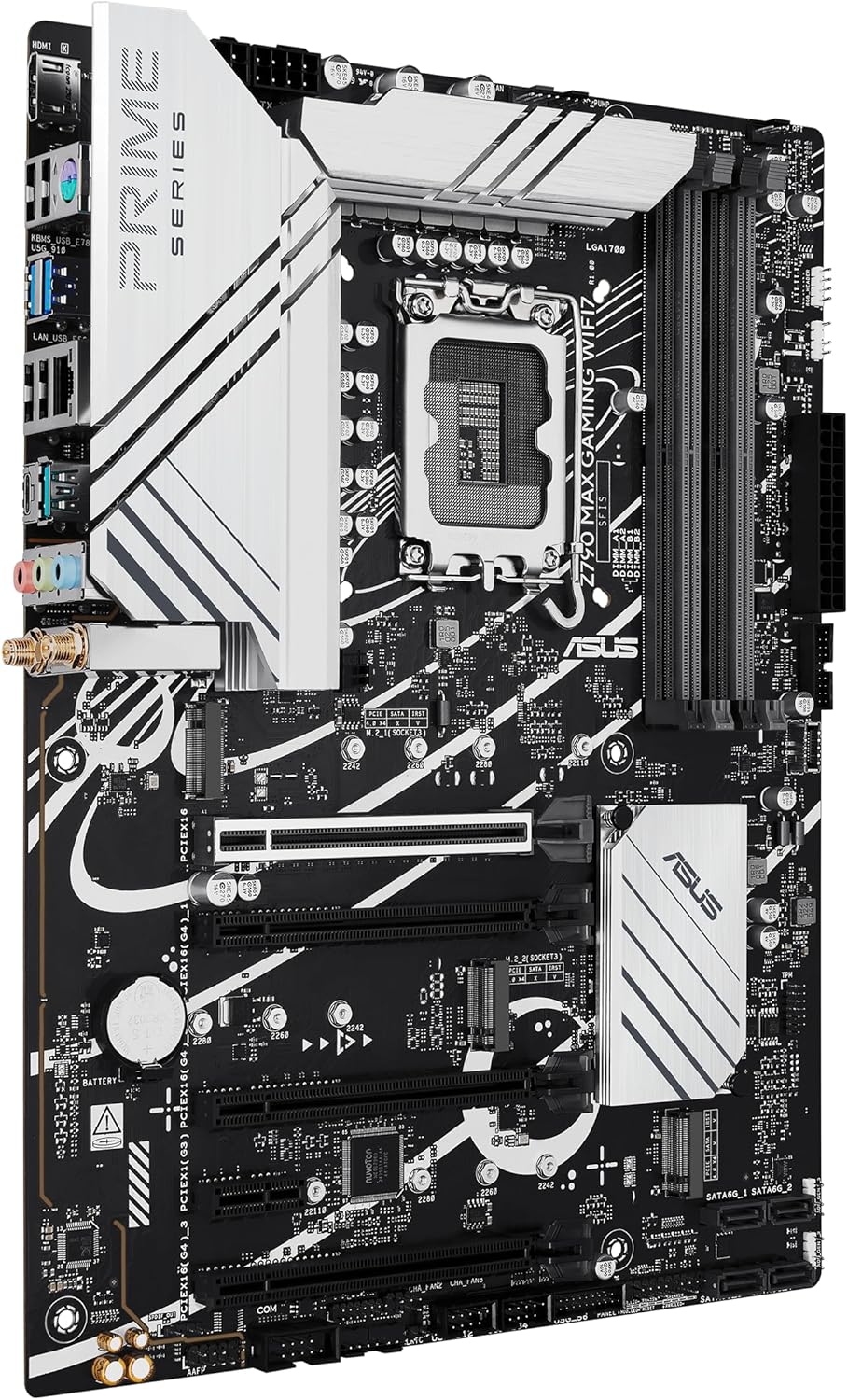
Delwedd: Ongl view of the ASUS Z790 MAX Gaming WIFI7 motherboard, showcasing the various ports on the rear I/O panel and the multiple PCIe expansion slots.
4. Cyfarwyddiadau Gweithredu
4.1 Cychwyn Cyntaf a Gosod BIOS/UEFI
- After assembly, connect your monitor, keyboard, and mouse.
- Trowch eich system ymlaen. Pwyswch y DEL allwedd yn ystod y cychwyn i fynd i mewn i'r cyfleustodau gosod BIOS/UEFI.
- In the BIOS, you can configure boot order, enable XMP/EXPO profiles for memory, adjust fan curves, and update firmware.
- Cadwch y newidiadau ac ymadael â'r BIOS i barhau â gosod y system weithredu.
4.2 Software and Drivers
- After installing your operating system (Windows 10 or Windows 11), install the necessary drivers for the chipset, audio, LAN, and Wi-Fi. These can typically be found on the ASUS support websafle ar gyfer eich model mamfwrdd penodol.
- The motherboard may prompt you to install ASUS Armoury Crate software. This utility can assist with driver installation, system monitoring, and Aura Sync RGB lighting control. Note that some users have reported stability issues with Armoury Crate; if encountered, drivers can be installed manually from the ASUS websafle.
- For Wi-Fi 7 functionality, Windows 11 version 24H2 or later is required for full features. Windows 11 21H2/22H2/23H2 only support Wi-Fi 6E. For Windows 10, drivers may not be available from ASUS; refer to the Wi-Fi chipset vendor's websafle am fanylion.
5. cynnal
- Glanhau: Glanhewch lwch o gas eich cyfrifiadur personol a chydrannau'r famfwrdd yn rheolaidd gan ddefnyddio aer cywasgedig. Gwnewch yn siŵr bod y system wedi'i diffodd a'i datgysylltu cyn glanhau.
- Diweddariadau BIOS: Gwiriwch gefnogaeth ASUS yn rheolaidd website for BIOS/UEFI updates. Updates can improve stability, add new features, and enhance compatibility. Follow ASUS's instructions carefully when updating the BIOS.
- Diweddariadau Gyrwyr: Cadwch eich gyrwyr wedi'u diweddaru i sicrhau perfformiad gorau posibl a chydnawsedd â meddalwedd a chaledwedd newydd.
6. Datrys Problemau
Os byddwch chi'n dod ar draws problemau, cyfeiriwch at y camau datrys problemau cyffredin canlynol:
- Dim Pŵer/Dim POST:
- Gwiriwch yr holl gysylltiadau pŵer (ATX 24-pin, CPU 8-pin).
- Ensure CPU and RAM are correctly seated.
- The motherboard features Q-LED Core diagnostic LEDs (red, yellow, white) which can indicate issues with CPU, DRAM, VGA, or Boot devices. Consult the quick start guide for LED interpretations.
- Try booting with only essential components (CPU, one RAM stick, GPU if no integrated graphics).
- Ansefydlogrwydd/Damweiniau System:
- Gwnewch yn siŵr bod yr holl yrwyr wedi'u gosod ac yn gyfredol.
- Gwiriwch dymheredd y CPU a'r GPU.
- Verify RAM stability, especially if XMP/EXPO profiles are enabled. Try disabling them to test.
- Ensure your power supply unit (PSU) is sufficient for your system's components.
- BIOS Flashback Issues: The motherboard supports BIOS Flashback for updating the BIOS without a CPU or RAM. If this feature is unresponsive, ensure the USB drive is formatted to FAT32, the BIOS file is correctly renamed (e.g., 'Z790MG.CAP'), and it is inserted into the designated BIOS Flashback USB port. Refer to the ASUS quick start guide for precise instructions.
- Problemau Cysylltedd Wi-Fi:
- Gwnewch yn siŵr bod yr antena Wi-Fi wedi'i chysylltu'n ddiogel.
- Verify Wi-Fi drivers are correctly installed.
- Check operating system compatibility for Wi-Fi 7 features as noted in the Operating Instructions section.
For further assistance, consult the ASUS support websafle neu cysylltwch â gwasanaeth cwsmeriaid ASUS.
7. manylebau
| Nodwedd | Manyleb |
|---|---|
| Brand | ASUS |
| Enw Model | Z790 MAX HAPCHWARAE WIFI7 |
| Soced CPU | LGA 1700 |
| Proseswyr Cydnaws | Intel Core 14th & 13th Gen Processors, Intel Core 12th Gen, Pentium Gold and Celeron Processors |
| Math o Sglodion | Intel Z790 |
| Technoleg Cof RAM | DDR5 |
| Cyflymder Cof | 4800 MHz (Sylfaen) |
| Cynhwysedd Storio Cof | Hyd at 192 GB |
| Slotiau PCIe | Cefnogaeth PCIe 5.0 |
| M.2 Slotiau | 3 x PCIe 4.0 M.2 |
| LAN | LAN Realtek 1Gb |
| Cysylltedd Di-wifr | Wi-Fi 7 |
| Porthladdoedd USB | Rear USB 20Gbps Type-C, Front USB 5Gbps Type-C, Thunderbolt (USB4) header support |
| Allbwn Fideo | HDMI |
| Llwyfan | Windows 10, Windows 11 |
| Lliw | DUW |
| Pwysau Eitem | 3.47 pwys |
| Dimensiynau Pecyn | 13.46 x 10.79 x 2.8 modfedd |
8. Gwybodaeth Gwarant
ASUS provides a limited warranty for its motherboards. The specific terms and duration of the warranty may vary by region and retailer. Please retain your proof of purchase for warranty claims. For detailed warranty information, including coverage and procedures, please visit the official ASUS support websafle neu cysylltwch â'ch man prynu.
Optional protection plans may be available from retailers, offering extended coverage beyond the standard manufacturer's warranty. These plans are separate from the ASUS product warranty.
9. Cefnogaeth
Am gymorth technegol, lawrlwythiadau gyrwyr, diweddariadau BIOS, a rhagor o wybodaeth am gynhyrchion, ewch i wefan gymorth swyddogol ASUS websafle:
When contacting support, please have your motherboard model name (Z790 MAX GAMING WIFI7) and serial number ready. You may also refer to the quick start guide included in your package, which often contains QR codes or links for direct assistance.