
FiiO M21
FiiO M21 Portable Music Player User Manual
Model: M21
1. Rhagymadrodd
Thank you for choosing the FiiO M21 Portable Music Player. This manual provides essential information for setting up, operating, and maintaining your device. Please read it thoroughly before use to ensure optimal performance and longevity of your M21 player.
The FiiO M21 is a high-fidelity portable music player featuring an Android 13 operating system, powered by a Snapdragon 680 processor. It incorporates four CS43198 DAC chips and a fully balanced 2-stage amplification design to deliver exceptional audio quality. With dual Type-C ports, versatile power supply modes, and a compact HD screen, the M21 is designed for audiophiles seeking a premium portable listening experience.
2. Cynnyrch Drosview
2.1. Cynnwys Pecyn
- FiiO M21 Portable Music Player
- Cebl USB Math-C
- Protective Case (Retro cassette-style)
- Canllaw Cychwyn Cyflym
- Cerdyn Gwarant
2.2. Botymau a Phorthladdoedd
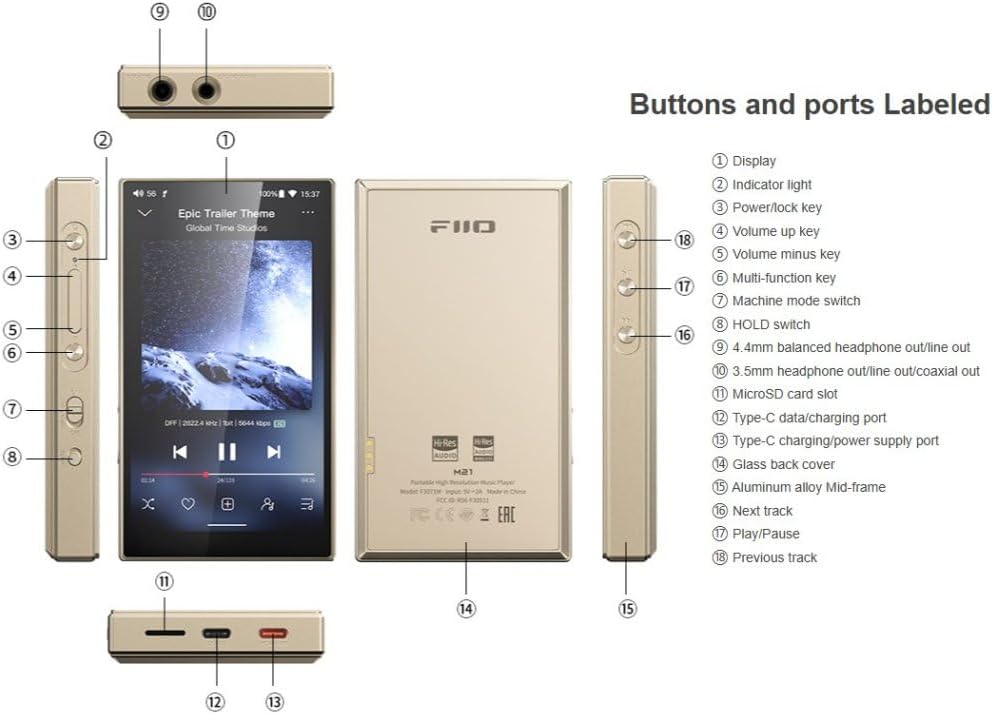
Ffigur 2.2.1: FiiO M21 with labeled buttons and ports for easy identification.
This image displays the FiiO M21 from multiple angles, highlighting its various buttons, ports, and features. Key components are numbered and correspond to a legend for easy identification. These include the display, indicator light, power/lock key, volume up/minus keys, multi-function key, machine mode switch, HOLD switch, 3.5mm headphone/line out, 4.4mm balanced headphone/line out/coaxial out, microSD card slot, Type-C data/charging port, Type-C charging/power supply port, glass back cover, aluminum alloy mid-frame, next track, play/pause, and previous track buttons.
- Arddangos: 4.7-inch compact HD screen.
- Allwedd pŵer/clo: Fe'i defnyddir i droi'r ddyfais ymlaen/diffodd a chloi/datgloi'r sgrin.
- Volume Up/Minus Keys: Addaswch y cyfaint allbwn sain.
- Allwedd Aml-swyddogaeth: Programmable key for various functions.
- Machine Mode Switch: Toggles between different operating modes.
- HOLD Switch: Yn atal pwyso botwm yn ddamweiniol.
- 3.5mm Headphone/Line Out: Standard single-ended audio output.
- 4.4mm Balanced Headphone/Line Out/Coaxial Out: Balanced audio output and digital coaxial output.
- Slot Cerdyn MicroSD: Ar gyfer storfa ehangadwy.
- Type-C Data/Charging Port: Ar gyfer trosglwyddo data a gwefru.
- Type-C Charging/Power Supply Port: Dedicated port for external power supply, especially for Desktop Mode.
- Trac Nesaf/Trac Blaenorol: Navigation buttons for music playback.
- Chwarae/Seibiant: Rheoli chwarae cerddoriaeth.
2.3. Nodweddion Allweddol
- Prosesydd: Qualcomm Snapdragon 680 (6nm process) for superior performance and power efficiency.
- System Weithredu: Android 13 with 4GB RAM + 64GB internal storage.
- DACs: 4x CS43198 DACs with 4-channel, 8-path fully differential output design.
- Ampgoleu: Fully balanced 2-stage amplification (cyftage and current boost).
- Pŵer Allbwn: 950mW high output power.
- Dual Type-C Ports: Separate ports for data/charging and dedicated power supply.
- Desktop/Portable Dual Power Supply Modes: Extends battery lifespan by operating on external power in Desktop Mode.
- Allbynnau Sain: Dual 3.5mm + 4.4mm headphone/LO outputs with independent line ampcylchedau goleuo.
- Allbwn Digidol: Supports SPDIF and USB Audio output with reduced jitter.
- Cysylltedd: Bluetooth (LDAC supported) and Wi-Fi.
- Arddangos: 4.7-inch HD screen.
- Dyluniad: Retro cassette-style protective case included.
3. Gosod
3.1. Gwefru Cychwynnol
Before first use, fully charge your FiiO M21. Connect the provided USB Type-C cable to the Type-C data/charging port on the device and the other end to a USB power adapter (5V/2A recommended) or a computer's USB port. The indicator light will show charging status and turn off when fully charged.
3.2. Pweru Ymlaen / I ffwrdd
- I Bweru Ymlaen: Press and hold the Power/Lock key until the FiiO logo appears on the screen.
- I Bweru i ffwrdd: Press and hold the Power/Lock key until a power-off menu appears. Select "Power off" to shut down the device.
- Cloi/Datgloi Sgrin: Briefly press the Power/Lock key to lock or unlock the screen.
3.3. Mewnosod Cerdyn MicroSD
The FiiO M21 supports expandable storage via a MicroSD card. Locate the MicroSD card slot on the side of the device. Gently insert the MicroSD card into the slot until it clicks into place. To remove, push the card inwards until it springs out.
3.4. Dewin Setup Cychwynnol
Upon first power-on, the device will guide you through an initial setup wizard. This includes selecting your language, connecting to Wi-Fi, and setting up your Google account (optional, for app downloads). Follow the on-screen prompts to complete the setup.
4. Cyfarwyddiadau Gweithredu
4.1. Mordwyo Sylfaenol
The FiiO M21 runs on Android 13, offering a familiar smartphone-like interface. Use touch gestures (tap, swipe, pinch) to navigate through menus, apps, and settings.
4.2. Chwarae Cerdd
- Cerddoriaeth leol: Trosglwyddo cerddoriaeth files to the internal storage or MicroSD card. Use the pre-installed music player app to browse and play your local library.
- Gwasanaethau Ffrydio: Connect to Wi-Fi and download your preferred music streaming apps (e.g., Spotify, Apple Music, Tidal) from the Google Play Store or FiiO Market.
- Rheoli cyfaint: Use the Volume Up/Minus keys on the side of the device to adjust playback volume.
- Rheolaethau Chwarae: Use the physical Next Track, Previous Track, and Play/Pause buttons for quick control.

Ffigur 4.2.1: FiiO M21 displaying its music playback interface.
This image shows the FiiO M21's front display, actively playing music. The screen displays album art, track information, playback progress, and on-screen controls for play/pause, skip, and other functions. The device's sleek design and high-resolution display are visible, emphasizing its primary function as a dedicated music player.
4.3. Connecting Headphones/External Devices
- Clustffonau â Gwifrau: Connect your headphones to either the 3.5mm single-ended output or the 4.4mm balanced output, depending on your headphone's connector.
- Clustffonau Bluetooth: Go to Settings > Connected devices > Bluetooth, turn on Bluetooth, and pair with your Bluetooth headphones. The M21 supports high-quality codecs like LDAC.
- Llinell Allan: The 3.5mm and 4.4mm ports can also function as Line Out for connecting to external amplifiers or speakers. Select the appropriate mode in the settings.
- Allbwn cyfechelog: Use the 4.4mm port for digital coaxial output to compatible DACs or receivers.
4.4. Desktop Mode
The M21 features a patented Desktop Mode. When activated, the device operates entirely on external power connected to the dedicated Type-C power supply port, bypassing the internal battery. This extends battery lifespan and is ideal for prolonged use as a desktop source.
- Connect a stable 5V/2A (or higher) power adapter to the dedicated Type-C power supply port.
- The device will automatically detect Desktop Mode or prompt you to activate it.
4.5. Gosodiadau System
Access the system settings by swiping down from the top of the screen and tapping the gear icon, or by finding the "Settings" app. Here you can configure Wi-Fi, Bluetooth, display, sound, battery, storage, and other Android system options.
5. cynnal
- Glanhau: Defnyddiwch frethyn meddal, sych, heb lint i lanhau'r ddyfais. Peidiwch â defnyddio glanhawyr hylif na aerosolau.
- Storio: Storiwch y ddyfais mewn lle oer, sych i ffwrdd o olau haul uniongyrchol, tymereddau eithafol, a lleithder.
- Gofal Batri: To prolong battery life, avoid fully discharging the battery frequently. If storing for a long period, charge the battery to about 50-60%.
- Diweddariadau Meddalwedd: Regularly check for and install system updates to ensure optimal performance and security. Updates can usually be found in System Settings > About device > System update.
- Osgowch Gollyngiadau ac Effeithiau: The device contains sensitive electronic components. Protect it from physical shocks.
6. Datrys Problemau
| Problem | Achos Posibl | Ateb |
|---|---|---|
| Nid yw'r ddyfais yn pweru ymlaen. | Batri isel; Damwain system. | Charge the device for at least 30 minutes. Press and hold the Power/Lock key for 10 seconds to force restart. |
| Dim allbwn sain. | Volume too low; Incorrect output selected; Headphone connection issue. | Increase volume. Check if headphones are properly connected. Verify output mode (headphone/line out) in settings. Try different headphones. |
| Methu cysylltu â Wi-Fi/Bluetooth. | Wi-Fi/Bluetooth off; Out of range; Network issue. | Ensure Wi-Fi/Bluetooth is enabled in settings. Move closer to the router/device. Restart the M21 and the router/Bluetooth device. |
| Device freezes or lags. | Too many apps running; Low storage; Software bug. | Close background apps. Free up storage space. Restart the device. Check for system updates. |
| Ni adnabyddir cerdyn microSD. | Card not inserted correctly; Incompatible card; Corrupted card. | Reinsert the card. Ensure the card is formatted correctly (FAT32/exFAT). Try a different MicroSD card. |
7. manylebau
| Nodwedd | Manylyn |
|---|---|
| Enw Model | M21 |
| Brand | FiiO |
| System Weithredu | Android 13 |
| Prosesydd | Qualcomm Snapdragon 680 |
| Sglodion DAC | 4x CS43198 |
| Cynhwysedd Storio Cof | 64 GB (Mewnol) |
| Maint Sgrin | 4.7 modfedd |
| Technoleg Cysylltedd | Bluetooth, WiFi |
| Nodwedd Arbennig | Sain Hi-Res |
| Pwysau Eitem | 15.8 owns |
| Dimensiynau Pecyn | 6.3 x 4.33 x 2.36 modfedd |
| Batris | Mae angen 1 batri 9V. (wedi'i gynnwys) |
| Cydrannau wedi'u Cynnwys | Cebl |
| Lliw | Glas Tywyll |
| Gwneuthurwr | FiiO |
| Gwlad Tarddiad | Tsieina |
8. Gwarant a Chefnogaeth
FiiO products typically come with a limited warranty. For specific warranty terms, duration, and conditions, please refer to the warranty card included in your product package or visit the official FiiO websafle. Cadwch eich prawf prynu ar gyfer hawliadau gwarant.
For technical support, troubleshooting assistance beyond this manual, or service inquiries, please contact FiiO customer support through their official website or authorized distributors. You can find contact information and FAQs on the Swyddogol FiiO Websafle.
Dogfennau Cysylltiedig - M21
 |
FiiO M21 Portable HiFi MP3 Player User Manual User manual for the FiiO M21 portable HiFi lossless music MP3 player, detailing features, controls, playback modes, and safety warnings. |
 |
Llawlyfr Defnyddiwr Cyflawn FiiO M11 Llawlyfr defnyddiwr cynhwysfawr ar gyfer chwaraewr sain digidol di-golled cydraniad uchel FiiO M11, yn cwmpasu gosod, nodweddion, gosodiadau sain, cysylltedd, a'r rhaglen FiiO Music. |
 |
Llawlyfr Defnyddiwr Cyflawn FiiO M6 Comprehensive user manual for the FiiO M6 high-resolution lossless digital audio player, detailing its features, buttons, ports, settings, firmware updates, and the FiiO Music application. |
 |
Llawlyfr Defnyddiwr Cyflawn FiiO M11S - Eich Canllaw i Sain Cydraniad Uchel Llawlyfr defnyddiwr cynhwysfawr ar gyfer chwaraewr cerddoriaeth cludadwy cydraniad uchel di-golled FiiO M11S. Yn cwmpasu nodweddion, gosodiadau, cysylltedd, a gweithrediad ar gyfer cariadon sain. |
 |
Manuel Complet FiiO M21 : Canllaw Defnyddio'r Lecteur Audio Gludadwy Explore le manuel complet du lecteur de musique haute résolution FiiO M21. Decouvrez utiliser utiliser ses ses moddau, sain sain fonctions, yn cysylltu Bluetooth a USB DAC, ac yn ogystal encore. |
 |
Llawlyfr Defnyddiwr FiiO X5: Canllaw Chwaraewr Cerddoriaeth Di-golled Cydraniad Uchel Llawlyfr defnyddiwr cynhwysfawr ar gyfer chwaraewr cerddoriaeth di-golled cydraniad uchel FiiO X5. Dysgwch am nodweddion, gweithrediad, diweddariadau cadarnwedd, datrys problemau, a chwestiynau cyffredin. |
Ask a question about this manual
Ask about setup, troubleshooting, compatibility, parts, safety, or missing instructions. Manuals+ will review the question and use this page’s manual context to help answer it.