
1. Rhagymadrodd
Welcome to the Lgnitek MT500 Smartwatch user manual. This guide provides essential information for setting up, operating, and maintaining your new smartwatch. The Lgnitek MT500 is designed to enhance your daily life with advanced health monitoring, communication features, and fitness tracking capabilities. Please read this manual thoroughly to ensure proper use and to fully utilize all features of your device.

Figure 1.1: Lgnitek MT500 Smartwatch, displaying a watch face with time and health metrics.
2. Gwybodaeth Diogelwch
Before using your Lgnitek MT500 Smartwatch, please observe the following safety precautions:
- Ymwadiad Meddygol: The health data provided by this smartwatch (ECG, HRV, BMI, uric acid, lipids, heart rate, SpO2, blood pressure, temperature, etc.) is for reference purposes only and should not be used for medical diagnosis, treatment, or prevention of disease. Consult a medical professional for any health concerns.
- Gwrthiant Dŵr: The device is IP68 water-resistant, suitable for swimming and rain. Avoid hot water, steam, or prolonged submersion in deep water. Do not operate buttons underwater.
- Codi tâl: Use only the provided charging cable. Ensure the charging contacts are dry and clean before charging to prevent corrosion or damage.
- Batri: Do not attempt to replace the battery yourself. Improper battery replacement can lead to explosion or injury. Dispose of batteries according to local regulations.
- Tymheredd Gweithredu: Operate the device within a temperature range of 0°C to 45°C (32°F to 113°F).
- Ymyrraeth: Keep the smartwatch away from strong magnetic fields to avoid interference with its functions.
3. Cynnwys Pecyn
Verify that all items are present in your Lgnitek MT500 Smartwatch package:
- Lgnitek MT500 Smartwatch (with strap)
- Cebl Codi Tâl Magnetig
- Llawlyfr Defnyddiwr

Figure 3.1: Illustration of the smartwatch, charging cable, and user manual included in the package.
4. Cynnyrch Drosview
The Lgnitek MT500 Smartwatch features a sleek design with a high-definition AMOLED display and intuitive controls.

Ffigur 4.1: Blaen view of the smartwatch, showcasing the 1.97-inch AMOLED display.

Ffigur 4.2: Ochr view, highlighting the physical buttons for navigation and interaction.

Ffigur 4.3: Cefn view, showing the advanced health sensors for accurate monitoring.
Nodweddion Allweddol:
- Arddangos: 1.97-inch AMOLED HD touchscreen (390x450 pixels) for vibrant colors and deep blacks.
- Gwydnwch: IP68 water resistance for daily use and swimming.
- Monitro Iechyd: ECG, HRV, BMI, Uric Acid, Lipids, 24/7 Heart Rate, SpO2, Blood Pressure, Body Temperature, Sleep, and Stress monitoring.
- Cyfathrebu: Bluetooth 5.3 for stable calls and smart notifications.
- Ffitrwydd: Over 50 sport modes, step, distance, and calorie tracking.
- Bywyd batri: Up to 7 days of normal use, 20 days standby.
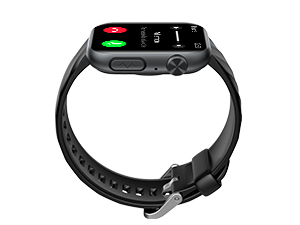
Ffigur 4.4: Manwl view of the 1.97-inch AMOLED screen specifications and exampllai o wynebau oriawr y gellir eu haddasu.
5. Gosod
5.1 Gwefru'r Oriawr Clyfar
Before first use, fully charge your smartwatch. Connect the magnetic charging cable to the charging contacts on the back of the watch and plug the USB end into a power adapter (not included) or a computer USB port.
- Amser Gwefru: Tua 3 awr ar gyfer gwefr lawn.
- Ensure the charging contacts are clean and dry.

Figure 5.1: Illustration showing the smartwatch connected to its magnetic charging cable and a USB power source.
5.2 Gosod Ap a Pharu Bluetooth
To unlock the full potential of your Lgnitek MT500, download and install the companion app on your smartphone.
- Lawrlwythwch yr Ap: Scan the QR code in the manual or search for "H Band" in your smartphone's app store (iOS or Android).
- Galluogi Bluetooth: On your smartphone, go to settings and enable Bluetooth.
- Dyfais Pâr: Open the H Band app, navigate to the device section, and search for "MT500". Select it to connect and pair.
- Caniatâd Grant: Follow the on-screen prompts to grant necessary permissions for notifications, location, etc.

Figure 5.2: Visual guide for downloading the H Band app, enabling Bluetooth, pairing the MT500, and confirming connection.

Figure 5.3: The smartwatch uses Bluetooth 5.3 for seamless synchronization and connectivity with both Android and iOS devices.
6. Cyfarwyddiadau Gweithredu
6.1 Mordwyo Sylfaenol
- Sgrin Gyffwrdd: Sweipiwch i'r chwith/dde, i fyny/i lawr i lywio drwy'r ddewislenni a'r nodweddion. Tapiwch i ddewis.
- Botwm Ochr: Press to wake the screen, return to the home screen, or access the app list. Long press for power options or SOS function (if configured).
7. Nodweddion Monitro Iechyd
The Lgnitek MT500 offers comprehensive health tracking capabilities. Remember, data is for reference only.
7.1 Monitro ECG
The smartwatch is equipped with an ECG function to detect bioelectrical signals from the heart. You can view your ECG data within 60 seconds.
- Press and hold the ECG button with your finger until the test is complete.
- The result will be displayed on the watch.
- Specific details and waveform reports are available in the H Band app.

Figure 7.1: Visual instructions for performing an ECG measurement on the smartwatch and viewing results in the app.
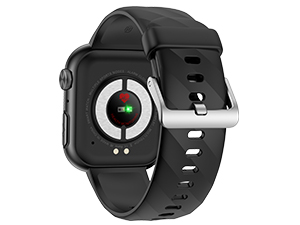
Figure 7.2: The smartwatch screen displaying an ECG waveform and heart rate during a test.
7.2 Uric Acid and Lipids Detection
Monitor your uric acid and blood lipid levels in real-time. Historical data can be stored in the app for trend analysis and preventive alerts.
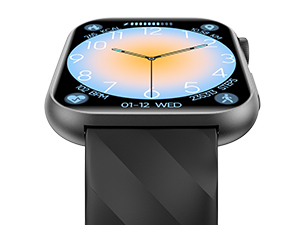
Figure 7.3: Smartwatch display showing uric acid and lipid monitoring, with corresponding app interface for detailed tracking.
7.3 Heart Rate Variability (HRV) Analysis
The smartwatch monitors HRV, providing insights into your heart's health and stress levels. Lorentz scatter diagrams can be used for early detection of arrhythmias.

Figure 7.4: Smartwatch displaying HRV data, with the app showing a Lorentz scatter diagram for detailed analysis.
7.4 Body Composition Analysis (BMI)
Analyze body composition data such as body fat percentage, percen cyhyrtage, subcutaneous fat, and protein levels. Data is collected in 15 seconds and reports are generated in the H Band app.

Figure 7.5: Smartwatch showing body composition analysis, with the app displaying a detailed report of various body metrics.
7.5 Continuous Monitoring (HR, SpO2, BP, Temp, Sleep, Stress)
The smartwatch continuously monitors your heart rate, blood oxygen (SpO2), blood pressure, body temperature, and sleep patterns. It also includes a microphysical control function for a 30-second one-click measurement of five health indicators.

Figure 7.6: Displays of Blood Oxygen, Blood Pressure, Body Temperature, and Stress monitoring on the smartwatch interface.
7.6 Monitro Cwsg
The watch tracks your sleep quality, recording deep sleep, light sleep, and nocturnal sleep, helping you understand and improve your sleep patterns.

Figure 7.7: Smartwatch displaying sleep duration and quality, with a user sleeping in the background.
7.7 MET Monitoring
MET (Metabolic Equivalent of Task) monitoring helps control exercise intensity and boosts metabolism. It evaluates calories burned during workouts and adjusts training programs accordingly for better fat loss.

Figure 7.8: Smartwatch displaying MET data, with individuals exercising in the background.
8. Nodweddion Cyfathrebu
8.1 Galwadau Bluetooth
Stay connected with stable Bluetooth 5.3 calls. You can make and receive calls directly from your smartwatch, add contacts, and view hanes galwadau.
8.2 Hysbysiadau Clyfar
Receive messages and notifications from various applications directly on your watch, without needing to take out your phone.

Figure 8.1: Smartwatch displaying incoming calls, contact lists, call history, and various app notification icons.
9. Nodweddion Clyfar Eraill
- AI Emotional & Fatigue Detection: An AI algorithm analyzes mood and fatigue via Heart Rate Variability (HRV), helping you adjust your lifestyle.
- Cynorthwyydd Llais: Use the intelligent voice assistant for questions, music control, alarms, timers, and weather updates.
- Interactive Games & Calculator: Enjoy interactive games and a built-in calculator.
- Nodyn atgoffa eisteddog: Derbyn rhybuddion i symud ar ôl cyfnodau o anweithgarwch.
- Rhagolwg y Tywydd: Real-time weather updates.
- Rheoli Cerddoriaeth: Rheoli chwarae cerddoriaeth ar eich ffôn clyfar cysylltiedig.
- Larymau ac Amseryddion: Set alarms and use countdown timers.
- Olrhain Mislif: Monitor your menstrual cycle.
- Ymarferion Anadlu: Guided breathing exercises to reduce stress.
- SOS Emergency Call: Configure an emergency contact for quick access.

Figure 9.1: A collage of various smartwatch functions including music control, weather, calculator, alarms, and more.
9.1 Setting up SOS Emergency Call
- In the H Band app, go to your profile page and click on "MT500".
- Select "Contacts".
- Add an emergency contact and enable the "SOS" function for them.
- On the watch, long-press the power button and slide to the right to activate "SOS".
- The watch will then initiate an emergency SOS call to your designated contact.

Figure 9.2: Step-by-step visual guide on how to configure and activate the SOS emergency call feature on the smartwatch and app.
10. Olrhain Ffitrwydd
The Lgnitek MT500 is equipped with a precise gravity sensor to track your steps, distance, and calories burned. Choose from over 50 training modes to suit your activity.
10.1 Dulliau Chwaraeon
Select your preferred workout mode from the watch to get accurate tracking for various activities.

Figure 10.1: Smartwatch displaying a list of sport modes, with lifestyle images of people engaging in various physical activities.
11. Addasu
11.1 Wynebau Gwylio
Personalize your smartwatch with over 150 DIY watch faces. A large number of watch faces are constantly updated online, supporting personalized dial settings for more options.

Ffigur 11.1: Examples of various customizable watch faces available for the smartwatch, including a DIY option in the app.
12. Gwybodaeth Batri
The Lgnitek MT500 is equipped with a 325 mAh lithium-polymer battery, offering extended usage times.
- Amser Codi Tâl: Tua 3 awr.
- Defnydd arferol: 3-7 diwrnod.
- Amser wrth gefn: Dros 20 diwrnod.
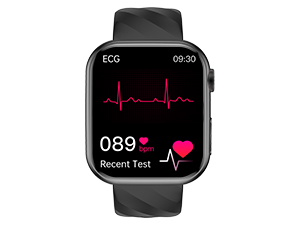
Figure 12.1: Visual representation of the smartwatch dimensions and battery life statistics (3 hours charge, 3-7 days use, 20 days standby).
13. cynnal
- Glanhau: Sychwch yr oriawr a'r strap yn rheolaidd gyda lliain meddal, sych. Ar gyfer baw ystyfnig, defnyddiwch frethyn sydd ychydig yn sych.amp brethyn a sychu'n drylwyr.
- Gwrthiant Dŵr: While IP68 rated, avoid exposing the watch to hot water, steam, or high-pressure water jets. Rinse with fresh water after exposure to saltwater.
- Osgoi Cemegau: Do not use harsh chemicals, cleaning solvents, or strong detergents, as they may damage the watch's finish or seals.
- Storio: Storiwch yr oriawr mewn lle oer, sych pan nad yw'n cael ei defnyddio am gyfnodau hir.
14. Datrys Problemau
If you encounter issues with your Lgnitek MT500 Smartwatch, try the following solutions:
| Problem | Ateb Posibl |
|---|---|
| Nid yw gwylio yn troi ymlaen | Gwnewch yn siŵr bod yr oriawr wedi'i gwefru'n llawn. Cysylltwch hi â'r gwefrydd am o leiaf 30 munud. |
| Methu paru â ffôn clyfar | 1. Ensure Bluetooth is enabled on your phone and the watch is discoverable. 2. Make sure the H Band app is installed and has necessary permissions. 3. Ailgychwynwch yr oriawr a'ch ffôn clyfar. 4. Try unpairing and re-pairing the device in the app. |
| Hysbysiadau heb eu derbyn | 1. Check app permissions for notifications on your phone. 2. Ensure the watch is connected via Bluetooth. 3. Verify notification settings within the H Band app. |
| Data iechyd anghywir | 1. Gwnewch yn siŵr bod yr oriawr yn cael ei gwisgo'n glyd ar eich arddwrn, nid yn rhy dynn nac yn rhy llac. 2. Glanhewch y synwyryddion ar gefn yr oriawr. 3. Remember that data is for reference only and not for medical use. |
| Bywyd batri byr | 1. Reduce screen brightness. 2. Turn off continuous monitoring for features you don't need 24/7. 3. Limit frequent use of power-intensive features like calls or games. |
If the problem persists, please refer to the support section for further assistance.
15. manylebau
| Nodwedd | Manylyn |
|---|---|
| Brand | Lgnitek |
| Rhif Model | MT500 |
| Lliw | Du |
| System Weithredu | iOS, Android |
| Maint Sgrin | 1.97 modfedd |
| Cysylltedd | Bluetooth 5.3 |
| Nodweddion Arbennig | ECG, HRV, BMI, Uric Acid, Lipids, Heart Rate, SpO2, Blood Pressure, Body Temperature, Sleep Monitoring, AI Emotional Detection, Voice Assistant, Bluetooth Calls |
| Dyfeisiau Cydnaws | Smartphone, Tabled |
| Math Batri | Lithiwm-polymer |
| Gallu Batri | 325 mAh |
| Gwrthiant Dŵr | IP68 |
| GPS | Dim GPS |
| Cynhwysedd Storio Cof | 128 MB |
16. Gwarant a Chefnogaeth
Lgnitek products are designed for reliability and performance. For warranty information, please refer to the documentation provided with your purchase or contact your retailer. If you have any questions or require technical assistance, please contact Lgnitek customer support via the contact information provided on the official website or through your purchase platform. We aim to respond to inquiries within 12 hours.