
Argon Audio TT MK2
Llawlyfr Defnyddiwr Trofwrdd Argon Audio TT MK2
Model: TT MK2
Rhagymadrodd
Diolch am brynuasing the Argon Audio TT MK2 Turntable. This manual provides essential information for the safe and optimal operation, setup, and maintenance of your new turntable. Please read this manual thoroughly before using the product and retain it for future reference.
The Argon Audio TT MK2 is designed to deliver high-fidelity audio playback from your vinyl records, featuring a built-in phono pre-amplifier, an Audio Technica AT3600 cartridge, and dual-speed control for 33 and 45 RPM records.
Cyfarwyddiadau Diogelwch Pwysig
Er mwyn lleihau'r risg o sioc drydanol, tân, neu ddifrod i'r uned, dilynwch y rhagofalon diogelwch canlynol:
- Peidiwch â gwneud yr offer hwn yn agored i law neu leithder.
- Peidiwch â gosod gwrthrychau sy'n llawn hylifau, fel fasys, ar yr offer.
- Peidiwch â rhwystro unrhyw agoriadau awyru. Gosodwch yn unol â chyfarwyddiadau'r gwneuthurwr.
- Peidiwch â gosod yn agos at unrhyw ffynonellau gwres fel rheiddiaduron, cofrestrau gwres, stofiau, neu gyfarpar arall (gan gynnwys amplifyddion) sy'n cynhyrchu gwres.
- Amddiffyn y llinyn pŵer rhag cael ei gerdded neu ei binsio, yn enwedig wrth blygiau, cynwysyddion cyfleustra, a'r pwynt lle maen nhw'n gadael yr offer.
- Defnyddiwch atodiadau/ategolion a nodir gan y gwneuthurwr yn unig.
- Tynnwch y plwg o'r teclyn hwn yn ystod stormydd mellt neu pan na chaiff ei ddefnyddio am gyfnodau hir o amser.
- Cyfeirio pob gwasanaeth i bersonél gwasanaeth cymwys. Mae angen gwasanaethu pan fydd y cyfarpar wedi'i ddifrodi mewn unrhyw ffordd, fel llinyn cyflenwad pŵer neu blwg wedi'i ddifrodi, hylif wedi'i ollwng neu wrthrychau wedi disgyn i'r offer, mae'r cyfarpar wedi bod yn agored i law neu leithder, nid yw'n gweithredu'n normal , neu wedi cael ei ollwng.
Beth Sydd yn y Bocs
Carefully unpack all components and ensure all items are present before discarding packaging materials:
- Argon Audio TT MK2 Turntable Unit
- Audio Technica AT3600 Cartridge (pre-mounted)
- Dust Lid
- RCA Cable
- Addasydd Pŵer
- Gwrthbwysau
- Pwysau Gwrth-sglefrio
- Platter and Drive Belt
- Ffelt Mat

Image: The Argon Audio TT MK2 Turntable with its clear dust cover in place, showcasing its sleek black finish.
Canllaw Gosod
1. Lleoliad
Place the turntable on a stable, level surface away from direct sunlight, heat sources, and strong vibrations. Ensure there is enough space around the unit for ventilation and operation.
2. Gosod Plater a Gwregys
- Carefully place the metal platter onto the spindle.
- Locate the drive belt. Gently stretch the belt around the inner rim of the platter and hook it onto the motor pulley. Ensure the belt is not twisted.
- Rhowch y mat ffelt ar ben y platter.

Image: The Argon Audio TT MK2 Turntable with its dust cover removed, showing the platter and tonearm assembly.
3. Cartridge and Tonearm Setup
The Audio Technica AT3600 cartridge comes pre-mounted on the tonearm. Follow these steps to balance the tonearm and set the tracking force:
- Tynnwch amddiffynnydd y stylus o'r cetris.
- Rhyddhewch y fraich dôn yn ysgafn o'i gorffwysfa.
- Rotate the counterweight at the rear of the tonearm until the tonearm floats freely and is perfectly balanced horizontally.
- Once balanced, hold the counterweight steady and rotate the numbered ring on the front of the counterweight to "0".
- Rotate the entire counterweight (including the numbered ring) counter-clockwise until the desired tracking force is set. For the AT3600 cartridge, the recommended tracking force is typically 3.5 grams.

Delwedd: Llun agos view of the tonearm's counterweight and anti-skate mechanism, showing the numerical scale for adjustment.
4. Anti-Skate Adjustment
Attach the anti-skate weight to the small loop on the tonearm and hang it over the second groove of the anti-skate support rod. This helps prevent the stylus from skipping inwards.
5. Cysylltu â System Sain
The TT MK2 features a built-in phono pre-amplifier, allowing direct connection to powered speakers or an amplifier's line-level input. If your amplifier has a dedicated "Phono" input, you can bypass the internal pre-amp.
- Connect the supplied RCA cable from the "RCA OUT" jacks on the rear of the turntable to the corresponding input on your amplifier or powered speakers (e.g., "AUX", "LINE IN").
- Locate the "RIAA" switch on the rear of the turntable.
- Set the switch to "ON" if connecting to a line-level input (e.g., AUX, CD) on your amplifier or directly to powered speakers. This activates the internal phono pre-ampllewywr.
- Set the switch to "OFF" if connecting to a dedicated "Phono" input on your amplifier. This bypasses the internal phono pre-amplifier, as your amplifier will provide the necessary RIAA equalization.

Image: The rear panel of the Argon Audio TT MK2 Turntable, showing the RCA output jacks, the RIAA (Phono/Line) switch, and the DC 12V power input.
6. Cysylltiad Pwer
Connect the supplied power adapter to the "DC IN 12V" port on the rear of the turntable, then plug the adapter into a wall outlet.
Cyfarwyddiadau Gweithredu
1. Pweru Ymlaen / I ffwrdd
Use the power switch located on the rear panel to turn the turntable ON or OFF.
2. Selecting Playback Speed
The TT MK2 supports two playback speeds: 33 1/3 RPM for LPs and 45 RPM for singles. Use the speed selection knob on the top right of the turntable to switch between "33" and "45".
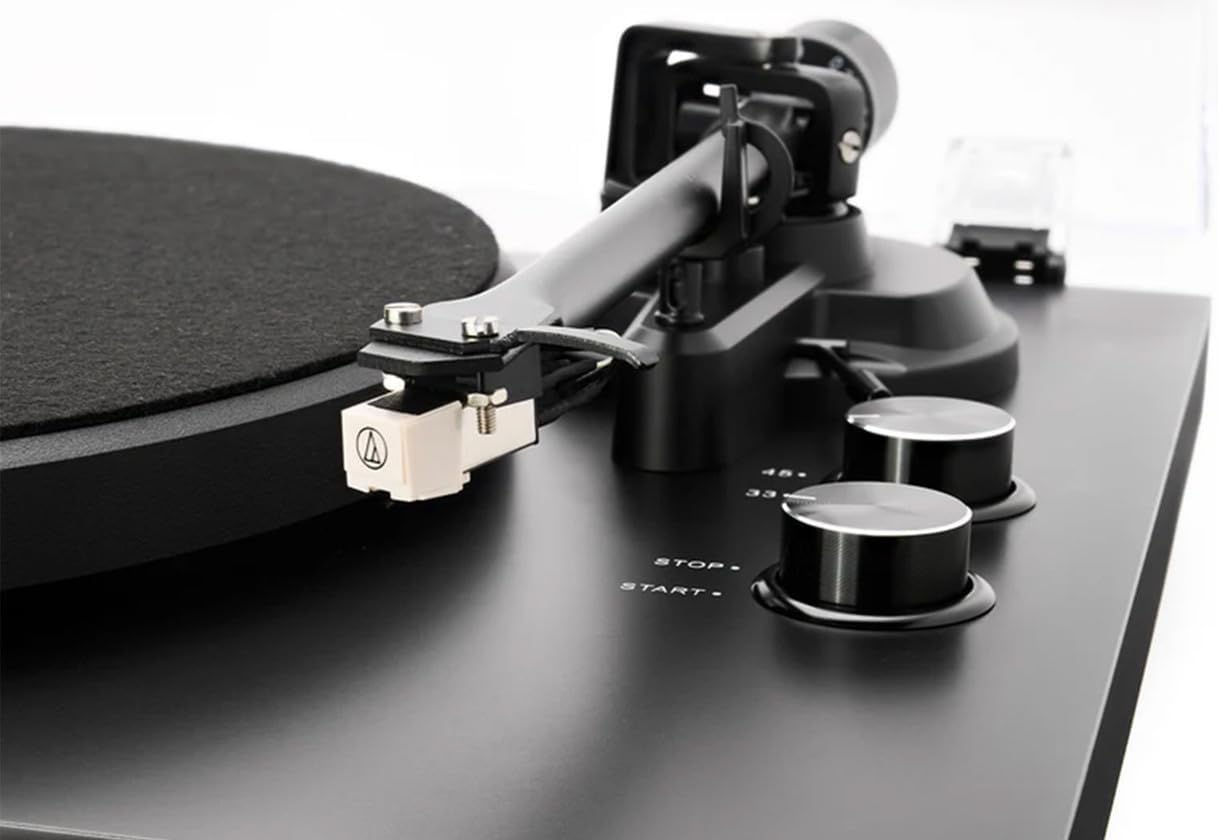
Image: A close-up of the Audio Technica AT3600 cartridge mounted on the tonearm, alongside the "STOP" and "START" buttons and the 33/45 RPM speed selection knob.
3. Chwarae Record
- Rhowch record ar y plât, gan sicrhau ei fod wedi'i ganoli.
- Select the correct speed (33 or 45 RPM) using the speed knob.
- Press the "START" button. The platter will begin to rotate.
- Codwch y fraich dôn yn ysgafn gan ddefnyddio'r lifer ciwio.
- Gosodwch y fraich dôn dros y rhigol gychwynnol a ddymunir ar y record.
- Slowly lower the cueing lever to gently drop the stylus onto the record.
4. Atal Chwarae
- At the end of a record, the tonearm will not automatically return. Gently lift the tonearm using the cueing lever.
- Dychwelwch y fraich dôn i'w gorffwysfa a'i sicrhau gyda chlip y fraich dôn.
- Press the "STOP" button to halt platter rotation.
- Carefully remove the record.
Cynnal a chadw
1. Glanhau'r Stylus
The stylus (needle) should be cleaned regularly to ensure optimal sound quality and prevent damage to your records. Use a soft brush designed for stylus cleaning, brushing gently from back to front (away from the cantilever).
2. Glanhau Cofnodion
Always handle records by their edges. Use a carbon fiber brush or a dedicated record cleaning solution and cloth to remove dust and debris before each play.
3. Glanhau'r Trofwrdd
Wipe the turntable chassis and dust cover with a soft, dry, lint-free cloth. For stubborn marks, a slightly damp gellir defnyddio lliain, ac yna lliain sych. Osgowch ddefnyddio cemegau llym neu lanhawyr sgraffiniol.
4. Gofal Gorchudd Llwch
The dust cover protects your turntable from dust. When not in use, keep the dust cover closed. Clean it gently with a soft, damp cloth to avoid scratching the acrylic surface.
Datrys problemau
If you experience issues with your Argon Audio TT MK2 Turntable, please consult the following table before contacting support:
| Problem | Achos Posibl | Ateb |
|---|---|---|
| Dim sain neu sain isel iawn |
|
|
| Distorted or muffled sound |
|
|
| Plater ddim yn troelli |
|
|
| Speed issues (too fast/slow) |
|
|
Manylebau
| Nodwedd | Manylyn |
|---|---|
| Enw Model | TT MK2 |
| Brand | Sain Argon |
| Dimensiynau (W x D x H) | 42 x 35 x 12 cm |
| Pwysau Eitem | 4.5 kg |
| Deunydd | Engineered Wood, Aluminium |
| Lliw | Du |
| Cetris | Audio Technica AT3600 (pre-fitted) |
| Phono Cyn-amp | Built-in, switchable (RIAA ON/OFF) |
| Cyflymderau Cylchdro | 33 1/3 RPM, 45 RPM (electronic speed selection) |
| Cysylltedd | Allbwn RCA |
| Cydrannau wedi'u Cynnwys | Turntable, Audio Technica AT3600 Cartridge, Dust Lid, RCA Cable, Power Adapter |
| Gwneuthurwr | Sain Argon |
| Gwlad Tarddiad | Denmarc |
Gwarant a Chefnogaeth
Argon Audio products are designed and manufactured to the highest quality standards. This product is covered by a manufacturer's warranty. Please refer to the warranty card included with your product or visit the official Argon Audio websafle am delerau ac amodau gwarant manwl.
For technical support, troubleshooting assistance beyond this manual, or warranty claims, please contact your authorized Argon Audio dealer or Argon Audio customer service directly. Contact information can typically be found on the Argon Audio websafle.
Ask a question about this manual
Ask about setup, troubleshooting, compatibility, parts, safety, or missing instructions. Manuals+ will review the question and use this page’s manual context to help answer it.