
1. Rhagymadrodd
Thank you for choosing the KLIM KLCD-0582 CD Cassette Boombox. This versatile audio system combines classic and modern features, allowing you to enjoy music from various sources including CDs, cassette tapes, AM/FM radio, Bluetooth-enabled devices, USB drives, and auxiliary input. This manual provides detailed instructions for safe operation, setup, and maintenance of your device. Please read it thoroughly before use and retain it for future reference.
2. Cyfarwyddiadau Diogelwch Pwysig
- Darllenwch y cyfarwyddiadau hyn yn ofalus cyn gweithredu'r uned.
- Cadwch y cyfarwyddiadau hyn er mwyn cyfeirio atynt yn y dyfodol.
- Gwrandewch ar bob rhybudd ar y cynnyrch ac yn y cyfarwyddiadau gweithredu.
- Dilynwch yr holl gyfarwyddiadau.
- Peidiwch â defnyddio'r offer hwn ger dŵr.
- Glanhewch â lliain sych yn unig.
- Peidiwch â rhwystro unrhyw agoriadau awyru. Gosodwch yn unol â chyfarwyddiadau'r gwneuthurwr.
- Peidiwch â gosod yn agos at unrhyw ffynonellau gwres fel rheiddiaduron, cofrestrau gwres, stofiau, neu gyfarpar arall (gan gynnwys amplifyddion) sy'n cynhyrchu gwres.
- Amddiffynnwch y llinyn pŵer rhag cael ei gerdded ymlaen neu ei binsio, yn enwedig wrth blygiau, cynwysyddion cyfleustra, a'r pwynt lle maent yn gadael y cyfarpar.
- Defnyddiwch atodiadau/ategolion a nodir gan y gwneuthurwr yn unig.
- Tynnwch y plwg o'r cyfarpar hwn yn ystod stormydd mellt neu pan na chaiff ei ddefnyddio am gyfnodau hir o amser.
- Cyfeirio pob gwasanaeth i bersonél gwasanaeth cymwys. Mae angen gwasanaethu pan fydd y cyfarpar wedi'i ddifrodi mewn unrhyw ffordd, fel llinyn cyflenwad pŵer neu blwg wedi'i ddifrodi, hylif wedi'i ollwng neu wrthrychau wedi disgyn i'r offer, mae'r cyfarpar wedi bod yn agored i law neu leithder, nid yw'n gweithredu'n normal , neu wedi cael ei ollwng.
3. Cynnwys Pecyn
Gwiriwch y pecyn am yr eitemau canlynol:
- KLIM CD Cassette Player (KLCD-0582)
- llinyn pŵer (cebl AC)
- AAA alkaline batteries * 2 (for remote control)
- KLIM envelope
- Llawlyfr cyfarwyddiadau (y ddogfen hon)
4. Cynnyrch Drosview
Familiarize yourself with the main components and controls of your KLIM KLCD-0582 boombox.
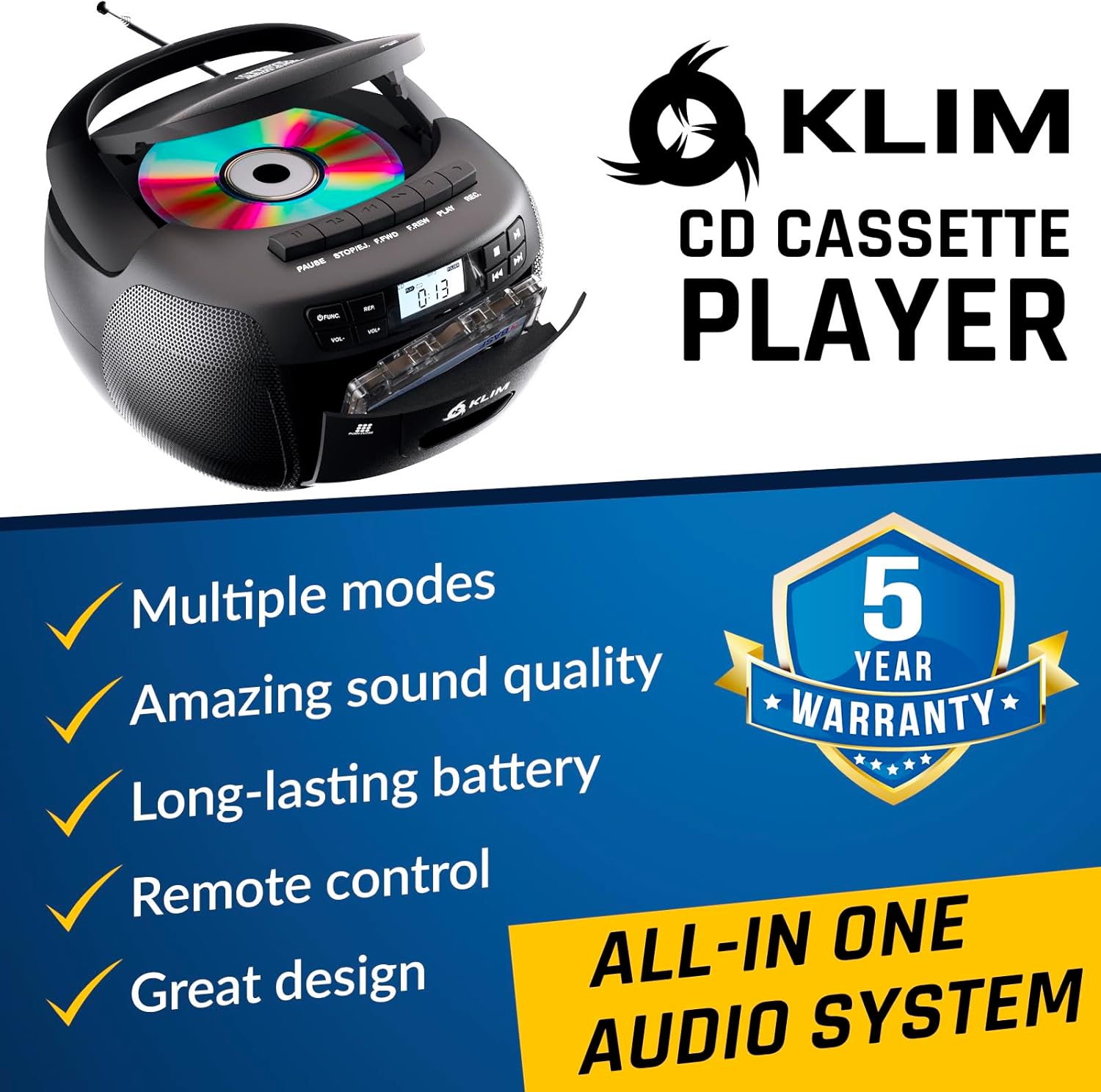
Ffigur 4.1: Blaen view of the KLIM KLCD-0582 CD Cassette Boombox, showing the CD lid, cassette deck, and control buttons.
Rheolaethau Panel Blaen:
- Botwm Pŵer: Yn troi'r uned ymlaen neu i ffwrdd.
- Botwm Swyddogaeth/Modd: Switches between CD, Cassette, Radio, Bluetooth, USB, and AUX modes.
- Volume Control (VOL+/-): Yn addasu'r cyfaint chwarae.
- Play/Pause Button (CD/USB): Yn cychwyn neu'n oedi chwarae CD/USB.
- Stop Button (CD/USB/Cassette): Yn atal chwarae.
- Skip/Search Buttons (<< / >>): Skips tracks or searches within a track (CD/USB). Tunes radio stations.
- Repeat Button (CD/USB): Yn ailadrodd y trac cyfredol neu'r holl draciau.
- Program Button (CD/USB): Programs track order for CD/USB playback.
- Record Button (Cassette): Initiates recording to cassette tape.
- Eject Button (Cassette): Opens the cassette deck.
- Arddangosfa LCD: Shows current mode, track number, radio frequency, etc.

Ffigur 4.2: Manwl view of the LCD display and speaker area, highlighting the digital interface.
Side/Rear Panel Connections:
- Mewnbwn Pwer AC: Yn cysylltu'r llinyn pŵer AC.
- Adran Batri: Holds 6 C-size batteries for portable use.
- Porth USB: Ar gyfer chwarae sain files o yriant USB.
- Mewnbwn AUX (3.5mm): Yn cysylltu dyfeisiau sain allanol.
- Jack clustffon (3.5mm): Ar gyfer gwrando preifat.
- Antena telesgopig: For AM/FM radio reception.

Figure 4.3: Product label on the bottom of the unit, indicating model number and electrical ratings.
5. Gosod
5.1 Pweru'r Uned
Gall eich boombox gael ei bweru gan bŵer AC neu fatris.
Pŵer AC (Defnydd Dan Do):
- Sicrhewch fod yr uned wedi'i diffodd.
- Connect the supplied AC power cord to the AC power input on the rear of the boombox.
- Plug the other end of the AC power cord into a standard wall outlet (110-120V, 60Hz).
DC Power (Battery Operation - Portable Use):
- Gwnewch yn siŵr bod yr uned wedi'i diffodd a'i datgysylltu o bŵer AC.
- Agorwch glawr adran y batri ar waelod yr uned.
- Insert 6 C-size (UM-2) batteries, ensuring correct polarity (+/-) as indicated inside the compartment.
- Caewch y clawr adran batri yn ddiogel.
Nodyn: Tynnwch y batris os na fydd yr uned yn cael ei defnyddio am gyfnod hir er mwyn atal gollyngiadau a difrod.
5.2 Gosod Batri Rheolydd o Bell
- Agorwch y compartment batri ar gefn y teclyn rheoli o bell.
- Insert 2 AAA alkaline batteries, observing the correct polarity.
- Caewch y clawr adran batri.

Figure 5.1: The boombox shown with its remote control, which requires AAA batteries.
5.3 Gosod Antena
For optimal FM radio reception, fully extend the telescopic antenna. For AM reception, rotate the unit for the best signal.
6. Gweithrediad
6.1 Rheolaeth Sylfaenol
- Pŵer ymlaen / i ffwrdd: Gwasgwch y GRYM botwm.
- Dewis Modd: Gwasgwch y SWYDDOGAETH or MODD button repeatedly to cycle through CD, Cassette, Radio (AM/FM), Bluetooth, USB, and AUX modes.
- Addasu Cyfrol: Defnyddiwch y VOL+ a VOL- botymau.
6.2 Chwarae CD
- Gwasgwch y SWYDDOGAETH botwm i ddewis modd CD.
- Agorwch gaead yr adran CD.
- Place a CD (audio CD or MP3/WMA CD) with the label side facing up.
- Close the CD compartment lid. The unit will read the disc and begin playback automatically or display the total number of tracks.
- Gwasgwch CHWARAE/SEIBIANT to start or pause playback.
- Gwasgwch AROS i atal chwarae.
- Defnydd SKIP (<< / >>) buttons to skip tracks. Hold to fast forward/rewind within a track.
- Chwarae Rhaglen: Yn y modd stopio, pwyswch RHAGLEN. Defnydd SGIP i ddewis y traciau a ddymunir, yna pwyswch RHAGLEN again to confirm each track. Press CHWARAE i ddechrau chwarae wedi'i raglennu.
- Chwarae Ailadrodd: Gwasgwch AILDDANGOS once for single track repeat, twice for all tracks repeat.
6.3 Chwarae a Recordio Casetiau
- Gwasgwch y SWYDDOGAETH button to select TAPE mode.
- Gwasgwch y YMADAWIAD button to open the cassette deck.
- Insert a cassette tape and close the deck.
- Gwasgwch CHWARAE i ddechrau chwarae.
- Defnydd FAST FORWARD (FFWD) or AIL-DDIRWYNO (REW) botymau i lywio'r tâp.
- Gwasgwch AROS i atal chwarae.
Recordio i gasét:
- Insert a blank, recordable cassette tape.
- Select the desired source (CD, Radio, AUX, Bluetooth, USB).
- Start playback on the source (e.g., play a CD track, tune to a radio station).
- Gwasgwch y COFNOD button on the boombox. The CHWARAE button will also engage. Recording will begin.
- Gwasgwch AROS i ddiweddu recordio.
Pwysig: Ensure the cassette tape has its record-protection tabs intact for recording.
Radio 6.4 AM/FM
- Gwasgwch y SWYDDOGAETH button to select RADIO mode.
- Extend the telescopic antenna for FM reception. For AM, rotate the unit.
- Defnyddiwch y DYNIO bwlyn neu SKIP (<< / >>) buttons to tune to your desired station. The frequency will be displayed on the LCD.
6.5 Cysylltiad Bluetooth
- Gwasgwch y SWYDDOGAETH button to select BLUETOOTH mode. The LCD will display "BT" and the unit will enter pairing mode, indicated by a flashing Bluetooth icon.
- Ar eich dyfais sy'n galluogi Bluetooth (e.e., ffôn clyfar, tabled), galluogwch Bluetooth a chwiliwch am ddyfeisiau sydd ar gael.
- Select "KLIM Boombox" from the list of devices.
- Once paired, the Bluetooth icon on the boombox's LCD will stop flashing. You can now play audio from your device through the boombox.
- Control playback (play/pause, skip tracks) either from your connected device or using the boombox's controls.
Chwarae USB 6.6
- Mewnosodwch yriant fflach USB i'r porthladd USB.
- Gwasgwch y SWYDDOGAETH button to select USB mode. The unit will automatically detect and begin playing compatible audio files (MP3/WMA).
- Defnydd CHWARAE/SEIBIANT, AROS, a SKIP (<< / >>) buttons to control playback, similar to CD mode.
- Chwarae Rhaglen: Yn y modd stopio, pwyswch RHAGLEN. Defnydd SGIP i ddewis y traciau a ddymunir, yna pwyswch RHAGLEN again to confirm each track. Press CHWARAE i ddechrau chwarae wedi'i raglennu.
6.7 AUX Mewnbwn
- Connect an external audio device (e.g., MP3 player, smartphone) to the AUX input jack using a 3.5mm audio cable (not included).
- Gwasgwch y SWYDDOGAETH button to select AUX mode. The LCD will display "AUX".
- Dechreuwch chwarae ar eich dyfais allanol. Bydd y sain yn cael ei llwybro drwy siaradwyr y boombox.
- Volume can be adjusted on both the boombox and the external device. Playback controls are managed on the external device.
6.8 Defnyddio'r Rheolaeth Anghysbell
The included remote control allows convenient operation from a distance of up to 20 feet. Ensure line of sight to the boombox's front panel.
- Pŵer (Botwm Coch): Yn troi'r uned ymlaen / i ffwrdd.
- Tewi: Yn tewi/dad-dewi sain.
- VOL +/-: Yn addasu cyfaint.
- SWYDDOG: Cycles through modes (CD, TAPE, FM, AM, BT, USB, AUX).
- REP: Repeat function for CD/USB.
- PROG: Program function for CD/USB.
- PLAY/PAUSE, STOP, FFWD, REW: Playback controls for CD/USB/Cassette.
- Number Buttons (0-9, -10, +10): Direct track selection for CD/USB.
7. cynnal
7.1 Glanhau'r Uned
- Tynnwch y plwg bob amser o'r uned o'r ffynhonnell pŵer cyn glanhau.
- Defnyddiwch lliain meddal, sych i lanhau'r arwynebau allanol.
- Peidiwch â defnyddio glanhawyr sgraffiniol, cwyrau na thoddyddion gan y gallant niweidio'r gorffeniad.
- Ar gyfer lens y CD, defnyddiwch ddisg glanhawr lens CD arbenigol.
- For the cassette deck, periodically clean the tape heads and pinch rollers with a cotton swab lightly dampyn cynnwys alcohol isopropyl.
7.2 Storio
When not in use for extended periods, store the unit in a cool, dry place away from direct sunlight and extreme temperatures. Remove batteries from both the main unit and the remote control to prevent leakage.
8. Datrys Problemau
If you encounter issues with your boombox, please refer to the following common problems and solutions before contacting support.
| Problem | Achos Posibl | Ateb |
|---|---|---|
| Dim pŵer | Cord AC heb ei gysylltu; Batris wedi'u gwagio neu wedi'u mewnosod yn anghywir. | Gwiriwch gysylltiad y llinyn AC; Amnewidiwch y batris neu sicrhewch fod y polaredd yn gywir. |
| Dim sain | Volume too low; Mute function active; Incorrect mode selected; Headphones connected. | Increase volume; Press MUTE on remote; Select correct mode; Disconnect headphones. |
| CD ddim yn chwarae / gwall "DIM DISG" | CD inserted incorrectly; CD dirty or scratched; CD compartment not closed; Unit in wrong mode. | Insert CD label side up; Clean or replace CD; Close CD lid securely; Select CD mode. |
| Nid yw'r tâp casét yn chwarae/recordio | Tape inserted incorrectly; Tape damaged; Record-protection tab missing (for recording); Unit in wrong mode. | Insert tape correctly; Use a new tape; Cover record-protection tab with tape; Select TAPE mode. |
| Derbyniad radio gwael | Antena heb ei hymestyn; Lleoliad yr uned. | Estynnwch yr antena FM yn llawn; Trowch yr uned i gael derbyniad AM gwell. |
| Methiant paru Bluetooth | Boombox not in pairing mode; Device Bluetooth off; Device too far. | Ensure boombox is in BT mode and flashing; Enable Bluetooth on device; Move device closer (within 30 ft). |
| Rheolaeth bell ddim yn gweithio | Batteries depleted or incorrectly inserted; Obstruction between remote and unit. | Replace batteries; Ensure clear line of sight to the unit's front panel. |
9. manylebau
| Nodwedd | Manylyn |
|---|---|
| Rhif Model | KLCD-0582 |
| Brand | KLIM |
| Technoleg Cysylltedd | Cynorthwyol, Bluetooth 5.1, USB |
| Lliw | Du |
| Dimensiynau Eitem (L x W x H) | 8.5 x 8.39 x 4.92 modfedd |
| Pwysau Eitem | 1.5 Cilogram |
| Ffynhonnell Pwer | Corded Electric (AC 110-120V/60Hz), 6 x C-size batteries (DC 9V) |
| Dyfeisiau Cydnaws | Chwaraewr MP3, dyfeisiau sy'n galluogi Bluetooth |
| Safonau a Gefnogir | CD, MP3, WMA |
| Fformat Sain â Chymorth | CD-DA, MP3, WMA |
| Siaradwyr | 3W Dual Speakers |
| Bandiau Radio | AM/FM |
10. Gwarant a Chefnogaeth
10.1 Gwybodaeth Gwarant
The KLIM KLCD-0582 CD Cassette Boombox comes with a Gwarant 5 mlynedd. This warranty covers manufacturing defects and ensures the product meets its specified performance. Please retain your proof of purchase for warranty claims.
10.2 Cefnogaeth i Gwsmeriaid
For any questions, technical assistance, or warranty claims, please contact KLIM customer support. You can typically find contact information on the manufacturer's website or through the retailer where you purchased the product. KLIM offers 24/7 customer support to assist you.
For more information, visit the official KLIM websafle neu cyfeiriwch at y manylion cyswllt a ddarperir yn eich pecynnu cynnyrch.