
1. Cynnyrch Drosview
The DOOGEE Tab A9 is a 10.1-inch Android 15 tablet designed for versatile use, from productivity to entertainment. It features a quad-core processor, ample memory, and a high-capacity battery, complemented by a suite of accessories for enhanced functionality.
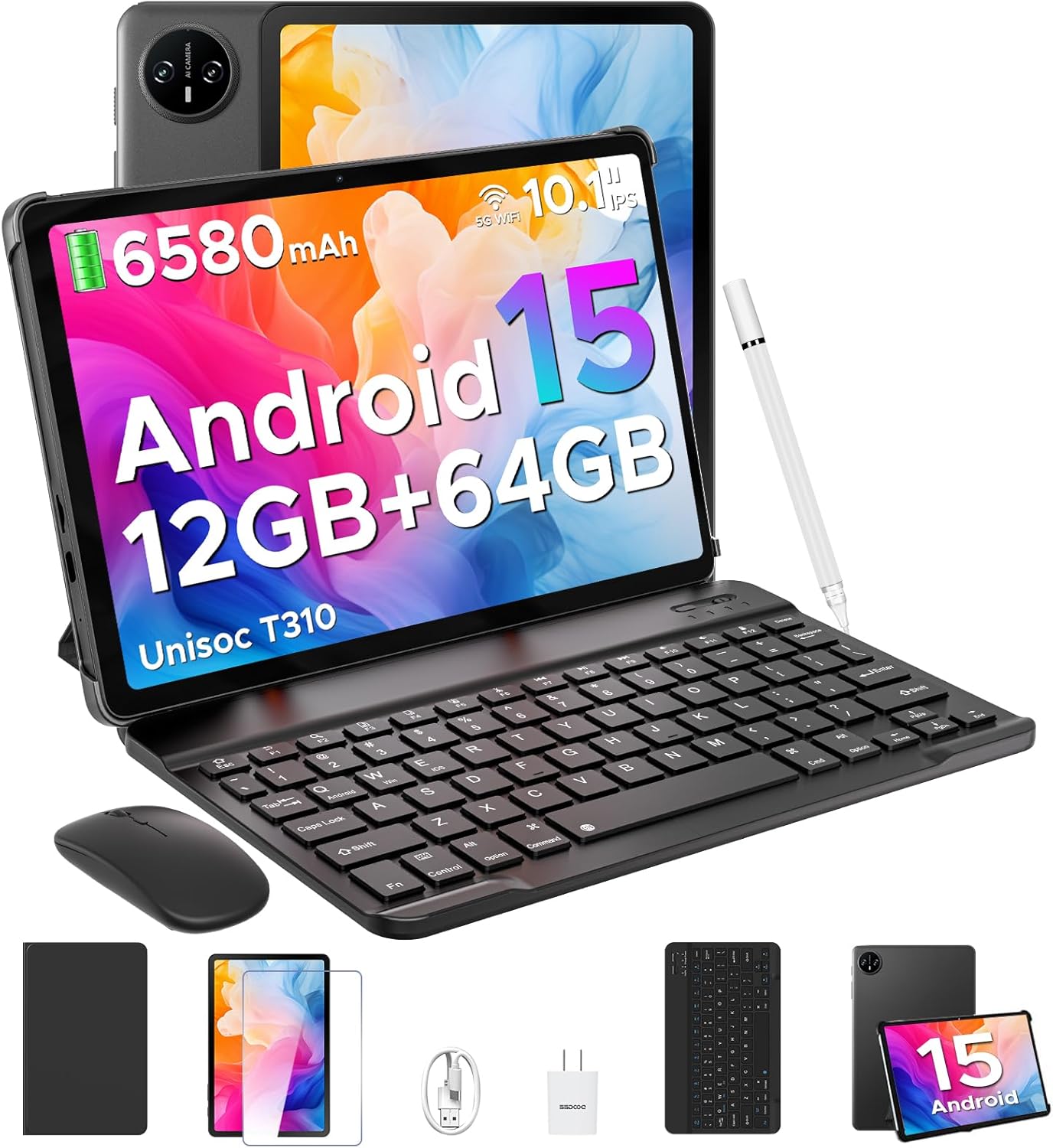
Image 1.1: DOOGEE Tab A9 tablet with its complete accessory kit.
Nodweddion Allweddol:
- System Weithredu: Android 15 for enhanced performance and privacy.
- Prosesydd: Unisoc T310 Quad-Core, 2.0GHz.
- Cof a Storio: 12GB RAM (3GB physical + 9GB virtual) and 64GB internal storage, expandable up to 2TB via microSD.
- Arddangos: 10.1-inch IPS HD (1280x800) touchscreen.
- Batri: 6580mAh ar gyfer defnydd estynedig.
- Camerâu: 8MP rear camera and 5MP front camera.
- Cysylltedd: 2.4G/5G Dual-band WiFi, Bluetooth 5.0.
- Diogelwch: Datgloi Wyneb.
- Sain: Dual speakers and 3.5mm headphone jack.
2. Beth sydd wedi'i gynnwys
Your DOOGEE Tab A9 package includes the following items:

Image 2.1: Contents of the DOOGEE Tab A9 package.
- DOOGEE Tab A9 Tablet
- Bysellfwrdd Bluetooth
- Llygoden Bluetooth
- Pen Stylus
- Amddiffynnydd Sgrin
- Achos Amddiffynnol
- Gwefrydd
- Cebl USB Math-C
- Llawlyfr Defnyddiwr
3. Gosod
3.1 Codi Tâl Cychwynnol
Before first use, fully charge your tablet using the provided charger and USB Type-C cable. Connect the cable to the tablet's charging port and the charger to a power outlet. The battery indicator on the screen will show charging status.
3.2 Pŵer Ymlaen/Diffodd
- I Bweru Ymlaen: Press and hold the Power button (located on the side of the tablet) until the DOOGEE logo appears.
- I Bweru i ffwrdd: Pwyswch a daliwch y botwm Pŵer, yna dewiswch "Diffoddwch" o'r opsiynau sy'n ymddangos ar y sgrin.
- I ailgychwyn: Pwyswch a daliwch y botwm Pŵer, yna dewiswch "Ailgychwyn" o'r opsiynau.
3.3 Connecting Accessories (Keyboard & Mouse)
The included keyboard and mouse connect via Bluetooth:
- Ensure the keyboard/mouse is charged and powered on.
- On your tablet, go to Gosodiadau > Dyfeisiau cysylltiedig > Bluetooth.
- Turn on Bluetooth and scan for available devices.
- Select the keyboard or mouse from the list and follow any on-screen pairing instructions.
3.4 Mewnosod Cerdyn MicroSD
To expand storage, insert a microSD card (up to 2TB, sold separately):
- Locate the SIM/microSD card tray on the side of the tablet.
- Defnyddiwch yr offeryn alldaflu SIM a ddarperir i agor yr hambwrdd.
- Place the microSD card into the designated slot on the tray.
- Ail-osodwch y hambwrdd yn ofalus i'r dabled.
4. Cyfarwyddiadau Gweithredu
4.1 Android 15 System
Your DOOGEE Tab A9 runs on Android 15, offering improved app launch speeds, system smoothness, and enhanced privacy controls. Explore the intuitive interface and customize settings to your preference.
Fideo 4.1: Drosoddview of the DOOGEE Tab A9 tablet's features, including its display, speakers, and connectivity.

Image 4.1: The Android 15 system logo, highlighting its intelligent, seamless, and secure features.
4.2 Gosodiadau Arddangos
The 10.1-inch IPS HD display offers clear visuals. You can adjust display settings for comfort:
- Modd Gofal Llygaid: Reduces blue light to minimize eye strain. Activate it in Settings > Display > Eye Care Mode.
- Modd Tywyll: Changes the system theme to a darker palette, ideal for low-light environments. Activate it in Settings > Display > Dark Mode.

Image 4.2: Visual representation of the tablet's 10.1-inch IPS HD display and its key specifications.
4.3 Defnyddio'r Camera
Capture photos and videos with the tablet's cameras:
- Camera Cefn (8MP): Suitable for general photography.
- Camera Blaen (5MP): Yn ddelfrydol ar gyfer galwadau fideo a hunluniau.
Open the Camera app from the home screen or app drawer to start. Tap the shutter button to take a photo or switch to video mode to record.

Delwedd 4.3: Enghraifftamples of photos taken with the 8MP main camera.

Image 4.4: The 5MP front camera is suitable for clear video calls.
4.4 Nodweddion Sain
The tablet is equipped with dual speakers for clear audio output and a 3.5mm audio jack for private listening with headphones.

Image 4.5: Illustration of the tablet's dual speaker system for enhanced audio.
4.5 Cysylltedd
- Wi-Fi: Supports 2.4G and 5G dual-band Wi-Fi for stable and fast internet access. Connect via Gosodiadau > Rhwydwaith a'r rhyngrwyd > Wi-Fi.
- Bluetooth 5.0: For connecting wireless peripherals like headphones, speakers, and the included keyboard and mouse. Manage connections in Gosodiadau > Dyfeisiau cysylltiedig > Bluetooth.

Image 4.6: Features of the tablet's WiFi 5 connectivity.
4.6 Datgloi Wyneb
For convenient and secure access, set up Face Unlock:
- Ewch i Gosodiadau > Diogelwch a phreifatrwydd > Datgloi wyneb.
- Dilynwch y cyfarwyddiadau ar y sgrin i gofrestru'ch wyneb.
- Ensure you are in a well-lit area during registration for optimal performance.

Image 4.7: The tablet's facial recognition unlock feature in action.
4.7 Multitasking with Split-Screen
Utilize the split-screen feature to run two apps simultaneously:
- Agorwch y cais cyntaf.
- Sweipiwch i fyny o waelod y sgrin a daliwch i gael mynediad at apiau diweddar.
- Tap the app icon at the top of the first app's card and select "Split screen".
- Dewiswch yr ail ap o'ch apiau diweddar neu drôr apiau i lenwi hanner arall y sgrin.

Image 4.8: Demonstrating efficient split-screen multitasking on the tablet.
4.8 Perfformiad a Storio
The Unisoc T310 Quad-Core processor and 12GB RAM (3GB physical + 9GB virtual) ensure smooth operation for daily tasks and multitasking. The 64GB internal storage provides space for essential apps and files, with expandable storage up to 2TB via microSD card.
Video 4.2: Highlights of the DOOGEE Tab A9's processor, RAM, and storage capabilities.

Image 4.9: Visual representation of the Unisoc T310 Quad-Core processor.

Image 4.10: Illustrates the tablet's memory and storage capacity, including expandable memory.
4.9 Bywyd Batri
The 6580mAh battery, combined with smart battery management, provides all-day usage. Actual battery life may vary based on usage patterns and settings.

Image 4.11: Details on the 6580mAh battery capacity and estimated usage times.
5. cynnal
- Diweddariadau Meddalwedd: Chwiliwch am ddiweddariadau system a'u gosod yn rheolaidd i sicrhau'r perfformiad a'r diogelwch gorau posibl. Ewch i Gosodiadau > System > Diweddariad system.
- Glanhau: Defnyddiwch frethyn meddal, di-flwff i lanhau'r sgrin a chorff y dabled. Osgowch ddeunyddiau sgraffiniol neu gemegau llym.
- Gofal Batri: To prolong battery life, avoid extreme temperatures and do not let the battery fully discharge frequently.
- Rheoli Storio: Clirio pethau diangen yn rheolaidd files and apps to maintain system speed.
6. Datrys Problemau
Cyfeiriwch at y tabl isod am broblemau cyffredin a'u datrysiadau:
| Mater | Ateb Posibl |
|---|---|
| Nid yw'r tabled yn troi ymlaen | Gwnewch yn siŵr bod y batri wedi'i wefru. Cysylltwch y gwefrydd a cheisiwch eto. Os nad yw'n ymateb, pwyswch a daliwch y botwm Pŵer am 10-15 eiliad i orfodi ailgychwyn. |
| Materion cysylltiad Wi-Fi | Restart the tablet and your Wi-Fi router. Check Wi-Fi settings to ensure the correct network is selected and the password is entered correctly. |
| Dyfais Bluetooth ddim yn paru | Ensure the Bluetooth device is in pairing mode and within range. Restart both the tablet and the Bluetooth device. Check tablet's Bluetooth settings. |
| Perfformiad araf | Close unused applications. Clear cache and temporary files. Consider uninstalling rarely used apps. Perform a system update if available. |
| Sgrin ddim yn ymateb | Ailgychwynwch y dabled. Os yw'r broblem yn parhau, gwnewch yn siŵr bod y sgrin yn lân ac yn rhydd o falurion. |
7. manylebau
| Nodwedd | Manylyn |
|---|---|
| Enw Model | Tab A9 |
| System Weithredu | Android 15 |
| Prosesydd | Unisoc T310 Quad-Core, 2 GHz |
| HWRDD | 12GB (3GB ffisegol + 9GB rhithwir) |
| Storio Mewnol | 64 GB |
| Storfa Ehangadwy | Hyd at 2TB trwy gerdyn MicroSD |
| Maint Sgrin | 10.1 modfedd |
| Cydraniad Sgrin | 1280 x 800 pixels (IPS HD) |
| Camera Cefn | 8 AS |
| Camera blaen | 5 AS |
| Gallu Batri | 6580 mAh |
| Math Di-wifr | 802.11ac, 802.11b, 802.11g, 802.11n (2.4G/5G WiFi) |
| Bluetooth | Bluetooth 5.0 |
| Dimensiynau (LxWxH) | 9.54 x 6.33 x 0.38 modfedd |
| Pwysau Eitem | 1.12 pwys |
8. Gwarant a Chefnogaeth
Your DOOGEE Tab A9 tablet comes with a Gwarant 2 mlynedd a cymorth technegol oes. For any questions, issues, or support needs, please contact DOOGEE customer service. Refer to the warranty card included in your package for specific terms and conditions.