
1. Rhagymadrodd
The ALIGATOR AZA930B is a mobile phone designed with ease of use in mind, particularly for seniors. It features a large keypad, a clear 2.8-inch color display, and essential safety functions such as an SOS button and SOS locator. This manual provides detailed instructions on how to set up, operate, maintain, and troubleshoot your device to ensure optimal performance and safety.
2. Gwybodaeth Diogelwch
Please read this section carefully before using your phone to ensure safe and proper operation.
- Diogelwch Batri: Use only ALIGATOR approved batteries and chargers. Do not short-circuit, puncture, or expose the battery to extreme temperatures. Dispose of batteries properly.
- Codi tâl: The phone does not include a charger. Use a compatible USB-C charger (recommended model ALIGATOR CHA0047) with a power output of 2.5-3W. Avoid charging in damp amodau.
- Diogelu'r Clyw: Osgowch wrando’n hir ar lefelau cyfaint uchel er mwyn atal niwed i’r clyw.
- Diogelwch Gyrru: Always prioritize driving safety. Use hands-free accessories and obey all local laws and regulations regarding mobile phone use while driving.
- Dyfeisiau Meddygol: Maintain a safe distance between the phone and medical devices such as pacemakers. Consult your physician and the medical device manufacturer for specific guidelines.
- Gwrthiant Dŵr: Nid yw'r ffôn hwn yn dal dŵr. Osgowch ddod i gysylltiad â hylifau.
3. Cynnwys Pecyn
Gwiriwch fod yr holl eitemau yn bresennol yn eich pecyn cynnyrch:
- ALIGATOR AZA930B Mobile Phone
- Doc Codi Tâl
- Llawlyfr Defnyddiwr (y ddogfen hon)
- Note: Charger is not included and must be purchased separately.
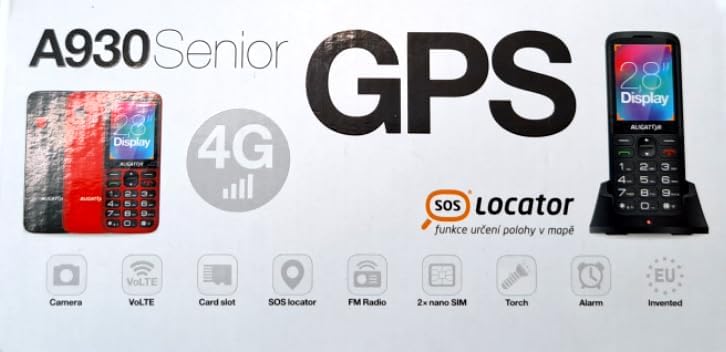
Figure 3.1: Product packaging illustrating the phone, charging dock, and various features such as 4G connectivity, GPS, SOS Locator, camera, VoLTE, card slot, FM radio, torch, and alarm. The box also indicates the 2.8-inch display.
4. Gosod
4.1. Wrthi'n mewnosod Cardiau SIM
The ALIGATOR AZA930B supports Dual SIM (2 x Nano SIM) functionality. To insert SIM cards:
- Pŵer oddi ar y ffôn.
- Tynnwch y clawr cefn a'r batri.
- Locate the SIM card slots. Insert your Nano SIM cards into the designated slots, ensuring the gold contacts face down and the cut corner aligns correctly.
- Amnewid y batri a'r clawr cefn.
4.2. Mewnosod Cerdyn Micro SD
The phone supports a Micro SD memory card up to 256 GB for additional storage.
- Follow steps 1 and 2 from "4.1. Inserting SIM Cards".
- Locate the Micro SD card slot. Insert the Micro SD card with the gold contacts facing down until it clicks into place.
- Amnewid y batri a'r clawr cefn.
4.3. Gwefru Cychwynnol
Before first use, fully charge the phone's 1700 mAh Li-ion battery.
- Connect the USB-C cable (not included) to the phone's USB-C port or place the phone in the charging dock.
- Connect the other end of the cable to a compatible charger (e.g., ALIGATOR CHA0047, 2.5-3W) or a powered USB port.
- The charging indicator will illuminate. A full charge may take several hours.

Figure 4.1: The ALIGATOR AZA930B phone placed in its dedicated charging dock. The phone's screen shows the current time and network signal indicators.

Figure 4.2: Detail from the product box, explicitly showing an icon indicating that a charger is not included and specifying a recommended charger power of 2.5-3W.
5. Cyfarwyddiadau Gweithredu
5.1. Pŵer Ymlaen / I ffwrdd
- I Bweru Ymlaen: Pwyswch a daliwch y botwm Pŵer/Diwedd Galwad (botwm coch) nes bod y sgrin yn goleuo.
- I Bweru i ffwrdd: Pwyswch a daliwch y botwm Pŵer/Diwedd Galwad nes bod yr opsiynau diffodd pŵer yn ymddangos, yna dewiswch "Diffodd".
5.2. Swyddogaethau Galwadau Sylfaenol
- Gwneud galwad: Enter the phone number using the large keypad and press the Call button (green button).
- Ateb Galwad: When the phone rings, press the Call button (green button).
- Dod â galwad i ben: Pwyswch y botwm Pŵer/Diwedd Galwad (botwm coch).
- Di-dwylo: During a call, activate hands-free mode via the on-screen option or a dedicated button if available.
5.3. SOS Button and SOS Locator
The SOS button is a critical safety feature, allowing quick contact in emergencies.
- Botwm SOS: Located on the back of the phone (often red). Press and hold this button to activate the emergency sequence.
- SOS Presets: You can set up to 5 preset emergency contacts. When the SOS button is pressed, the phone will automatically call these numbers in sequence and send an emergency SMS.
- SOS Locator: This function sends the phone's location via SMS to the emergency contacts after the SOS button is pressed. The recipient can then view the location on a map via a web link provided in the SMS. This feature utilizes both GSM and GPS for location accuracy.

Ffigur 5.1: Cefn view of the ALIGATOR AZA930B, showing the prominent red SOS button and the speaker grille for clear audio.

Ffigur 5.2: Cefn onglog view of the ALIGATOR AZA930B, demonstrating the activated flashlight feature.
5.4. "Zachranka" Rescue Application
The "Zachranka" application is a mobile emergency call application pre-installed on the device.
- It provides quick contact with emergency medical services or mountain rescue.
- The application is valid in Austria, Hungary, the Czech Republic, and in the territories of the Slovak mountains.
- For more information, refer to the "Zachranka" app's official resources.

Ffigur 5.3: Blaen a chefn views of the ALIGATOR AZA930B, accompanied by the "Zachranka" rescue application logo, indicating its integration with the device.
5.5. Nodweddion Eraill
- Llyfr Ffôn: Store up to 500 contacts.
- Negeseuon: Send and receive SMS messages (memory for 100 SMS). Supports sending photos via MMS.
- Amlgyfrwng:
- Radio FM: Gwrandewch ar orsafoedd radio FM.
- Chwaraewr cyfryngau: Chwarae sain a fideo files stored on the phone or Micro SD card.
- Recordydd Llais: Record voice memos.
- Flashlight: Actifadwch y flashlight adeiledig i oleuo.
- Offer: Includes Alarm, Calculator, and SIM toolkit support.
- Bluetooth: Cysylltu â chlustffonau Bluetooth neu ddyfeisiau eraill.
- Larwm Dirgryniad: Set the phone to vibrate for incoming calls or notifications.
- Alawon: Choose from 10+1 pre-installed melodies.
- Addasiad Amser Awtomatig: The phone can automatically adjust its time.

Ffigur 5.4: Blaen view of the ALIGATOR AZA930B, highlighting its user-friendly large keypad and vibrant color display.
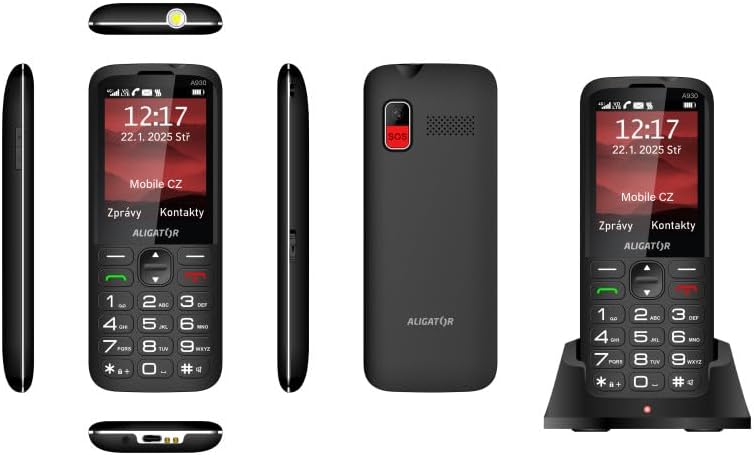
Ffigur 5.5: Cynhwysfawr views of the ALIGATOR AZA930B, illustrating its design from the top, sides, front, back, and when seated in its charging dock.
6. cynnal
- Glanhau: Defnyddiwch frethyn meddal, sych i lanhau wyneb y ffôn. Osgowch ddefnyddio cemegau llym neu ddeunyddiau sgraffiniol.
- Gofal Batri: Er mwyn ymestyn oes y batri, osgoi rhyddhau'r batri'n llwyr yn aml. Storiwch y ffôn mewn lle oer, sych os na chaiff ei ddefnyddio am gyfnodau hir.
- Storio: Keep the phone away from extreme temperatures, direct sunlight, and dusty environments.
7. Datrys Problemau
| Problem | Achos Posibl | Ateb |
|---|---|---|
| Nid yw'r ffôn yn troi ymlaen. | Mae'r batri wedi gwanhau neu heb ei fewnosod yn iawn. | Gwefrwch y batri. Gwnewch yn siŵr bod y batri wedi'i fewnosod yn gywir. |
| Dim signal rhwydwaith. | SIM card not inserted correctly or out of network coverage. | Reinsert SIM card. Move to an area with better network coverage. |
| Methu gwneud na derbyn galwadau. | No credit, SIM card issue, or network problem. | Check your account balance. Verify SIM card insertion. Contact your network provider. |
| Nid yw'r botwm SOS yn gweithio. | SOS numbers not set up or incorrect. | Ensure SOS numbers are correctly configured in settings. Check network signal. |
| Mae'r batri yn draenio'n gyflym. | High usage, background apps, or aging battery. | Lleihewch ddisgleirdeb y sgrin. Caewch gymwysiadau diangen. Ystyriwch ailosod y batri os yw'n hen. |
8. manylebau
| Nodwedd | Manylyn |
|---|---|
| Rhif Model | AZA930B |
| Arddangos | Arddangosfa Lliw TFT 2.8 modfedd |
| Slotiau Cerdyn SIM | Dual SIM (2 x Nano SIM) |
| Cefnogaeth Cerdyn Cof | Micro SD hyd at 256 GB |
| Batri | 1700 mAh Li-ion |
| Amser Siarad | Hyd at 480 munud |
| Amser Wrth Gefn | Hyd at 10 diwrnod |
| Camera | 1.9 AS |
| Cysylltedd | 4G/LTE/VoLTE, Bluetooth |
| Porthladd Codi Tâl | USB-C |
| Jack clustffon | 3.5 mm |
| Dimensiynau | 14.3 x 5.8 x 1.36 cm |
| Pwysau | 95 g |
| System Weithredu | Symbian 9.1 |
| Lliw | Du |
Sylwer: Gall manylebau newid heb rybudd ymlaen llaw.
9. Gwarant a Chefnogaeth
ALIGATOR products are designed and manufactured to the highest quality standards. For detailed warranty information, including terms, conditions, and duration, please refer to the warranty card included with your product or visit the official ALIGATOR websafle.
For technical support, service, or inquiries regarding your ALIGATOR AZA930B mobile phone, please contact ALIGATOR customer service or visit their official support channels. Keep your purchase receipt and product serial number (IMEI) handy when seeking support.
- IMEI 1: 357140835088496
- IMEI 2: 357140835088504
- Barcode/UPC: 8596426108267