
1. Rhagymadrodd
The Luo ke DT-6013 is a digital capacitance meter designed for accurate measurement of capacitors. It features a large LCD display with backlight, offering 6000 counts for precise readings across 10 measuring ranges from 600pF to 100mF. This device is suitable for selecting capacitors, measuring unknown capacitance, matching capacitance, and testing the capacitance of cables, switches, and PCB circuits. Its LSI-circuit ensures high reliability and durability, complemented by input overload protection, zero adjustment, data-hold function, over-range indication, and low battery indication. The compact and pocket-sized design enhances portability and ease of use.
Nodweddion Allweddol:
- Large 6000-count LCD display with backlight for clear visibility.
- 10 measuring ranges from 600pF to 100mF.
- High reliability and durability due to LSI-circuit design.
- Input overload protection for enhanced safety.
- ZERO adjustment function to compensate for test lead capacitance.
- Data-hold function to freeze displayed readings.
- Over-range and low battery indications.
- Dyluniad cryno a chludadwy.
2. Cynnyrch Drosview
The DT-6013 Digital Capacitor Meter is designed for ease of use and accurate capacitance measurements. Below are images illustrating the device and its components.

Ffigur 2.1: Blaen view of the DT-6013 Digital Capacitor Meter, showing the LCD display, HOLD and ZERO buttons, rotary range switch, and input terminals.

Ffigur 2.2: The DT-6013 meter alongside its red and black alligator clip test leads, which connect to the CX input terminals.
3. Gosod
3.1 Gosod Batri
The DT-6013 requires two AA 1.5V batteries for operation. These are typically included with the device. To install or replace batteries:
- Ensure the meter is powered OFF.
- Lleolwch glawr adran y batri ar gefn y mesurydd.
- Open the cover by sliding or unscrewing it, depending on the design.
- Insert two AA 1.5V batteries, observing the correct polarity (+ and -) as indicated inside the compartment.
- Amnewid y clawr adran batri yn ddiogel.
3.2 Cysylltu Gwifrau Prawf
Connect the provided test leads to the meter's input terminals:
- Insert the red test lead into the positive (CX+) input terminal.
- Insert the black test lead into the negative (CX-) input terminal.
Ensure the connections are firm to prevent inaccurate readings.
4. Cyfarwyddiadau Gweithredu
4.1 Pweru Ymlaen/Diffodd
To power on the meter, rotate the central rotary switch from the "OFF" position to any desired capacitance range. To power off, rotate the switch back to the "OFF" position.
4.2 Dewis Ystod
The DT-6013 offers 10 measuring ranges. Select the appropriate range using the rotary switch. It is recommended to start with a higher range if the capacitance value is unknown and then decrease the range for more precise readings. The available ranges are: 600pF, 6nF, 60nF, 600nF, 6uF, 60uF, 600uF, 6mF, 60mF, and 100mF.
4.3 DIM Addasiad
Before measuring small capacitance values, it is crucial to perform a ZERO adjustment to compensate for the capacitance of the test leads and internal circuitry. This ensures accurate readings.
- Ensure the test leads are connected to the meter but not connected to any component.
- Select the desired capacitance range.
- Gwasgwch y ZERO button. The display should show '0.00' or a very small value, indicating that the lead capacitance has been nulled.
4.4 Mesur Cynhwysedd
To measure the capacitance of a component:
- Ensure the capacitor to be measured is fully discharged before connecting the test leads. Rhybudd: Failure to discharge capacitors can result in electric shock or damage to the meter.
- Select an appropriate capacitance range on the meter. If unsure, start with a higher range.
- Perform a ZERO adjustment as described in Section 4.3.
- Connect the alligator clips of the test leads to the terminals of the capacitor. The polarity for non-polarized capacitors does not matter. For polarized capacitors (electrolytic), connect the red lead to the positive terminal and the black lead to the negative terminal.
- Darllenwch y gwerth cynhwysedd a ddangosir ar y sgrin LCD.
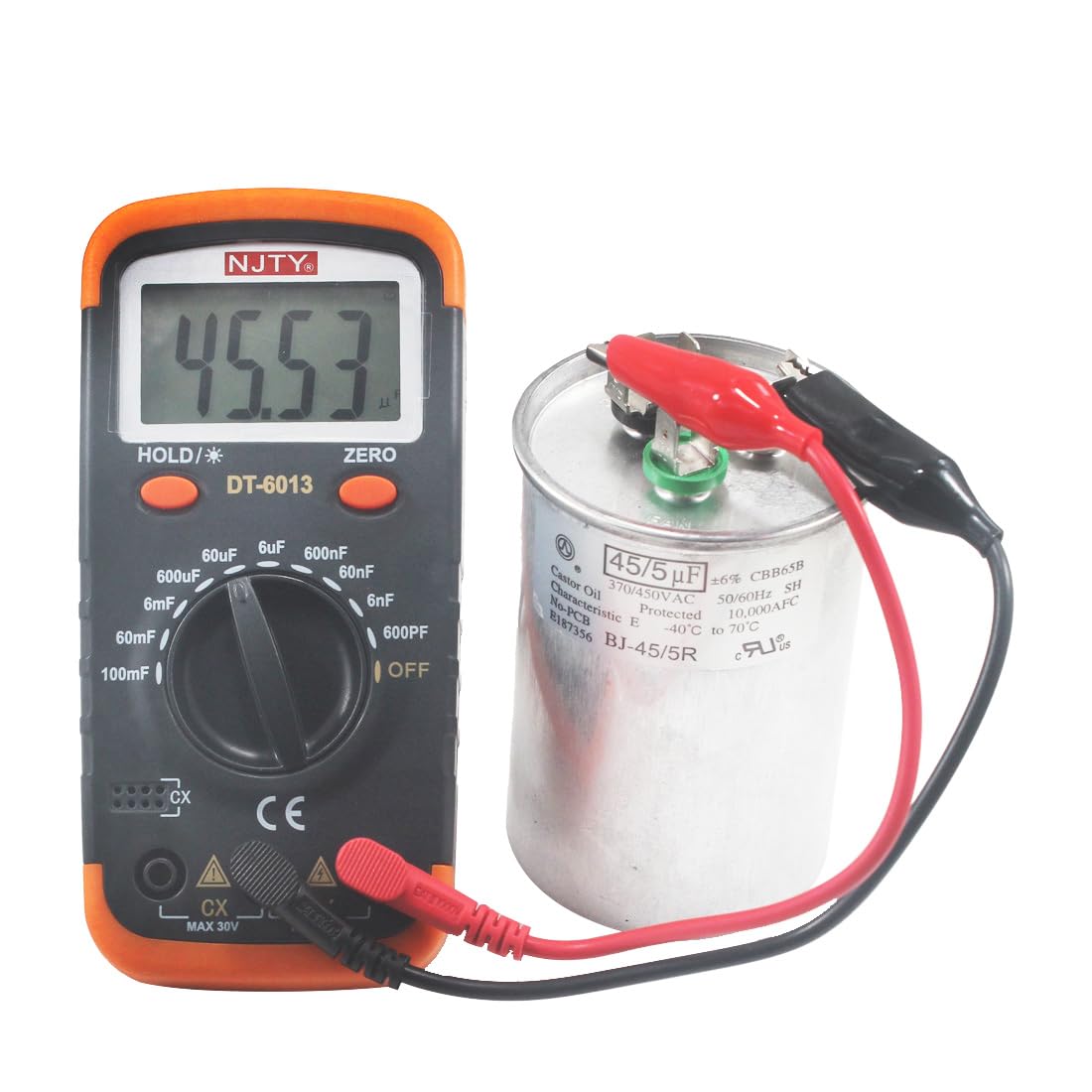
Ffigur 4.1: The DT-6013 meter actively measuring the capacitance of a large cylindrical capacitor using its alligator clip test leads.
4.5 Data-Hold Function
Gwasgwch y DALWCH botwm i rewi'r darlleniad cyfredol ar yr arddangosfa. Pwyswch ef eto i ryddhau'r daliad ac ailddechrau mesuriadau byw.
4.6 Over-Range Indication
If the measured capacitance exceeds the selected range, the display will show an "OL" (Over Load) or similar indication. In this case, switch to a higher capacitance range.
4.7 Dynodiad Batri Isel
Pan fydd y batri cyftage drops to a critical level, a battery symbol will appear on the LCD. This indicates that the batteries need to be replaced soon to ensure accurate measurements.
5. cynnal
5.1 Glanhau
To clean the meter, use a soft, dry cloth. Do not use abrasive cleaners or solvents, as these can damage the casing or display. Ensure the meter is powered off before cleaning.
5.2 Batri Newydd
Refer to Section 3.1 for instructions on battery replacement when the low battery indicator appears.
5.3 Storio
When not in use for extended periods, store the meter in a cool, dry place, away from direct sunlight and extreme temperatures. It is recommended to remove the batteries if the meter will not be used for several months to prevent battery leakage.
6. Datrys Problemau
- No Display / Meter does not power on:
- Gwiriwch a yw'r batris wedi'u gosod yn gywir a bod digon o wefr arnynt. Amnewidiwch nhw os oes angen.
- Ensure the rotary switch is moved from the "OFF" position to a measurement range.
- Darlleniadau Anghywir:
- Perform a ZERO adjustment before measurement.
- Ensure the test leads are securely connected to both the meter and the component.
- Verify that the correct measurement range is selected.
- Gwnewch yn siŵr bod y cynhwysydd wedi'i ryddhau'n llwyr cyn profi.
- "OL" (Over Load) displayed:
- The measured capacitance exceeds the current range. Switch to a higher capacitance range.
- Dangosydd Batri Isel:
- Replace the AA 1.5V batteries as soon as possible to maintain measurement accuracy.
7. manylebau
| Manyleb | Gwerth |
|---|---|
| Model | DT-6013 |
| Math Mesur | Capacitance (Farads and its sub-units) |
| Mesur Ystodau | 600pF, 6nF, 60nF, 600nF, 6uF, 60uF, 600uF, 6mF, 60mF, 100mF |
| Arddangos | Large LCD, 6000 Counts, with Backlight |
| Ffynhonnell Pwer | 2 x Batris AA 1.5V |
| Pwysau Eitem | 8.8 owns (tua 250g) |
| Dimensiynau Pecyn | 6.46 x 4.29 x 1.81 modfedd |
| Safon Diogelwch | CE Ardystiedig |
| Nodweddion | ZERO adjustment, Data-hold, Overload protection, Low battery indication |
8. Gwybodaeth Diogelwch
- Always ensure the capacitor under test is fully discharged before connecting the meter. High voltage capacitors can store dangerous charges.
- Do not attempt to measure capacitance in live circuits. Disconnect power before testing.
- Peidiwch â bod yn fwy na'r uchafswm mewnbwn cyftage of 30V (as indicated on the meter's input terminals).
- Do not operate the meter if it appears damaged or if the battery compartment is not securely closed.
- Use only the specified battery type (AA 1.5V) and ensure correct polarity during installation.
- Keep the meter away from water, moisture, and extreme temperatures.
- Nid yw'r ddyfais hon yn degan. Cadwch allan o gyrraedd plant.
9. Gwarant a Chefnogaeth
Warranty information for the Luo ke DT-6013 Digital Capacitor Meter is typically provided with the product packaging or can be obtained directly from the manufacturer or authorized reseller. Please retain your proof of purchase for any warranty claims.
For technical support or inquiries, please contact your point of purchase or refer to the official Luo ke website for customer service contact details. You can visit the Luo ke Store on Amazon for more information: Luo ke Store.