
Rhagymadrodd
The ORIA Bluetooth Auxiliary Adapter (Model CP329) is a versatile 2-in-1 device functioning as both a Bluetooth transmitter (TX) and receiver (RX). It enables wireless audio connectivity for a wide range of devices, transforming non-Bluetooth equipment into Bluetooth-enabled systems. Featuring Bluetooth 5.3 technology, it offers stable connections, low latency, and supports hands-free calling in receiver mode.
Cynnwys Pecyn
- 1 x ORIA Bluetooth Auxiliary Adapter (CP329)
- 1 x Cebl Codi Tâl Math-C
- 1 x Llawlyfr Defnyddiwr
Cynnyrch Drosview
Familiarize yourself with the components of your ORIA Bluetooth Auxiliary Adapter:
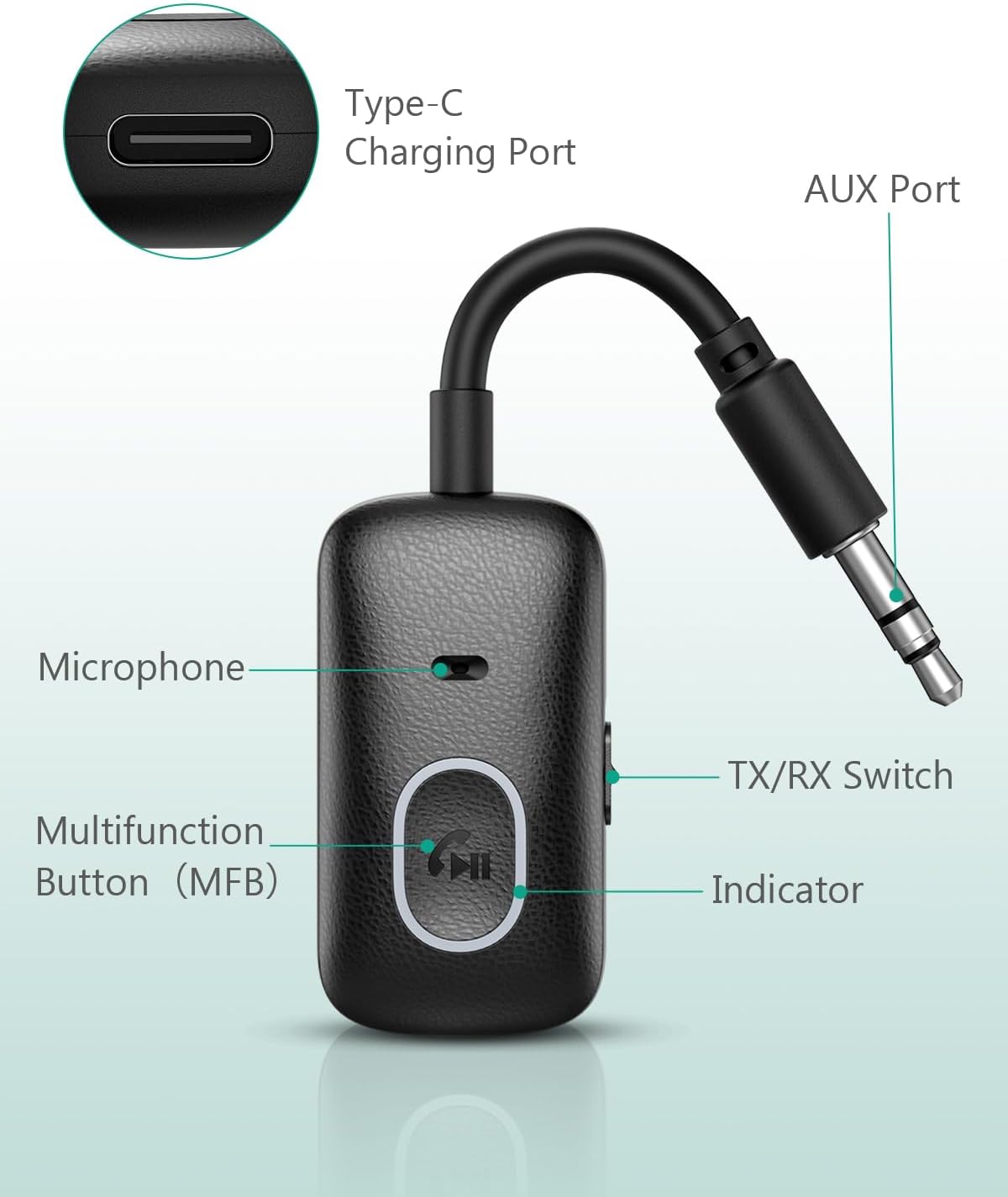
Delwedd: Labeled components of the ORIA Bluetooth Auxiliary Adapter.
- Botwm Amlswyddogaethol (MFB): Power on/off, Play/Pause, Answer/End/Reject calls, Redial.
- Switsh TX/RX: Yn newid rhwng y moddau Trosglwyddydd (TX) a Derbynnydd (RX).
- Golau Dangosydd: Yn dangos statws y ddyfais (paru, cysylltu, gwefru).
- Meicroffon: For hands-free calling in RX mode.
- AUX Port (3.5mm Jack): Connects to audio input/output devices.
- Porthladd codi tâl Math-C: Ar gyfer gwefru'r ddyfais.
Manylebau
| Nodwedd | Manylyn |
|---|---|
| Rhif Model | CP329 |
| Fersiwn Bluetooth | 5.3 |
| Technoleg Cysylltedd | Bluetooth |
| Math o Gysylltydd | Jac 3.5mm |
| Dulliau Gweithredu | Trosglwyddydd (TX) a Derbynnydd (RX) |
| Nodwedd Arbennig | Galwad Di-dwylo |
| Battery Life (Receiver Mode) | Hyd at 7 awr |
| Battery Life (Transmitter Mode) | Hyd at 5 awr |
| Amser Codi Tâl | Tua 1 awr (trwy Fath-C) |
| Di-wifr Range | Hyd at 10 metr (33 troedfedd) heb rwystrau |
| Pwysau | 43 gram |
| Lliw | Du |
Gosod a Chodi Tâl
Codi Tâl ar y Dyfais
Before first use, fully charge the adapter. Connect the provided Type-C charging cable to the adapter's Type-C port and the other end to a USB power source (e.g., wall adapter, computer USB port). The indicator light will show charging status and turn off when fully charged. The device can be used while charging.

Delwedd: Charging the ORIA Bluetooth Auxiliary Adapter.
Pŵer Ymlaen / Diffodd
- Pŵer Ymlaen: Press and hold the Multifunction Button (MFB) for approximately 3 seconds until the indicator light flashes.
- Pwer i ffwrdd: Press and hold the MFB for approximately 3 seconds until the indicator light turns off.
Cyfarwyddiadau Gweithredu
The ORIA Bluetooth Auxiliary Adapter has two operating modes: Transmitter (TX) and Receiver (RX). Use the TX/RX switch on the side of the device to select the desired mode.
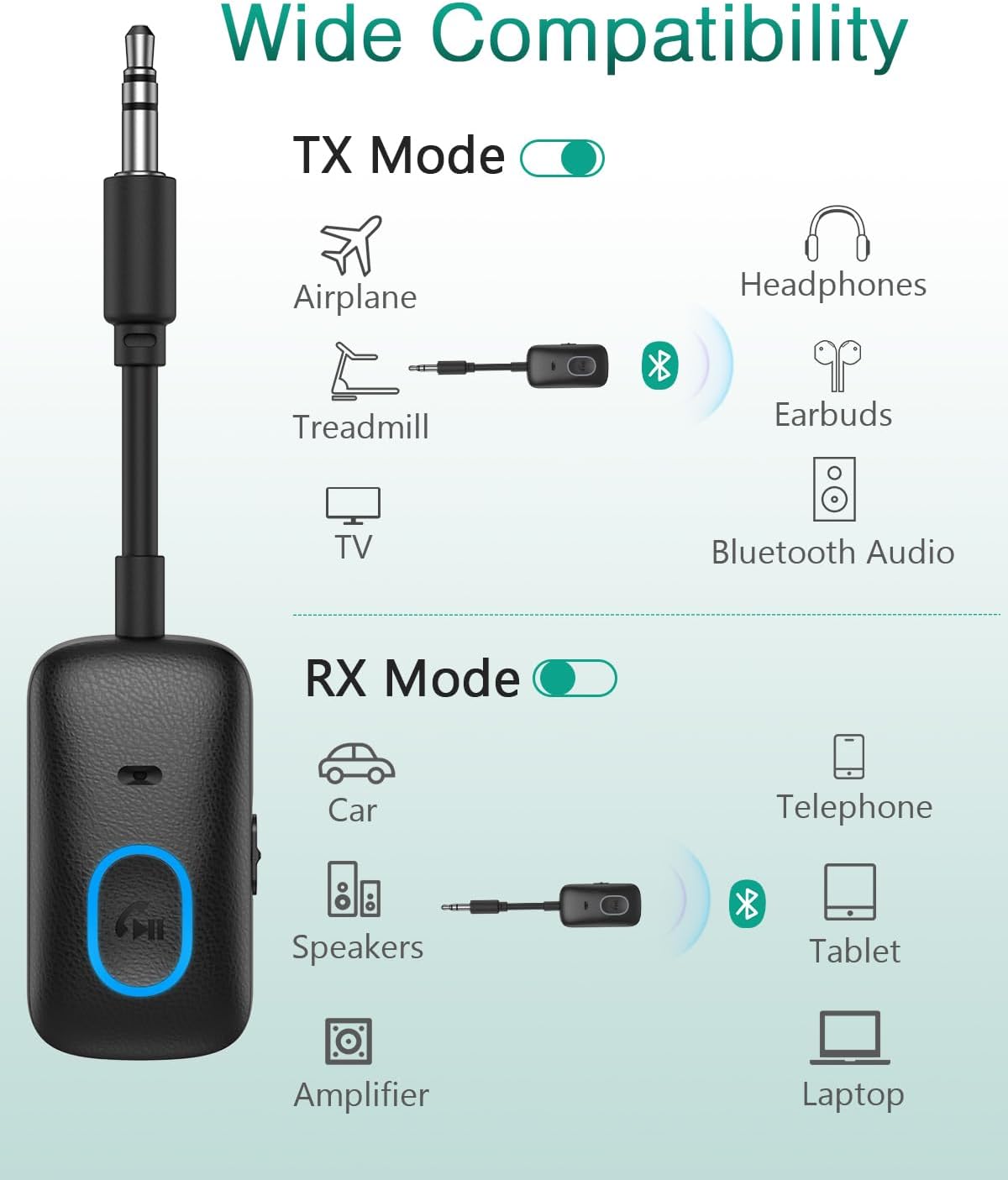
Delwedd: Wide compatibility of the ORIA Bluetooth Auxiliary Adapter in TX and RX modes.

Delwedd: Steps for powering on, selecting mode, pairing, and enjoying audio.
Trosglwyddydd (TX) Modd
In TX mode, the adapter converts non-Bluetooth audio sources (e.g., TV, PC, treadmill, airplane audio system) into Bluetooth signals, allowing you to stream audio wirelessly to Bluetooth headphones or speakers.
- Newidiwch yr addasydd i Modd TX using the TX/RX switch.
- Plug the 3.5mm AUX jack of the adapter into the audio output port of your non-Bluetooth device (e.g., TV headphone jack).
- Gwnewch yn siŵr bod eich clustffonau neu siaradwr Bluetooth mewn modd paru.
- The adapter will automatically search for and connect to nearby Bluetooth receiving devices. The indicator light will show a stable blue light once connected.
- Adjust the volume on your receiving device (headphones/speaker) or the source device.

Delwedd: ORIA Bluetooth Adapter in TX mode connected to a TV.

Delwedd: Using the ORIA Bluetooth Adapter for airplane audio.

Delwedd: Connecting the adapter to single or double 3.5mm airplane audio jacks.
Modd Derbynnydd (RX).
In RX mode, the adapter receives Bluetooth audio signals from your smartphone, tablet, or laptop and outputs them to non-Bluetooth audio systems (e.g., car stereo, home speakers, wired headphones).
- Newidiwch yr addasydd i Modd RX using the TX/RX switch.
- Plug the 3.5mm AUX jack of the adapter into the audio input port of your non-Bluetooth audio system (e.g., car AUX input, speaker AUX input).
- On your smartphone or other Bluetooth device, enable Bluetooth and search for "CP329" (or similar device name).
- Select "CP329" to pair. The indicator light will show a stable blue light once connected.
- Play audio on your Bluetooth device. The sound will be transmitted to your connected audio system.

Delwedd: ORIA Bluetooth Adapter in RX mode for car audio.
Galwadau Di-law (Modd Derbyn yn Unig)
When in RX mode and connected to your smartphone, the adapter supports hands-free calling via its built-in microphone.
- Ateb Galwad: Pwyswch yr MFB unwaith yn fyr.
- Galwad Diwedd: Pwyswch yr MFB unwaith yn fyr yn ystod galwad.
- Gwrthod Galwad: Press and hold the MFB for approximately 2 seconds.
- Ail-redeg Rhif Diwethaf: Cliciwch ddwywaith ar y MFB.
- Galluogi Cynorthwyydd Llais (Siri/Cynorthwyydd Google): Triple-click the MFB.
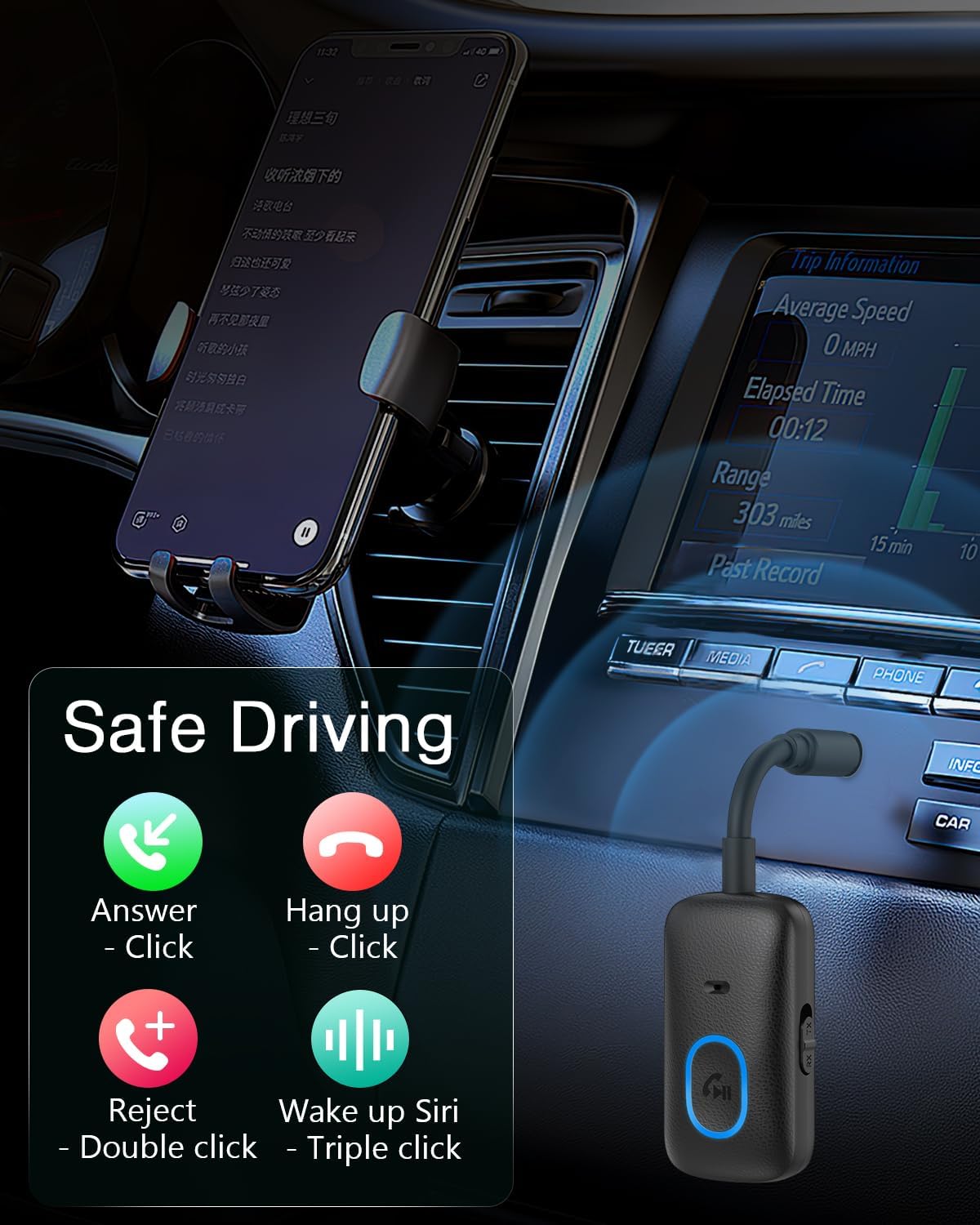
Delwedd: Hands-free calling controls using the Multifunction Button.
Cynnal a chadw
- Cadwch y ddyfais yn sych. Osgowch ddod i gysylltiad â lleithder neu hylifau.
- Peidiwch â cheisio dadosod neu addasu'r ddyfais.
- Glanhewch y ddyfais gyda lliain meddal, sych. Peidiwch â defnyddio cemegau llym na glanhawyr sgraffiniol.
- Storiwch y ddyfais mewn lle oer, sych pan nad yw'n cael ei ddefnyddio.
Datrys problemau
- Nid yw'r ddyfais yn troi ymlaen:
- Ensure the device is fully charged. Connect it to a power source using the Type-C cable.
- Press and hold the MFB for at least 3 seconds to power on.
- Methu paru â dyfais Bluetooth:
- Gwnewch yn siŵr bod yr addasydd yn y modd cywir (TX ar gyfer trosglwyddo, RX ar gyfer derbyn).
- Make sure the adapter is in pairing mode (indicator light flashing).
- Ensure the target Bluetooth device (headphones/speaker in TX mode, smartphone/tablet in RX mode) is also in pairing mode and within range (10 meters).
- Turn off and on both devices and try pairing again.
- Cliriwch gysylltiadau Bluetooth blaenorol ar eich dyfais os oes angen.
- Dim sain neu ansawdd sain gwael:
- Check if the 3.5mm AUX cable is securely connected to both the adapter and the audio device.
- Gwnewch yn siŵr bod y gyfrol ar yr addasydd a'r ddyfais sain gysylltiedig wedi'i throi i fyny.
- Verify that the adapter is correctly paired and connected.
- Reduce the distance between the adapter and the paired Bluetooth device, and remove any obstacles.
- Ensure there is no interference from other wireless devices.
- Hands-free calling not working:
- Ensure the adapter is in RX mode and successfully paired with your smartphone.
- Check your smartphone's Bluetooth settings to ensure "Call Audio" is enabled for the adapter.
- Gwnewch yn siŵr nad yw'r meicroffon wedi'i rwystro.
Gwarant a Chefnogaeth
The ORIA Bluetooth Auxiliary Adapter (CP329) comes with a Gwarant gwneuthurwr 2 flynedd. For technical support, warranty claims, or any product-related inquiries, please contact ORIA customer support through your purchase platform or the official ORIA websafle.

Delwedd: ORIA Customer Support details.