
1. Rhagymadrodd
This manual provides detailed instructions for the installation, operation, and maintenance of your RSNAVI Android Car Stereo. This unit is designed to integrate advanced multimedia and navigation features into your Chrysler Grand Voyager (2011-2015 model years).
Please read this manual thoroughly before installation and use to ensure proper functionality and to maximize your experience with the device.

Ffigur 1.1: RSNAVI Android Car Stereo with included accessories.
This image displays the RSNAVI 9-inch Android Car Stereo unit integrated into a vehicle's dashboard, specifically designed for the Chrysler Grand Voyager. Surrounding the main unit are various accessories: a rearview camera for enhanced visibility, an external microphone for clear audio input during calls, and a cooling fan to maintain optimal operating temperature. The screen shows a map interface and various application icons, indicating its multimedia and navigation capabilities.
2. Compatibility and Package Contents
2.1 Cydnawsedd Cerbydau
This RSNAVI Android Car Stereo is specifically designed for the Chrysler Grand Voyager manufactured between 2011 a 2015. Before installation, confirm the year, size, and shape of your vehicle's center console to ensure proper fitment.
2.2 Cynnwys Pecyn
The standard package includes the following components:
- RSNAVI Android Car Stereo Head Unit
- Datgodiwr Canbus
- Cord Pŵer
- RCA Cable
- Antena Radio
- Antena GPS
- USB Cables (Dual USB interface)
- Meicroffon Allanol
- Cefnview Camera (AHD/CVBS compatible)
- Installation Frame (if applicable for specific models)
3. Gosod a Gosod
3.1 Gwiriad Cyn Gosod
- Gwnewch yn siŵr bod tanio'r cerbyd i ffwrdd a bod y batri wedi'i ddatgysylltu cyn dechrau unrhyw waith trydanol.
- Gwiriwch fod yr holl gydrannau a restrir yn Adran 2.2 yn bresennol.
- Familiarize yourself with your vehicle's dashboard removal process. Online video tutorials specific to the Chrysler Grand Voyager 2011-2015 can be helpful.
3.2 Gwifrau a Chysylltiad
The car stereo comes with dedicated wiring harnesses designed for your vehicle. Connect the power cord, RCA cables, radio antenna, GPS antenna, USB cables, external microphone, and rearview camera to their respective ports on the head unit and to the vehicle's wiring system.
- llinyn pŵer: Connect to the vehicle's power supply, ensuring correct polarity. The included Canbus decoder facilitates integration with vehicle systems.
- Ceblau RCA: Ar gyfer cysylltiadau mewnbwn/allbwn sain/fideo (e.e., allanol amplifier, additional monitors).
- Antenâu: Connect the radio antenna for FM/RDS reception and the GPS antenna for navigation functionality. Position the GPS antenna in a location with a clear view o'r awyr.
- Rhyngwynebau USB: Use the dual USB interfaces for connecting USB drives, charging devices, or for wired CarPlay/Android Auto connections.
- Meicroffon Allanol: Connect for improved call quality and voice commands.
- Cefnview Camera: Connect the camera to the 'Inverted Input' (AHD/CVBS) port. Ensure proper routing of the camera cable to the rear of the vehicle.

Ffigur 3.1: Included wiring harness and installation frame.
This image displays the specific wiring harness and a custom-fit frame provided with the RSNAVI car stereo. The harness includes various connectors for power, speakers, and data, designed to integrate seamlessly with the Chrysler Grand Voyager's electrical system. The frame ensures a flush and secure installation of the 9-inch head unit into the vehicle's dashboard opening.

Ffigur 3.2: Dashboard before and after stereo installation.
This image set illustrates the visual transformation of a Chrysler Grand Voyager dashboard. The top-left panel shows the original factory radio. The other panels demonstrate the RSNAVI Android Car Stereo installed, displaying various interfaces such as a navigation map, a media player, and the main application screen, highlighting the integrated appearance and functionality.
3.3 Gwiriadau Ôl-osod
- Ailgysylltu batri'r cerbyd.
- Turn on the ignition and power on the head unit.
- Test all functions: radio, Bluetooth, GPS, USB, steering wheel controls, and rearview camera.
- If any issues arise, refer to the Troubleshooting section or recheck connections.
4. Cyfarwyddiadau Gweithredu
4.1 System Drosoddview
The RSNAVI car stereo operates on an Android system, providing a familiar and customizable user interface via its 9-inch touchscreen. The system supports various applications and features, similar to a smartphone or tablet.
CarPlay Di-wifr 4.2 / Android Auto
Connect your smartphone wirelessly to access Apple CarPlay or Android Auto. This feature allows for hands-free calls, access to phone contacts, emails, notifications, map navigation, music, and video playback directly on the car stereo display. This integration is designed to enhance driving safety by minimizing phone interaction.
- Sicrhewch fod Bluetooth a Wi-Fi wedi'u galluogi ar eich ffôn clyfar.
- Ar stereo'r car, agorwch yr ap CarPlay neu Android Auto.
- Dilynwch yr awgrymiadau ar y sgrin i baru'ch dyfais.
- Once connected, your phone's compatible apps will appear on the stereo display.

Ffigur 4.1: CarPlay, Android Auto, and Mirror Link interfaces.
This image illustrates the various smartphone integration options available with the RSNAVI car stereo. It shows the user interfaces for Wireless CarPlay and Android Auto, displaying familiar app icons for navigation, music, and communication. Additionally, it demonstrates the Mirror Link function, which allows the display of an iOS or Android phone screen directly onto the car stereo, enabling full control of the phone's interface.
4.3 Llywio GPS
The unit features a dual navigation system supporting both offline and online maps. A built-in offline map is provided, but internet data download is required for initial setup or updates. Online maps require a Wi-Fi connection.
- Gwnewch yn siŵr bod yr antena GPS wedi'i osod yn iawn a bod ganddo signal clir.
- To use offline maps, navigate to the map application and download the necessary regional data via a Wi-Fi connection.
- For online navigation, connect the unit to a Wi-Fi hotspot.
4.4 Cysylltedd WiFi
Connect the car stereo to a Wi-Fi hotspot (e.g., from your smartphone) to access online features. This enables app installation from the Play Store, online navigation, and streaming media.
- Go to the system settings and select 'Wi-Fi'.
- Trowch Wi-Fi ymlaen a dewiswch y rhwydwaith rydych chi ei eisiau.
- Rhowch y cyfrinair os gofynnir i chi.

Ffigur 4.2: GPS Navigation and WiFi Hotspot features.
This image highlights the navigation and connectivity capabilities of the RSNAVI car stereo. The top section displays a detailed GPS map with route guidance, indicating distance and estimated travel time. The bottom section illustrates the WiFi Hotspot feature, showing a screen filled with various streaming applications like Netflix, Hulu, and YouTube, demonstrating the unit's ability to access online content when connected to a network.
4.5 Swyddogaeth Bluetooth
The integrated Bluetooth module allows for hands-free calling, phone book synchronization, and audio streaming from your smartphone.
- Galluogi Bluetooth ar eich ffôn clyfar a'i wneud yn hawdd ei ddarganfod.
- On the car stereo, open the Bluetooth application and search for devices.
- Select your phone from the list and confirm the pairing code.
- Ar ôl paru, gallwch wneud/derbyn galwadau a chwarae cerddoriaeth yn ddi-wifr.
Radio 4.6 FM/RDS
The unit includes an FM/RDS radio tuner for clear channel reception and low noise. RDS (Radio Data System) provides additional information such as station name and program type.
- Agorwch y rhaglen Radio.
- Defnyddiwch y swyddogaeth sganio i ddod o hyd i orsafoedd sydd ar gael a'u cadw'n awtomatig.
- Manually tune to frequencies or select from saved presets.
4.7 Cyfartalydd Sain (EQ)
Adjust the audio output using the built-in equalizer to customize the sound profile. This includes settings for bass, treble, and mid-range frequencies, as well as various sound field modes.
- Access the EQ settings from the main menu or audio settings.
- Select a preset or manually adjust the frequency bands to your preference.
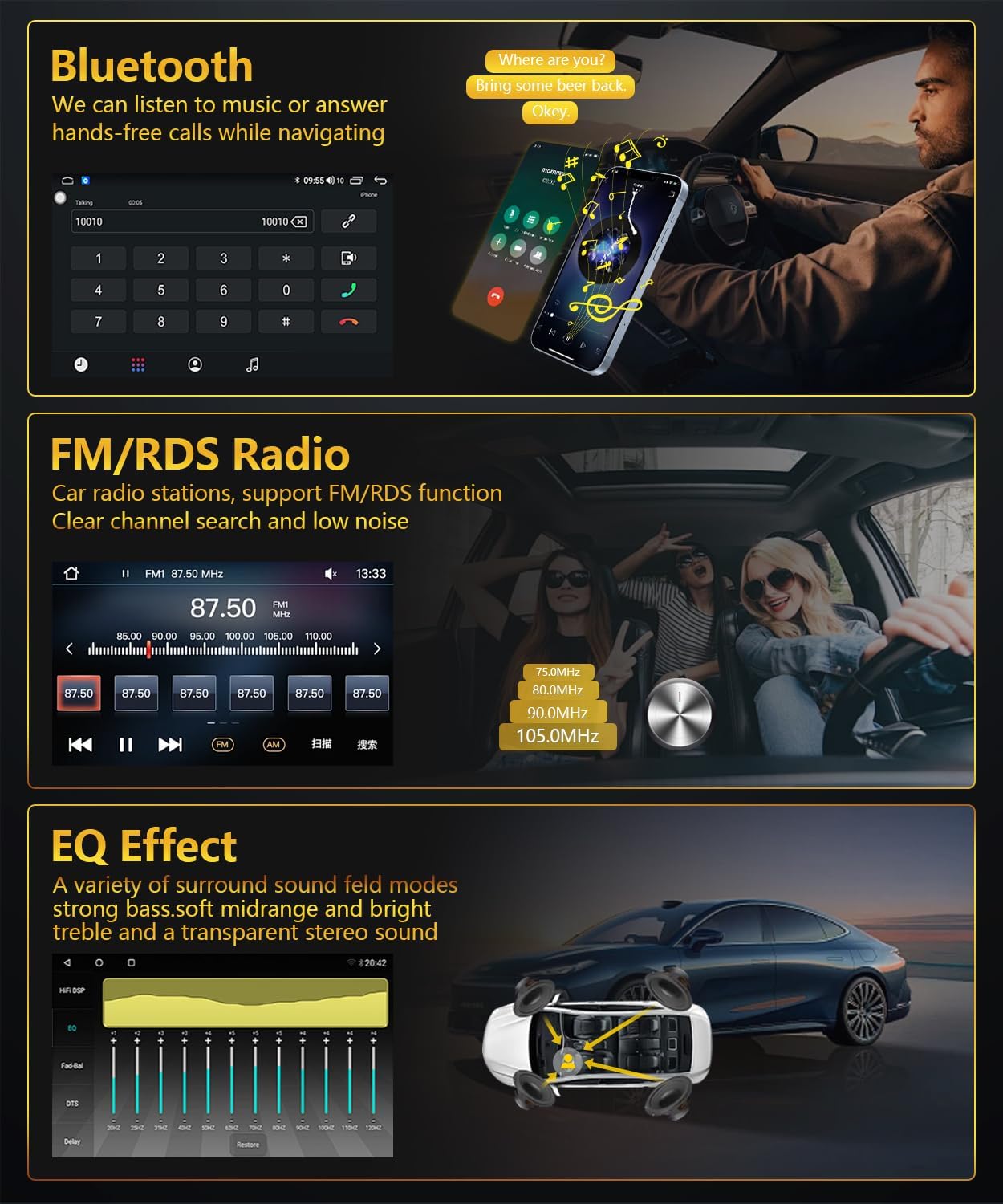
Ffigur 4.3: Bluetooth, FM/RDS Radio, and EQ Effect features.
This image showcases three key audio features of the RSNAVI car stereo. The top section displays the Bluetooth calling interface, showing a dial pad and contact information. The middle section illustrates the FM/RDS radio tuner, with frequency display and station presets. The bottom section presents an audio equalizer (EQ) interface, allowing users to fine-tune sound characteristics like bass, mid-range, and treble, accompanied by a diagram showing speaker placement in a car for optimal sound distribution.
4.8 Arddangosfa Camera Gwrthdroi
Mae'r uned yn cefnogi cefnview camera input. When the vehicle is shifted into reverse gear, the screen automatically switches to display the camera feed, aiding in safe maneuvering. The included camera is waterproof and features night vision and a wide-angle view.
- Sicrhewch y cefnview camera is correctly installed and connected to the 'Inverted Input'.
- Shift the vehicle into reverse gear; the display will automatically show the camera view.
4.9 Rheoli Olwyn Llywio
If your vehicle has original steering wheel control buttons, they can be configured to operate the car radio, providing convenient and safe control while driving.
- Access the 'Steering Wheel Control' settings in the system menu.
- Follow the on-screen instructions to map the vehicle's steering wheel buttons to the desired functions on the car stereo.

Ffigur 4.4: Reversing Display and Steering Wheel Control.
This image highlights two important safety and convenience features. The top section illustrates the rearview camera system, detailing its HD image quality, waterproof design, night vision, and wide-angle capabilities, with a visual representation of the camera's field of view. The bottom section displays the car stereo's interface for configuring steering wheel controls, showing various button functions like volume, track skip, and call management, allowing for seamless operation without taking hands off the wheel.
5. cynnal
5.1 Gofal Cyffredinol
Er mwyn sicrhau hirhoedledd a pherfformiad gorau posibl stereo eich car, dilynwch y canllawiau cynnal a chadw cyffredinol hyn:
- Glanhau sgrin: Defnyddiwch frethyn meddal, di-flwff i sychu'r sgrin gyffwrdd yn ysgafn. Ar gyfer staeniau ystyfnig, sychwch ychydigampgolchwch y lliain gyda dŵr neu lanhawr sy'n ddiogel i sgriniau. Osgowch gemegau llym neu ddeunyddiau sgraffiniol.
- Tynnu Llwch: Periodically clean dust from the unit's vents and openings using a soft brush or compressed air to prevent overheating.
- Tymheredd: Osgowch amlygu'r uned i dymheredd eithafol am gyfnodau hir. Yr ystod tymheredd gweithredu yw -20℃ i 75℃.
- Diweddariadau Meddalwedd: Check for available software updates periodically to ensure the system has the latest features and bug fixes.
6. Datrys Problemau
This section addresses common issues you might encounter with your RSNAVI Android Car Stereo.
6.1 Materion ac Atebion Cyffredin
- Dim pŵer:
- Gwiriwch yr holl gysylltiadau pŵer a ffiwsiau.
- Ensure the vehicle battery is properly connected.
- Dim Sain:
- Gwiriwch gysylltiadau'r siaradwr.
- Gwiriwch lefelau cyfaint a gosodiadau mud.
- Gwnewch yn siŵr bod y ffynhonnell sain gywir wedi'i dewis.
- Colli Signal GPS:
- Ensure the GPS antenna is securely connected and placed in a location with a clear view o'r awyr.
- If using offline maps, ensure map data has been fully downloaded.
- Materion Cysylltedd Bluetooth:
- Gwnewch yn siŵr bod Bluetooth wedi'i alluogi ar y stereo a'ch ffôn.
- Dileu parau blaenorol a cheisio ail-baru.
- Ailgychwyn y ddau ddyfais.
- Poor UI Responsiveness:
- Caewch gymwysiadau cefndir diangen.
- Perfformio ailgychwyn system.
- Rheolyddion yr Olwyn Lywio Ddim yn Gweithio:
- Verify the Canbus decoder is correctly installed.
- Reconfigure the steering wheel control settings in the system menu.
6.2 Gosodiadau Ffatri
If persistent issues occur, a factory reset may resolve them. The factory setting keyword is 3368. Use this option with caution as it will erase all user data and settings.
7. manylebau
| Nodwedd | Manyleb |
|---|---|
| System | Android |
| Chipset | UIS81411 |
| Maint Sgrin | 9 modfedd |
| Cof (RAM + ROM) | 2GB (RAM) + 64GB (ROM) |
| Cydraniad Sgrin | 1280*720 |
| Sglodion Radio | UIS |
| Allbwn Pwer | 4 x 45W |
| Tymheredd Gweithredu | -20 ℃ i 75 ℃ |
| Grym AmpSglodion lifier | TDA7388 |
| Band Radio | FM/RDS |
| Allbwn Fideo | Cefnogir |
| Inverted Input | AHD/CVBS (Rearview Camera) |
| Meicroffon Allanol | Cefnogir |
| Sgrin Hollti | Cefnogir |
| Map | Built-in offline map (Internet download data required) |
| WIFI | Cefnogir |
| USB | Rhyngwyneb USB deuol |
| Technoleg Cysylltedd | Bluetooth, USB, Wi-Fi |
| Modd Allbwn Sain | Stereo |
| Cydrannau wedi'u Cynnwys | Canbus, Car Radio, Power cord, RCA Cable, Radio Antenna |
| Dimensiynau Cynnyrch | 33.02 x 27 x 11.02 cm; 1 kg |
| Rhif Model | 4 Core 2G-64G CAM |
8. Gwarant a Chymorth i Gwsmeriaid
RSNAVI is committed to providing quality products and support. Your purchase includes:
- Gwarant Arian Yn Ôl 30 Diwrnod: Os nad ydych chi'n fodlon â'ch pryniant, gallwch ei ddychwelyd o fewn 30 diwrnod am ad-daliad llawn.
- Gwarant 24 Mis: The product is covered by a 24-month warranty against manufacturing defects.
- Cymorth Technegol Oes: RSNAVI offers lifetime technical assistance for any questions regarding installation or use.
For any questions or assistance, please contact our customer service team via email. We aim to respond and address your concerns within 24 hours.